
The technical infrastructure of YouTube is a marvel of modern software engineering. Every minute, over 500 hours of content are uploaded to the platform, spanning everything from low-resolution legacy clips to 8K high-dynamic-range (HDR) cinematic experiences. For the average user, “video format” might seem like a simple question of file extensions like .MP4 or .MOV. However, in the realm of professional technology and digital distribution, the answer is a complex ecosystem involving containers, codecs, and adaptive bitrate streaming protocols.
Understanding what video format YouTube uses requires a distinction between the format you upload and the format YouTube uses to serve that content to billions of devices worldwide.
The Anatomy of Video: Containers vs. Codecs
To understand YouTube’s technical specifications, one must first distinguish between a container and a codec. This distinction is the cornerstone of digital media technology.
The Role of the Container
A container, or wrapper, is the file format that holds the video stream, audio stream, and metadata (such as subtitles or chapter markers) together. When you see a file ending in .MP4, .MKV, or .WebM, you are looking at a container. YouTube’s infrastructure is highly flexible, supporting dozens of upload containers, but for delivery, it primarily relies on MP4 and WebM.
The Power of the Codec
The codec (coder-decoder) is the mathematical algorithm used to compress and decompress the video data. This is where the real technology resides. Because raw video files are massive—a single minute of uncompressed 4K video can exceed 50 GB—codecs are essential for shrinking that data into a size manageable for internet streaming. YouTube utilizes several sophisticated codecs, including H.264 (AVC), VP9, and the cutting-edge AV1, to balance visual quality with bandwidth efficiency.
The Dominant Codecs: H.264, VP9, and AV1
YouTube does not store just one version of a video. Instead, its transcoders create multiple versions of every upload using different codecs to ensure compatibility across everything from a 10-year-old smart TV to the latest flagship smartphone.
H.264 (Advanced Video Coding – AVC)
H.264, often referred to as AVC, remains the most universally compatible codec on the planet. For years, it has been the gold standard for YouTube. Most videos uploaded in 1080p or lower are processed using the H.264 codec within an MP4 container.
The primary advantage of H.264 is hardware acceleration. Almost every modern processor, graphics card, and mobile chipset has dedicated silicon designed to decode H.264 efficiently, which preserves battery life and ensures smooth playback. However, H.264 is aging. It is less efficient at higher resolutions like 4K, requiring significantly higher bitrates to maintain image clarity.
VP9: Google’s High-Efficiency Alternative
Developed by Google as an open-source, royalty-free codec, VP9 was the successor to the older VP8. YouTube uses VP9 extensively for high-resolution content (1440p and 4K) and for high-frame-rate videos.
VP9 offers roughly 50% better compression than H.264 for the same level of visual quality. When you watch a 4K video on YouTube, you are almost certainly streaming a VP9-encoded file. Most modern browsers (Chrome, Firefox, Edge) and Android devices support VP9, though Apple only recently integrated support for it across its ecosystem to allow 4K YouTube playback on iPhones and Apple TVs.
AV1: The Future of Video Compression
The AOMedia Video 1 (AV1) codec represents the current frontier of video technology. It is a royalty-free, open-standard codec designed specifically for the era of 8K and HDR. AV1 is approximately 30% more efficient than VP9 and 50-60% more efficient than H.264.
YouTube has begun aggressively rolling out AV1 for its most popular videos and high-resolution streams. The challenge with AV1 is its computational complexity; it requires significantly more processing power to encode and decode. As hardware manufacturers like NVIDIA, Intel, and Apple begin including dedicated AV1 decoders in their latest chips, this format will eventually become the primary standard for all YouTube content, allowing for breathtaking quality even on slower internet connections.
Resolution, Bitrates, and Technical Specifications

YouTube’s internal formatting logic is dictated by the need to provide a “buffer-free” experience. This is achieved through Adaptive Bitrate Streaming (ABR), specifically using protocols like MPEG-DASH (Dynamic Adaptive Streaming over HTTP) and HLS (HTTP Live Streaming).
Adaptive Bitrate Streaming
When you click play, YouTube’s player doesn’t just download one file. It breaks the video into small segments (usually 2 to 5 seconds long). The player constantly monitors your internet speed and hardware capabilities. If your bandwidth drops, the player seamlessly switches to a lower-resolution segment (e.g., from 1080p to 720p) encoded at a lower bitrate. This is why a video might look blurry for a few seconds before snapping into sharp focus.
Bitrate Management and Tiers
Bitrate is the amount of data processed per second, usually measured in Mbps (megabits per second). YouTube uses a tiered bitrate system based on the codec and resolution:
- 1080p (SDR): Typically ranges from 8 to 12 Mbps.
- 4K (SDR): Typically ranges from 35 to 45 Mbps.
- 4K (HDR): Can go up to 60-80 Mbps to account for the increased color depth.
YouTube’s algorithms prioritize popular content for higher-tier encoding. A viral video is more likely to receive a high-quality VP9 or AV1 transcode than a video with ten views, which might stay in the more basic H.264 format to save on server storage and processing costs.
The Transcoding Process: What Happens After Upload
When a creator uploads a video—perhaps a .MOV file from an iPhone or a ProRes file from a professional cinema camera—YouTube’s ingestion servers take over. This stage is known as transcoding.
Step 1: The Mezzanine File
The original uploaded file is treated as a “mezzanine” or source file. YouTube stores this high-quality original as a master copy. This allows the platform to re-encode the video in the future if a new, better codec (like a successor to AV1) becomes available, without requiring the creator to re-upload.
Step 2: Parallel Processing
YouTube’s transcoders break the video into chunks and process them in parallel across thousands of CPU and GPU cores in Google’s data centers. This is why a video might be available in 360p almost immediately after uploading, while the 4K and 1080p versions take significantly longer to appear. The lower resolutions are easier to compute and are prioritized to get the content live.
Step 3: Optimization for HDR and Frame Rates
If the uploaded video contains metadata for HDR (High Dynamic Range), YouTube’s tech stack triggers a specialized workflow. It must convert the wide color gamut (Rec. 2020) into formats compatible with both HDR displays and standard (SDR) displays. This process ensures that a video shot in Dolby Vision or HDR10 looks vibrant on an OLED screen but doesn’t look washed out on an older laptop.
Optimal Tech Settings for Creators
For those looking to achieve the best results on the platform, understanding the “input” format is just as important as the “output” format. While YouTube can ingest almost anything, certain specifications prevent unnecessary quality loss during the transcoding process.
Recommended Container and Codec
The industry recommendation for YouTube uploads is the MP4 container using the H.264 (AVC) codec. While YouTube can handle H.265 (HEVC) or VP9 uploads, H.264 provides the most stable upload experience with a high quality-to-file-size ratio.
Technical Fine-Tuning
To ensure the highest quality once YouTube finishes its processing, creators should aim for the following:
- Audio Codec: AAC-LC (Advanced Audio Coding), with a sample rate of 48khz or 96khz.
- Frame Rates: Content should be uploaded in the native frame rate it was recorded in (usually 24, 25, 30, 48, 50, or 60 fps).
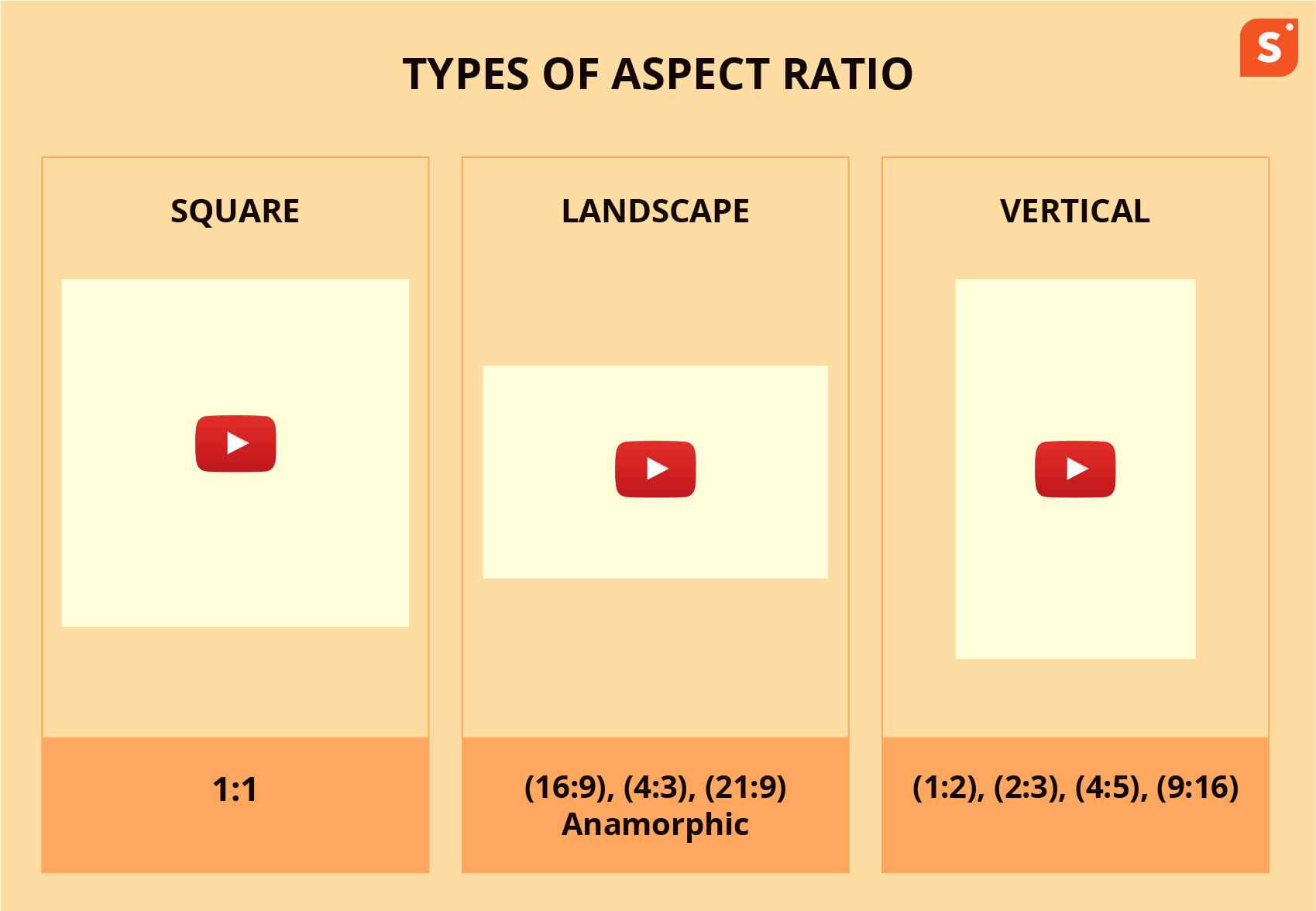
- Aspect Ratio: While 16:9 is the standard for desktop, YouTube’s player is now dynamic. It will automatically adjust to 9:16 for YouTube Shorts or 1:1 for square videos without adding letterboxing (black bars).
The “4K Trick” for 1080p Content
A common technical tactic used by savvy creators is to upscale 1080p footage to 4K before uploading. Because YouTube allocates a much higher bitrate and the superior VP9 codec to 4K uploads, the resulting 1080p option for viewers often looks significantly sharper than if the video had been uploaded as a native 1080p file.

The Infrastructure of Scale
In summary, “YouTube video format” is not a static answer. It is a dynamic, multi-layered system designed for maximum reach and efficiency. By utilizing the MP4 and WebM containers alongside H.264, VP9, and AV1 codecs, YouTube manages to bridge the gap between high-end professional cinematography and the limitations of global internet infrastructure. As AI-driven compression and 8K streaming become more prevalent, the platform’s technical standards will continue to evolve, pushing the boundaries of how digital media is consumed worldwide.
aViewFromTheCave is a participant in the Amazon Services LLC Associates Program, an affiliate advertising program designed to provide a means for sites to earn advertising fees by advertising and linking to Amazon.com. Amazon, the Amazon logo, AmazonSupply, and the AmazonSupply logo are trademarks of Amazon.com, Inc. or its affiliates. As an Amazon Associate we earn affiliate commissions from qualifying purchases.