
The rapid acceleration of the digital age has brought about an era of unprecedented innovation, but it has also created a logistical and environmental challenge: electronic waste, or e-waste. As consumer cycles for smartphones, laptops, and smart home devices shorten, the question of what to do with “retired” hardware becomes critical. Effective hardware lifecycle management is no longer just a concern for IT departments in large corporations; it is a vital skill for every tech-savvy individual.
Recycling in the technology sector is not as simple as tossing a plastic bottle into a blue bin. It involves navigating complex materials, hazardous components, and significant data security risks. Understanding what to recycle, what to refurbish, and what to keep out of the waste stream entirely is essential for protecting the environment and your personal digital security.
The E-Waste Crisis and the Value of Your Old Tech
To understand the “what” and “how” of tech recycling, one must first understand the “why.” Modern electronics are a dense concentrated source of both value and toxicity. A typical smartphone contains dozens of elements, including gold, silver, copper, and palladium, alongside rare earth elements like neodymium and dysprosium. When these devices are thrown into landfills, these valuable materials are lost, necessitating further destructive mining.
Conversely, electronics contain hazardous materials such as lead, mercury, and cadmium. If a lithium-ion battery is crushed in a standard recycling truck or landfill, it can cause catastrophic fires. Therefore, tech recycling is a specialized process designed to recover high-value materials while safely sequestering toxins.
The Security Aspect of Hardware Disposal
Beyond the environmental impact, hardware recycling is a digital security frontier. Every device with a storage controller—from an old digital camera to a high-end NVMe SSD—contains fragments of your digital life. Recycling the physical chassis without “recycling” or wiping the data effectively is a recipe for identity theft. Professional tech recycling focuses as much on data sanitization as it does on material recovery.
What to Recycle: Hardware That Belongs in the Circular Economy
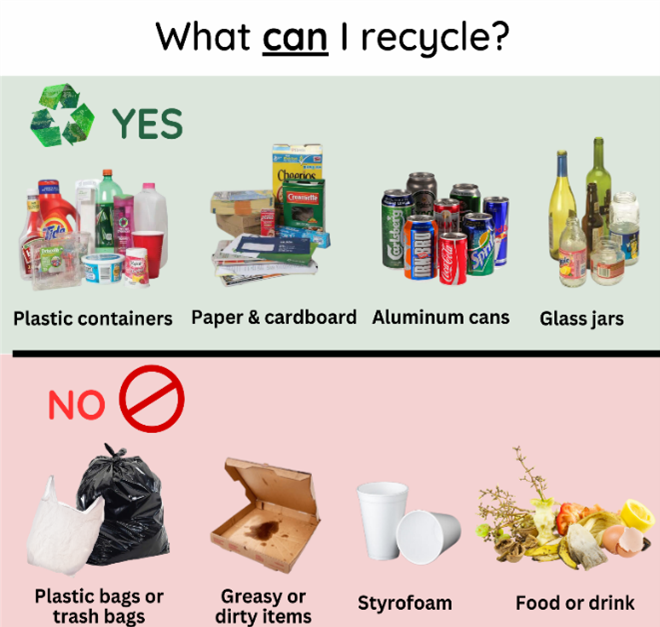
Most consumer electronics are highly recyclable if handled through the correct channels. The following categories represent items that should never see a trash can but are prime candidates for e-waste processing centers.
Smartphones, Tablets, and Wearables
Mobile devices are perhaps the most frequently replaced tech items. Because they are designed for portability, they utilize highly compressed internal architectures rich in precious metals. Over 90% of a smartphone’s components can be recovered, including the glass screen, the aluminum or stainless steel frame, and the circuit boards.
When recycling these, it is crucial to remove SIM cards and microSD cards. While the device itself is recyclable, these small storage chips should often be destroyed or kept if they contain sensitive data.
Laptops and Desktop Computers
Computers are the “gold mine” of the e-waste world. Motherboards and CPUs contain the highest concentrations of precious metals. Furthermore, the aluminum heat sinks and steel casings have high commodity value. Even the plastic casings, often made of high-quality ABS or polycarbonate, can be pelletized and reused in new manufacturing.
Peripherals and Cables
One of the most overlooked areas of tech recycling is the “junk drawer” of cables. USB cords, HDMI cables, power bricks, and old VGA wires contain significant amounts of high-grade copper. Keyboards and mice, while mostly plastic, contain small PCBs (Printed Circuit Boards) that should be harvested. If you have a box of tangled chargers from the early 2000s, these are perfect candidates for dedicated e-waste bins.
Internal Components: RAM, GPUs, and Motherboards
If you are a PC builder, you likely have loose components. These are highly prized by recyclers. Graphics cards (GPUs) are particularly valuable due to their complex cooling systems (copper and aluminum) and dense memory arrays. Even “dead” components have value in the secondary materials market.
What NOT to Recycle: Items to Avoid or Handle with Extreme Caution
“What not to recycle” can be interpreted in two ways: items that are too dangerous for standard e-waste programs, and items that are still too functional to be scrapped.

Swollen Lithium-Ion Batteries
If you have an old laptop or phone where the casing is bulging, you are dealing with a “spicy pillow”—a swollen lithium-ion battery. You should not put these in a standard recycling bin or even a general e-waste drop-off without notifying the staff. These are high-risk fire hazards. They require specialized hazardous waste handling. Most dedicated tech recyclers have specific fire-safe drums for these units.
CRT Monitors and Older Televisions
Old “tube” TVs and monitors (Cathode Ray Tubes) are increasingly difficult to recycle. They contain several pounds of lead in the glass to shield users from X-rays, as well as phosphors and mercury. Many general e-waste programs will no longer accept them, or they may charge a significant fee. You should not attempt to break these down yourself, as the vacuum tube can implode and release toxic dust.
Devices with Intact Personal Data
You should not recycle any device that has not been properly sanitized. Simply “deleting” files or “formatting” a drive is often insufficient, as data recovery software can easily pull bits from the platters or NAND cells. Until a device is cryptographically erased or physically shredded, it should stay in your possession.
High-Functioning Hardware (The “Reuse” Rule)
In the hierarchy of sustainability, “Reuse” comes before “Recycle.” If you have a three-year-old laptop that is simply “slow,” it should not be recycled. It should be refurbished, upgraded with an SSD, or donated. Recycling consumes energy to break down materials; keeping a device in the functional ecosystem is far more efficient.
The Tech Professional’s Checklist: Preparing Devices for Retirement
Before you take your box of gear to a certified recycler, you must follow a technical protocol to ensure your security and the efficiency of the recycling process.
Step 1: Data Sanitization
For traditional Hard Disk Drives (HDDs), use a tool that performs multiple passes of random data overwrites (such as DBAN). For modern Solid State Drives (SSDs), use the manufacturer’s “Secure Erase” utility. SSDs handle data differently than HDDs due to wear leveling; therefore, standard overwriting is less effective than a controller-level secure erase command which resets all cells to an empty state.
Step 2: Account Decoupling
Modern devices are often “locked” to a cloud identity (Find My iPhone, Android Factory Reset Protection, or Microsoft Account locks). If you recycle a device that is still locked to your ID, it may be impossible for a refurbisher to give it a second life, forcing them to scrap it for parts instead. Always sign out of iCloud, Google, and Steam accounts before saying goodbye to hardware.
Step 3: Removing Peripheral Hazards
Check for forgotten media. Check the optical drive for discs, the SD card slot for memory cards, and the USB ports for tiny wireless mouse dongles. Remove any alkaline batteries (like AAs in a wireless mouse), as these require a different recycling stream than the device itself and can leak acid that ruins the recyclability of the internal components.
Where to Go: Finding Certified Tech Recyclers
Not all recycling centers are created equal. Some “recyclers” simply ship e-waste to developing nations where it is burned in open pits to extract copper, releasing toxic fumes. To ensure your tech is handled ethically, look for specific certifications.
R2 and e-Stewards Certifications
When searching for a recycler, look for the R2 (Responsible Recycling) or e-Stewards logos. These organizations audit facilities to ensure they follow strict environmental and data security standards. They guarantee that no e-waste is illegally exported and that all data-bearing media are destroyed or wiped according to NIST standards.
Manufacturer and Retailer Programs
Many major tech brands offer “Circular Economy” programs. Companies like Apple, Dell, and HP provide mail-back programs or in-store drop-offs. Often, if the device has any remaining value, they will provide a gift card or credit toward a new purchase. Best Buy and Staples also offer robust in-store recycling kiosks for cables, rechargeable batteries, and most consumer electronics.
The Secondary Market: Resale vs. Recycling
Before choosing the recycling bin, check the “sold” listings on sites like eBay or specialized hardware forums. Tech enthusiasts often buy “for parts” devices to harvest specific chips or screens. Selling your old hardware to someone who will use it for repair is the highest form of recycling, as it extends the utility of the original manufacturing energy.
Conclusion
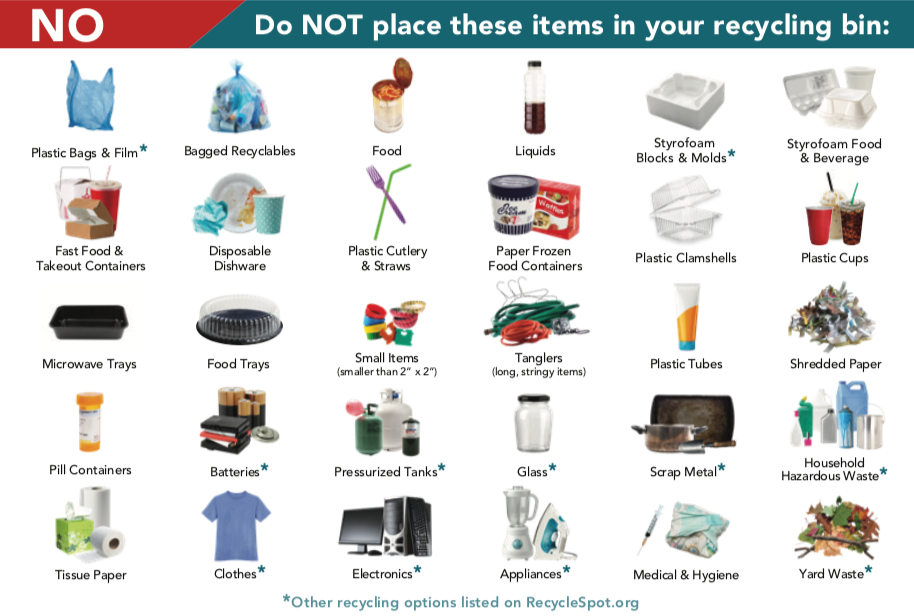
Recycling technology is a sophisticated process that sits at the intersection of environmental science and digital security. By distinguishing between high-value recyclables like laptops and circuit boards, and hazardous “no-go” items like swollen batteries or leaded CRTs, you contribute to a more sustainable tech ecosystem.
The goal for any modern user should be a “zero-landfill” policy for tech. Through proper data sanitization, account decoupling, and the use of certified R2 or e-Stewards facilities, we can ensure that the gadgets of today become the raw materials for the innovations of tomorrow, rather than a toxic legacy for the future.
aViewFromTheCave is a participant in the Amazon Services LLC Associates Program, an affiliate advertising program designed to provide a means for sites to earn advertising fees by advertising and linking to Amazon.com. Amazon, the Amazon logo, AmazonSupply, and the AmazonSupply logo are trademarks of Amazon.com, Inc. or its affiliates. As an Amazon Associate we earn affiliate commissions from qualifying purchases.