
In the intricate world of digital communication, the seamless flow of information from one corner of the globe to another relies on a complex infrastructure of protocols and hardware. At the heart of this system lies the email server. When you configure a new email account on a smartphone, tablet, or desktop client like Microsoft Outlook or Mozilla Thunderbird, one of the most critical pieces of data you are asked to provide is the “incoming mail server host name.” While it may appear as a cryptic string of text, such as imap.gmail.com or pop3.mail.com, it serves as the foundational address that allows your device to locate, authenticate, and retrieve your messages from the vast expanse of the internet.

Understanding what an incoming mail server host name is requires a deep dive into the client-server architecture of the internet. It is the specific identifier for a server that is configured to receive and store emails until they are requested by a user’s mail client. This identifier acts much like a physical street address, ensuring that the request sent by your device reaches the correct digital “post office” responsible for holding your data.
Understanding the Role of Incoming Mail Servers: POP3 vs. IMAP
To comprehend the host name, one must first understand the protocols that govern how incoming mail is handled. An incoming mail server host name is always associated with a specific protocol—usually either IMAP or POP3. These protocols dictate how the server interacts with your device and how your messages are managed once they are retrieved.
The Mechanics of IMAP (Internet Message Access Protocol)
IMAP is the modern standard for email retrieval, designed for a world where users access their mail from multiple devices simultaneously. When you use an IMAP host name (such as imap.example.com), your mail client connects to the server and mirrors the content found there. The “state” of your inbox—which messages are read, deleted, or organized into folders—is synchronized across the server and all connected devices.
Technically, the IMAP host name serves as the gateway for a persistent connection. Because the emails remain on the server, the host name must be highly available and capable of handling frequent requests for synchronization. For developers and IT professionals, the IMAP host name is the endpoint for a two-way communication channel that ensures data integrity across various platforms.
The Mechanics of POP3 (Post Office Protocol version 3)
POP3 is an older protocol that operates on a “download and delete” model. When a client connects to a POP3 host name (such as pop.example.com), it requests all new messages, downloads them to the local storage of the device, and then instructs the server to delete the originals. While modern iterations of POP3 allow for a “leave a copy on server” setting, the protocol is inherently designed for single-device usage.
The host name for a POP3 server points to a repository that acts more like a temporary holding cell than a permanent archive. From a technical standpoint, POP3 is less resource-intensive for the server compared to IMAP, but it lacks the flexibility required for the multi-device workflows common in today’s technology landscape.
Choosing the Right Protocol Host Name
The choice between an IMAP and POP3 host name depends entirely on the user’s needs. If a user requires a unified experience across a laptop, phone, and tablet, the IMAP host name is the correct choice. If the user is concerned about server storage limits and prefers to keep all data locally on one machine, the POP3 host name is the legacy solution. Regardless of the choice, the host name itself remains the essential “location” that bridges the gap between the local software and the remote data center.
Anatomy of a Host Name: How Domains Route Your Data
A host name is not merely a random string of characters; it is a structured address that utilizes the Domain Name System (DNS) to route traffic. When you enter a host name into your email settings, your device does not immediately know where to go. Instead, it must resolve that host name into an IP address.
The Domain Name System (DNS) and Mail Exchange (MX) Records
The process starts with a DNS lookup. When you type imap.gmail.com, your device queries a DNS server to find the numerical IP address associated with that name. However, for email specifically, the DNS system utilizes various record types. While “A” records point to a general IP address, “MX” (Mail Exchange) records are what tell the broader internet which servers are responsible for accepting incoming email for a specific domain.
The incoming mail server host name you provide in your client is the specific endpoint within that domain’s infrastructure. For instance, while the MX record for company.com might point to a cluster of Google’s servers, the host name you use in your client tells your software exactly which sub-domain or service to ping to access your personal mailbox.
Common Host Name Formats
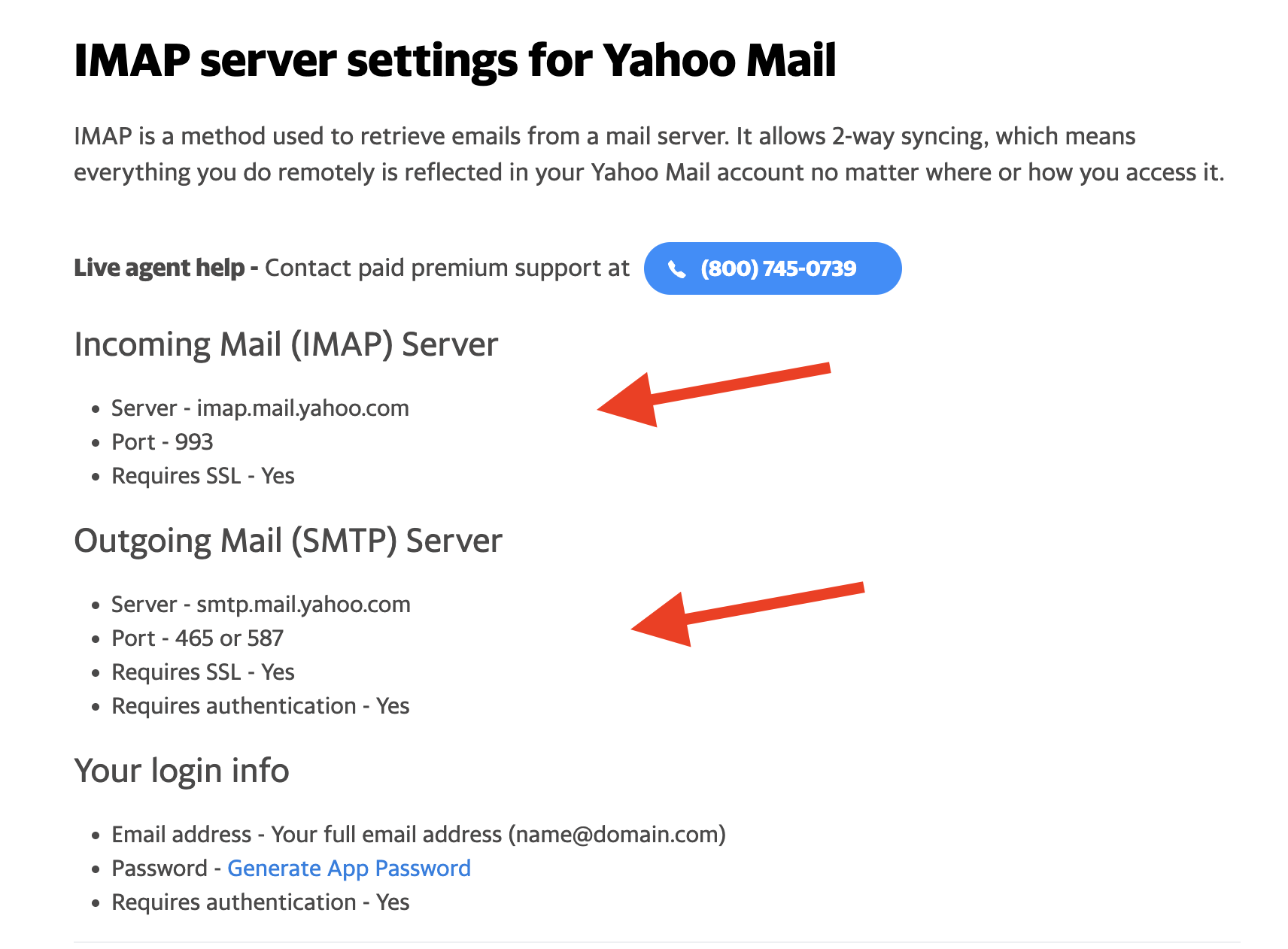
Most major email service providers follow a predictable naming convention for their host names. This helps in both branding and technical organization. For example:
- Google Workspace/Gmail:
imap.gmail.comorpop.gmail.com - Microsoft Outlook/Office 365:
outlook.office365.com - Yahoo Mail:
imap.mail.yahoo.com
For private domains or self-hosted email through providers like Bluehost or SiteGround, the host name is often a derivative of the domain itself, such as mail.yourdomain.com. In these cases, the “mail” prefix acts as a sub-domain that is specifically routed to the mail server software (like Dovecot or Courier) running on the host’s hardware.
Configuring Your Mail Client: Step-by-Step Technical Setup
Properly identifying and entering the incoming mail server host name is only half the battle. To successfully retrieve mail, the host name must be paired with the correct security settings and port numbers.
Locating Your Host Name
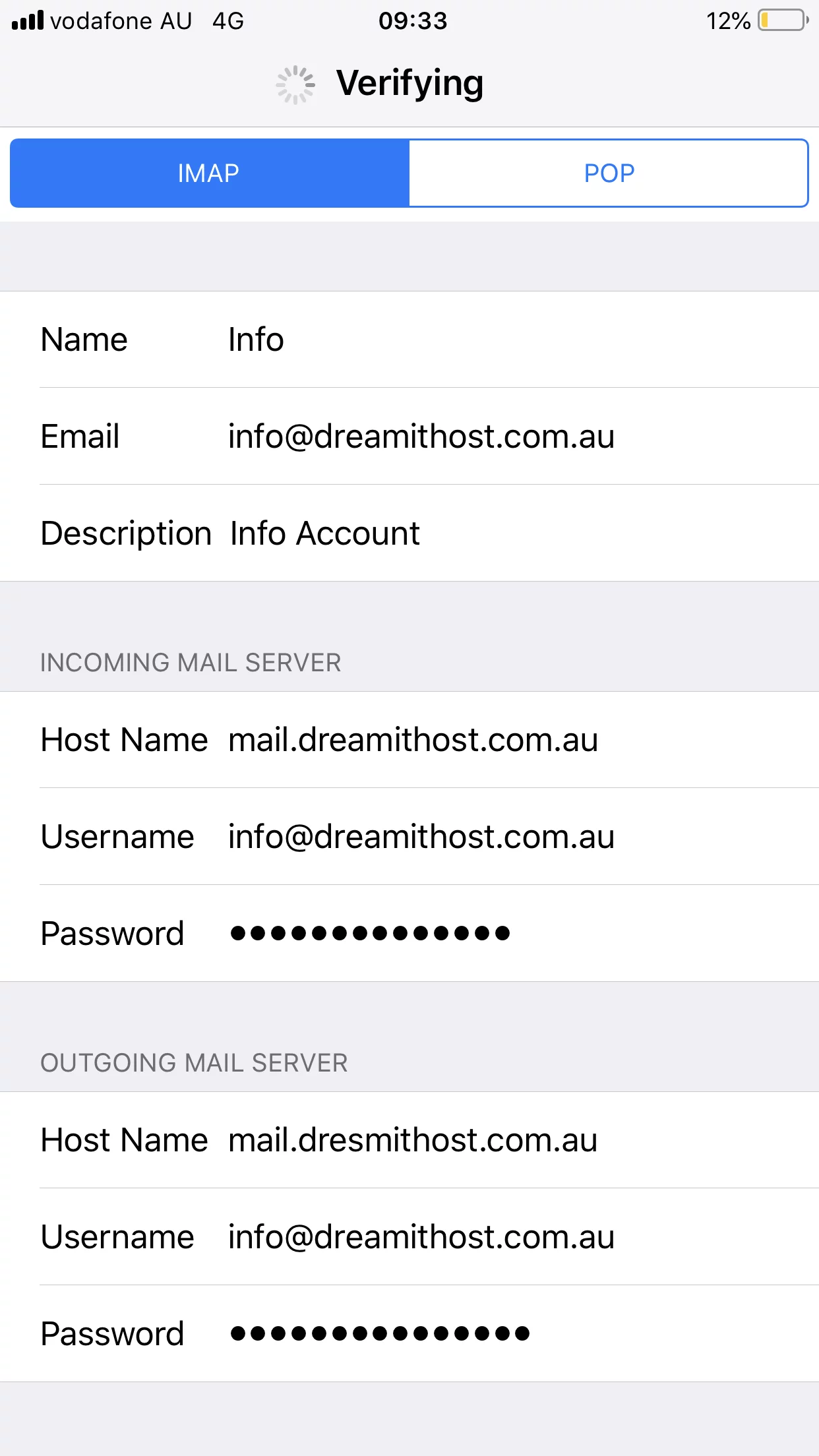
If you are using a professional or private email address, the host name is typically found in the “Email Accounts” or “Client Configuration” section of your web hosting control panel (such as cPanel or Plesk). Most hosts provide a “Manual Settings” block which lists the incoming and outgoing server addresses. If you are using a corporate email, this information is usually managed by the IT department and may be automatically pushed to your device via Mobile Device Management (MDM) profiles.
Security Protocols: SSL, TLS, and Port Numbers
A host name alone is insecure. In the early days of the internet, email was sent in “cleartext,” meaning anyone with access to the network could intercept and read your messages. Today, the incoming mail server host name must be used in conjunction with encryption protocols like SSL (Secure Sockets Layer) or TLS (Transport Layer Security).
When you enter a host name, you must also specify a port:
- IMAP over SSL/TLS: Port 993 is the industry standard.
- POP3 over SSL/TLS: Port 995 is the industry standard.
- Non-encrypted (Insecure): Port 143 (IMAP) or 110 (POP3). These are largely deprecated and should be avoided to prevent digital security breaches.
The host name acts as the destination, while the port acts as the specific “door” through which the encrypted data flows. Without the correct port, the server will reject the connection request, even if the host name is correct.
Troubleshooting Connection Failures
If a mail client fails to connect despite a correct host name, several technical factors could be at play. Firewall settings on a local network or a VPN might block the specific ports (993 or 995). Furthermore, if the host name uses a self-signed SSL certificate rather than one issued by a trusted Certificate Authority (CA), the mail client may throw a security warning or refuse to connect entirely. Verifying that the host name matches the domain name on the SSL certificate is a vital troubleshooting step for systems administrators.
Security Implications and the Future of Email Protocols
As cyber threats evolve, the reliance on traditional host names and basic authentication (username and password) is shifting toward more secure methods.
Protection Against Man-in-the-Middle Attacks
The incoming mail server host name is a prime target for “man-in-the-middle” (MITM) attacks. If an attacker can spoof a DNS record, they can redirect your mail client to a malicious server. This is why the industry has moved toward DNSSEC (Domain Name System Security Extensions), which adds a layer of digital signatures to DNS records, ensuring that the host name your device is connecting to is authentic.
Beyond Traditional Protocols: Graph API and Modern Auth
We are currently seeing a transition away from standard IMAP/POP3 host names in enterprise environments. Major players like Microsoft and Google are encouraging the use of proprietary APIs (like the Microsoft Graph API) and OAuth 2.0 for authentication.
In these modern setups, the user often doesn’t need to know the incoming mail server host name at all. Instead, they log in via a web-based authentication prompt, and the application handles the connection via secure tokens. This eliminates the risk of users entering incorrect host names and significantly hardens the security of the inbox against credential harvesting and brute-force attacks.
However, for the millions of users on independent servers, small business platforms, and legacy systems, the incoming mail server host name remains the essential technical bridge. It represents the intersection of DNS routing, server-side storage protocols, and client-side configuration—a fundamental element of the technology that keeps the world’s digital conversations moving forward. Understanding its function is not just a matter of “getting the email to work”; it is an insight into how the global network organizes and secures our most vital data.
aViewFromTheCave is a participant in the Amazon Services LLC Associates Program, an affiliate advertising program designed to provide a means for sites to earn advertising fees by advertising and linking to Amazon.com. Amazon, the Amazon logo, AmazonSupply, and the AmazonSupply logo are trademarks of Amazon.com, Inc. or its affiliates. As an Amazon Associate we earn affiliate commissions from qualifying purchases.