
In the modern era of hyper-connectivity, fiber optic technology stands as the invisible backbone of the global internet. While we interact with the results of fiber optics every time we stream a high-definition video or participate in a lag-free video conference, the physical hardware itself often remains hidden behind data center walls, buried beneath city streets, or tucked away in telecommunications closets. Identifying fiber optic cabling requires an understanding of its unique physical characteristics, which differ significantly from traditional copper-based wiring.
To the untrained eye, a cable might just look like a cable. However, fiber optic technology possesses distinct visual markers—from the vibrant colors of its protective jackets to the intricate precision of its glass cores. Understanding what fiber cable looks like is not just a matter of curiosity; it is a fundamental skill for IT professionals, network engineers, and tech enthusiasts who must distinguish between different grades of bandwidth and connectivity standards.

The Core Components: Understanding What’s Beneath the Jacket
To understand the exterior appearance of a fiber cable, one must first understand its internal architecture. Unlike copper cables, which rely on the flow of electrons through metal, fiber optics transmit data as pulses of light through strands of glass or plastic. This fundamental difference in physics dictates the entire design and visual profile of the cable.
The Glass Core and Cladding
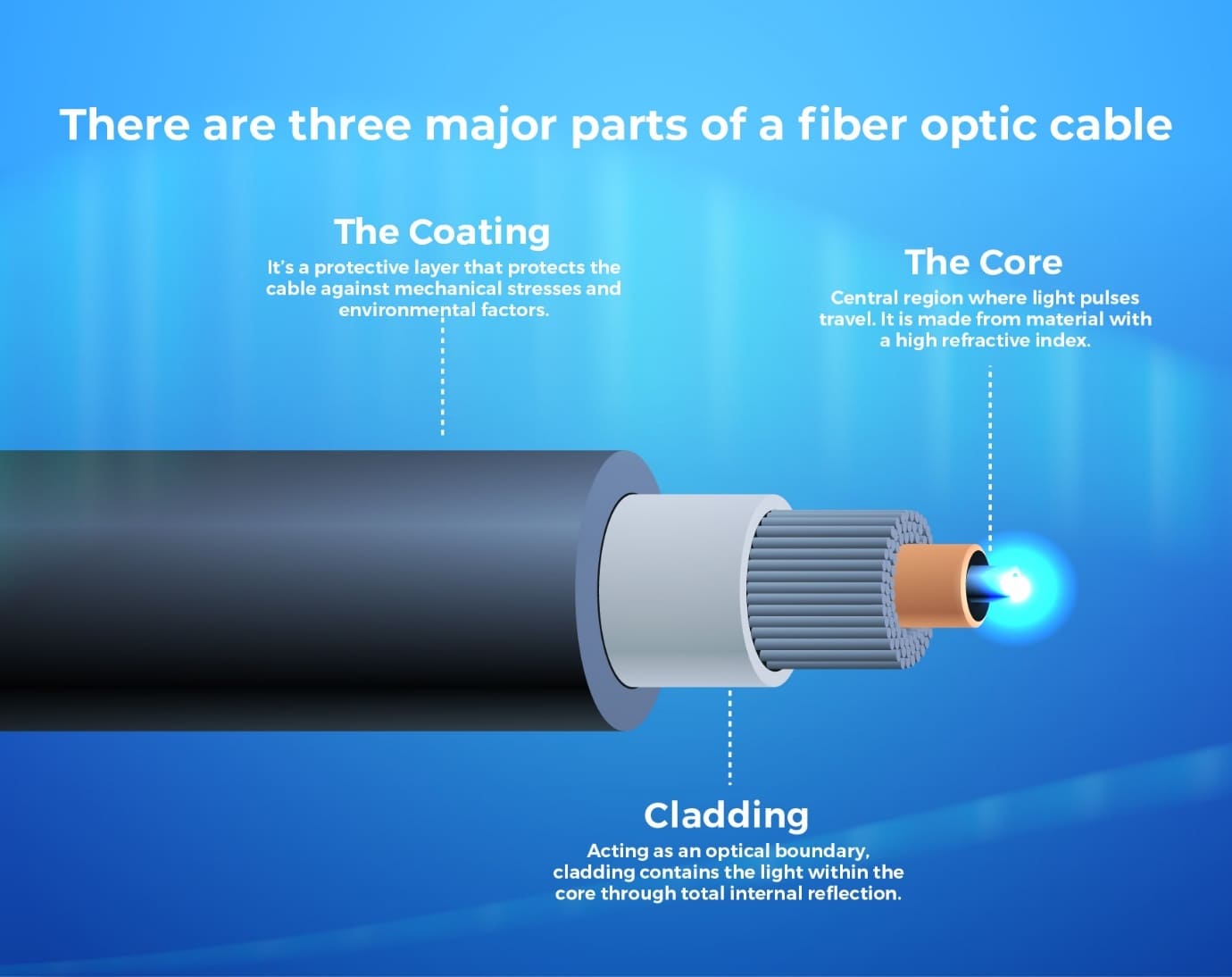
At the very center of any fiber optic cable is the core. If you were to strip away the outer layers, you would find a strand of glass so thin it is often compared to a human hair. In single-mode fiber, this core is typically about 8 to 10 microns in diameter. In multi-mode fiber, it is slightly larger, usually 50 or 62.5 microns.
Surrounding this core is the cladding, a second layer of glass with a different refractive index. Visually, the core and cladding are almost indistinguishable without a microscope, appearing as a single, translucent thread. This glass assembly is surprisingly flexible but remains fragile, which is why the layers surrounding it are so substantial.
Buffers and Strength Members
Moving outward from the glass, you will find the coating and buffer layers. These are usually made of plastic or acrylate and provide the first line of defense against moisture and physical damage. When you look at a “tight-buffered” cable, the plastic sits directly against the fiber. In “loose-tube” designs, often used for outdoor installations, the fibers float within a gel-filled tube.
One of the most recognizable internal features of a fiber cable is the strength member. Most indoor fiber cables use aramid yarn—commonly known by the brand name Kevlar—as a protective buffer. These are the yellow, fuzzy fibers you see when you cut open a cable. They are designed to take the tension during the pulling process, ensuring that the delicate glass core is never stretched or snapped.
Identifying Fiber Cables by Color and Connector Type
One of the most effective ways to identify fiber optics at a glance is through the industry-standard color-coding system. Because different types of fiber are not cross-compatible, manufacturers use specific jacket colors to prevent technicians from making costly mistakes.
The Secret Language of Jacket Colors
When walking through a server room or looking at the back of a high-end router, the color of the cable tells you exactly what technology is inside:
- Yellow: This is the universal sign for Single-Mode Fiber (OS1/OS2). Single-mode fiber is used for long-distance transmissions, sometimes spanning dozens of miles without needing a signal booster.
- Orange: Typically represents older Multi-Mode Fiber (OM1 or OM2). These are less common in modern high-speed environments but are still found in legacy building infrastructures.
- Aqua: This color denotes 10-Gigabit optimized Multi-Mode Fiber (OM3 or OM4). If you see aqua cables, you are likely looking at a high-speed local area network (LAN) or a modern data center setup.
- Erika Violet: This newer color standard is often used for OM4 or OM5 cables to distinguish them from standard aqua OM3 cables, particularly in high-density European data centers.
- Green: While not common for the cable jacket itself, green is the standard color for APC (Angled Physical Contact) connectors.
Decoding Fiber Connectors
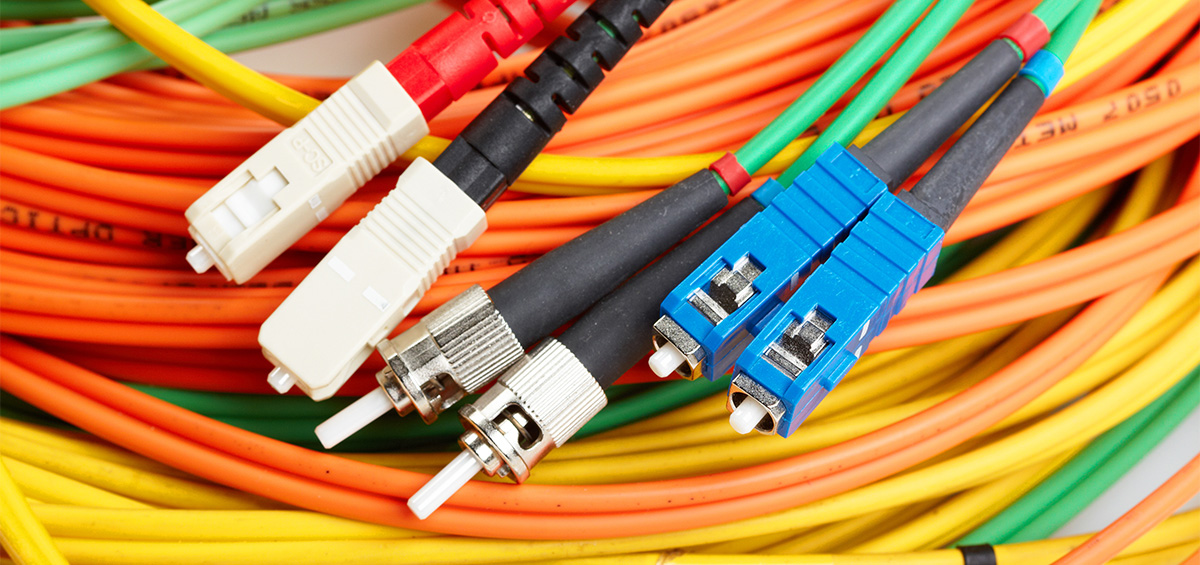
The “business end” of a fiber cable—the connector—is its most identifying feature. Unlike the blocky, wide RJ45 connectors found on Ethernet cables, fiber connectors are sleek and come in several distinct shapes:
- LC (Lucent Connector): These are the most popular connectors in modern tech. They are small, “squarish,” and feature a tab that clicks into place, much like a miniature Ethernet plug. Their small form factor allows for high-density connections on switches.
- SC (Subscriber Connector): Often referred to as a “square connector,” these are larger than LC connectors and use a push-pull locking mechanism. They were the standard for many years and are still frequently seen in residential fiber-to-the-home (FTTH) installations.
- ST (Straight Tip): These look like older BNC video connectors. They are cylindrical with a bayonet-style twist lock. You will mostly see these in industrial environments or older campus networks.
- MTP/MPO: These are wide, multi-fiber connectors that can house 12, 24, or even 72 fibers in a single rectangular plug. They are used for high-capacity backbones in massive data centers.
Fiber vs. Copper: How to Tell the Difference at a Glance
For many, the challenge lies in distinguishing a fiber optic patch cord from a high-quality Category 6 (Cat6) Ethernet cable. While they may appear similar from a distance, several tactile and visual cues set them apart.
Thickness and Flexibility
Copper cables, especially shielded Cat6A or Cat7, are relatively thick and stiff because they contain four twisted pairs of copper wire and often a plastic “spline” in the center to reduce interference. Fiber cables, particularly “patch cords” used to connect devices, are significantly thinner and more lightweight. A standard duplex fiber cable (two strands joined together) is often half the thickness of a single Cat6 cable.
Furthermore, fiber has a different “feel.” While modern fiber is surprisingly resilient, it has a specific bend radius. If you bend a copper cable too sharply, it might kink; if you do the same to a fiber cable, the glass core could fracture, or the signal could “leak” out of the cladding (a phenomenon known as macrobending). Because of this, fiber installations often include “bend radius protectors”—curved plastic guides that ensure the cable never turns a corner too sharply.
Terminations and Ports
The most definitive way to tell the difference is to look at the port it plugs into. Copper Ethernet cables plug into standard 8P8C (RJ45) ports built directly into the motherboard or switch. Fiber, however, usually connects via an SFP (Small Form-factor Pluggable) transceiver.
An SFP is a small, metal modular device that slides into a slot on a switch. The fiber cable then plugs into the SFP. If you see a metal “cage” or a removable rectangular module where the cable connects, you are almost certainly looking at a fiber optic interface. This modularity allows tech professionals to swap out the SFP to change the cable type or distance capability without replacing the entire switch.
Specialized Forms: From Residential Drop Cables to Industrial Backbone
The appearance of fiber changes drastically depending on its environment. What you see inside an office is vastly different from what is buried under the sidewalk or suspended from utility poles.
Fiber to the Home (FTTH) Hardware
If you have fiber internet at home, the cable coming from the street is often a “drop cable.” These are usually black and heavily reinforced to withstand UV exposure and tension. Inside your home, this cable connects to an Optical Network Terminal (ONT). The ONT is the “fiber modem” that converts light signals into electrical signals for your router. The patch cord connecting the wall jack to your ONT is often a thin, white or yellow cable with green SC/APC connectors. These green connectors are angled to reduce back-reflection, which is critical for the high-power signals used in residential broadband.
Submarine and Armored Cables
At the most extreme end of the spectrum are the cables that cross the floors of the world’s oceans. These don’t look like cables at all; they look like heavy-duty industrial piping. To protect the tiny glass fibers from the immense pressure of the deep sea, salt-water corrosion, and even shark bites, these cables are wrapped in layers of steel wire, copper sheeting, and thick polyethylene.
In industrial settings, you may encounter “armored” fiber cable. This looks like flexible metal conduit (similar to what you might see in a garage or workshop). Inside the metal interlocking armor is the standard fiber cable. This design is used in environments where rodents might chew through the plastic or where the cable is at risk of being crushed by heavy machinery.
Ultimately, identifying fiber optic cable is about recognizing the marriage of extreme delicacy and robust engineering. Whether it is the hair-thin glass core transmitting data at the speed of light or the heavy-duty armored jacket protecting it in a factory, fiber optic cable is a distinct and vital component of our technological landscape. By paying attention to jacket colors, connector shapes, and the presence of SFP modules, anyone can begin to map the physical pathways of the digital world.
aViewFromTheCave is a participant in the Amazon Services LLC Associates Program, an affiliate advertising program designed to provide a means for sites to earn advertising fees by advertising and linking to Amazon.com. Amazon, the Amazon logo, AmazonSupply, and the AmazonSupply logo are trademarks of Amazon.com, Inc. or its affiliates. As an Amazon Associate we earn affiliate commissions from qualifying purchases.