
In an increasingly digital financial landscape, tools like Cash App have revolutionized how we send, receive, and manage money. At the heart of this convenience lies the Cash App Card – a free, customizable Visa debit card that allows users to spend their Cash App balance anywhere Visa is accepted, both online and in physical stores. For millions, it’s an essential component of their personal finance toolkit, offering a seamless bridge between digital funds and everyday spending. However, the fundamental question often arises: “Where can I add money to my Cash App Card?”
Understanding the various methods to fund your Cash App Card is crucial for maximizing its utility and integrating it effectively into your financial routine. Whether you’re looking to manage daily expenses, set aside funds for specific purposes, or simply ensure you have access to your money, knowing your options provides unparalleled flexibility. This comprehensive guide will delve into the primary and secondary methods for adding money to your Cash App Card, offering insights into each process, associated considerations, and best practices for secure and efficient fund management.
Understanding Your Cash App Card and Funding Needs
Before diving into the “how,” it’s beneficial to grasp the “why” and “what” behind your Cash App Card. This foundational understanding will help you choose the most appropriate funding methods for your specific financial behaviors and goals.
The Versatility of the Cash App Card
The Cash App Card is more than just a piece of plastic; it’s a direct extension of your Cash App balance. Issued by Sutton Bank, it functions like a traditional debit card, allowing you to spend the funds available in your Cash App account. This means you can use it for online purchases, swipe it at point-of-sale terminals in retail stores, and even withdraw cash from ATMs (though ATM fees may apply from both Cash App and the ATM operator). Its primary appeal lies in its tight integration with the Cash App ecosystem, providing instant access to peer-to-peer payments and other financial services offered within the app. For many, it serves as a convenient alternative to traditional bank accounts for managing daily spending and receiving payments.
Why Top Up Your Cash App Card?
There are numerous reasons why individuals regularly add money to their Cash App Card, reflecting its diverse applications in personal finance:
- Everyday Spending: For users who prefer to compartmentalize their spending, loading funds onto their Cash App Card for daily expenses like groceries, fuel, or dining out can be a effective budgeting strategy.
- Peer-to-Peer Payments: While you can send money directly from a linked bank account, having funds readily available on your Cash App balance ensures instant transfers to friends, family, or service providers within the app.
- Budgeting and Expense Tracking: Using the Cash App Card for specific categories of spending can help users track their expenditures more easily through the app’s transaction history, aiding in personal budgeting efforts.
- Receiving Income: Many gig economy workers, freelancers, and even those with traditional employment utilize Cash App for direct deposits, making it a primary channel for receiving their earnings.
- Building an Emergency Fund (Small Scale): While not a substitute for a traditional savings account, some users may keep a small liquid fund on their Cash App balance for immediate, unexpected expenses.
- Online Shopping: The virtual card details are readily available for secure online transactions, often used by individuals who prefer not to use their primary bank debit/credit card for certain online purchases.
Understanding these use cases highlights the importance of flexible and accessible funding options, ensuring your Cash App Card remains a powerful and practical financial tool.
Primary Methods for Adding Funds to Your Cash App Card
The most common and generally recommended ways to add money to your Cash App Card involve linking external financial accounts or receiving funds directly. These methods offer a high degree of convenience and are often free of charge.
Linking a Bank Account
The most straightforward and widely used method for funding your Cash App Card is to link an external bank account. This connection allows you to initiate transfers directly from your bank to your Cash App balance.
How to Link Your Bank Account
- Open Cash App: Navigate to the ‘Banking’ tab (the house icon on the bottom left).
- Add a Bank: Select ‘Link Bank’ or ‘Add Bank’.
- Choose Your Method:
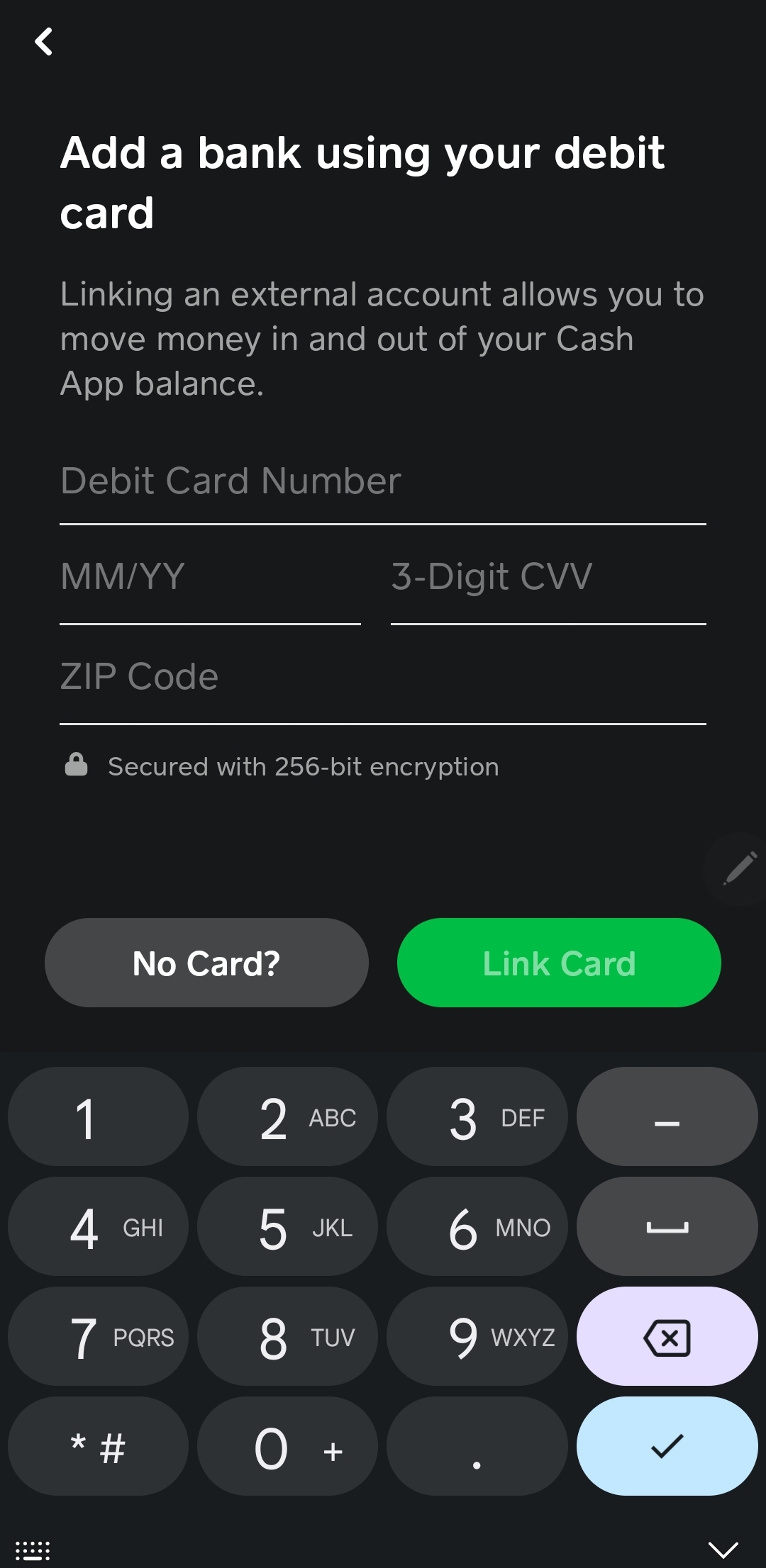
- Debit Card: You can link your bank account by entering your debit card number, expiration date, CVV, and zip code. This method is often preferred for its simplicity and speed, as transfers via debit card can sometimes be faster than direct bank transfers.
- Bank Login (Plaid Integration): For a more secure and robust connection, Cash App often uses Plaid, a third-party service that allows you to securely log in to your online banking portal within the Cash App interface. This automatically links your bank account without manually entering routing and account numbers.
- Verification: Follow any prompts for verification, which might include micro-deposits or a security code from your bank.
Initiating a Transfer
Once your bank account is linked, you can easily add money:
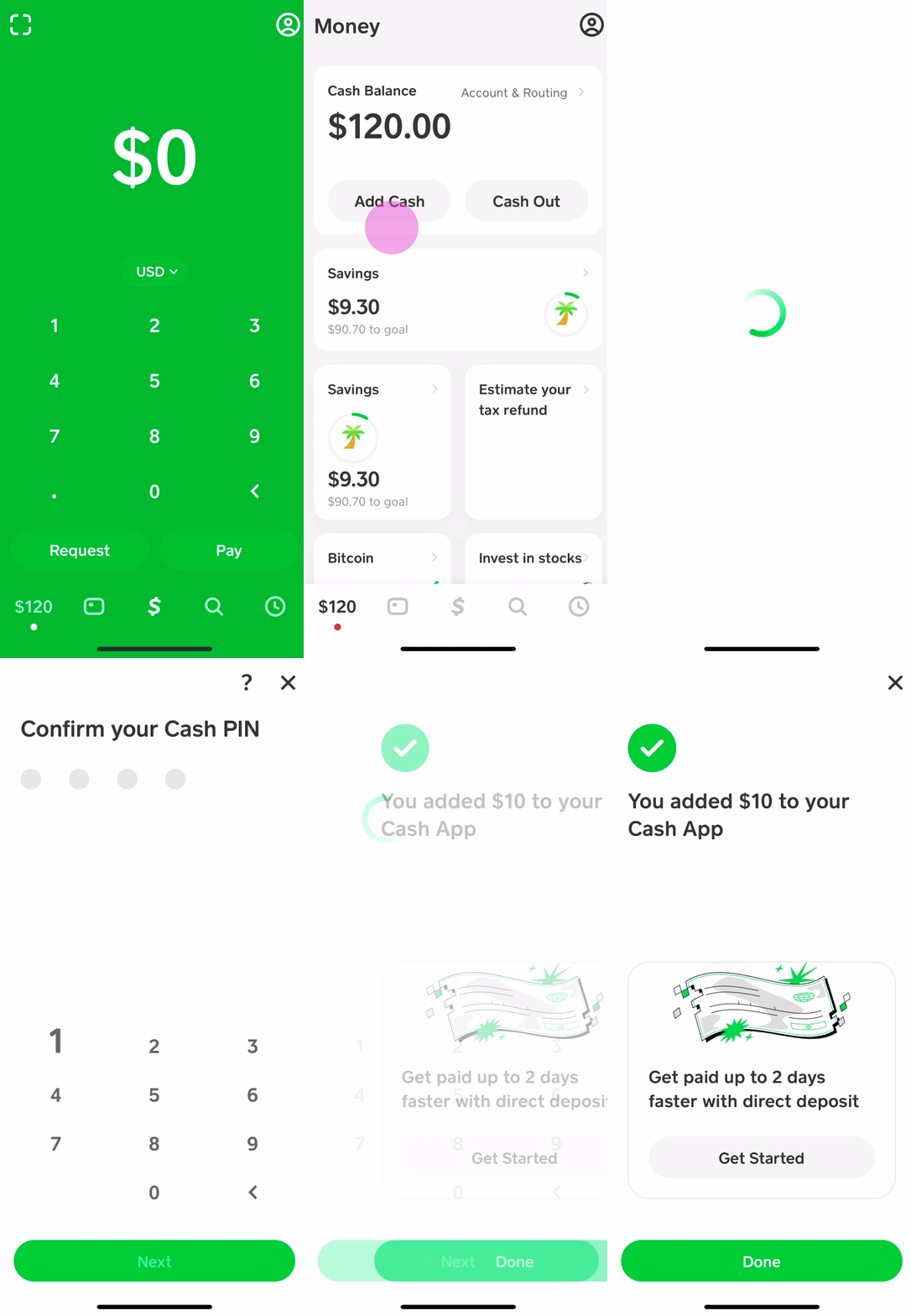
- Go to the ‘Banking’ tab.
- Tap ‘Add Cash’.
- Enter the desired amount.
- Confirm the transfer using your PIN or Touch ID/Face ID.
Transfers from a linked bank account typically take 1-3 business days to clear and become available on your Cash App balance. Instant deposits are often available if you’ve linked a debit card, though Cash App may charge a small fee for this expedited service.
Direct Deposit
For users who receive regular income, setting up direct deposit to their Cash App account is an incredibly convenient way to fund their Cash App Card. This allows employers, government agencies, or other payers to send funds directly to your Cash App balance, often making them available earlier than traditional bank deposits.
How to Set Up Direct Deposit
- Access Account & Routing Numbers: In the Cash App, go to the ‘Banking’ tab. You’ll see your Cash App routing number and account number displayed.
- Provide to Payer: Give these numbers to your employer’s payroll department, the government agency, or any other payer. You’ll typically fill out a direct deposit form, similar to setting up direct deposit for a traditional bank account.
- Confirm Setup: It may take one or two pay cycles for the direct deposit to take effect. Always double-check with your payer to ensure the information has been processed correctly.
Benefits of Direct Deposit
- Automatic Funding: Your Cash App Card is funded automatically on payday, eliminating the need for manual transfers.
- Early Access to Paychecks: Cash App often makes direct deposit funds available up to two days earlier than many traditional banks, providing quicker access to your earnings.
- No Fees: Direct deposits are a free service, making it a cost-effective way to receive and manage your income.
Receiving Funds from Other Cash App Users
Cash App’s core functionality revolves around peer-to-peer (P2P) payments. If a friend, family member, or client sends you money via Cash App, those funds are instantly added to your Cash App balance, making them immediately available on your Cash App Card.
How It Works
- Recipient Provides $Cashtag or Phone/Email: To receive money, you simply provide the sender with your unique $Cashtag, phone number, or email address associated with your Cash App account.
- Sender Initiates Transfer: The sender enters your identifier, the amount, and sends the payment.
- Instant Receipt: The funds are typically available in your Cash App balance within seconds, ready to be spent with your Cash App Card.
This method is incredibly popular for splitting bills, repaying debts, or receiving small payments quickly and efficiently.
Convenient Cash Deposit Options for Your Cash App Card
While digital transfers are convenient, there are still many instances where physical cash needs to be converted into digital funds. Cash App understands this need and offers solutions for depositing physical cash directly onto your card.
Retail Stores Accepting Cash App Deposits
Cash App has partnered with several major retailers across the United States, allowing users to deposit cash directly into their Cash App account at the register. This is an invaluable service for those who receive payment in cash, prefer to budget with cash, or simply need to convert physical money into a digital balance for their Cash App Card.
Participating Retailers Include:
- Walmart
- Walgreens
- CVS
- 7-Eleven
- Dollar General
- Family Dollar
- Rite Aid
- And many other local convenience stores and pharmacies.
Process for Cash Deposits at Retailers:
- Generate a Deposit Barcode:
- Open your Cash App.
- Tap the ‘Banking’ tab (house icon).
- Tap ‘Deposit Cash’.
- Select ‘Deposit at a Store’. Cash App will then generate a unique barcode.
- Present Barcode at Register: Go to the customer service desk or any regular checkout lane at a participating store. Inform the cashier you want to add money to your Cash App.
- Hand Over Cash: Present the generated barcode to the cashier for scanning and hand over the cash amount you wish to deposit.
- Confirm Deposit: The cashier will process the transaction. The funds are typically added to your Cash App balance immediately or within a few minutes. You’ll receive an in-app notification confirming the deposit.
Fees and Limits for Cash Deposits:
- Fees: Cash App typically charges a small fee for cash deposits at retailers (e.g., $1-$4, though this can vary by retailer and location).
- Limits: There are daily and weekly limits on how much cash you can deposit. These limits are usually clearly displayed within the Cash App when you initiate a cash deposit (e.g., $500 per deposit, $1,000 per week). It’s crucial to check these limits before heading to the store to avoid any inconvenience.
This cash deposit feature bridges the gap between traditional cash transactions and the digital convenience of the Cash App Card, ensuring accessibility for a broader range of financial habits.
Managing Your Funds and Optimizing Your Cash App Experience
Beyond simply adding money, effective management of your funds within Cash App is key to a smooth and secure financial experience. Understanding limits, fees, and security protocols will empower you to use your Cash App Card more efficiently and responsibly.
Understanding Limits and Fees
Every financial tool comes with its own set of rules, and Cash App is no exception. Being aware of these can prevent unexpected hurdles and help you plan your transactions effectively.
Common Limits:
- Sending Limits: Initially, users may have limits on how much they can send (e.g., $250 within 7 days). Verifying your identity (name, date of birth, last four digits of SSN) significantly increases these limits, often to $7,500 per week.
- Receiving Limits: Unverified accounts may also have receiving limits. Verification removes these limitations, allowing you to receive unlimited funds.
- Cash Deposit Limits: As mentioned, cash deposits at retailers typically have limits (e.g., $500 per transaction, $1,000 per week).
- ATM Withdrawal Limits: Cash App Card users generally have daily and weekly limits on ATM withdrawals (e.g., $310 per transaction, $1,000 per day, $1,000 per week).
- Spending Limits: There are also typically daily and weekly spending limits for the Cash App Card itself, which are significantly higher after verification.
Associated Fees:
- Instant Deposits: While standard transfers from a linked bank account are free, Cash App charges a small fee (typically 0.5% – 1.75%) for instant transfers from your Cash App balance to a linked debit card.
- ATM Withdrawals: Cash App charges a $2 fee for ATM withdrawals unless you have direct deposit enabled and meet certain criteria (e.g., receive $300 or more in direct deposits within a month), which waives the fee. The ATM operator may also charge their own fees.
- Cash Deposits: As noted, a small fee (usually $1-$4) is charged for depositing cash at retail locations.
- Bitcoin Transactions: If you buy or sell Bitcoin through Cash App, fees are typically applied based on market volatility and transaction size.
Always check the most current fees and limits within the Cash App or on their official support page, as they can change.
Security Best Practices for Your Cash App Card
Protecting your funds and personal information is paramount. Adhering to security best practices ensures a safe Cash App experience.
- Enable Security Locks: Set up a PIN, Touch ID, or Face ID within the app to prevent unauthorized access to your account and payments.
- Monitor Transactions Regularly: Frequently review your transaction history in the app to spot any suspicious or unauthorized activity promptly.
- Guard Your Card Details: Treat your Cash App Card like any other debit card. Do not share your card number, CVV, or expiration date with anyone you don’t trust, especially over unsecured channels.
- Beware of Scams: Be vigilant against phishing attempts, fake customer support, and unsolicited requests for money. Cash App will never ask for your sign-in code, PIN, or full debit card number outside of the app.
- Report Lost/Stolen Cards Immediately: If your Cash App Card is lost or stolen, immediately disable it within the app or contact Cash App support to prevent unauthorized use.
- Use Strong, Unique Passwords: Ensure the email account linked to your Cash App has a strong, unique password and two-factor authentication enabled.
Integrating Cash App into Your Personal Finance Strategy
With a clear understanding of how to fund and manage your Cash App Card, you can strategically integrate it into your broader personal finance goals.
- Budgeting Tool: Use your Cash App balance and card specifically for variable expenses (e.g., entertainment, dining out) to keep them separate from fixed costs managed by a primary bank account.
- Spending Tracker: Leverage the in-app transaction history to monitor where your money is going, complementing other budgeting apps or spreadsheets.
- Receiving Gig Income: For freelancers or those with side hustles, direct deposit into Cash App can streamline income collection and management.
- Dedicated Savings (Small Amounts): While not a high-yield savings account, some users might use a portion of their Cash App balance for very short-term savings goals or small emergency funds due to its accessibility.
Troubleshooting Common Funding Issues
Despite the convenience, users may occasionally encounter issues when trying to add money to their Cash App Card. Knowing how to troubleshoot these common problems can save time and frustration.
Delayed Transfers
If you’ve initiated a transfer from a linked bank account and the funds haven’t appeared in your Cash App balance within the expected timeframe (1-3 business days):
- Check Bank Account: Verify that the funds have indeed left your linked bank account.
- Review Cash App Activity: Look at your Cash App activity feed for any pending transactions or error messages.
- Consider Weekends/Holidays: Bank transfers don’t process on weekends or public holidays, which can extend the transfer time.
- Contact Your Bank: If funds have left your bank but haven’t appeared in Cash App after the standard processing time, contact your bank to inquire about the transaction status.
Rejected Deposits
Various reasons can lead to a rejected deposit, whether from a bank transfer or a cash deposit at a retailer:
- Incorrect Information: For bank transfers, ensure your bank account details are correctly linked. For direct deposits, double-check the routing and account numbers provided to your payer.
- Exceeding Limits: If you’ve hit your daily or weekly limits for adding cash (e.g., cash deposits at retailers or bank transfers), the transaction will be rejected.
- Insufficient Funds: For transfers from a linked bank account, ensure you have sufficient funds in your bank account to cover the transfer amount.
- Fraud Flags: Banks or Cash App’s security systems may flag unusual transactions as potentially fraudulent, leading to a rejection.
- Expired Card/Account Issues: Ensure your linked debit card hasn’t expired, or there aren’t any holds or issues with your bank account.
Contacting Cash App Support
If you’ve exhausted troubleshooting steps and still can’t resolve a funding issue, contacting Cash App support is the next step.
- In-App Support: The most efficient way to get support is usually through the Cash App itself. Tap the profile icon in the top right, scroll down, and select ‘Support’. You can browse articles or start a chat with a support representative.
- Website: You can also visit Cash App’s official support website for FAQs and contact options.
- Social Media: While not a primary support channel for sensitive issues, Cash App often responds to general inquiries on X (formerly Twitter). Be extremely cautious of fake support accounts.
Always be prepared to provide relevant transaction details, dates, and any error messages you’ve received.
Conclusion
The Cash App Card stands as a versatile and accessible tool in the realm of personal finance, bridging the gap between digital convenience and everyday spending needs. Understanding “where can I add money to my Cash App Card” unlocks its full potential, transforming it from a simple peer-to-peer payment app into a comprehensive financial management instrument.
From the seamless integration of linked bank accounts and the efficiency of direct deposits to the practical accessibility of cash deposits at retail stores, Cash App offers a robust array of options to keep your card funded. By combining these funding methods with a keen awareness of limits, fees, and security best practices, users can confidently leverage their Cash App Card for budgeting, managing expenses, and ensuring instant access to their funds. As digital finance continues to evolve, mastering these fundamental operations ensures that your Cash App Card remains a powerful ally in navigating your financial journey.