
In the evolving landscape of social media software, user experience (UX) design has shifted significantly toward providing more granular control over digital interactions. One of the most impactful features introduced by Instagram in recent years is the “Restrict” function. Developed as a response to the growing need for sophisticated anti-bullying tools and digital security measures, the Restrict feature offers a subtle alternative to the more binary options of blocking or muting.
Understanding what happens when you restrict someone on Instagram is essential for anyone looking to optimize their digital safety and manage their online presence with precision. This article explores the technical mechanics of the feature, its impact on communication workflows, and how it fits into the broader ecosystem of social media security.
The Mechanics of Restriction: How Instagram’s Software Manages Interactions
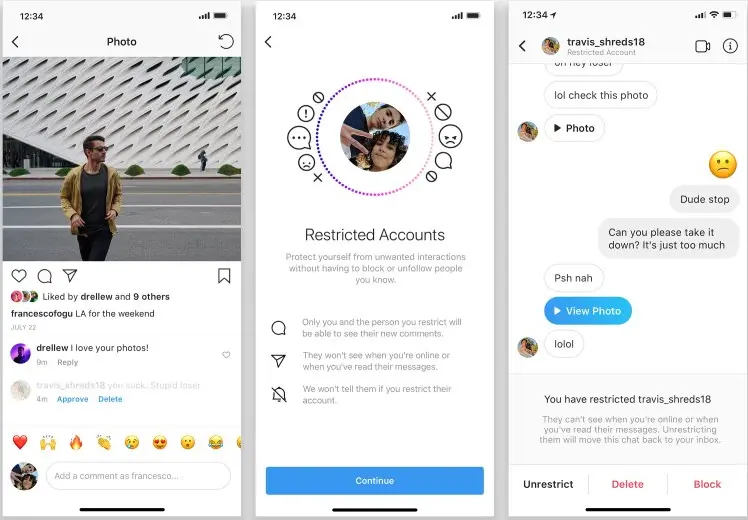
At its core, the Restrict feature is a “shadow-moderation” tool. Unlike blocking, which severs all digital ties and alerts the other party by making your profile disappear, restricting is designed to be invisible to the person being restricted. The software architecture behind this feature alters how data—specifically comments and messages—is processed and displayed to the user and their audience.
Comment Visibility and Moderation
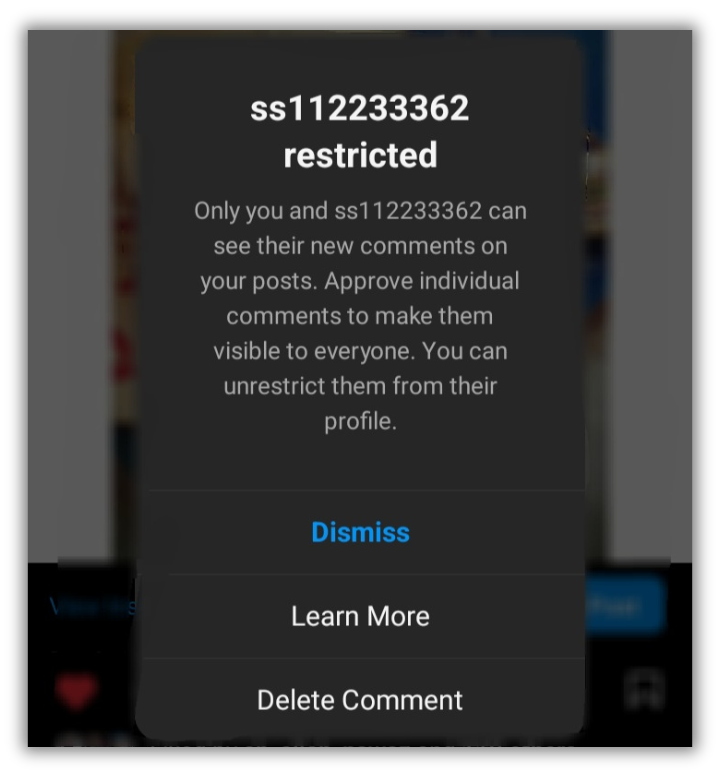
When a restricted user comments on your post, the Instagram API handles that data differently than a standard interaction. The comment will appear to the restricted person as if it has been posted normally, but it will not be visible to the public or to you immediately. Instead, it is placed behind a “Restricted Comment” filter.
From your perspective, you have three choices: you can ignore the comment, delete it, or approve it so that it becomes visible to everyone else. This technical buffer allows users to maintain a clean public feed without the social fallout that often accompanies a public deletion or a direct confrontation.
Direct Messaging and the “Request” Filter
The Direct Message (DM) infrastructure undergoes a significant shift when a restriction is applied. Messages from a restricted account are automatically diverted from the primary or general inbox into the “Message Requests” folder.
From a software standpoint, this prevents the sender from knowing their message’s status. A restricted user cannot see if you have read their message (Read Receipts are disabled for these specific threads), nor can they see when you are online or your “Active Now” status. This creates a digital one-way mirror, where you can monitor the communication without the sender receiving any telemetry or confirmation of your engagement.
Activity Status and Read Receipts
Digital privacy is often compromised by the “Active Now” indicator and the “Seen” stamp in messaging apps. The Restrict feature programmatically suppresses these data points. Even if your global settings allow for activity status to be shared, the Instagram software makes an exception for restricted accounts. By masking your digital footprint, the app provides a layer of security that prevents persistent individuals from tracking your usage patterns.
Restrict vs. Block vs. Mute: Navigating Instagram’s Security Hierarchy
To understand the technological value of the Restrict feature, one must compare it to the other moderation tools available within the Instagram interface. Each serves a specific purpose in the hierarchy of digital boundary setting.
The Philosophy of Shadow-Management
The “Mute” feature is a passive tool; it hides another user’s content from your feed but does nothing to stop them from interacting with you. “Blocking” is an aggressive tool; it completely removes the user from your digital environment but is easily detectable, often leading to real-world social friction.
The “Restrict” feature occupies the middle ground. It is an active moderation tool that prioritizes the user’s mental health and digital security without triggering a notification or a visible change in the restricted user’s UI. This makes it an ideal choice for managing “frenemies,” persistent acquaintances, or mild cases of online harassment where a hard block might escalate the situation.
Comparing the User Experience (UX) of Each Tool
From a UX design perspective, these tools represent different levels of “friction.”
- Mute: Low friction. You simply stop seeing them.
- Restrict: Medium friction. You control how they see you and how others see them, without them knowing.
- Block: High friction. You vanish from their digital world, which is a clear and often provocative signal.

By providing these varying degrees of control, Instagram’s developers allow users to tailor their social environment based on the specific threat level or social nuance of each relationship.
Digital Safety and Online Wellbeing: The “Restrict” Feature as a Shield
The development of the Restrict feature was not merely a UI update; it was a strategic move by Meta to address the epidemic of cyberbullying. In a tech-driven society, our digital and physical lives are inextricably linked, and the software we use must reflect the complexities of human interaction.
Combatting Cyberbullying and Harassment
For victims of cyberbullying, the Restrict feature provides a safe harbor. Research in digital psychology suggests that “blocking” a bully can sometimes lead to increased harassment through “sock-puppet” accounts (fake accounts created to bypass a block). Because the restricted user believes they are still being heard (since their comments appear normal to them), they are less likely to escalate their behavior or create new accounts to circumvent the restriction. This technical loophole acts as a psychological deterrent.
Maintaining Professional Boundaries Without Escalation
In a professional context, many users find themselves in a position where they must remain “connected” to colleagues or clients on social media but wish to limit those individuals’ access to their personal lives. Restricting allows for the maintenance of a professional facade. Since the restricted individual can still see your profile and your posts, the “social contract” remains intact, while your private interactions and active status remain shielded.
Step-by-Step Tutorial: Implementing Restrict Across Platforms
The Instagram interface provides multiple entry points for restricting an account, ensuring that users can deploy this security feature the moment they encounter a problematic interaction.
Restricting via Direct Messages
If an interaction becomes uncomfortable within the DM interface, you can restrict the user directly from the chat:
- Open the chat with the individual.
- Tap the person’s name at the top of the thread.
- Scroll down to the “Options” or “Privacy and Support” section.
- Select “Restrict.”
- Confirm the action. The thread will immediately move to your Message Requests.
Restricting via the Profile Interface
For a more proactive approach, you can restrict an account by visiting their profile:
- Navigate to the profile of the user you wish to restrict.
- Tap the three dots (menu) in the top right corner.
- Select “Restrict” from the pop-up menu.
- Instagram will provide a brief overview of what this means; select “Restrict Account” to finalize.
Bulk Restriction through Comment Settings
Instagram also allows users to manage multiple interactions simultaneously. Within your profile’s privacy settings, you can navigate to the “Comments” section. Here, you can find a list of “Blocked Accounts” or “Restricted Accounts.” You can manually add usernames to these lists to prevent them from interacting with your content before they even attempt to do so. This is a powerful preventative measure for public figures or those experiencing a surge in unwanted attention.
The Future of Subtle Moderation in Social Media Technology
The success of the Restrict feature on Instagram has set a precedent for other social media platforms. We are seeing a shift in software development toward “soft” moderation. Features like Twitter’s (now X) “soft block” or LinkedIn’s “unfollow” reflect a growing understanding that digital relationships are not binary.
As AI and machine learning continue to integrate with social media platforms, we can expect the Restrict feature to become even more intelligent. Future iterations of this software may automatically suggest restricting accounts that exhibit patterns of toxic behavior or bot-like activity. This proactive digital defense would reduce the emotional labor required by the user to manage their own security.
Furthermore, the integration of end-to-end encryption in messaging apps creates new challenges for moderation. In an encrypted environment, the platform cannot “read” the harassment. Therefore, client-side tools like “Restrict” become the primary line of defense, giving the power back to the user to filter their own experience without compromising the privacy of the encrypted tunnel.
In conclusion, “restricting” someone on Instagram is a sophisticated technological solution to a complex social problem. By understanding how this feature alters the flow of data, suppresses activity signals, and creates a controlled environment for interactions, users can better navigate the digital world. It is a vital tool in the modern tech stack for anyone seeking to balance open social connectivity with rigorous personal privacy.
aViewFromTheCave is a participant in the Amazon Services LLC Associates Program, an affiliate advertising program designed to provide a means for sites to earn advertising fees by advertising and linking to Amazon.com. Amazon, the Amazon logo, AmazonSupply, and the AmazonSupply logo are trademarks of Amazon.com, Inc. or its affiliates. As an Amazon Associate we earn affiliate commissions from qualifying purchases.