
In an era where digital fluency is as crucial as traditional literacy, understanding a 5-year-old’s writing must extend beyond the mere formation of letters on paper. For the digital native, “writing” encompasses a dynamic array of interactions with screens, keyboards, styluses, and voice assistants. This article delves into how technology shapes the nascent stages of a 5-year-old’s writing, examining not just the physical output, but the cognitive processes, tool interactions, and multimodal expressions that define their early textual engagement.
The Evolving Landscape of Early Literacy in the Digital Age
The definition of “writing” for a 5-year-old has expanded dramatically. While the foundational skills of phonics, letter recognition, and motor control for handwriting remain critical, these are increasingly intertwined with digital competencies. Parents and educators must now consider how technology augments, and sometimes redefines, the journey from scribbles to coherent sentences.

Beyond Pencil and Paper: Redefining “Writing” for the Digital Native
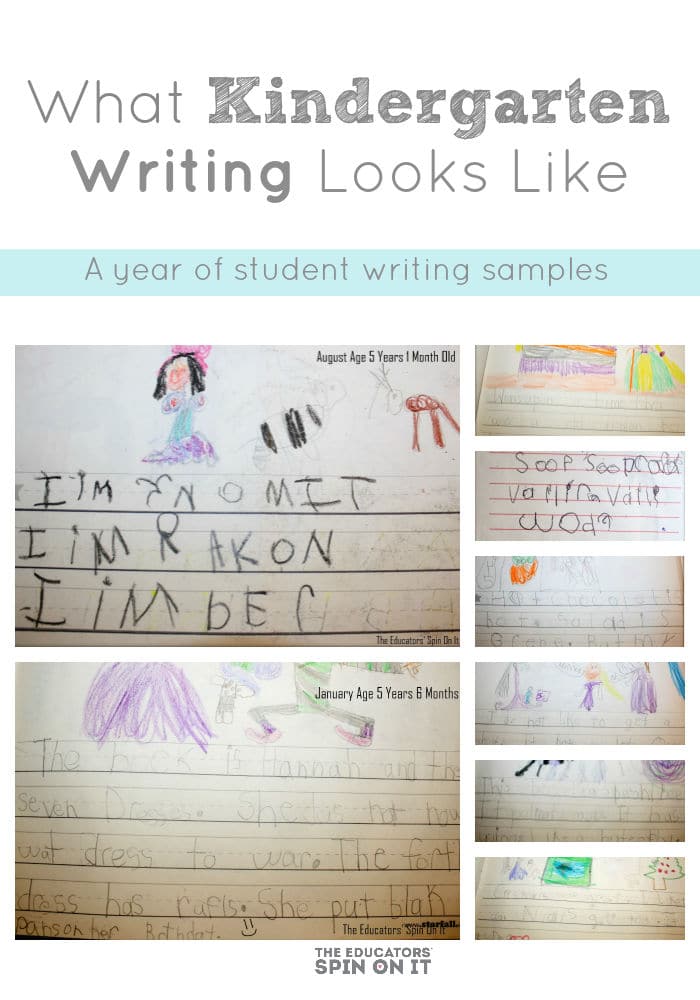
For today’s preschoolers, the tactile experience of crayons and paper often coexists with the swipe of a finger on a tablet screen. “Writing” for a 5-year-old might mean tracing letters with a stylus, typing out words on a child-friendly keyboard, or even dictating a story using voice-to-text software. This broadens the scope of early literacy, allowing children to experiment with different forms of textual input and output. Their “writing” might appear as:
- Digital Traces: Lines and shapes formed on a touch screen, mimicking letter strokes.
- Typed Characters: Single letters, simple words, or even strings of characters on a keyboard.
- Multimedia Creations: Stories composed of images, recorded voice, and perhaps a few typed words, all integrated within a digital platform.
- Early Coding Sequences: Simple drag-and-drop commands that represent a form of symbolic writing to instruct a program.
This shift means that assessing a 5-year-old’s writing development requires observing their interactions across various mediums, appreciating that digital tools can lower the barrier to expression, allowing ideas to flow even when fine motor skills for handwriting are still developing.
The Role of Intuitive Interfaces in Early Skill Development
Technology designed for young children often features highly intuitive interfaces that make complex tasks accessible. For a 5-year-old learning to write, these interfaces can be transformative:
- Large, Colorful Buttons and Icons: Reduces cognitive load, making navigation straightforward.
- Immediate Feedback: Visual and auditory cues (e.g., a correct letter appearing, a sound confirming a successful action) reinforce learning and encourage persistence.
- Gamification: Turning writing practice into engaging games, complete with rewards and progress tracking, keeps children motivated.
- Assisted Input: Features like guided tracing paths for letters or predictive text (used judiciously) can provide scaffolding for learners, allowing them to focus on the concept of words rather than solely on perfect letter formation.
These intuitive designs ensure that the technology itself does not become a barrier, but rather a transparent tool that facilitates the learning process, enabling a 5-year-old to produce “writing” that might otherwise be beyond their current physical capabilities.
Visual Characteristics of Tech-Assisted Writing at Age Five
When a 5-year-old engages with digital writing tools, the visual outcome can differ significantly from traditional pen-and-paper efforts. It often reflects a blend of emerging literacy skills and the unique affordances of the technology.
Emerging Letter Formation and Digital Tracing
One of the most common applications for 5-year-olds involves apps that teach letter formation. Here, their “writing” looks like:
- Guided Strokes: Often, the app provides a dotted line or arrow to guide the child’s finger or stylus. The resulting letters, while potentially imperfect, follow the correct directional strokes more consistently than freehand attempts.
- Varied Line Quality: Digital tracing often results in smoother, more uniform lines than physical handwriting, as the interface might “snap” to a certain path or offer corrective feedback. However, fine motor control is still developing, so digital lines can also appear wobbly or disconnected initially.
- Uppercase Dominance: Many early literacy apps focus on uppercase letters first due to their simpler forms, so a 5-year-old’s digital writing might predominantly feature capital letters.
- Color and Animation: Digital letters often come alive with color changes, animations, or sounds upon successful formation, making the process visually dynamic and engaging.
This stage showcases a child grappling with the visual representation of letters, often with the digital tool acting as a patient tutor providing endless opportunities for practice without the frustration of smudges or torn paper.
Early Word Recognition and Predictive Text Assistance
As 5-year-olds move beyond individual letters, technology aids them in forming words. Their digital writing might visually demonstrate:
- Invented Spelling (Digitally Rendered): Children will often type out phonetic approximations of words. The digital output makes these “invented spellings” clear and readable, unlike sometimes indecipherable handwritten versions. For example, “elephant” might become “L-F-N-T” or “E-L-F-A-N-T,” clearly displayed on screen.
- Assisted Word Completion: Some child-friendly keyboards or word processors offer visual cues for word completion. A child might type “D-O-G” and see the full word “DOG” appear as an option, which they can then select. This helps them connect the sounds and letters they know to correctly spelled words.
- Repetitive Words: Similar to early handwriting, children might repeatedly type favorite words, their names, or simple high-frequency words, producing neat, consistent digital representations of these words.
The clean, standardized font of digital text allows the child’s phonetic understanding to shine through, making their early attempts at word construction more legible and encouraging.
Expressing Ideas Through Multimedia and Digital Storytelling
Perhaps the most exciting aspect of digital writing for 5-year-olds is the ability to integrate text with other media. Their “writing” might look like:
- Illustrated Narratives: Short sentences or key words paired with digital drawings, photos, or clip art. The visual elements often carry as much, if not more, of the narrative weight.
- Voice-Annotated Text: A child might type a few words and then record their voice explaining the scene or elaborating on the story. The “writing” is therefore a combination of typed words and audio narration.
- Interactive eBooks: Using simple story creator apps, a 5-year-old can create multi-page “books” where each page might have minimal text, a drawn image, and perhaps an interactive element. The text itself might be large, unevenly spaced (if free-typed without alignment tools), but clearly part of a larger, multimodal story.
- Emoji and Symbol Use: Five-year-olds are adept at using emojis and simple symbols to convey meaning, a form of pictorial writing that often accompanies or supplements their textual output in digital messages or stories.
In these contexts, the “writing” isn’t just about text; it’s about communicating ideas using the full spectrum of digital expression available to them, preparing them for a future where communication is inherently multimedia.
Key Technology Tools Shaping Young Writers
A range of specific technologies plays a pivotal role in defining what a 5-year-old’s writing looks like today. These tools are designed to be engaging, educational, and developmentally appropriate.
Educational Apps for Letter and Word Practice
The app store is replete with applications tailored for early literacy. These apps fundamentally alter the visual characteristics of a 5-year-old’s writing practice:
- Tracing Apps: Programs like “LetterSchool” or “ABC Kids” provide animated guidance for letter strokes. The child’s output is often a brightly colored, perfectly formed letter that “snaps” into place, giving immediate positive reinforcement.
- Phonics Games: Apps such as “Hooked on Phonics” or “Starfall” present words with clear, segmented sounds and corresponding letter combinations. When a child “writes” a word in these apps, it’s often by dragging and dropping letters, resulting in a perfectly aligned, phonetically correct word.
- Word Building Apps: These allow children to manipulate letter tiles on screen to form words, showcasing their emerging understanding of phoneme-grapheme correspondence in a neat, digital format.
These apps provide structured, repeatable practice that might otherwise be monotonous, making the learning process visually stimulating and interactive.
Interactive Tablets and Stylus Integration
Tablets (like iPads or Amazon Fire Kids tablets) coupled with styluses bridge the gap between digital and physical writing.
- Digital Canvas: A tablet becomes a versatile canvas where children can “draw” letters with a stylus, mimicking the feel of a pencil while benefiting from digital functionalities like undo, erase, and different colors/brushes.
- Improved Precision: While finger-tracing can be crude, a child-friendly stylus can significantly improve the precision of digital letter formation, making their on-screen writing look more controlled and refined.
- Multi-Sensory Feedback: Many tablets offer haptic feedback or sound effects when a child correctly traces a letter, adding a sensory dimension to the writing process.
The combination of a tactile stylus and an interactive screen offers a rich environment for developing both digital and fine motor skills simultaneously, influencing the neatness and consistency of their early digital script.
Voice-to-Text Solutions for Idea Generation
Perhaps the most revolutionary tool for early writers is voice-to-text technology. For a 5-year-old, this tool completely changes what “writing” looks like:
- Instantaneous Text: A child can simply speak their thoughts, and the words appear almost magically on the screen. The resulting “writing” is grammatically coherent (depending on the child’s verbal fluency) and perfectly typed, free from any of the mechanical errors or legibility issues common in early handwriting.
- Focus on Content Over Mechanics: This technology liberates young writers from the physical demands of writing, allowing them to focus purely on generating ideas, narratives, and factual statements. Their “writing” then reflects their imaginative capacity and verbal vocabulary, unhindered by their emerging motor skills.
- Early Authorship: A 5-year-old can “write” a multi-paragraph story or a detailed description using voice-to-text, producing an output that visually resembles adult text, fostering a strong sense of authorship and accomplishment.
While not developing handwriting per se, this technology is invaluable for developing the mental processes of writing: organizing thoughts, constructing sentences, and telling stories, allowing their “written” output to look impressively advanced.
Cultivating Digital Fluency and Foundational Skills
The digital landscape offers immense opportunities for a 5-year-old’s writing development, but careful integration is key to ensuring a holistic approach to literacy.
Balancing Screen Time with Traditional Practice
While technology enhances writing, it should not replace traditional methods entirely. A 5-year-old’s writing should ideally be a blend of:
- Physical Handwriting: Continued practice with pencils, crayons, and paper to develop fine motor skills, hand-eye coordination, and a sense of effort in forming letters.
- Digital Exploration: Engaging with apps and tools that build digital literacy, keyboarding skills, and multimodal expression.
The goal is for a child’s overall “writing profile” to show competence and comfort across both realms.
Nurturing Creativity and Problem-Solving Through Digital Platforms
Digital tools aren’t just for practice; they are powerful platforms for creative expression. A 5-year-old’s “writing” can look like:
- Interactive Stories: Creating simple digital narratives with branching paths.
- Basic Presentations: Using drawing tools and minimal text to explain a concept or share information.
- Early Coding Narratives: Using block-based coding to create stories where characters move and interact, essentially “writing” instructions.
These activities foster problem-solving skills, logical thinking, and creativity, transforming writing into an interactive and dynamic process.
Preparing for Future Digital Communication
In an increasingly digital world, the writing skills developed at age five will lay the groundwork for future communication. What a 5-year-old’s writing looks like today, through a digital lens, is a preview of their future capabilities in:
- Email and Messaging: Forming concise digital messages.
- Content Creation: Developing narratives for digital platforms.
- Collaborative Documents: Learning to contribute text in shared online spaces.
The early exposure to varied digital writing forms helps them adapt to the diverse communication demands of the modern world.
Best Practices for Parents and Educators in the Tech-Enabled Writing Journey
To ensure that a 5-year-old’s digital writing journey is enriching and effective, thoughtful guidance is paramount.
Selecting Age-Appropriate and Engaging Tools
Not all tech is created equal. When choosing tools for a 5-year-old’s writing development:
- Look for Educational Value: Prioritize apps and platforms specifically designed for early literacy and aligned with developmental milestones.
- Ensure Intuitive Design: The interface should be easy for a child to navigate independently, promoting a sense of agency.
- Prioritize Safety and Privacy: Choose apps that are ad-free, offer parental controls, and protect children’s data.
- Consider Engagement: The tools should be fun and hold a child’s interest without being overly stimulating or distracting.
The right tools will make a child’s digital writing look purposeful and progressive, supporting their learning rather than overwhelming it.
Guiding Exploration and Providing Support
Adult involvement is crucial. For a 5-year-old’s digital writing to flourish:
- Co-create and Collaborate: Sit with the child, ask questions about their digital stories, and offer to type for them or help them find letters.
- Encourage Experimentation: Allow them to explore different apps and functions, even if the “writing” produced isn’t perfect.
- Celebrate All Forms of Writing: Acknowledge and praise their efforts whether they’re tracing letters on a tablet, typing their name, or dictating a complex story using voice-to-text.
This support reinforces the idea that writing is a joyful act of communication, regardless of the medium.

Fostering a Safe and Creative Digital Environment
Finally, creating a conducive environment is key:
- Set Clear Boundaries: Establish screen time limits and designated areas for digital learning.
- Emphasize Digital Citizenship: Introduce basic concepts of online safety and responsible tool use.
- Encourage Offline Connections: Ensure digital writing complements, rather than replaces, real-world interactions and traditional play.
By embracing technology thoughtfully, we can empower 5-year-olds to explore the vast world of written communication, ensuring their “writing” looks not just legible, but creative, expressive, and ready for the future. What a 5-year-old’s writing looks like today is a vibrant tapestry woven from emerging motor skills, foundational literacy, and the boundless possibilities offered by digital innovation.
aViewFromTheCave is a participant in the Amazon Services LLC Associates Program, an affiliate advertising program designed to provide a means for sites to earn advertising fees by advertising and linking to Amazon.com. Amazon, the Amazon logo, AmazonSupply, and the AmazonSupply logo are trademarks of Amazon.com, Inc. or its affiliates. As an Amazon Associate we earn affiliate commissions from qualifying purchases.