
In the vast and intricate world of enterprise software, Oracle stands as a colossal presence, offering a comprehensive suite of products ranging from robust databases to sophisticated middleware and business applications. Managing the installation, configuration, patching, and uninstallation of these complex software packages is no trivial task. This is precisely where the Oracle Universal Installer (OUI) steps in – a foundational and indispensable tool that acts as the gateway to deploying Oracle software across diverse operating environments. More than just a simple wizard, OUI is a sophisticated deployment engine designed to streamline and standardize the intricate process of bringing Oracle technologies to life within an organization’s IT infrastructure.
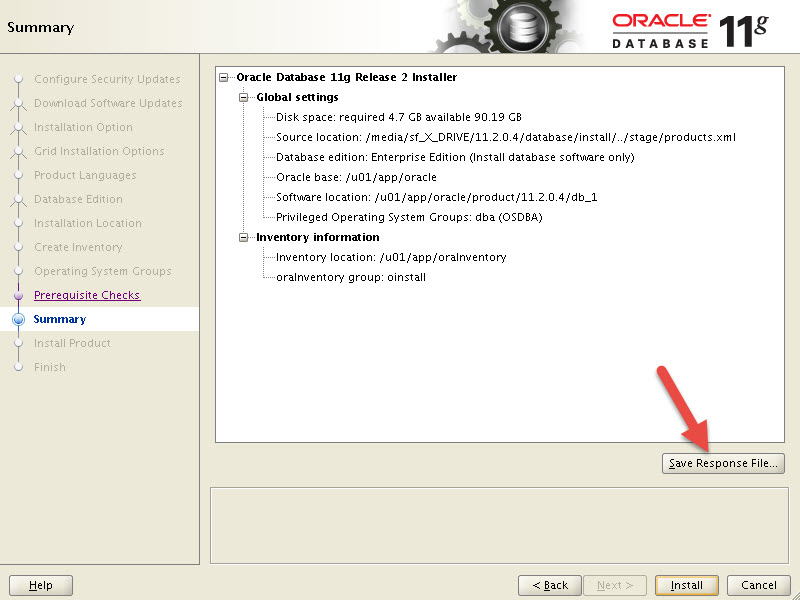
At its core, Oracle Universal Installer is a Java-based application provided by Oracle Corporation. Its primary purpose is to facilitate the installation and management of virtually all Oracle products, including the flagship Oracle Database, Oracle Fusion Middleware components (like WebLogic Server, SOA Suite), Oracle Applications (EBS, Siebel, PeopleSoft), and various development tools. For system administrators, IT managers, and developers alike, OUI represents a critical piece of the puzzle, ensuring that Oracle environments are set up correctly, maintained efficiently, and operated securely. Understanding OUI is not merely about knowing how to click “next” in an installation wizard; it’s about appreciating the underlying intelligence that ensures compatibility, manages dependencies, and provides a reliable framework for enterprise-grade software deployments.
Unpacking the Core Functionality: More Than Just an Installer
While its name might suggest a singular function, Oracle Universal Installer is far more versatile than a mere setup program. It embodies a comprehensive suite of features designed to manage the full lifecycle of Oracle software on a given host. From initial deployment to ongoing maintenance and eventual removal, OUI provides the necessary mechanisms to maintain a stable and performant Oracle ecosystem.
A Centralized Installation and Management Hub
OUI serves as the central orchestrator for deploying Oracle products. It eliminates the need for product-specific installers, offering a unified interface and consistent methodology across the entire Oracle product portfolio. This centralization brings significant benefits in terms of operational efficiency and consistency, especially in environments with multiple Oracle components.
- Diverse Product Support: Whether you’re setting up a mission-critical Oracle Database, configuring an application server like WebLogic, or deploying an Oracle Forms and Reports environment, OUI is the tool you’ll interact with. This broad support ensures a consistent experience regardless of the specific Oracle technology being installed.
- Simplifying Complexity: Oracle software often involves multiple components that need to interact seamlessly. OUI is engineered to handle these interdependencies, guiding users through the necessary steps to ensure that all required modules are installed and configured correctly, thereby reducing the chances of post-installation issues arising from missing prerequisites or misconfigurations.
- Multi-Platform Compatibility: Developed in Java, OUI is designed to run across various operating systems, including different flavors of Linux, Unix, and Windows. This cross-platform capability ensures that IT teams can leverage the same installation principles and tools regardless of their underlying server infrastructure.
Key Features that Define OUI’s Power
The power of OUI lies in its rich set of features, each meticulously crafted to address common challenges in enterprise software deployment and management. These features contribute significantly to the reliability, repeatability, and security of Oracle installations.
- Graphical User Interface (GUI) and Silent Mode: OUI offers a user-friendly graphical interface, making it accessible for manual installations where interactive input is feasible. However, for large-scale deployments, automation is key. OUI excels here with its “silent mode” capability. This allows installations to be performed without any user interaction, driven by pre-configured response files. This feature is invaluable for scripting deployments, integrating with configuration management tools, and ensuring consistent installations across hundreds or thousands of servers.
- Pre-installation Checks and Dependency Resolution: Before any files are copied, OUI performs rigorous checks to ensure the target system meets all minimum requirements. This includes verifying disk space, memory, operating system versions, required libraries, and kernel parameters. If any prerequisites are missing, OUI provides clear warnings or errors, preventing wasted effort and potential installation failures later on. This proactive approach significantly reduces troubleshooting time and enhances deployment success rates.
- Rollback Capabilities for Installation Failures: Despite the best preparations, installations can sometimes fail due to unforeseen circumstances. OUI is designed with robust rollback mechanisms. If an installation process terminates prematurely or encounters an unrecoverable error, OUI can revert the system to its pre-installation state, cleaning up any partially installed files or configuration changes. This feature is crucial for maintaining system integrity and minimizing downtime.
- Patching and Upgrading Oracle Software: Beyond initial installation, OUI is also instrumental in the ongoing maintenance of Oracle products. It integrates with patching utilities (like
opatch) to apply security updates, bug fixes, and feature enhancements. It also plays a role in facilitating major version upgrades, often providing options to migrate existing configurations and data. This ensures that Oracle environments remain secure, performant, and compliant with the latest standards. - Deinstallation and Cleanup: Just as important as installing software is the ability to remove it cleanly. OUI provides a systematic way to deinstall Oracle products, removing associated files, registry entries, and configuration settings. This prevents orphaned files and conflicting configurations, maintaining a clean and manageable server environment.
- Oracle Inventory Management (
oraInventory): Perhaps one of OUI’s most critical underlying components is the Oracle Inventory. This central repository keeps track of all Oracle software products installed on a specific host, including their versions, patch levels, and associated Oracle Homes. The inventory is vital for OUI to correctly identify existing installations, apply patches, and perform deinstallations. Without a healthyoraInventory, managing Oracle software effectively becomes extremely challenging. - Response Files: Enabling Automation and Standardization: Response files (
.rspfiles) are plain text files that contain the answers to all the prompts OUI would normally ask during an interactive installation. By creating and using response files, IT teams can automate complex installations, ensure consistency across multiple deployments, and significantly reduce human error. This is a cornerstone for DevOps practices in Oracle environments, allowing for repeatable and predictable deployments.
The Operational Workflow: How OUI Brings Oracle to Life
Understanding the specific steps OUI follows provides deeper insight into its methodical approach and why it’s so effective in handling the complexity of Oracle software deployments. The operational workflow is designed to be logical, thorough, and resilient.
Step-by-Step Installation Process
While the exact screens and options might vary slightly depending on the Oracle product and version, the general flow of an OUI installation remains consistent:
- Launching OUI: The process begins by executing the
setup.exe(Windows) orrunInstaller(Linux/Unix) script located in the installation media. - Welcome Screen & Inventory Creation/Selection: OUI first presents a welcome screen. If it’s the first Oracle installation on the host, OUI will prompt for the location to create the central Oracle Inventory. If an inventory already exists, OUI will register the new installation within it.
- Product Selection: Users select the specific Oracle product or components they wish to install from the available options.
- Installation Type: OUI often offers different installation types (e.g., “Typical,” “Custom,” “Enterprise Edition,” “Standard Edition”) to cater to various use cases and resource requirements.
- Prerequisite Checks: This critical phase involves OUI scanning the system for necessary prerequisites like OS version, memory, disk space, and kernel parameters. It will flag any missing components or configuration issues that need to be resolved before proceeding.
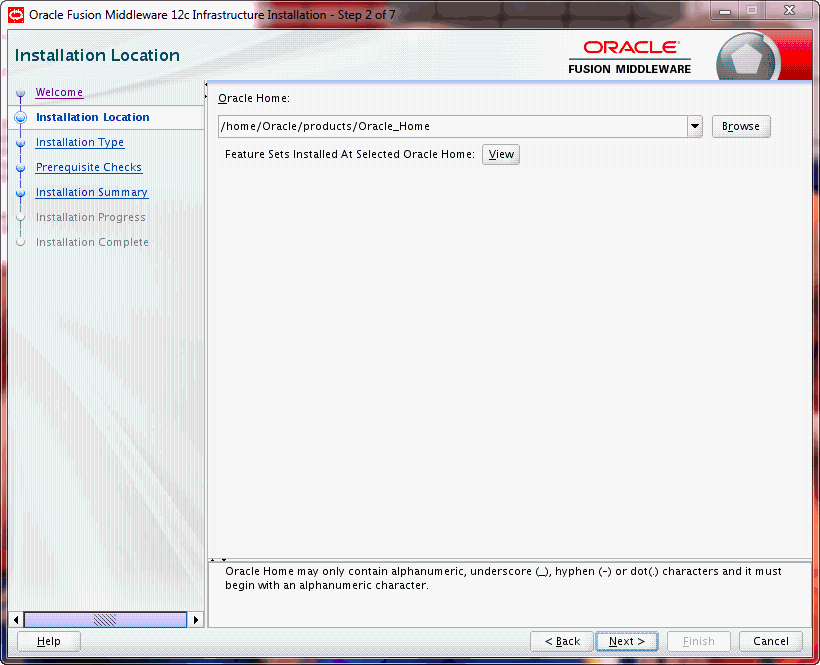
- Specify Installation Location (Oracle Home): Users define the “Oracle Home” directory, which is the base directory where the Oracle software for that specific product will be installed. Each distinct Oracle product or version usually resides in its own Oracle Home.
- Configuration Options: This is where product-specific settings are configured. For a database installation, this might include database name (SID), character set, password for administrative users, and memory allocation. For middleware, it could involve domain names, port numbers, and administrator credentials.
- Installation Summary: OUI presents a summary of all chosen options and configurations. This is a crucial point for review before committing to the installation.
- Execution and Progress: Once confirmed, OUI begins copying files, creating directories, linking executables, and performing initial configurations. A progress bar typically indicates the status of the operation.
- Post-installation Tasks/Scripts: After the core software is installed, OUI may execute post-installation scripts (e.g.,
root.shon Unix-like systems) for final system-level configurations and permissions. It also often launches configuration assistants for specific components (e.g., Database Configuration Assistant, Net Configuration Assistant) to complete the setup. - Completion: Upon successful completion, OUI provides a summary and often indicates where to find logs or further configuration steps.
The Critical Role of Oracle Inventory (oraInventory)
The oraInventory directory is not merely a collection of logs; it is the definitive record of all Oracle software installed on a system. Its integrity is paramount for the proper functioning of OUI and for managing Oracle environments.
- What it is: The
oraInventoryis a global directory, typically located outside of any specific Oracle Home, that contains metadata about all Oracle products installed on a server. It includes information such as the unique ID for each Oracle Home, the products installed within each home, their versions, patch levels, and other essential configuration data. - Why it’s Vital:
- Dependency Management: It helps OUI understand which products are already present and what dependencies might exist.
- Patching and Upgrades: Patching tools like
opatchrely heavily on the inventory to identify the correct Oracle Homes and apply patches accurately. - Deinstallation: To perform a clean deinstallation, OUI consults the inventory to know exactly which files and configurations belong to a specific Oracle Home.
- Conflict Resolution: It helps prevent accidental overwrites or conflicts when installing multiple Oracle products or versions on the same host.
- Location and Management: The
oraInventorylocation is defined during the first Oracle software installation on a server. It’s critical to back up this directory regularly, especially before major installations, patches, or upgrades. Corrupted inventory can lead to severe issues in managing Oracle software.
Strategic Advantages and Impact for Businesses
The capabilities of Oracle Universal Installer extend far beyond the technical mechanics of software deployment. Its design and features have significant strategic implications for businesses, impacting operational efficiency, system reliability, and even digital security posture.
Ensuring Reliability and Consistency Across Environments
In enterprise IT, consistency is a virtue. Disparate installations, each configured slightly differently, can lead to maintenance nightmares, unpredictable performance, and complex troubleshooting. OUI addresses this head-on.
- Standardization of Deployments: Through the use of response files, organizations can enforce strict standardization in their Oracle deployments. Every new database server, every new middleware instance, can be installed with the exact same configuration, minimizing configuration drift and ensuring a consistent baseline.
- Reduced Human Error: Manual installations, especially for complex software, are prone to human error – a missed checkbox, a typo in a path, an incorrect parameter. OUI’s automated and guided approach significantly reduces these risks, leading to more reliable and predictable outcomes.
- Support for Complex Enterprise Architectures: Modern Oracle deployments often involve multi-node clusters, high-availability setups, and distributed components. OUI is built to understand and facilitate these complex architectures, ensuring that all pieces fit together correctly from the ground up, which is critical for business continuity and performance.
Streamlining IT Operations and Enhancing Productivity
For IT departments grappling with ever-growing infrastructure and demanding service level agreements, efficiency is paramount. OUI contributes directly to improved operational productivity.
- Automation Through Response Files: The ability to automate installations via response files is a game-changer for large organizations. It transforms what could be a multi-day manual process into a repeatable script that can run unattended. This frees up valuable administrator time to focus on higher-value tasks like architecture design, performance tuning, and proactive monitoring.
- Faster Deployments and Upgrades: Automated and reliable installations mean faster time-to-market for new applications and services that rely on Oracle technology. Similarly, streamlined patching and upgrade processes reduce maintenance windows and minimize service disruption, which directly impacts business operations.
- Lowering Operational Overhead for IT Teams: By reducing the complexity and error rate associated with Oracle software management, OUI lowers the overall operational overhead. Less time spent troubleshooting installation issues, applying inconsistent patches, or recovering from failed deployments translates into more efficient use of IT resources and reduced operational costs. This positively impacts the bottom line and allows IT to be a strategic enabler rather than just a cost center.
Mitigating Risks and Bolstering Digital Security
Software deployment isn’t just about functionality; it’s also about security. A poorly installed system is an open invitation for vulnerabilities. OUI contributes to a stronger security posture.
- Controlled Patching and Updates: Regular patching is fundamental to digital security, addressing known vulnerabilities. OUI’s integration with
opatchand its systematic approach to applying updates ensures that security patches are applied correctly and consistently across all Oracle deployments, reducing the attack surface. - Dependency Resolution Preventing Conflicts: Unresolved software dependencies can sometimes create system instability, which might inadvertently open security gaps. By rigorously checking dependencies, OUI helps ensure a stable and secure underlying platform for Oracle products.
- Proper Deinstallation to Avoid Remnants: Incomplete deinstallation can leave orphaned files, configurations, or even unpatched executables on a system, potentially posing a security risk. OUI’s clean deinstallation capabilities ensure that when software is removed, it’s truly gone, minimizing potential vectors for attack or unauthorized access.
OUI in the Modern Oracle Landscape
While Oracle Universal Installer has been a cornerstone for on-premise deployments for decades, the landscape of enterprise IT is continually evolving, with a significant shift towards cloud computing and DevOps methodologies. Understanding OUI’s place in this modern context is crucial for future-proofing IT strategies.
Evolution and Integration with Cloud and DevOps
Oracle itself is heavily invested in cloud technologies (Oracle Cloud Infrastructure – OCI) and promoting DevOps practices. While OUI remains critical for traditional on-premise and hybrid cloud deployments, its principles and capabilities are being extended or complemented by newer tools and approaches in cloud-native environments.
- Role in Hybrid Environments: Many organizations operate in hybrid cloud models, with some Oracle components on-premise and others in the cloud. OUI remains the primary tool for managing the on-premise footprint, ensuring consistency with cloud-based deployments where relevant.
- Transition to Newer Deployment Tools for Cloud-Native Applications: For cloud-native Oracle services, especially those delivered as Platform-as-a-Service (PaaS) or Software-as-a-Service (SaaS) on OCI, the underlying installation and configuration are largely managed by Oracle. However, the fundamental principles of dependency management, configuration validation, and streamlined deployment that OUI embodies are baked into these cloud services. For deploying Oracle software on Kubernetes, for instance, Oracle provides Kubernetes operators that automate much of the lifecycle management, taking inspiration from the reliability OUI offered in traditional setups.
- Automation as a Precursor to Infrastructure-as-Code: OUI’s silent installation capability using response files was an early form of “Infrastructure-as-Code” for Oracle. It provided the foundation for repeatable, scriptable deployments long before IaaS became a mainstream concept. This foresight continues to serve organizations adopting more advanced automation frameworks like Terraform or Ansible, where OUI can be invoked programmatically.

Best Practices for Effective OUI Utilization
To fully leverage the power and reliability of Oracle Universal Installer, adhering to best practices is essential:
- Understand Prerequisites Thoroughly: Always consult the official Oracle documentation for the specific product and version you are installing. Pay close attention to operating system versions, patches, kernel parameters, and required libraries. Addressing these before running OUI will save significant troubleshooting time.
- Utilize Response Files for Repeatable Deployments: For any non-trivial or repeated installation, invest time in creating and testing response files. This ensures consistency, reduces errors, and enables automation. Store these response files in version control for tracking changes.
- Regular Inventory Backups: Periodically back up the
oraInventorydirectory. This is crucial for recovery in case of system failures or accidental deletions. A corrupted inventory can severely hinder future patching, upgrades, or deinstallations. - Stay Updated with Oracle Documentation: Oracle frequently updates its installation guides and best practices. Keeping abreast of these changes ensures you are using OUI effectively and securely.
- Perform Test Installations: Before deploying to production, always perform installations in a development or staging environment that mirrors production as closely as possible. This allows you to identify and resolve any unforeseen issues without impacting critical systems.
- Manage Oracle Homes Strategically: Plan your Oracle Home strategy carefully. While multiple Oracle Homes can coexist on a single server, managing too many distinct installations can become complex. Consider consolidating where appropriate, especially for patch sets and minor versions.
In conclusion, Oracle Universal Installer remains a fundamental and powerful tool in the Oracle ecosystem. It is much more than a simple installation wizard; it is a sophisticated deployment and management engine that ensures the reliability, consistency, and security of Oracle software across diverse IT infrastructures. By understanding its core features, operational workflow, and strategic advantages, IT professionals can leverage OUI to streamline operations, enhance productivity, mitigate risks, and effectively manage their vital Oracle investments, both on-premise and in hybrid cloud environments. As organizations continue to rely on Oracle for their critical business operations, the importance of mastering OUI and its best practices will undoubtedly endure.
aViewFromTheCave is a participant in the Amazon Services LLC Associates Program, an affiliate advertising program designed to provide a means for sites to earn advertising fees by advertising and linking to Amazon.com. Amazon, the Amazon logo, AmazonSupply, and the AmazonSupply logo are trademarks of Amazon.com, Inc. or its affiliates. As an Amazon Associate we earn affiliate commissions from qualifying purchases.