
In the ever-expanding universe of digital information, certain file formats emerge as crucial bridges between raw data and actionable insights. Among these, the KMZ file holds a significant, albeit often understated, position, particularly within the realm of geospatial technology. Far from being an obscure technical jargon, understanding what a KMZ file is unlocks a deeper appreciation for how we interact with and visualize location-based data in our increasingly connected world. This article delves into the technical intricacies of KMZ files, exploring their origins, structure, applications, and why they remain a vital component of modern digital mapping and geographic information systems (GIS).

The Genesis and Structure of KMZ Files: A Layered Approach to Geospatial Data
The KMZ file format is intrinsically linked to Google Earth and its predecessor, Keyhole Markup Language (KML). To truly grasp what a KMZ file is, one must first understand KML. KML, an XML-based file format, was developed by Keyhole Inc. (later acquired by Google) to mark up geographic features with a standardized structure, enabling them to be displayed on Earth-based browsers like Google Earth, Google Maps, and Google Maps mobile. Essentially, KML provides the instructions and data for rendering points of interest, lines, polygons, and associated descriptions on a globe or map.
From KML to KMZ: The Power of Compression
The “Z” in KMZ signifies compression. While a KML file is an XML document, it often exists alongside other supporting files, such as images, icons, or even 3D models, that are referenced within the KML. Imagine creating a detailed map with custom markers and accompanying photographs for each location. If you were to share this information as individual KML and associated image files, managing and distributing them would become cumbersome, especially when dealing with numerous data points or large visual assets.
This is where the KMZ format shines. A KMZ file is, in essence, a zipped archive containing a single KML file (named doc.kml by convention) and any additional resources that the KML file references. This packaging dramatically simplifies the sharing and management of complex geospatial data. Instead of distributing a folder of files, you can distribute a single, compact KMZ file. This compression also leads to smaller file sizes, making them quicker to download and transfer, a significant advantage in bandwidth-constrained environments or for large datasets.
The Anatomy of a KMZ File: Unpacking the Contents
To illustrate the structure more clearly, consider a KMZ file as a digital package. When you “unzip” or decompress a KMZ file (which can often be done with standard archiving tools like WinRAR, 7-Zip, or even by simply renaming the extension to .zip and extracting), you will typically find:
doc.kml: This is the core of the KMZ file. It’s an XML file that contains all the geographic information, including coordinates, placemark descriptions, styling, and references to other resources. It acts as the central index and instruction manual for how the geospatial data should be rendered.- Referenced Assets: These are any additional files that the
doc.kmlfile points to. This could include:- Images: JPEGs, PNGs, GIFs used for icons, ground overlays, or informational pop-ups.
- 3D Models: Collada (
.dae) files or other formats used to represent structures or objects in three dimensions. - Sound Files: MP3s or WAVs for audio descriptions or information.
- Other KML Files: For more complex hierarchical data.
The KML file uses specific XML tags to define various geographic elements:
<Placemark>: Defines a specific location on the map, often represented by an icon. It can include a name, description, and a geometry element.<Point>: Specifies a single geographic coordinate (latitude, longitude, and optional altitude).<LineString>: Defines a series of connected points, creating a line or path.<Polygon>: Defines a closed area with a specified boundary.<Icon>: Specifies the image to be used for a placemark’s icon.<description>: Provides textual information or HTML content to be displayed when a placemark is clicked.<GroundOverlay>: Allows for the overlaying of an image onto a specific geographic area.
The KMZ format’s efficiency and versatility stem from this layered approach, allowing for rich, multimedia-enhanced geospatial data to be packaged and shared seamlessly.
Applications of KMZ Files: Visualizing and Interacting with Geographic Data
The utility of KMZ files extends across a wide spectrum of industries and applications, fundamentally transforming how we visualize and interact with geographic information. Their ability to package complex spatial data with rich multimedia content makes them an invaluable tool for communication, analysis, and engagement.
Navigation and Travel Planning
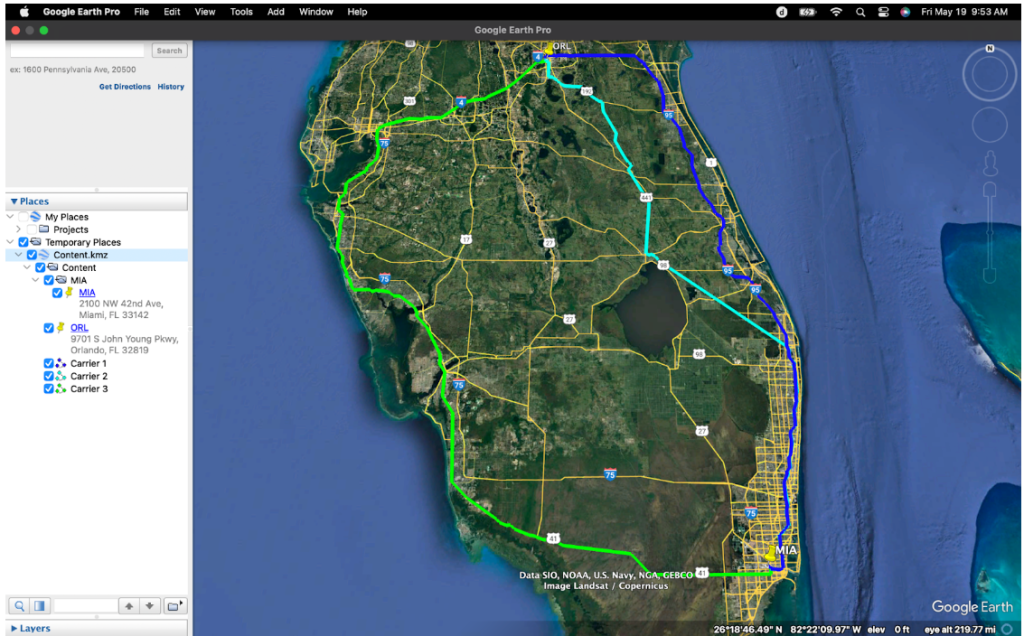
One of the most widespread uses of KMZ files is in navigation and travel planning. Users can create or download KMZ files to mark specific points of interest (POIs) for upcoming trips, hiking routes, or cycling paths. For example, a travel blogger might share a KMZ file of their recommended restaurants and landmarks in a city, complete with photos and descriptions. Cyclists can download GPX files (which can often be converted to KML/KMZ) of popular trails, and hikers can share their adventure routes. When opened in Google Earth or compatible GIS software, these files provide an interactive map with clickable markers, offering detailed information and visual cues that enhance the planning and execution of any journey.
Environmental Monitoring and Conservation
In fields like environmental science and conservation, KMZ files are crucial for visualizing and communicating spatial data related to natural resources. Researchers might create KMZ files to highlight areas of deforestation, track the migration patterns of wildlife, or map out conservation zones. These files can incorporate satellite imagery, sensor data, and expert annotations, providing a comprehensive visual narrative of environmental conditions. This visual representation aids in decision-making, public awareness campaigns, and collaborative efforts to protect vulnerable ecosystems. For instance, a conservation organization might use KMZ files to present the impact of climate change on specific geographical regions, making complex scientific data accessible to policymakers and the general public.
Urban Planning and Infrastructure Management
Urban planners and civil engineers leverage KMZ files to visualize and analyze urban development projects, utility networks, and infrastructure. They can be used to map out proposed building sites, visualize the routes of new public transportation lines, or highlight the locations of underground utilities like water pipes and power lines. The ability to overlay these data layers with existing geographical features and include detailed information about each element is essential for effective planning, risk assessment, and public consultation. For example, a city council might use a KMZ file to present a proposed park development to residents, showcasing proposed layouts, amenities, and projected green spaces.
Emergency Response and Disaster Management
During emergencies and natural disasters, timely and accurate spatial information is critical. KMZ files can be used to quickly map out affected areas, identify critical infrastructure at risk, delineate evacuation routes, and pinpoint the locations of relief distribution centers. Emergency responders can use these files on mobile devices to navigate complex environments, coordinate efforts, and assess damage. For instance, after a hurricane, a KMZ file could be generated to show the extent of flooding, the location of damaged roads, and the safe access routes for emergency vehicles, allowing for more efficient and targeted aid delivery.
Education and Outreach
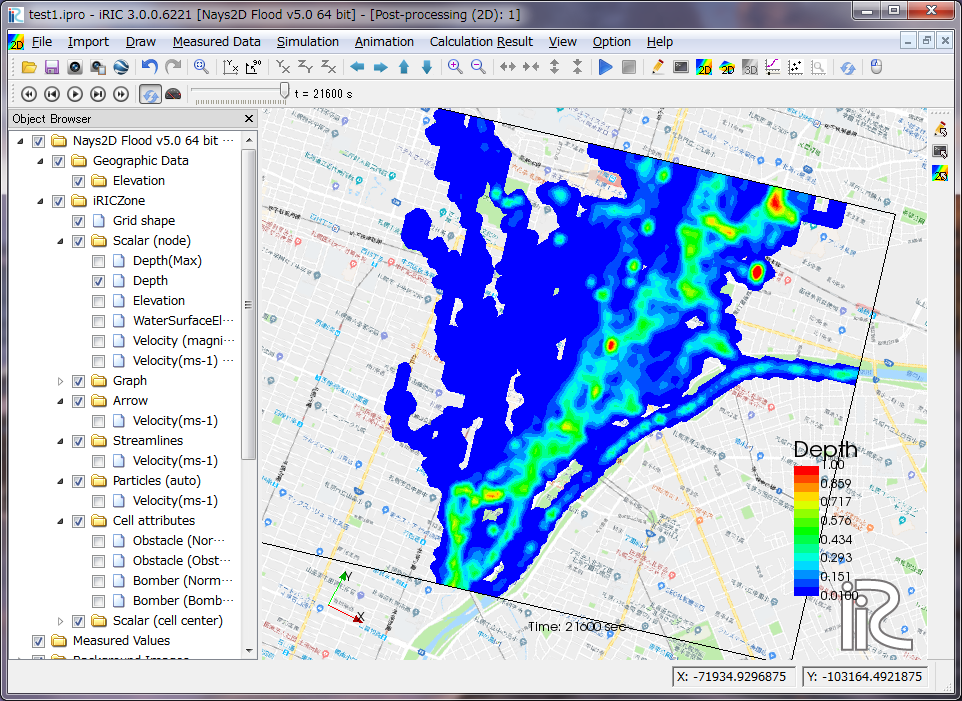
In educational settings, KMZ files serve as powerful tools for teaching geography, history, and social studies. Teachers can create interactive lessons by marking historical sites, mapping out ancient trade routes, or illustrating population distribution. Students can explore these digital landscapes, gaining a deeper understanding of spatial relationships and the impact of human activities on the environment. For example, a history class might use a KMZ file to visualize the battlefields of a significant war, with placemarks for troop movements and historical accounts.
The versatility of KMZ files lies in their ability to make complex geospatial data accessible, understandable, and actionable. By packaging location data with rich media, they bridge the gap between technical datasets and engaging visual narratives, empowering a diverse range of users to explore, analyze, and communicate about our world.
Working with KMZ Files: Tools and Accessibility
Despite their sophisticated capabilities, KMZ files are remarkably accessible, thanks to a range of user-friendly tools and broad software compatibility. This ease of use has been a significant factor in their widespread adoption.
Google Earth: The Primary Platform
Unquestionably, Google Earth is the flagship application for working with KMZ files. Its intuitive interface allows users to simply double-click a KMZ file to open it directly, rendering the enclosed geographic data on a 3D globe. Within Google Earth, users can navigate through placemarks, view descriptions, zoom in on areas of interest, and even explore 3D models if included. Google Earth Pro, a more feature-rich desktop application, offers advanced capabilities for importing, exporting, and analyzing geospatial data, including extensive support for KML/KMZ. For mobile users, Google Earth on iOS and Android devices also provides robust KMZ viewing and basic interaction.
Beyond Google Earth: Broader Compatibility
While Google Earth is the native environment, the KMZ format’s foundation in KML, an open standard, ensures broader compatibility across various platforms and software. Many Geographic Information System (GIS) software packages, both commercial and open-source, can import and export KML/KMZ files.
- ArcGIS: Esri’s industry-leading GIS software fully supports KML/KMZ, allowing GIS professionals to seamlessly integrate data from Google Earth into their workflows and vice-versa.
- QGIS: This powerful and popular open-source GIS application offers excellent support for KML/KMZ, making it accessible to a wider range of users and organizations.
- Other GIS and Mapping Tools: Numerous other specialized GIS applications, web-based mapping platforms, and even some CAD software can import and export KML/KMZ, demonstrating the format’s interoperability.
Creating and Editing KMZ Files
Creating and editing KMZ files can be achieved through several methods:
- Directly within Google Earth: Users can create placemarks, draw lines and polygons, add descriptions and images, and then save their work as a KML file. This KML file can then be compressed into a KMZ file using standard archiving tools.
- Google My Maps: This web-based application provides a more streamlined interface for creating custom maps with placemarks, lines, and shapes. Users can then export their maps as KML files, which can subsequently be converted to KMZ.
- GIS Software: For more advanced geospatial analysis and data creation, GIS software like ArcGIS or QGIS is the preferred choice. These applications allow for the creation of complex spatial datasets that can be exported in KML/KMZ format.
- Text Editors for KML: For users comfortable with XML, directly editing the
doc.kmlfile within a KMZ archive using a text editor offers the highest level of control. However, this requires a good understanding of the KML schema.
The accessibility and interoperability of KMZ files, coupled with the availability of robust tools for creation and editing, underscore their role as a de facto standard for sharing rich geospatial information. Whether you’re a casual user planning a trip or a professional analyzing environmental data, working with KMZ files is an increasingly straightforward and rewarding endeavor.
The Future of KMZ Files: Evolution and Integration
As technology continues to advance, the role and capabilities of formats like KMZ are also evolving. While KMZ has established itself as a reliable container for geospatial data, its future is intrinsically linked to broader trends in data visualization, cloud computing, and augmented reality.
Enhanced Interactivity and Dynamic Data
The current KMZ format primarily relies on static data. However, future iterations and the evolution of KML standards are likely to incorporate more dynamic and interactive elements. This could include real-time data feeds, such as live traffic information or weather updates, directly integrated into KMZ files. Imagine opening a KMZ file for a city and seeing live public transport locations or current air quality readings superimposed on the map. This move towards dynamic content will make KMZ files even more powerful for real-time decision-making and situational awareness.
Cloud-Native Geospatial Experiences
The rise of cloud computing is profoundly impacting how geospatial data is stored, processed, and accessed. While KMZ files are excellent for sharing discrete datasets, future workflows will likely involve more cloud-native approaches. This means that instead of downloading a KMZ file, users might access its content directly from cloud storage, with the rendering and manipulation happening server-side. This could lead to seamless integration with web-based mapping applications and even allow for collaborative editing of KMZ-like data in real-time. Services that host and manage KML/KMZ data in the cloud will become increasingly important, facilitating larger-scale data sharing and complex analytical operations without the need for extensive local storage.
Integration with Augmented and Virtual Reality
The burgeoning fields of Augmented Reality (AR) and Virtual Reality (VR) present exciting new frontiers for geospatial data visualization, and KMZ files are well-positioned to play a role. As AR/VR headsets become more prevalent, the ability to overlay digital geographic information onto the real world (AR) or create immersive virtual environments based on spatial data (VR) will become increasingly common. KMZ files, with their ability to package 3D models, textures, and location data, can serve as a foundational element for these immersive experiences. Imagine walking through a historical site and seeing a KMZ-generated AR overlay of how it looked centuries ago, complete with contextual information. This integration will transform how we learn, explore, and interact with our surroundings.
Standardization and Interoperability
While KML is an Open Geospatial Consortium (OGC) standard, ongoing efforts to refine and extend it will continue to ensure its relevance. The focus will likely be on improving support for more complex data types, enhancing interoperability with other geospatial standards, and ensuring backward compatibility. As the volume and complexity of geospatial data grow, robust and well-defined standards are crucial for data exchange and long-term accessibility.
In conclusion, the KMZ file, born from the need to package and share rich geographic information, continues to be a vital technology. Its future lies not in being replaced, but in evolving and integrating with emerging technological paradigms. By embracing greater interactivity, leveraging cloud infrastructure, and extending into AR/VR, KMZ and its underlying KML standard will remain instrumental in shaping how we perceive, understand, and interact with the spatial dimensions of our digital world.
aViewFromTheCave is a participant in the Amazon Services LLC Associates Program, an affiliate advertising program designed to provide a means for sites to earn advertising fees by advertising and linking to Amazon.com. Amazon, the Amazon logo, AmazonSupply, and the AmazonSupply logo are trademarks of Amazon.com, Inc. or its affiliates. As an Amazon Associate we earn affiliate commissions from qualifying purchases.