
In the vast and often overwhelming landscape of digital communication, the email thread stands as a silent but powerful organizer. Far more than just a sequence of messages, an email thread is the digital equivalent of a continuous conversation, bundling together related emails into a single, cohesive unit. It’s the backbone of efficient communication in personal and professional settings, transforming a chaotic inbox into a structured dialogue.
At its core, an email thread groups an initial message with all subsequent replies, forwards, and replies to those replies, ensuring that the entire history of a specific topic or discussion remains intact and easily accessible. This seemingly simple feature is fundamental to how we interact with email today, providing context, reducing clutter, and streamlining collaboration. Without email threads, our inboxes would quickly devolve into an unmanageable jumble of disconnected messages, making it nearly impossible to follow a discussion, retrieve past information, or keep track of ongoing projects. Understanding what an email thread is, how it works, and how to leverage it effectively is crucial for anyone navigating the modern digital world.

The Mechanics of Email Threading
The magic behind email threading isn’t overtly visible to the average user, but it relies on a sophisticated system of identifiers and headers embedded within each email message. Email clients don’t just guess which emails belong together; they follow a specific protocol to accurately group conversations.
How Email Clients Group Messages
Every email sent carries a unique identifier, known as a Message-ID. When you reply to an email, your email client includes information from the original message’s Message-ID in special headers of your reply. The most important of these are the In-Reply-To and References headers.
Message-ID: A unique string assigned to every email message, much like a serial number.In-Reply-To: This header in a reply email contains theMessage-IDof the specific email it is replying to. This is the primary link in a direct back-and-forth exchange.References: This header contains a list of allMessage-IDs from previous messages in the conversation chain leading up to the current email. It provides a more comprehensive historical context, allowing email clients to reconstruct entire conversations even if some messages in the middle are missing or deleted.
When an email client processes incoming mail, it scans these headers. If an email’s In-Reply-To or References headers point to Message-IDs of emails already in your inbox, the client intelligently groups them together. Different email clients, such as Gmail, Outlook, Apple Mail, and Thunderbird, have their own algorithms for interpreting these headers and presenting the threads, but the underlying principle remains consistent.
Visualizing the Thread
Once emails are grouped, email clients employ various visual cues to help users understand they are part of a thread. The most common methods include:
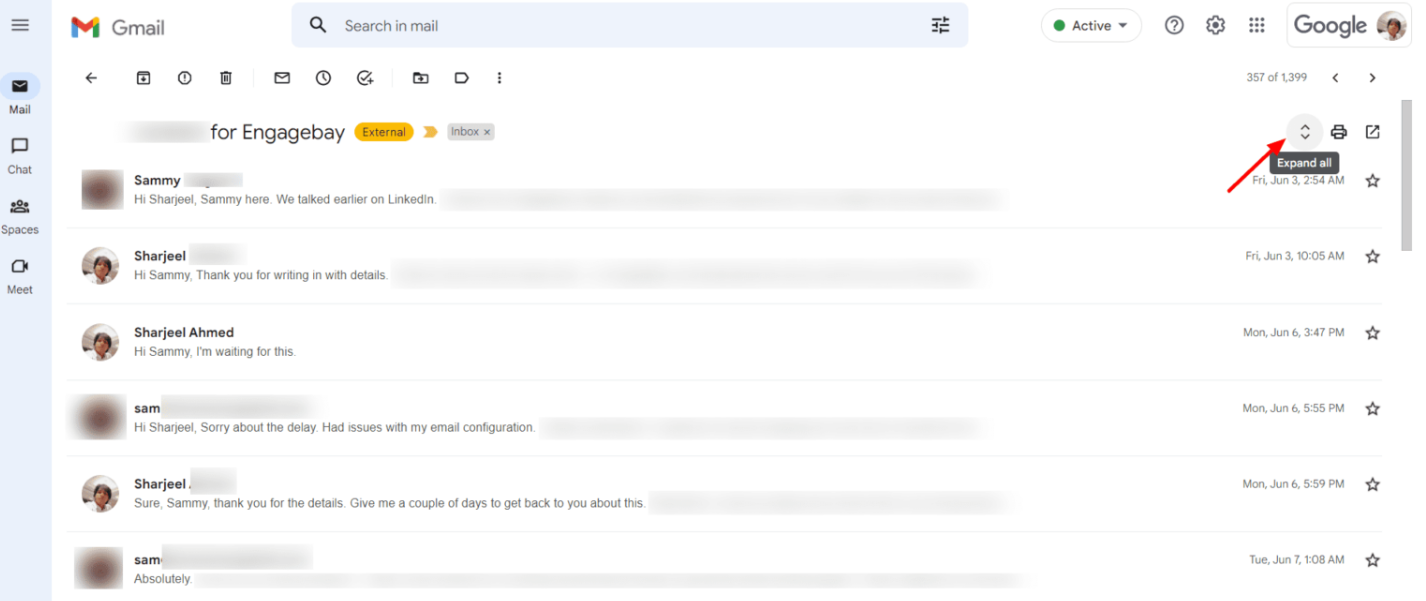
- Collapsible Views: Threads are often presented as a single entry in the inbox. Clicking or tapping on this entry expands it to reveal all the individual messages within the conversation. This drastically reduces clutter, as one discussion appears as one line item.
- Indentation: Within an expanded thread, replies are often indented to show their hierarchical relationship to the original message and subsequent replies. This visual hierarchy makes it easy to follow the flow of the conversation.
- Conversation View Settings: Most modern email clients offer the option to enable or disable conversation view (threading). Users can usually customize how threads are displayed, for instance, showing the newest message at the top or bottom, or highlighting unread messages within a thread.
The Importance of Subject Lines
While the technical headers do the heavy lifting, consistent subject lines play a crucial role in both the technical formation and user understanding of email threads. When you hit “reply,” most email clients automatically prepend “Re:” (or “Fwd:” for forwards) to the original subject line. Maintaining this format signals to the email client, and more importantly, to the human recipient, that the message is part of an ongoing conversation.
- Maintaining Consistency: Sticking to the original subject line with the “Re:” prefix helps ensure that all related messages are grouped correctly by email clients, especially when multiple people are involved.
- When to Change Subject Lines: It’s good practice to change the subject line only when the topic of the conversation fundamentally shifts, thereby explicitly initiating a new thread. Forgetting to do so can lead to confusion and miscategorization of discussions.
Why Email Threads Are Indispensable for Productivity
The benefits of email threading extend far beyond mere visual organization. They fundamentally transform how individuals and teams manage communication, leading to significant gains in productivity and clarity.
Enhanced Context and Continuity
One of the most significant advantages of email threads is their ability to maintain context. Imagine trying to follow a complex project discussion without threads – you’d have to search for individual messages, piece together their order, and constantly remind yourself of what was said when.
- Keeping Related Messages Together: All communication pertaining to a specific topic, task, or project stays neatly bundled. This means you don’t have to hunt through your inbox for scattered replies.
- Easy to Track Discussion Evolution: Threads provide a chronological narrative of a conversation. You can quickly scroll through to see how ideas evolved, decisions were made, and tasks were assigned, even if you weren’t part of the conversation from the beginning. This is invaluable for onboarding new team members or reviewing past discussions.
Improved Organization and Searchability
Email threads are a powerful weapon against inbox clutter and information overload.
- Reducing Inbox Clutter: Instead of dozens of individual messages related to one topic, you see a single thread. This dramatically reduces the visual noise in your inbox, making it easier to scan and identify new or important conversations.
- Faster Retrieval of Information: When you need to find a specific piece of information, searching within a thread is far more efficient than sifting through countless individual emails. Most email clients allow you to search within a specific thread or view all messages related to a search term within their respective threads.
Streamlined Collaboration
For teams and groups, email threads are a cornerstone of efficient collaboration.
- Group Discussions Stay Unified: Whether it’s a team discussing a new marketing strategy or a cross-departmental group coordinating a product launch, all relevant input and feedback remain centralized within one thread. This prevents parallel conversations and ensures everyone is on the same page.
- Easier for New Participants to Catch Up: When a new person is added to an ongoing discussion, they can quickly review the entire thread to understand the history, decisions, and current status, without needing others to recap everything. This saves time and ensures a smooth transition.
Reduced Redundancy
Threads help prevent the common pitfalls of duplicated effort and information.
- Avoiding Duplicate Information or Questions: By having the full conversation history visible, participants are less likely to ask questions that have already been answered or re-share information that has already been provided earlier in the thread.
- Focusing on New Contributions: Everyone can see what’s been discussed, allowing them to focus their contributions on new ideas, solutions, or updates, rather than repeating previous points.
Navigating and Managing Email Threads Effectively
While email threads offer immense benefits, mastering their use requires a conscious effort to adopt best practices and utilize the features provided by email clients. Poor thread management can quickly turn a helpful tool into a source of frustration.
Best Practices for Participating in Threads
Your actions within an email thread impact everyone involved. Adhering to certain etiquette can significantly enhance clarity and efficiency.
- Reply All vs. Reply: This is perhaps the most critical distinction.
Reply Allshould only be used when your response is relevant to everyone in the original recipient list. If your reply is only for the sender or a small subset of recipients, useReply. Misuse ofReply Allleads to “reply-all storms” and unnecessary inbox clutter for many. - Quoting Previous Messages Appropriately: When replying, it’s often helpful to quote the specific part of the previous message you are addressing. However, avoid quoting the entire thread every time, as this makes messages overly long and difficult to read. Trim quotes to only the most relevant sections.
- Maintaining Focus Within the Thread: Stick to the original topic of the thread. If a new, related but distinct, topic arises, it’s usually better to start a new email thread with a descriptive subject line.
- When to Fork a New Conversation: As mentioned, when the discussion deviates significantly, or a sub-topic requires dedicated focus with a different set of recipients, start a new thread. Clearly indicate in your new subject line that it spun off from a previous discussion if relevant (e.g., “New Project Idea (from Marketing Strategy Thread)”).
Utilizing Thread Management Features
Modern email clients offer various features to help you manage threads more effectively.
- Archiving Entire Threads: Instead of deleting individual emails, many clients allow you to archive an entire thread. This removes it from your main inbox view but keeps it accessible for future reference via search.
- Muting Conversations: For threads that become irrelevant or overly noisy (e.g., “reply-all storms”), the “mute” or “ignore” feature can be a lifesaver. This prevents future messages in that thread from appearing in your inbox, though they are still archived for reference if needed.
- Marking as Unread: Even if you’ve read some messages in a thread, you can mark the entire thread as unread if you need to revisit it later or want a visual reminder to act on it.
- Using Labels/Folders for Threads: Apply labels (Gmail) or move entire threads to specific folders (Outlook) to categorize them by project, client, or priority. This aids in long-term organization.
Common Threading Pitfalls to Avoid
Awareness of common missteps can help you avoid turning a helpful tool into a hindrance.
- “Reply-All” Storms: Unnecessary responses to the entire group can overwhelm inboxes and distract recipients from more important tasks.
- Off-Topic Tangents: Allowing a thread to drift away from its original purpose makes it hard to follow and locate specific information later.
- Overly Long or Unmanaged Threads: Threads that span dozens or even hundreds of messages without clear outcomes or summaries can become unwieldy. Consider a summary email or a new thread for key decisions.
- Changing Subject Lines Prematurely: This can break the thread, causing replies to appear as new, disconnected conversations, undermining the very purpose of threading.
The Evolution and Future of Threaded Communication
While email threading has been around for decades, the concept of grouped conversations continues to evolve and proliferate across various digital platforms, adapting to new technological advancements.
Beyond Traditional Email
The fundamental principle of threading – grouping related messages – has transcended email and become a core feature in many other communication tools.
- Threading in Collaboration Tools: Platforms like Slack, Microsoft Teams, and Asana heavily utilize threading within their channels and project spaces. This allows users to dive deep into a specific sub-topic without derailing the main channel discussion, bringing similar organizational benefits as email threads.
- Social Media Conversations: The comment sections on platforms like Facebook, X (formerly Twitter), and Reddit are essentially threaded conversations, where replies are nested under specific comments, allowing users to follow sub-discussions.
- Forums and Comment Sections: Traditional online forums and blog comment sections have long relied on threading to organize discussions around specific posts or topics, making it easier for participants to follow different branches of a conversation.
AI and Advanced Thread Management
The future of threaded communication is likely to be significantly influenced by artificial intelligence and machine learning.
- Smart Summaries of Long Threads: AI could analyze lengthy threads and automatically generate concise summaries, highlighting key decisions, action items, and participants, saving users immense time.
- AI-Powered Prioritization of Threads: AI might learn user preferences and communication patterns to intelligently prioritize threads, bringing the most important conversations to the forefront and muting less critical ones automatically.
- Automated Thread Organization: AI could suggest when a new thread should be initiated due to a topic shift, or even suggest relevant labels or folders for ongoing discussions.
- Sentiment Analysis: AI could potentially analyze the sentiment within a thread, alerting users to escalating conflicts or opportunities for intervention.
The Ongoing Relevance of Email Threads
Despite the rise of real-time messaging and collaboration platforms, email remains an indispensable professional communication tool. Email threads, therefore, continue to be highly relevant.
- Email’s Enduring Role: Email serves as the formal record, the official communication channel, and the primary means of reaching external stakeholders. For these reasons, email isn’t going away.
- Threading Principles Applied Across Platforms: The underlying principles of organized, contextualized conversations that email threading established have influenced the design of almost all modern communication platforms. Understanding email threading provides a foundational understanding of digital discourse.

Conclusion
The email thread, often taken for granted, is a cornerstone of modern digital communication. From its technical underpinnings in message headers to its profound impact on personal and professional productivity, it acts as an invisible hand guiding the flow of information. By grouping related messages into cohesive conversations, email threads combat information overload, enhance context, streamline collaboration, and boost overall efficiency.
Mastering the art of email threading involves not only understanding how it works but also actively employing best practices in replying, subject line management, and utilizing client-side features. As communication tools continue to evolve, the fundamental concept of threading remains pivotal, influencing the design of new platforms and promising further enhancements through AI. In an increasingly interconnected world, a clear and well-managed inbox, powered by effective email threads, is not just a convenience—it’s a necessity for staying productive, informed, and connected.
aViewFromTheCave is a participant in the Amazon Services LLC Associates Program, an affiliate advertising program designed to provide a means for sites to earn advertising fees by advertising and linking to Amazon.com. Amazon, the Amazon logo, AmazonSupply, and the AmazonSupply logo are trademarks of Amazon.com, Inc. or its affiliates. As an Amazon Associate we earn affiliate commissions from qualifying purchases.