
In today’s hyper-connected world, computers are no longer just specialized tools; they are integral to nearly every aspect of our lives. From the smartphones in our pockets to the complex systems powering global businesses, understanding the fundamental components of these machines is crucial. But what exactly makes a computer tick? The answer lies in the harmonious interplay between two distinct yet inseparable elements: hardware and software.
This article will delve into the core concepts of computer hardware and software, exploring what each entails, how they function together, and their significance across various domains, including technology, branding, and even finance. By demystifying these essential building blocks, we aim to equip you with a clearer understanding of the digital infrastructure that underpins our modern existence.

The Tangible Brains and Brawn: Understanding Computer Hardware
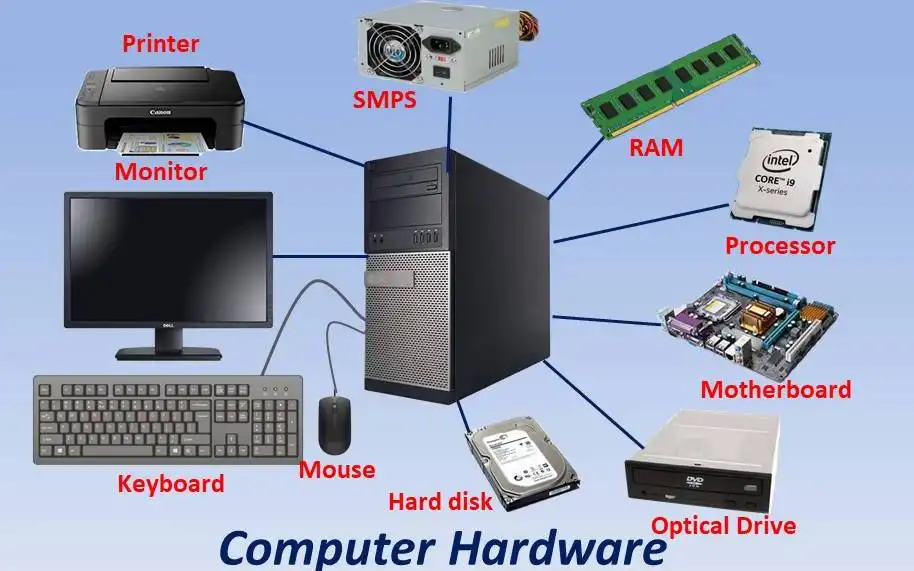
Computer hardware refers to the physical, tangible components of a computer system. It’s everything you can see and touch – the circuits, the chips, the casings, and the peripherals that allow us to interact with the machine. Think of hardware as the physical body and brain of the computer, providing the raw power and the physical means for it to operate.
Essential Hardware Components: The Building Blocks of a Computer
To truly grasp what hardware is, it’s beneficial to break down its core components. While the specific parts can vary greatly depending on the type of computer (from a desktop PC to a high-performance server or a simple IoT device), several fundamental categories are common.
The Central Processing Unit (CPU): The Computer’s Brain
At the heart of every computer lies the Central Processing Unit (CPU), often referred to as the “brain.” The CPU is responsible for executing instructions and performing calculations. It fetches instructions from memory, decodes them, and then executes them. The speed and power of a CPU are measured in Gigahertz (GHz), with higher numbers indicating faster processing capabilities. Modern CPUs are incredibly complex, containing billions of transistors packed onto a tiny silicon chip. The evolution of CPUs has been a driving force behind the rapid advancements we’ve seen in technology, enabling more complex software and AI tools to run efficiently.
Memory (RAM and Storage): The Computer’s Short-Term and Long-Term Memory
Computers need ways to store and access data. This is where memory comes into play, broadly divided into two main categories:
-
Random Access Memory (RAM): RAM is the computer’s short-term, volatile memory. It’s where the CPU stores data and instructions that are currently being used. When you open an application or a file, it’s loaded into RAM for quick access. The more RAM a computer has, the more applications it can run simultaneously without slowing down. RAM is volatile, meaning its contents are lost when the computer is powered off. This is why saving your work regularly is so important!
-
Storage Devices: These are responsible for long-term, non-volatile data storage. Unlike RAM, data stored on these devices persists even when the computer is turned off. Common storage devices include:
- Hard Disk Drives (HDDs): Traditional storage devices that use spinning platters to store data. They offer large capacities at a lower cost but are slower than SSDs.
- Solid State Drives (SSDs): Newer, faster storage devices that use flash memory. They significantly reduce boot times and application loading speeds, making them a popular choice for modern computers.
- Cloud Storage: While not physically part of your device, cloud storage services (like Google Drive, Dropbox, iCloud) store your data on remote servers, accessible via the internet. This is increasingly important for backups, collaboration, and accessing files from multiple devices.
Input/Output (I/O) Devices: The Bridge to the Outside World
Input devices allow us to send information to the computer, while output devices allow the computer to send information back to us. These are the primary ways we interact with our machines.
-
Input Devices:
- Keyboard: Used for typing text and commands.
- Mouse/Trackpad: Used for pointing, clicking, and navigating graphical interfaces.
- Touchscreen: Found on smartphones, tablets, and some laptops, allowing direct interaction with the display.
- Microphone: For voice input, crucial for AI tools and communication.
- Webcam: For video input, used in video conferencing and visual recognition.
-
Output Devices:
- Monitor/Display: Shows visual information generated by the computer.
- Speakers/Headphones: Produce audio output.
- Printer: Creates hard copies of digital documents.
Motherboard: The Backbone of the System
The motherboard is a printed circuit board that connects all the other hardware components together. It acts as a central hub, allowing the CPU, RAM, storage, and I/O devices to communicate with each other. It houses essential chips and slots for expansion cards, making it the vital nervous system of the computer.
Graphics Processing Unit (GPU): For Visual Power
While the CPU handles general-purpose processing, the Graphics Processing Unit (GPU) is specifically designed to accelerate the creation of images, videos, and animations. For tasks like gaming, video editing, and increasingly for complex AI computations, a powerful GPU is essential. The rise of visually rich applications and AI models has made GPUs a critical component in many modern systems.
The Intangible Command: Understanding Computer Software
If hardware is the body, then software is the mind – the set of instructions, data, and programs that tell the hardware what to do and how to do it. Software is intangible; you can’t touch it, but it’s what brings the hardware to life and makes it useful. Without software, a computer is just a collection of inert electronic parts.
Categories of Software: The Different Layers of Instruction
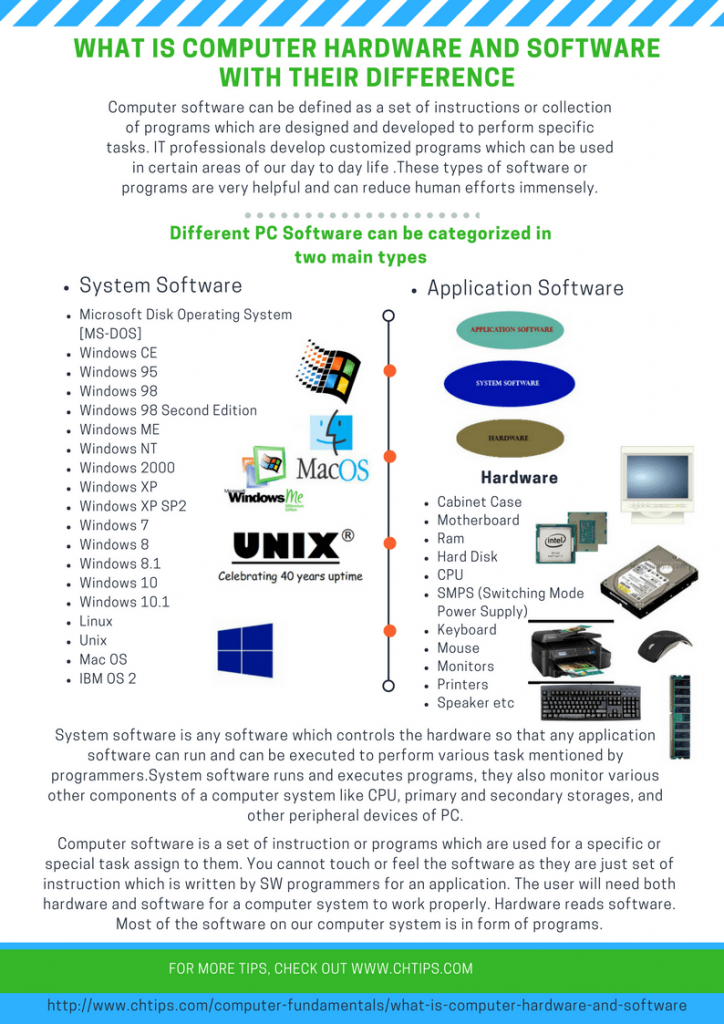
Software can be broadly categorized into two main types: system software and application software.
System Software: The Foundation for Operation
System software is designed to control and manage the computer’s hardware and provide a platform for application software to run. It’s the fundamental layer that makes the computer usable.
- Operating Systems (OS): The most crucial piece of system software. The OS manages the computer’s resources (CPU, memory, storage), provides a user interface, and allows other programs to run. Examples include Windows, macOS, Linux, Android, and iOS. The efficiency and features of an OS directly impact user productivity and the types of applications that can be used.
-
Device Drivers: These are small programs that allow the operating system to communicate with specific hardware devices, like printers, graphics cards, or network adapters.
-
Utility Software: Tools that perform specific tasks to manage and maintain the computer system. This includes antivirus software for digital security, disk cleanup tools, and file compression utilities.
Application Software: Tools for Specific Tasks
Application software, often simply called “apps,” are programs designed to perform specific tasks for the user. This is the software that most people interact with daily. The range of application software is vast and constantly expanding, mirroring the diverse needs of users and businesses.
-
Productivity Software: Applications designed to help users complete tasks more efficiently. This includes:
- Word Processors: (e.g., Microsoft Word, Google Docs) for creating and editing text documents.
- Spreadsheets: (e.g., Microsoft Excel, Google Sheets) for data analysis and calculations.
- Presentation Software: (e.g., Microsoft PowerPoint, Google Slides) for creating slideshows.
- Project Management Tools: (e.g., Asana, Trello) for organizing and tracking tasks and projects.
-
Communication Software: Applications that facilitate interaction between users.
- Email Clients: (e.g., Outlook, Gmail) for sending and receiving emails.
- Messaging Apps: (e.g., WhatsApp, Slack) for real-time text communication.
- Video Conferencing Tools: (e.g., Zoom, Microsoft Teams) for virtual meetings.
-
Entertainment Software: Games, media players, and streaming applications.
-
Creative Software: Programs for graphic design, video editing, music production, and more.
-
AI Tools and Apps: Increasingly, we see software that leverages artificial intelligence for a wide range of purposes, from content generation and data analysis to personalized recommendations and intelligent automation. The development of these AI tools relies heavily on both sophisticated software algorithms and powerful hardware to process the vast amounts of data involved.
The Symbiotic Relationship: How Hardware and Software Work Together
The true magic of a computer lies not in its hardware or software alone, but in their seamless integration. They are two sides of the same coin, each dependent on the other to function.
From Input to Output: The Workflow of a Computer
Let’s trace a simple example: when you click on an icon to open an application.
- Input: Your mouse click is an input signal. The mouse hardware sends this signal to the computer.
- Software Interpretation: The operating system (system software) receives this signal. It interprets the click as a command to launch a specific application.
- Hardware Execution: The OS instructs the CPU (hardware) to fetch the application’s program instructions from the storage device (hardware) and load them into RAM (hardware).
- Processing: The CPU then executes these instructions, carrying out the application’s functions.
- Output: As the application runs, it might display text on the monitor (output hardware) or play audio through speakers (output hardware), all managed by the operating system and executed by the hardware.
This continuous cycle of input, processing, and output, facilitated by the intricate dance between hardware and software, is what allows us to perform complex tasks with what appears to be effortless ease.
Implications Across Industries: Hardware and Software in Action
The distinction between hardware and software is not just an academic concept; it has profound implications for how we approach technology, build brands, and manage finances.
Technology Trends: The Driving Force of Innovation
The constant evolution of both hardware and software is the engine of technological advancement. Faster processors, more efficient memory, and advanced graphics cards (hardware) enable the development of more powerful and sophisticated applications, AI algorithms, and immersive digital experiences (software).
- AI Tools: The boom in AI tools, from chatbots to image generators, is a prime example. These tools rely on complex software algorithms that require immense computational power, pushing the boundaries of hardware development in areas like specialized AI chips (e.g., GPUs, TPUs).
- Gadgets and Apps: The proliferation of smart gadgets and mobile apps is another testament to this symbiotic relationship. Innovative hardware designs (wearables, IoT devices) are brought to life by intuitive and powerful software applications.
- Digital Security: Protecting both hardware from physical damage or unauthorized access and software from malware and cyber threats is paramount. Robust digital security strategies often involve a combination of hardware-based security measures and sophisticated software defenses.
Brand Strategy: The Digital Footprint
In the modern business landscape, understanding computer hardware and software is essential for crafting effective brand strategies.
- Brand Identity: The user experience of a brand’s digital presence is heavily influenced by the software it uses. A smooth, intuitive app or website (software) on a user’s reliable device (hardware) contributes positively to their perception of the brand.
- Marketing and Design: Digital marketing campaigns often leverage specialized software for design, analytics, and customer engagement. The effectiveness of these tools can depend on the underlying hardware capabilities of the marketing team’s computers and the target audience’s devices.
- Case Studies: Successful case studies often highlight how businesses have leveraged specific hardware configurations or innovative software solutions to achieve their goals. For example, a company might use powerful servers (hardware) to run advanced data analytics software, leading to better customer insights and improved marketing strategies.
Money and Finance: The Digital Economy
The world of personal finance and online income is inextricably linked to computer hardware and software.
- Personal Finance: Budgeting apps, investment platforms, and banking software (all applications) run on our computers and smartphones (hardware). The performance and security of these applications are critical for managing our money effectively.
- Investing: Trading platforms, financial analysis tools, and real-time market data feeds (software) require reliable internet connections and capable hardware to execute trades quickly and efficiently. Delays caused by slow hardware or software glitches can have significant financial consequences.
- Online Income and Side Hustles: Many side hustles and online income streams rely on digital tools. Freelancers might use specialized software for graphic design or writing, while online entrepreneurs use e-commerce platforms and marketing software. The efficiency of these tools, powered by underlying hardware, directly impacts earning potential.
- Financial Tools: From accounting software for businesses to simple budgeting apps for individuals, financial tools are entirely software-based. Their accessibility and functionality are dependent on the hardware they run on.
Conclusion
In essence, computer hardware provides the physical infrastructure, the tangible components that allow for computation and interaction. Computer software, on the other hand, provides the instructions, the intelligence, the intangible essence that dictates what the hardware can do. Together, they form the bedrock of our digital world.
From the groundbreaking advancements in technology and the strategic crafting of brands to the intricate management of our personal and business finances, a fundamental understanding of computer hardware and software is no longer a niche skill but a prerequisite for navigating and thriving in the 21st century. By appreciating this symbiotic relationship, we can better understand the tools we use, the innovations that shape our future, and the digital landscape that continues to evolve at an unprecedented pace.
aViewFromTheCave is a participant in the Amazon Services LLC Associates Program, an affiliate advertising program designed to provide a means for sites to earn advertising fees by advertising and linking to Amazon.com. Amazon, the Amazon logo, AmazonSupply, and the AmazonSupply logo are trademarks of Amazon.com, Inc. or its affiliates. As an Amazon Associate we earn affiliate commissions from qualifying purchases.