
In the vast, interconnected expanse of the digital world, a single click can sometimes feel like a step into an unknown abyss. You’ve been careful, you’ve heard the warnings, yet one moment of distraction, one clever deception, and you find yourself asking that dreaded question: “What if I clicked on a phishing link?” It’s a common scenario, far more prevalent than many realize, and it’s a terrifying moment that can trigger a cascade of anxieties about data theft, financial fraud, and identity compromise.
But here’s the crucial truth: clicking a phishing link, while certainly a cause for concern, is rarely an irreversible catastrophe. It’s a wake-up call, a moment to transition from panic to proactive defense. This article is your guide to navigating the immediate aftermath, understanding the potential ramifications across your tech, financial, and personal brand landscape, and most importantly, providing a clear roadmap to recovery and robust future prevention. We’ll delve into the technical steps you need to take, the financial vigilance required, and the strategies to protect your reputation, transforming a moment of vulnerability into an opportunity for digital resilience.

The Immediate Aftermath: Containment and Assessment
The instant you realize you might have clicked on a phishing link, a rush of adrenaline often leads to confusion. The key here is to channel that energy into swift, decisive action. Think of it like a digital fire drill: the faster you react, the less damage the “fire” can do. Your primary goal is containment – preventing any potential malware from spreading or sensitive data from being exfiltrated.
Don’t Panic, Act Fast
While it’s natural to feel overwhelmed, succumbing to panic can delay crucial actions. Take a deep breath. Acknowledge the situation, then shift your focus immediately to the steps below. Every minute counts in mitigating potential harm. Remember, many phishing attempts are simply trying to harvest credentials, not immediately install complex malware, but assuming the worst-case scenario empowers you to be thorough.
Disconnect and Isolate
This is your very first technical defense. If you clicked on the link on a device (computer, phone, tablet) that is connected to the internet, immediately disconnect it.
- For Wi-Fi: Turn off Wi-Fi on the device or unplug your router/modem.
- For Ethernet: Unplug the Ethernet cable from your computer.
- For Mobile Data: Turn off cellular data on your smartphone.
Why is this crucial? Disconnecting severs any active connection the phishing site or potential malware might have to the internet. This can prevent:
- Malware downloads: Stopping additional malicious software from being installed.
- Data exfiltration: Preventing your sensitive data from being uploaded to a cybercriminal’s server.
- Network spread: If your device is on a home or work network, it prevents the potential malware from spreading to other devices on that network.
Isolate the compromised device. For now, assume it’s infected and avoid using it for sensitive tasks until it’s thoroughly cleaned.
Change Critical Passwords (On a Secure Device)
One of the most common goals of phishing is to steal your login credentials. If you entered any information into a fake login page, or if the link led to a malware download that could capture keystrokes, your passwords are at risk.
- Priority Accounts: Start with your most critical accounts:
- Primary Email Address: This is often the “master key” to resetting passwords for other accounts.
- Banking and Financial Institutions: Online banking, investment platforms, credit card portals.
- Social Media: Facebook, Instagram, LinkedIn – these are frequently targeted for identity theft and scam propagation (impacting your personal brand).
- Work Accounts: If it was a work-related email, inform your IT department immediately and change work-related passwords.
- Online Shopping/Payment Processors: Amazon, PayPal, etc.
- Use a Different Device: It’s imperative to change these passwords from a different, known-secure device (e.g., a friend’s computer, a different phone, or a factory-reset device that you trust). This prevents any potential keyloggers on your compromised device from capturing your new passwords.
- Strong, Unique Passwords: For each account, create a new, strong, and unique password. Consider using a reputable password manager (e.g., LastPass, 1Password, Bitwarden) to generate and store these securely.
Run a Comprehensive Malware Scan
Once your device is disconnected and critical passwords are changed (on a secure device), it’s time to scan the potentially compromised machine.
- Reputable Antivirus/Anti-Malware Software: Use a trusted antivirus program (e.g., ESET, Bitdefender, Norton, Malwarebytes). If you don’t have one, or if it’s outdated, you might need to download an installer on a clean device and transfer it via USB.
- Full System Scan: Don’t just do a quick scan. Perform a full, deep scan of your entire system. This can take several hours, but it’s essential for detecting deeply embedded threats like rootkits, keyloggers, and spyware.
- Remove Detected Threats: Follow the software’s instructions to quarantine or remove any detected threats. If the software recommends a reboot, comply.
- Second Opinion: Consider running a scan with a secondary anti-malware tool (e.g., Malwarebytes, HitmanPro) as a “second opinion” after your primary antivirus has finished. No single tool catches everything.
Unpacking the Potential Damage: Tech, Money, and Your Brand
Clicking a phishing link opens a Pandora’s Box of potential threats. The specific risks depend on the nature of the link (e.g., did it download a file, or was it a credential-harvesting page?) and what information, if any, you might have subsequently entered. Understanding these potential damages across technological, financial, and reputational fronts is crucial for targeted recovery.
Data Breach and Identity Theft
The most common goal of phishing is to steal your Personally Identifiable Information (PII). This can include your name, address, phone number, email address, date of birth, social security number, driver’s license number, and even medical information.
- Technological Vector: If you landed on a fake login page and entered credentials, or if malware installed on your device siphons off data, your PII is at risk. This data can then be sold on dark web marketplaces.
- Financial Impact: Stolen PII is the cornerstone of identity theft. Scammers can use it to open new credit lines, file fraudulent tax returns, apply for loans, or even commit crimes in your name.
- Long-Term Consequences: Identity theft can take years to fully resolve, impacting your credit score, financial standing, and peace of mind.
Financial Fraud and Monetary Loss
This is often the most immediate and tangible fear. Phishing attacks frequently target direct financial access.
- Direct Bank Account Access: If your banking credentials were compromised, fraudsters can initiate unauthorized transfers, pay bills, or empty your accounts.
- Credit Card Fraud: Stolen credit card numbers (or access to an account where they are stored) lead to unauthorized purchases.
- Online Payment Platforms: Compromised PayPal, Venmo, or other online payment service accounts can be used to send money to scammers or make fraudulent purchases.
- Impact on Online Income/Side Hustles: If you rely on platforms for online income (e.g., freelancing platforms, e-commerce sites, affiliate marketing dashboards), losing access or having funds siphoned off can directly impact your livelihood.
Reputation and Brand Erosion
While often overlooked, the impact on your personal or professional brand can be significant, especially in today’s digitally-driven world.
- Social Media Takeovers: Compromised social media accounts can be used to post embarrassing or offensive content, spread misinformation, or even launch further phishing attacks against your friends and followers. This can severely damage your personal reputation and trustworthiness.
- Professional Email Compromise (PEC): If your work email is compromised, it can be used to send fraudulent invoices to clients, request sensitive information from colleagues, or leak confidential company data. This can jeopardize your employment, client relationships, and professional standing.
- Loss of Trust: If you’re a freelancer, business owner, or public figure, a security breach can erode trust among your clients, partners, and audience. Recovering from such a hit to your “brand” can be challenging, requiring transparent communication and demonstrable action.
- Exploiting Your Network: Scammers often exploit compromised accounts to target the victim’s contacts, effectively using your “brand” to legitimize their scams.
Device Compromise and Further Infection
Some phishing links don’t just harvest credentials; they initiate downloads of malicious software.
- Malware Installation: This could include viruses, worms, Trojans, or more sophisticated threats like ransomware (which encrypts your files and demands payment) or keyloggers (which record every keystroke).
- Remote Access Trojans (RATs): These give attackers remote control over your device, allowing them to spy on you, access your files, or use your device as a platform for further attacks.
- Botnet Inclusion: Your device might become part of a “botnet,” a network of compromised computers used by cybercriminals for large-scale attacks like DDoS (Distributed Denial of Service).
The Road to Recovery: Reclaiming Your Digital Life
Having assessed the potential damage, the next phase is focused on comprehensive recovery. This involves a multi-pronged approach that addresses technical vulnerabilities, financial security, and reputational repair. Be diligent, be patient, and systematically work through these steps.
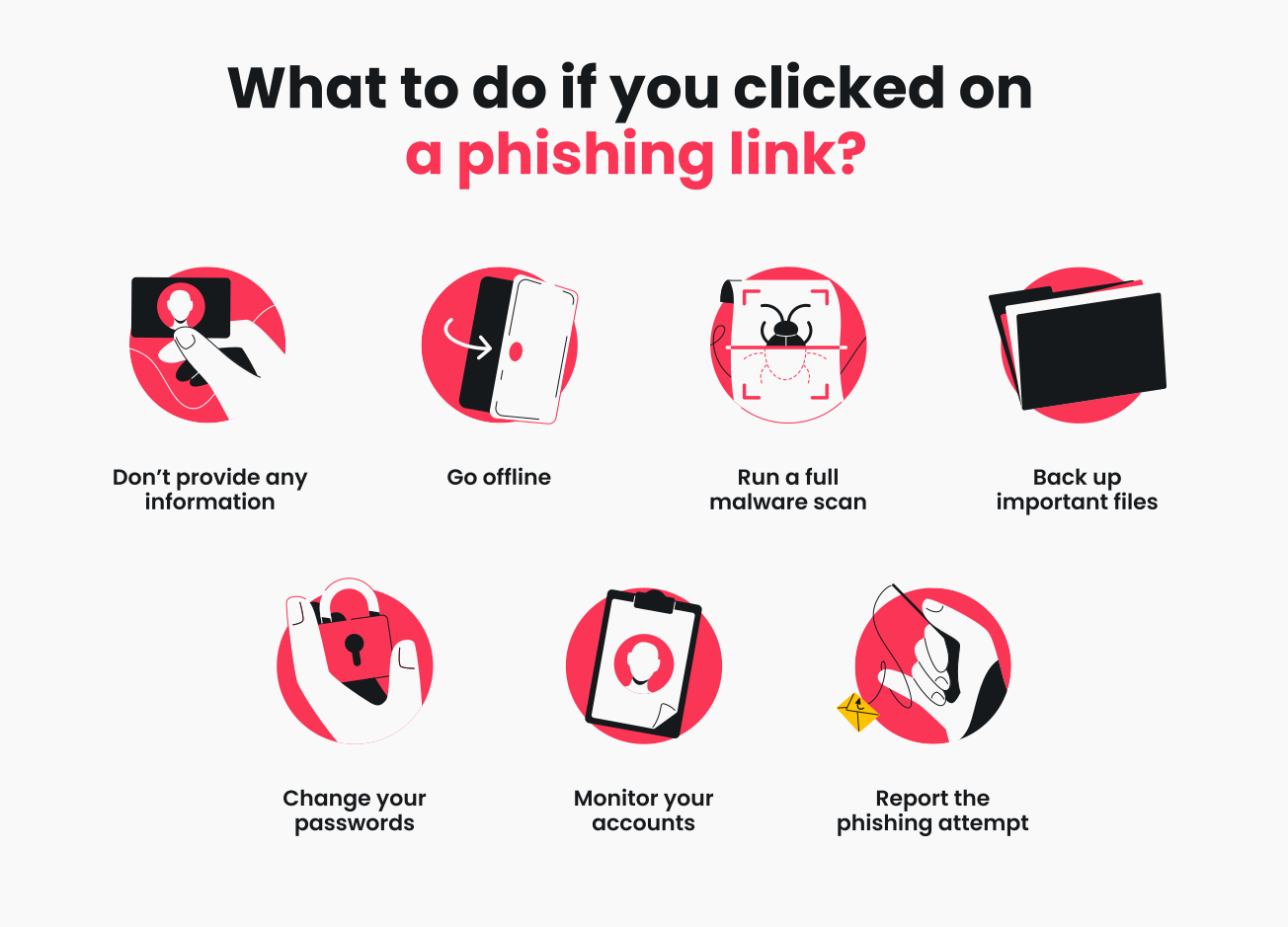
Notify Financial Institutions and Monitor Accounts
This is a critical first step if you suspect any financial information might be compromised.
- Contact Your Bank(s) and Credit Card Companies: Immediately call the fraud department of any bank or credit card company associated with accounts you suspect are compromised. Explain the situation and ask them to monitor your accounts for suspicious activity, or even issue new cards.
- Review Transactions Diligently: Scrutinize all recent transactions for any unauthorized activity. Set up transaction alerts with your bank so you’re notified of any activity.
- Freeze or Lock Accounts (If Advised): Your bank may advise you to temporarily freeze or close accounts and open new ones, especially if there’s clear evidence of compromise.
Engage Credit Bureaus and Monitor Credit
Identity theft is a silent threat that can manifest weeks or months after an initial compromise.
- Place a Fraud Alert: Contact one of the three major credit bureaus (Experian, Equifax, TransUnion) to place a free 90-day fraud alert on your credit file. This will require businesses to verify your identity before extending credit. By law, the bureau you contact must inform the other two.
- Consider a Credit Freeze: For stronger protection, consider a credit freeze (also known as a security freeze). This restricts access to your credit report, making it difficult for identity thieves to open new accounts in your name. You’ll need to “thaw” it temporarily if you apply for new credit.
- Obtain Credit Reports: Request a free copy of your credit report from each of the three major bureaus at AnnualCreditReport.com. Review them carefully for any accounts you don’t recognize. Repeat this annually.
- Utilize Credit Monitoring Services: Consider subscribing to a reputable credit monitoring service that alerts you to changes in your credit file.
Secure All Your Accounts Thoroughly
Re-securing your digital presence is paramount. This goes beyond just changing passwords.
- Implement Two-Factor Authentication (2FA) / Multi-Factor Authentication (MFA) Everywhere: This is non-negotiable. Even if a scammer gets your password, 2FA adds a second layer of defense (e.g., a code sent to your phone or generated by an authenticator app). Enable it on your email, banking, social media, work accounts, and any other service that offers it.
- Use a Password Manager: Adopt a password manager to generate and securely store unique, strong passwords for every single account. This eliminates password reuse, a major vulnerability.
- Review Security Settings: On all major platforms (Google, Microsoft, Facebook, Apple, etc.), navigate to your security settings and review active sessions, connected apps, and authorized devices. Remove anything suspicious or unrecognized.
- Update Security Questions: If your security questions were weak or easily guessable, update them to be more complex.
Professional and Personal Brand Management
If your social media or professional email was compromised, proactive communication is key to managing your brand.
- Inform Close Contacts: If your email or social media was used to spread phishing, send a clear message to your contacts (from a secure alternative channel) informing them of the compromise and warning them against any suspicious messages they might have received from you.
- Clean Up Malicious Content: Remove any unauthorized posts, messages, or content that might have been published from your compromised accounts.
- Update Professional Networks: If you use platforms like LinkedIn for professional branding, consider posting a brief, factual update if the compromise was significant and impacted your professional persona. Transparency can help rebuild trust.
- Monitor Your Online Presence: Regularly search for your name or brand online to catch any lingering negative impact or further misuse of your identity.
Report the Incident
Reporting can help others and contribute to the fight against cybercrime.
- Anti-Phishing Working Group (APWG): Forward the original phishing email (as an attachment) to reportphishing@apwg.org.
- Email Provider: Report the email to your email service provider (e.g., Gmail, Outlook, Yahoo) using their built-in reporting features.
- Law Enforcement: If you’ve suffered significant financial loss, identity theft, or suspect serious criminal activity, report it to your local police department and relevant national agencies (e.g., FBI’s Internet Crime Complaint Center – IC3 in the US).
Backup and Rebuild (If Necessary)
In severe cases of device compromise (e.g., ransomware, persistent malware), a complete system wipe might be the safest option.
- Backup Critical Data: Before any drastic steps, ensure all your important, clean data (documents, photos, etc.) is backed up to a secure external drive or cloud service. Be careful not to back up potentially infected files.
- Clean Operating System Installation: If recommended by an IT professional or if you’re comfortable, perform a clean reinstallation of your operating system. This is often the most reliable way to ensure all malware is eradicated. Reinstall your applications from official sources.
Building a Resilient Shield: Proactive Prevention Strategies
Recovering from a phishing attack is an arduous process. The best defense, therefore, is proactive prevention. By integrating robust security practices into your daily digital routine, you can significantly reduce your vulnerability to future attacks and fortify your digital life across tech, money, and brand.
Sharpening Your Phishing Detection Skills
Your brain is often your best firewall. Learn to identify the tell-tale signs of phishing:
- Suspicious Sender: Does the sender’s email address exactly match the supposed organization? Look for subtle misspellings or unusual domains (e.g., “amaz0n.com” instead of “amazon.com”).
- Urgent or Threatening Language: Phishing emails often create a sense of urgency or fear (“Your account will be suspended!”, “Immediate action required!”).
- Generic Greetings: “Dear Customer” instead of your name is a red flag. Legitimate communications usually personalize.
- Grammar and Spelling Errors: Professional organizations rarely send out emails riddled with mistakes.
- Unusual Links: Hover over links (without clicking!) to see the actual URL. If it doesn’t match the sender’s domain or looks suspicious, don’t click. On mobile, long-press the link to preview.
- Requests for Sensitive Information: Legitimate companies will rarely ask for your password, SSN, or full credit card number via email.
- Brand Impersonation: Scammers meticulously mimic brand logos and layouts. Look for any subtle inconsistencies.
The Power of Strong Authentication
- Password Managers are Essential: Stop reusing passwords. A password manager not only stores complex, unique passwords but also helps you identify which sites you’ve visited before, potentially thwarting fake login pages.
- Two-Factor Authentication (2FA) / Multi-Factor Authentication (MFA): Make this your default for every service that offers it. Authenticator apps (e.g., Google Authenticator, Authy) are generally more secure than SMS codes. Physical security keys (e.g., YubiKey) offer the strongest protection.
Keeping Your Digital Environment Secure
Your devices and software are the foundation of your digital security.
- Keep Software Updated: Enable automatic updates for your operating system (Windows, macOS, iOS, Android), web browsers, antivirus software, and all applications. Updates often include critical security patches that fix vulnerabilities exploited by attackers.
- Use Reputable Antivirus and Anti-Malware: Ensure you have up-to-date, active protection on all your devices.
- Firewall: Ensure your operating system’s firewall is enabled. This acts as a barrier between your device and the internet, controlling incoming and outgoing network traffic.
- Secure Browsing Habits: Use a reputable ad-blocker and consider privacy-focused browser extensions. Be wary of downloading attachments from unknown sources.
- VPN for Public Wi-Fi: When using public Wi-Fi networks, always use a Virtual Private Network (VPN) to encrypt your internet traffic and protect your data from snoopers.
Understanding Data Privacy and Minimizing Exposure
The less information publicly available about you, the harder it is for phishers and identity thieves to target you.
- Review Privacy Settings: Regularly audit and adjust the privacy settings on all your social media accounts and online services. Limit what personal information is visible to the public.
- Be Mindful of What You Share: Think twice before posting sensitive personal details (e.g., vacation dates, full birthdate, pet names often used as security answers) on social media.
- Data Minimization: Only provide essential information when signing up for services. If a field seems irrelevant, consider leaving it blank or providing minimal detail.
Education as Your Best Defense
The threat landscape evolves constantly. Staying informed is crucial.
- Follow Cybersecurity News: Keep up-to-date with common scams and new attack vectors.
- Educate Your Family and Colleagues: Share your knowledge and encourage good cybersecurity practices within your personal and professional networks. A strong chain is only as strong as its weakest link.
Conclusion
Clicking on a phishing link is an unnerving experience, often accompanied by a sinking feeling of regret and vulnerability. However, it is not the end of your digital journey. Instead, view it as a critical learning experience and a powerful catalyst for fortifying your digital defenses. By taking immediate, structured steps to contain the threat, diligently assessing the potential damage across your technical, financial, and personal brand spheres, and embarking on a methodical path to recovery, you can reclaim your digital security and peace of mind.
Beyond recovery, this incident serves as an invaluable opportunity to build a truly resilient digital shield. Embracing strong authentication, practicing astute vigilance in recognizing threats, keeping your software updated, and being mindful of your online data footprint are not just best practices—they are necessities in an ever-evolving digital world. Your vigilance and proactive measures are your strongest allies in navigating the complexities of the internet safely, transforming a moment of fear into a foundation of lasting digital security.
aViewFromTheCave is a participant in the Amazon Services LLC Associates Program, an affiliate advertising program designed to provide a means for sites to earn advertising fees by advertising and linking to Amazon.com. Amazon, the Amazon logo, AmazonSupply, and the AmazonSupply logo are trademarks of Amazon.com, Inc. or its affiliates. As an Amazon Associate we earn affiliate commissions from qualifying purchases.