
In our increasingly digital world, the ability to store and transfer vast amounts of data is paramount. From capturing life’s precious memories to running complex software, we rely on various storage solutions. Among these, the Secure Digital (SD) card stands out as a remarkably versatile and widely adopted technology. Its compact size belies its significant capabilities, making it an indispensable component in a wide array of electronic devices. But what exactly does an SD card do, and how has it become so fundamental to our modern digital lives?

The core function of an SD card is simple yet profound: it provides portable, non-volatile storage. This means it can hold data even when it’s not powered, and it can be physically removed and inserted into different devices. This portability and permanence are the cornerstones of its utility, enabling a seamless flow of information across a multitude of platforms. To truly grasp the impact of SD cards, we need to delve into their technological underpinnings, their diverse applications, and the key considerations for choosing the right one.
The Technical Backbone: How SD Cards Work and Their Evolution
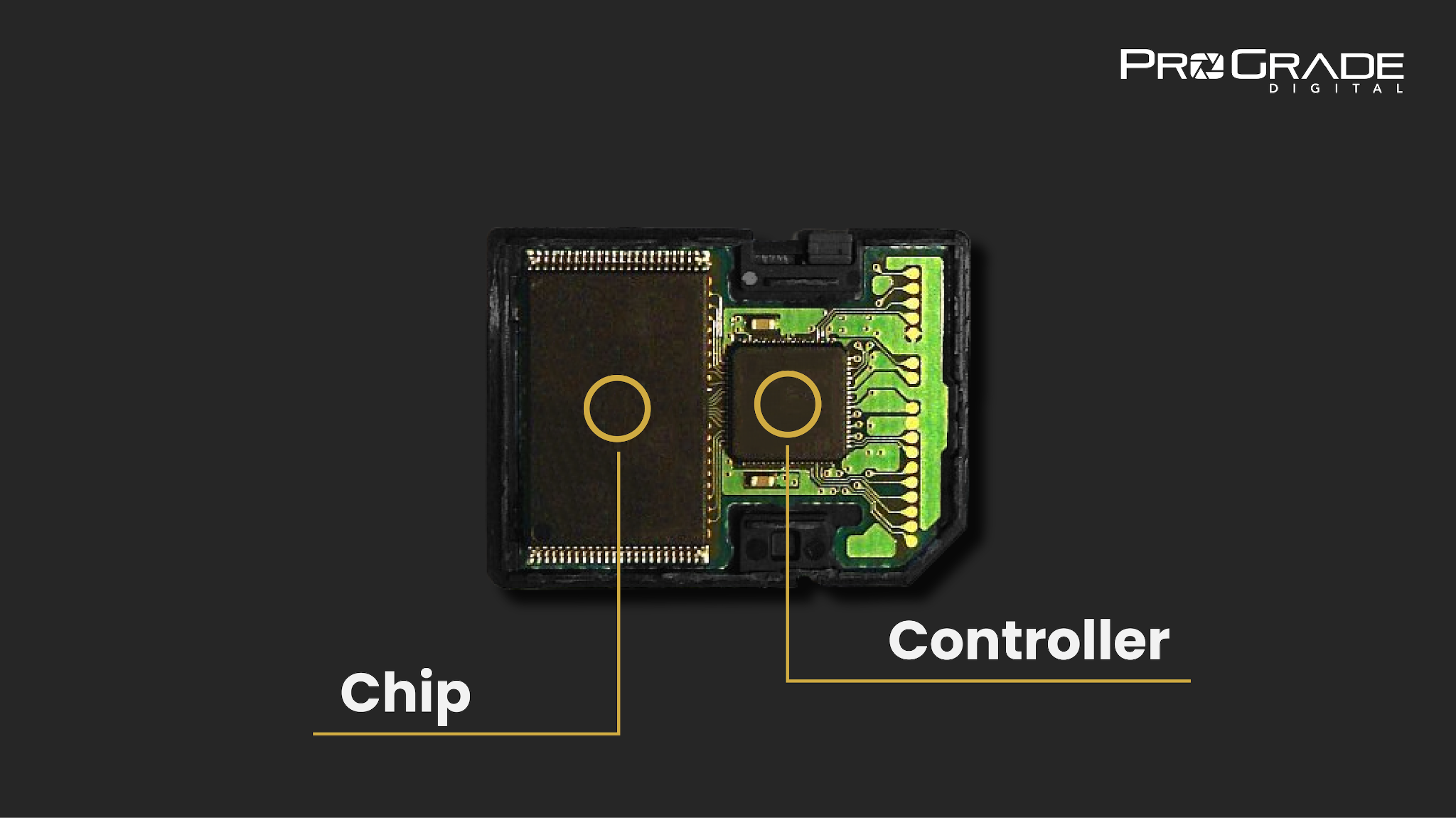
At its heart, an SD card is a miniature flash memory storage device. Flash memory, specifically NAND flash, is the technology that allows it to store data electronically. Unlike traditional hard drives that use spinning platters, flash memory relies on a grid of memory cells that can retain electrical charges, representing binary data (0s and 1s). This solid-state nature makes SD cards more robust, faster, and more energy-efficient than older storage technologies.
The “Secure Digital” designation in its name also hints at its design. Originally developed by SanDisk and later standardized by the SD Association, the format was designed with security features and a tiered capacity system in mind. This has led to a fascinating evolution of SD card technology, marked by increasing capacities, faster speeds, and distinct form factors.
Form Factors and Capacities: A Spectrum of Storage
The physical size and storage capacity of SD cards have dramatically expanded since their inception. Understanding these variations is crucial for selecting the appropriate card for a specific device and use case.
MiniSD and MicroSD: The Compact Revolution
While the original SD card was already quite small, the trend towards miniaturization in electronics led to the development of smaller form factors.
- MiniSD Cards: Though less common now, MiniSD cards were an intermediate step between full-sized SD and the even smaller microSD. They offered similar functionality but in a reduced size.
- MicroSD Cards: These are by far the most prevalent form factor today. Their minuscule size, typically the size of a fingernail, makes them ideal for smartphones, tablets, action cameras, drones, and countless other portable devices where space is at a premium. Despite their small footprint, modern microSD cards can boast astonishing storage capacities.
SD, SDHC, SDXC, and SDUC: The Expanding Horizon of Capacity
The acronyms associated with SD cards signify not just a change in physical dimensions but also a significant leap in storage capacity and, importantly, the underlying file system technology.
- SD (Secure Digital): The original standard, offering capacities up to 2GB. These are now largely obsolete for most modern applications.
- SDHC (Secure Digital High Capacity): Introduced to overcome the 2GB limitation, SDHC cards can store between 4GB and 32GB. They utilize the FAT32 file system.
- SDXC (Secure Digital eXtended Capacity): This standard significantly increased the maximum capacity to 2TB, although commercially available cards currently reach up to 1TB. SDXC cards utilize the exFAT file system, which is better suited for larger files and capacities. This is the most common standard for high-capacity cards today.
- SDUC (Secure Digital Ultra Capacity): The latest iteration, SDUC promises theoretical capacities of up to 128TB. While still in its nascent stages of adoption and with very few devices supporting it, SDUC represents the future of ultra-high-capacity portable storage.
The file system difference between SDHC and SDXC (FAT32 vs. exFAT) is also important. exFAT is a more modern file system designed for flash memory and is essential for handling very large files that might exceed the limitations of FAT32. Ensuring compatibility between your device and the SD card’s file system is key to avoiding issues.
Speed Classes and Performance: More Than Just Storage
Beyond capacity, the speed at which an SD card can read and write data is a critical performance metric. This is particularly important for applications involving high-resolution video recording, burst photography, or running applications directly from the card. The SD Association has established various speed classes to help consumers understand these performance capabilities.
Speed Class: For General Recording Needs
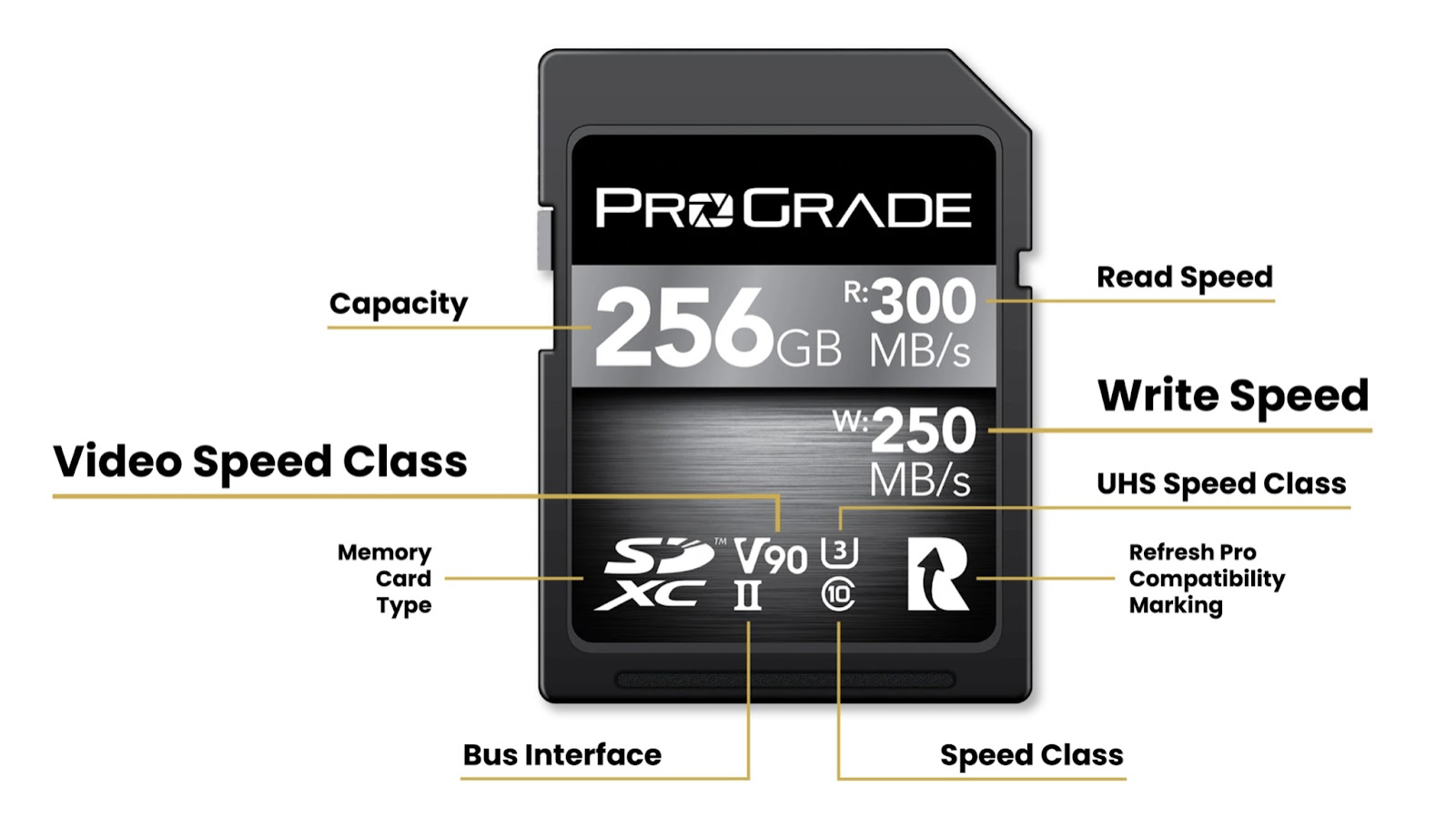
The Speed Class (represented by a number inside a ‘C’ symbol, e.g., Class 10) guarantees a minimum sequential write speed.
- Class 2: Minimum 2 MB/s
- Class 4: Minimum 4 MB/s
- Class 6: Minimum 6 MB/s
- Class 10: Minimum 10 MB/s
A Class 10 card is generally sufficient for Full HD video recording and basic smartphone use.
UHS Speed Class: For High-Performance Applications
The UHS (Ultra High Speed) Speed Class is designed for more demanding tasks and often corresponds to cards utilizing the UHS bus interface. These are denoted by a ‘U’ symbol with a number inside.
- UHS Speed Class 1 (U1): Guarantees a minimum sequential write speed of 10 MB/s. This is often equivalent to Class 10 but utilizes the UHS bus for potentially faster bursts.
- UHS Speed Class 3 (U3): Guarantees a minimum sequential write speed of 30 MB/s. This is crucial for recording 4K video and demanding applications.
Video Speed Class: Tailored for Video Recording
The Video Speed Class is a more recent addition, specifically designed to address the needs of high-resolution video recording, including 4K and 8K. These are denoted by a ‘V’ followed by a number.
- V6: Minimum 6 MB/s
- V10: Minimum 10 MB/s
- V30: Minimum 30 MB/s
- V60: Minimum 60 MB/s
- V90: Minimum 90 MB/s
For 4K video recording, a V30 or higher card is recommended. For 8K, V60 or V90 cards are necessary to ensure smooth, uninterrupted recording.
Application Performance Class: For Running Apps
The Application Performance Class (denoted by an ‘A’ inside a circle) is designed to guarantee minimum random read and write speeds, which are critical for running applications directly from the card.
- A1: Minimum 1500 IOPS (Input/Output Operations Per Second) for random read and 500 IOPS for random write.
- A2: Minimum 4000 IOPS for random read and 2000 IOPS for random write. A2 cards offer significantly better performance for app loading and multitasking.
Understanding these speed indicators allows users to select cards that will perform optimally with their specific devices and intended uses, preventing bottlenecks and ensuring a smooth user experience.
The Ubiquitous Applications of SD Cards: Where Do We Find Them?
The versatility of SD cards is evident in their widespread integration across a staggering array of electronic devices. Their compact size, portability, and increasing capacities have made them the go-to solution for expanding storage in many of today’s most common gadgets.
Expanding Digital Memories: Cameras, Smartphones, and Tablets
Perhaps the most common use of SD cards is in digital cameras, from point-and-shoot models to professional DSLRs and mirrorless cameras. They serve as the primary storage for photographs and videos, allowing users to capture countless images without needing to constantly transfer them. Similarly, many smartphones and tablets feature microSD card slots, offering an affordable way to increase internal storage for apps, photos, videos, music, and other media. This is particularly valuable for users who consume a lot of media or who opt for devices with smaller base storage configurations.
Powering Portable Entertainment and Productivity: Drones, Gaming Consoles, and Laptops
The rise of portable gaming consoles and handheld devices has also seen a surge in SD card usage. Devices like the Nintendo Switch rely heavily on microSD cards to store games, downloadable content, and save data, as internal storage is often limited. Drones, with their need to capture high-resolution aerial footage, also depend on fast and capacious SD cards to store the extensive video files they generate. Even some laptops and ultra-portable computers include SD card readers, allowing for easy expansion of storage for documents, projects, or media libraries.
Specialized Roles: Dash Cams, Security Cameras, and More
Beyond consumer electronics, SD cards play crucial roles in more specialized applications.
- Dash Cams: These always-on cameras require reliable, continuous recording, making SD cards essential for storing footage of driving events.
- Security Cameras: Both indoor and outdoor security cameras often use SD cards for local storage of recorded video, providing a backup or standalone surveillance solution.
- GPS Devices and Sat Navs: While increasingly integrated with internal storage or cloud services, some dedicated GPS units still use SD cards to store map data, which can be updated or expanded.
- Audio Recorders: Professional audio recorders and even some dictation devices utilize SD cards for storing high-quality audio files.
- Embedded Systems: In industrial and embedded applications, SD cards can be used to store firmware, operating system data, or data logs for various devices.
The sheer breadth of these applications underscores the SD card’s status as a foundational technology in the modern digital ecosystem.
Choosing the Right SD Card: Key Considerations for Consumers
With a plethora of options available, selecting the appropriate SD card can seem daunting. However, by understanding a few key factors, consumers can make informed decisions that best suit their needs and budget.
Device Compatibility: The First Hurdle
The most critical step is to ensure that the SD card is compatible with the device it will be used in. This involves checking:
- Form Factor: Does the device accept a full-sized SD card, a microSD card, or perhaps a MiniSD?
- Capacity Support: Does the device officially support the capacity of the SD card you are considering? For instance, an older device might not recognize SDXC cards beyond a certain capacity, even if the card itself is larger. Referencing the device’s manual is crucial here.
- Speed Class Support: While most devices will simply operate at the card’s slowest supported speed, for high-performance tasks like 4K video recording, ensuring the device supports UHS-I or UHS-II and that the card meets the required Video Speed Class (e.g., V30 or higher) is paramount.
Performance Needs: Matching Card to Task
As discussed earlier, the intended use of the SD card dictates the necessary performance.
- Photography and Casual Video: A Class 10 or U1 card is often sufficient.
- 4K Video Recording: A U3 or V30 (or higher) card is recommended for smooth recording.
- Action Cameras and Drones: For high frame rates and resolutions, V60 or V90 cards might be necessary.
- Running Apps: If you plan to install apps on a smartphone or tablet and store them on the SD card, an A1 or A2 rated card will provide a noticeably smoother experience.
Storage Capacity: How Much Space Do You Really Need?
Estimating your storage needs is crucial to avoid overspending or underspending.
- Photos: Consider the resolution and file size of your images. High-resolution RAW files from professional cameras can consume significant space.
- Videos: Video files, especially 4K or 8K footage, are much larger. A few minutes of 4K video can easily be several gigabytes.
- Apps and Games: Check the size of the apps and games you intend to install.
- Music and Other Media: Factor in the size of your music library, downloaded movies, and other media files.
It’s often better to err on the side of slightly more storage than you think you’ll need, as capacities are becoming more affordable.
Durability and Reliability: Investing in Quality
SD cards are often exposed to harsh environments, temperature fluctuations, and repeated use. Reputable brands invest in robust manufacturing and testing to ensure their cards are durable and reliable. For critical applications like dash cams or security cameras, choosing a card designed for continuous writing and higher endurance can prevent premature failure and data loss. Consider cards with features like water resistance, shockproof, and temperature proofing if your usage demands it.
In conclusion, the SD card, despite its unassuming appearance, is a sophisticated piece of technology that has profoundly impacted how we store, transfer, and interact with digital information. From its humble beginnings to its current status as a high-capacity, high-speed solution, it remains an integral part of our digital lives, powering everything from our cherished memories to our most advanced gadgets. Understanding what an SD card does and the nuances of its various specifications empowers users to leverage this ubiquitous storage solution to its fullest potential.
aViewFromTheCave is a participant in the Amazon Services LLC Associates Program, an affiliate advertising program designed to provide a means for sites to earn advertising fees by advertising and linking to Amazon.com. Amazon, the Amazon logo, AmazonSupply, and the AmazonSupply logo are trademarks of Amazon.com, Inc. or its affiliates. As an Amazon Associate we earn affiliate commissions from qualifying purchases.