
In the fast-paced digital world, an email can be sent with a single click, often before a second thought has fully formed. It’s a common, almost universal experience: the instant jolt of panic that follows hitting ‘send’ on an email only to realize it contains a critical error, an embarrassing typo, an incomplete thought, or even sensitive information intended for another recipient. In these moments of digital dread, Microsoft Outlook offers a potential lifeline: the “Recall This Message” feature. But what exactly does recalling a message in Outlook do, and how effective is this digital undo button in the professional landscape governed by technology, brand reputation, and financial implications?
This article delves deep into the mechanics, significance, and limitations of Outlook’s email recall function. We’ll explore how this feature attempts to retrieve or replace a sent message, its implications for professional communication, and how it aligns with broader themes of digital productivity, brand management, and even financial prudence in the modern business environment.
The Anatomy of an Email Recall: How It Works
At its core, Outlook’s recall feature is an attempt to reverse the irreversible. When you send an email, it typically travels to the recipient’s server almost immediately. The recall function steps in to intercept this journey or modify the message after it has landed in the recipient’s inbox but, ideally, before it has been read.
The Ideal Scenario: When Recall is Most Effective
The success of an email recall hinges on several critical conditions, making it less of a guaranteed fix and more of a hopeful intervention. For recall to have the highest chance of success, the following must generally be true:
- Both Sender and Recipient Use an Exchange Account: This is perhaps the most crucial factor. The recall feature is primarily designed to work within an Exchange Server environment, which is common in corporate and institutional settings. If you and your recipient are both on the same Exchange server (i.e., within the same organization’s network), the chances of success are significantly higher.
- The Message is Unread: This is the golden rule. Once a recipient opens the message, the recall’s primary function – to delete or replace the original – becomes largely ineffective. The recipient will likely still see the original message, even if a recall attempt is registered.
- The Recipient is Using Outlook as Their Email Client: While Exchange is key, the recipient’s client also matters. If they are using a different email client (Gmail, Apple Mail, etc.), or even Outlook but accessing it via a web browser (Outlook on the Web) or a mobile app, the recall may not function as intended or may only partially succeed in some configurations.
- The Message Hasn’t Been Processed by Rules: If the recipient has rules set up that automatically move the message to another folder (e.g., an archive folder, a specific project folder), the recall might fail to locate and delete the original message.
The Mechanics of Recall: What Happens Behind the Scenes
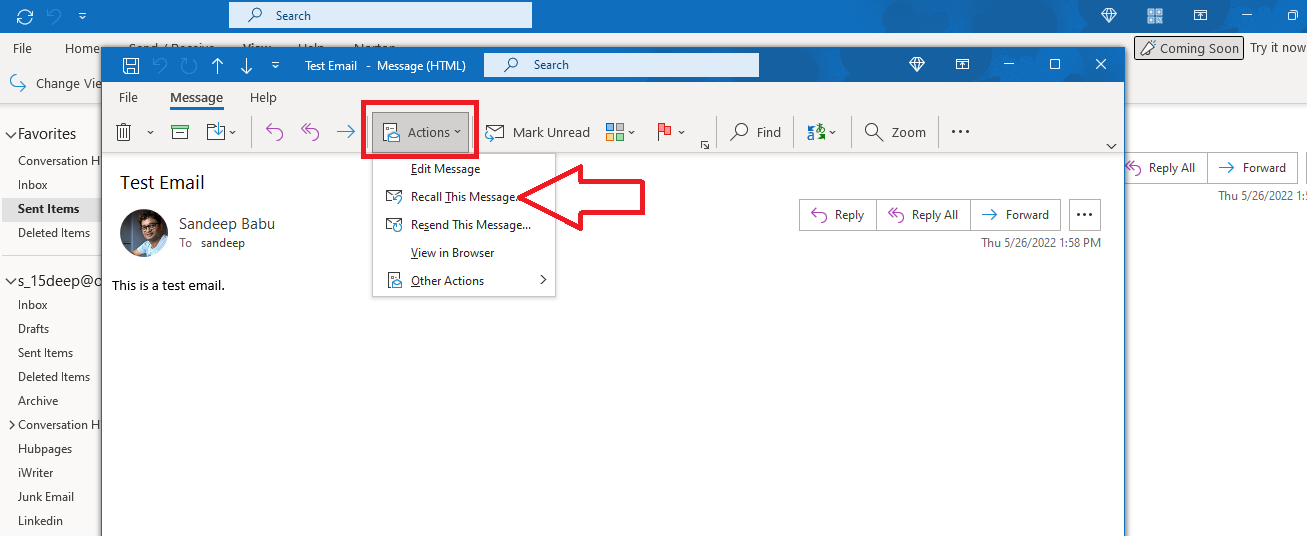
When you initiate a recall, Outlook doesn’t simply “pull back” the email. Instead, it sends a second message, a “recall message,” to the recipient’s inbox. This recall message, which is hidden from the recipient’s view under ideal conditions, instructs the recipient’s Outlook client to:
- Delete unread copies of this message: This option attempts to remove the original email from the recipient’s inbox if it hasn’t been opened yet. The recipient receives no notification that a message was ever sent or recalled.
- Delete unread copies and replace with a new message: This option attempts to delete the original unread message and then immediately replaces it with a new version that you can compose. If successful, the recipient sees only the revised message, with no indication of the original.
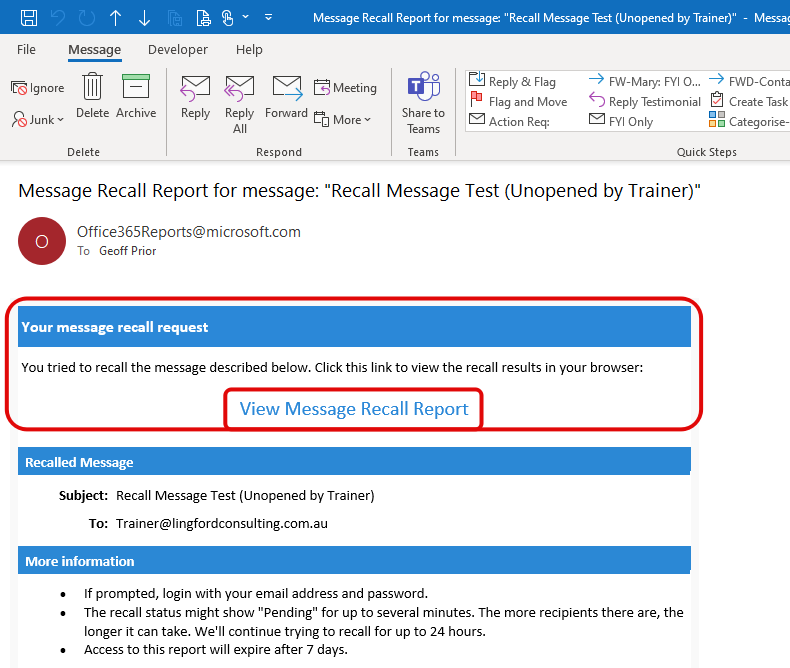
For the sender, Outlook provides a notification of the recall’s success or failure, informing them whether the message was successfully deleted from some or all recipients’ inboxes. However, even a “successful” recall doesn’t guarantee the recipient never saw the original, especially if they received a notification that an attempt was made, or if they had a preview pane open that rendered the message content.
Why Recalling a Message Matters: Beyond Just Fixing Typos
While the immediate motivation for recalling a message is often to correct an error, the implications of this feature extend far beyond simple typos. In a professional context, the ability to potentially retract or modify a sent email touches upon crucial aspects of brand management, operational productivity, and even financial risk mitigation.
Preserving Professional Reputation (Brand)
In today’s interconnected world, an individual’s or an organization’s brand is constantly being shaped by every interaction, and email is a primary channel for these interactions. A poorly worded, inaccurate, or inappropriate email can have significant repercussions on one’s professional reputation.
- Avoiding Misunderstandings: A hastily sent email with ambiguous language or incorrect instructions can lead to confusion, wasted effort, and strained professional relationships. Recalling and correcting such a message ensures clarity and maintains a reputation for clear, precise communication.
- Maintaining Credibility: Sending emails with factual errors, incorrect figures, or outdated information undermines credibility. The ability to retract these errors quickly helps preserve trust and competence, vital components of a strong professional brand.
- Preventing Embarrassment: From personal gaffes to inappropriate comments, an ill-considered email can cause significant personal or corporate embarrassment. Recalling such a message, even if only partially successful, can mitigate the spread of potentially damaging content and protect the sender’s image. This is a direct link to the “Brand” topic – safeguarding one’s professional identity.
Enhancing Productivity and Workflow (Tech)
Beyond reputation, the email recall feature plays a subtle but significant role in organizational productivity and workflow efficiency, aligning directly with the “Tech” theme of optimizing digital tools for better output.
- Minimizing Rework: Incorrect instructions or data in an email can lead recipients to start work based on flawed premises, resulting in wasted time and effort. Recalling and replacing the message with correct information prevents rework and keeps projects on track, enhancing overall productivity.
- Streamlining Communication: Sending multiple follow-up emails to correct an original message clutters inboxes and disrupts focus. A successful recall allows for a cleaner communication stream, ensuring that only the accurate, actionable information is presented, which is a hallmark of efficient digital communication.
- Fostering Confidence: Knowing that a “safety net” like email recall exists (even if imperfect) can, paradoxically, encourage more decisive communication. While not an excuse for carelessness, it allows professionals to send important messages with slightly less anxiety, knowing a critical error might be fixable, thereby contributing to a smoother, more confident workflow.
Mitigating Risk and Financial Implications (Money)
While not immediately apparent, the ability to recall an email can have indirect but substantial financial implications, touching upon the “Money” aspect of the website’s themes.
- Preventing Financial Errors: Imagine an email containing incorrect pricing, flawed financial data, or erroneous invoice details sent to a client or supplier. If acted upon, such an email could lead to incorrect billing, overpayments, underpayments, or even legal disputes, all of which have direct financial costs. A successful recall could prevent these costly errors.
- Protecting Sensitive Information: Sending confidential financial data, trade secrets, or client information to the wrong recipient can lead to data breaches, regulatory fines, and significant reputational damage, all of which carry immense financial penalties. Recalling such a message, particularly if caught quickly, can be a crucial first line of defense against a potentially devastating security incident.
- Safeguarding Deals and Partnerships: Miscommunication in critical business negotiations or partnership discussions can lead to lost opportunities, broken deals, or damaged relationships that directly impact revenue and future financial prospects. Correcting an email before it causes irreversible damage can preserve these financially important relationships. Therefore, while not a direct financial tool, recall serves as a risk mitigation feature that protects an organization’s financial well-being by preserving professional integrity and accuracy.
Limitations and Best Practices for Email Recall

Despite its potential utility, it’s crucial to understand that Outlook’s email recall is not a magical ‘undo’ button. It comes with significant limitations, and its success is far from guaranteed.
When Recall Fails: Common Pitfalls
The most common reasons for recall failure are:
- Message Has Been Read: As discussed, once the recipient opens the email, the game is largely over. Even if Outlook attempts to delete it, the recipient has already seen the content. In many cases, the recall notification might even alert them that you tried to pull something back, piquing their curiosity.
- Recipient is Outside Your Organization: If the recipient’s email system is not an Exchange server (e.g., Gmail, Yahoo, independent ISPs), Outlook’s recall mechanism cannot directly communicate with their server to delete the message. The recall will almost certainly fail.
- Recipient is Using a Non-Outlook Client or Mobile App: Even within an Exchange environment, if the recipient accesses their email through a web browser (Outlook on the Web) or a mobile email app, the recall may not work as intended because these interfaces process messages differently.
- Message Has Been Moved by Rules: If the recipient has an inbox rule that automatically moves the original message from their Inbox to another folder (e.g., a “Project X” folder, an archive), the recall message may not be able to locate and delete the original.
- Cached Mode Issues: In some specific configurations, particularly with older versions of Outlook or certain cached mode settings, recall functionality can be inconsistent.
Strategic Use of Recall: When to Attempt It
Given its limitations, when should you attempt a recall?
- Act Immediately: The window of opportunity is minuscule. Attempt a recall the moment you realize the error. Every second counts before the recipient opens the email.
- Assess the Recipient: Consider who received the email. If they are within your organization and you know they primarily use Outlook on their desktop, your chances are higher.
- Gravity of the Error: For minor typos, a quick follow-up correction might be less disruptive than an attempted recall that fails and notifies the recipient. For critical errors, sensitive information, or potentially damaging content, a recall is always worth attempting, regardless of the odds.
The “Recall” Notification: A Double-Edged Sword
One aspect often overlooked is the notification. If a recall attempt fails (e.g., because the recipient has read the message), the recipient often receives a notification stating, “[Your Name] would like to recall the message ‘[Original Subject]’.” This can be a double-edged sword:
- Increased Curiosity: This notification almost guarantees the recipient will go back and look for the original message, even if they hadn’t noticed it before.
- Transparency vs. Discretion: It exposes your attempt to retract something, which might lead to questions or awkward conversations. Therefore, sometimes a polite apology and correction might be more effective and less intrusive than a failed recall attempt that announces itself.
Proactive Measures: Avoiding the Need for Recall
The best recall is the one you never have to make. Implementing proactive email management strategies can significantly reduce the need for this feature:
- Proofread Diligently: Take an extra moment to read through your email before sending.
- Use Delayed Delivery: Outlook allows you to delay sending emails by a few minutes. This grace period gives you a chance to review and cancel if an error is spotted immediately after hitting ‘send’.
- Recipient Verification: Double-check the recipient list, especially for sensitive emails or ‘reply-all’ situations.
- Attach Confirmation: For emails with attachments, ensure all necessary files are attached before sending.
- Drafting and Review Cycles: For crucial communications, consider drafting them in advance and having a colleague review before dispatch.
Beyond Recall: Advanced Email Management for Modern Professionals
While email recall offers a potential safety net, a truly productive and brand-conscious professional leverages a broader suite of tools and strategies for effective communication. This ties back into the website’s emphasis on “Tech” for productivity and “Brand” for reputation.
Leveraging Outlook’s Advanced Features (Tech)
Outlook is more than just an email client; it’s a powerful productivity hub. Mastering its advanced features can prevent many of the situations that necessitate a recall:
- Rules and Alerts: Automate the sorting of incoming emails, prioritize important messages, and set up alerts for specific keywords to ensure you don’t miss critical information.
- Quick Steps: Create one-click actions for common multi-step tasks, such as moving an email to a specific folder, marking it as read, and replying with a template.
- Categories and Search Folders: Organize your inbox more effectively, making it easier to find information and reducing the risk of accidental miscommunication.
- Delayed Delivery: As mentioned, this is a lifesaver. Setting all outgoing messages to delay for 1-2 minutes gives you a crucial window to cancel a send if an error is immediately spotted.
- Templates and Signatures: Standardize professional communication for frequently sent messages, reducing errors and saving time.
The Role of Digital Security and Compliance (Tech & Brand)
Careful email sending practices, including the judicious use of recall, contribute significantly to digital security and compliance, protecting both individual and corporate brands. Sending sensitive information to the wrong person, even accidentally, can lead to data breaches, regulatory fines (like GDPR or HIPAA), and severe reputational damage. Proactive measures and the rapid use of recall (where effective) are part of a broader strategy to maintain digital hygiene and uphold trust. This is where “Tech” meets “Brand” in protecting digital assets and corporate image.
Building a Professional Communication Strategy (Brand & Money)
Ultimately, the email recall feature is a reactive tool. A truly robust approach involves developing a proactive professional communication strategy. Clear, concise, accurate, and timely communication is a cornerstone of professional success. It builds trust, fosters strong relationships, facilitates efficient collaboration, and directly influences business outcomes, negotiations, and client satisfaction – all of which have tangible “Money” implications for revenue and profitability. Investing time in crafting effective emails, understanding your audience, and leveraging technology wisely is a far more reliable path to success than relying solely on the hope of a successful recall.
Conclusion
The “What Does Recalling a Message in Outlook Do?” question reveals a feature that, while often hoped for as a magical undo button, is in reality a nuanced and often conditional tool. Outlook’s email recall mechanism is an attempt to correct immediate errors, working best under specific circumstances within an Exchange environment. Its value extends beyond simple typo correction, playing a role in protecting professional reputation (Brand), enhancing operational productivity (Tech), and indirectly mitigating financial and reputational risks (Money) by preventing miscommunication and data exposure.
While not a foolproof solution, understanding its mechanics, limitations, and best practices empowers professionals to use it strategically in moments of urgent need. More importantly, it highlights the paramount importance of careful, intentional, and proactive email communication. In a world where digital correspondence defines much of our professional interaction, mastering the art of sending the right message, right the first time, remains the ultimate goal, with recall serving as a valuable, albeit imperfect, safety net for those inevitable human errors.
aViewFromTheCave is a participant in the Amazon Services LLC Associates Program, an affiliate advertising program designed to provide a means for sites to earn advertising fees by advertising and linking to Amazon.com. Amazon, the Amazon logo, AmazonSupply, and the AmazonSupply logo are trademarks of Amazon.com, Inc. or its affiliates. As an Amazon Associate we earn affiliate commissions from qualifying purchases.