
In the rapidly evolving landscape of web development and digital performance, acronyms frequently emerge as benchmarks for success. Among the most critical terms to surface in recent years is CLS. For developers, SEO specialists, and tech enthusiasts, understanding what CLS stands for—and how it functions—is essential for building a high-quality digital presence.
CLS stands for Cumulative Layout Shift. It is a core performance metric used to measure visual stability on a webpage. As one of Google’s “Core Web Vitals,” it represents a fundamental shift in how we evaluate the “health” of a website, moving away from simple loading speeds toward a more nuanced understanding of the user experience (UX).
Defining CLS: Beyond the Acronym
At its most basic level, Cumulative Layout Shift measures how much the content on a screen “jumps” as a page loads. We have all experienced the frustration of browsing a site, preparing to click a link or a button, only for a late-loading advertisement or image to push the content down, causing us to click the wrong element. CLS is the technical quantification of that annoyance.
The Technical Definition of Cumulative Layout Shift
In technical terms, CLS is a score assigned to a webpage based on every unexpected layout shift that occurs during the entire lifespan of the page. A layout shift happens any time a visible element changes its position from one rendered frame to the next.
It is important to note the word “unexpected.” If a user clicks a “Expand” button and the layout shifts to show more text, that is an expected interaction and does not count against the CLS score. CLS specifically targets shifts that occur without user initiation, often caused by asynchronous loading or resources being added to the DOM (Document Object Model) above existing content.
How CLS is Calculated: The Math of Instability
Google calculates the CLS score using a specific formula involving two metrics: the Impact Fraction and the Distance Fraction.
- Impact Fraction: This measures how much space an unstable element takes up in the viewport between two frames. For example, if an element occupies 50% of the viewport and then moves down by another 25%, the total area impacted is 75%.
- Distance Fraction: This measures the distance that the unstable element has moved relative to the viewport. If the element moves by 25% of the screen height, the distance fraction is 0.25.
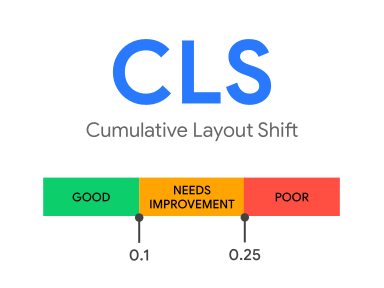
The final CLS score is the product of these two numbers: Impact Fraction x Distance Fraction. A “good” CLS score, according to industry standards, is anything below 0.1. Scores between 0.1 and 0.25 need improvement, while anything above 0.25 is considered poor.
Why CLS Matters for the Modern Web Ecosystem
CLS is not just a vanity metric for developers; it has profound implications for the viability of software products and web-based applications. In the tech world, performance is often synonymous with retention and reliability.
Enhancing User Experience (UX) and Reducing Frustration
The primary goal of monitoring CLS is to improve the user experience. Visual instability creates a sense of “jank” and unreliability. In high-stakes environments—such as e-commerce checkouts or financial dashboards—a layout shift can lead to catastrophic errors, such as a user accidentally confirming a purchase they didn’t intend to make or deleting data because a button moved at the last millisecond. By prioritizing a low CLS, tech teams ensure that their software feels solid, predictable, and professional.
The Impact on Search Engine Optimization (SEO)
From a strategic technology standpoint, CLS became a centerpiece of web discussion when Google integrated it into its ranking algorithms as part of the Page Experience update. Search engines no longer just look at keywords and backlinks; they look at how users interact with the page. A high CLS score can negatively impact a site’s visibility in search engine results pages (SERPs). This makes CLS a bridge between the engineering department and the marketing department, requiring collaborative efforts to optimize code for better organic reach.
Conversion Rates and the “Cost” of Visual Instability
In the tech industry, data drives decisions. Case studies across the web have shown that sites with better Core Web Vitals—specifically low CLS—see higher conversion rates. When a site is visually stable, users feel more confident navigating it. They stay longer, consume more content, and are more likely to complete desired actions (like signing up for a SaaS trial or downloading an app). Conversely, a high CLS increases bounce rates, as users quickly lose patience with a “shaky” interface.
Identifying the Primary Causes of Poor CLS Scores
To fix a problem, one must first understand its source. In modern software development, several common technical oversights contribute to high CLS scores.
Images and Videos Without Dimensions

This is perhaps the most common culprit. In the early days of the web, it was standard practice to define width and height attributes in HTML. As responsive design became the norm, many developers shifted to using CSS to manage sizes. However, if the browser doesn’t know the aspect ratio of an image before it downloads, it cannot reserve the correct amount of space. Once the image finally loads, the browser suddenly realizes it needs 500 pixels of height, pushing everything below it down instantly.
Dynamically Injected Content and Ads
Modern web apps often use “lazy loading” or asynchronous JavaScript to fetch data. This includes third-party advertisements, newsletter sign-up forms, or “related content” widgets. If these elements are injected into the top of a page after the initial text has rendered, they will cause a massive layout shift. In the world of ad-tech, this is a notorious challenge, as ads often vary in size and take longer to load than the primary content.
Web-font Loading Issues (FOIT/FOUT)
Fonts can also trigger layout shifts. When a browser downloads a custom web font, it might display a fallback font first (Flash of Unstyled Text – FOUT) or hide the text entirely until the font arrives (Flash of Invisible Text – FOIT). If the custom font has different dimensions or letter spacing than the fallback font, the paragraphs may wrap differently, causing the entire layout of the page to shift once the custom font is applied.
Strategies for Optimizing CLS: A Technical Tutorial
Optimizing for CLS requires a shift in how developers approach front-end architecture. It is about “reserving space” for the future.
Implementing Aspect Ratio Boxes
The most effective way to handle images and media is to provide the browser with the aspect ratio beforehand. Modern CSS provides the aspect-ratio property, which allows developers to define the proportions of an element.
- Tutorial Tip: Always include
widthandheightattributes on your<img>and<video>tags. Modern browsers use these attributes to calculate the aspect ratio before the asset is downloaded, allowing the browser to reserve the exact amount of space needed in the layout.
Reserving Space for Ad Slots and Embeds
Since you often cannot control the speed at which a third-party ad loads, you must control the container it lives in.
- Styling the Container: Wrap ads in a
<div>with a defined minimum height. - Avoid Top-Loading: Try to avoid placing non-static elements near the top of the viewport. If an ad shifts content at the bottom of the page (below the fold), it doesn’t impact the CLS score for the initial load.
- Placeholder Content: Use “skeleton screens” or placeholders that match the eventual size of the injected content to keep the UI stable.
Optimizing Font Delivery with CSS
To minimize shifts caused by fonts, developers should use the font-display: swap; property in their CSS. This ensures that text is immediately visible using a system font. To take it a step further, you can use the size-adjust property in @font-face to make your fallback font match the proportions of your custom font as closely as possible, ensuring that the transition between the two is seamless and shift-free.
Measuring and Monitoring CLS Performance
In the tech world, “if you can’t measure it, you can’t improve it.” Monitoring CLS requires a combination of “Lab Data” and “Field Data.”
Lab Data vs. Field Data
- Lab Data: This is collected in a controlled environment using tools that simulate a user’s experience. It is excellent for debugging during the development phase. Tools like Lighthouse and Chrome DevTools provide lab data.
- Field Data: Also known as Real User Monitoring (RUM), this is data collected from actual users visiting your site in the real world. This is the data Google actually uses for its ranking signals. The Chrome User Experience Report (CrUX) is the primary source for this information.
Tools for Auditing Your CLS Score
Several high-level tech tools are indispensable for maintaining a stable CLS:
- Google Search Console: Provides a “Core Web Vitals” report that highlights which URLs on your site are failing the CLS threshold.
- PageSpeed Insights: Offers a detailed breakdown of which specific elements are causing layout shifts.
- Layout Shift Debugger: A specialized tool that provides a visual overlay of a page, highlighting exactly which elements moved and by how much.
By integrating these tools into a continuous integration/continuous deployment (CI/CD) pipeline, technology teams can ensure that no new code deployment accidentally degrades the visual stability of the application.

Conclusion
So, what does CLS stand for? While it literally stands for Cumulative Layout Shift, in the broader context of technology and digital strategy, it stands for User-Centric Performance. It represents a move toward a web where the user’s comfort and visual experience are prioritized over raw, unoptimized delivery.
For developers and tech leaders, mastering CLS is not just about passing a Google test; it is about building software that feels reliable, trustworthy, and high-quality. By understanding the math behind the shift, identifying the technical triggers, and implementing robust CSS and JavaScript solutions, we can create a more stable and pleasant digital world for everyone.
aViewFromTheCave is a participant in the Amazon Services LLC Associates Program, an affiliate advertising program designed to provide a means for sites to earn advertising fees by advertising and linking to Amazon.com. Amazon, the Amazon logo, AmazonSupply, and the AmazonSupply logo are trademarks of Amazon.com, Inc. or its affiliates. As an Amazon Associate we earn affiliate commissions from qualifying purchases.