
In today’s hyper-connected world, social media apps are an integral part of our digital lives. Snapchat, with its ephemeral messaging and creative filters, has carved out a significant niche. However, like any complex software, Snapchat can sometimes experience performance hiccups. One common solution users encounter is “clearing the cache.” But what exactly does this mean, and why should you care? This article will demystify the concept of clearing cache on Snapchat, exploring its technical implications, its impact on your user experience, and its connection to broader themes of digital hygiene and app management.
Understanding the Cache: A Digital Memory Lane
Before we delve into clearing it, it’s crucial to understand what the “cache” actually is. Imagine your phone or computer as a human brain. The cache is akin to short-term memory. It’s a temporary storage area where an application, like Snapchat, keeps frequently accessed data and information. This data can include things like:
- Images and videos: Snap photos and videos that you’ve viewed or received.
- App settings and preferences: Your personalized configurations for how Snapchat looks and functions.
- User data: Bits of information about your profile and interactions.
- Temporary files: Data that helps the app load faster and run more smoothly.
The primary purpose of the cache is to enhance performance. By storing this data locally, Snapchat doesn’t have to repeatedly download or generate it from its servers. This results in quicker loading times for your feed, faster transmission of snaps, and a generally more responsive app experience. It’s a clever optimization technique employed by most modern applications to make your digital interactions seamless.
However, like any memory system, the cache isn’t infallible. Over time, it can accumulate a significant amount of data. This can lead to several issues, which is where the concept of “clearing” comes into play.
Why Clear the Cache? Addressing App Glitches and Performance Slumps
While a healthy cache is beneficial, an overgrown or corrupted one can become a bottleneck. Clearing the cache on Snapchat is essentially a digital spring cleaning. It involves deleting these temporary files that the app has stored. The reasons why you might need to do this are varied and often tied to common app frustrations:
Slow Loading Times and Lag
As mentioned, a cache is meant to speed things up. However, if the cache becomes too large or contains fragmented data, it can paradoxically slow down the app. When the app has to sift through a massive amount of temporary data to find what it needs, it can lead to noticeable lag when scrolling through your feed, opening snaps, or even sending them. Clearing the cache can free up storage space and remove corrupted files, allowing Snapchat to access necessary data more efficiently.
App Crashing and Freezing
Corrupted cache files are a common culprit behind app instability. If a piece of temporary data gets damaged, it can cause the app to misbehave, leading to unexpected crashes or the app freezing entirely. This is especially true after app updates, as new versions might not be entirely compatible with older cached data. Clearing the cache can resolve these conflicts by starting with a clean slate.
Storage Space Concerns
While not the primary reason, a large cache can consume a surprising amount of your device’s storage. If you’re constantly running low on space, clearing the cache of frequently used apps like Snapchat can free up gigabytes of data, allowing you to install new apps, take more photos, or store other important files.
Resolving Login or Synchronization Issues
In some cases, a cluttered cache can interfere with the app’s ability to communicate effectively with Snapchat’s servers. This can manifest as problems logging in, snaps not sending or receiving properly, or your story not updating. Clearing the cache can help re-establish a clean connection, ensuring that your app is communicating with the latest server information.
Eliminating Stale or Incorrect Data
Sometimes, the cache might hold outdated information. For instance, if you’ve unfriended someone or changed your username, and these changes aren’t reflecting properly in the app, it could be due to old data lingering in the cache. Clearing it forces the app to fetch the most up-to-date information from the server.
How to Clear Snapchat Cache: A Step-by-Step Guide

The process of clearing your Snapchat cache is relatively straightforward and can be done directly within the app’s settings. It’s important to note that clearing the cache does not delete your account, your snaps, your chat history, or any other personal data. It only removes the temporary files that facilitate the app’s operation.
Navigating Snapchat’s Settings
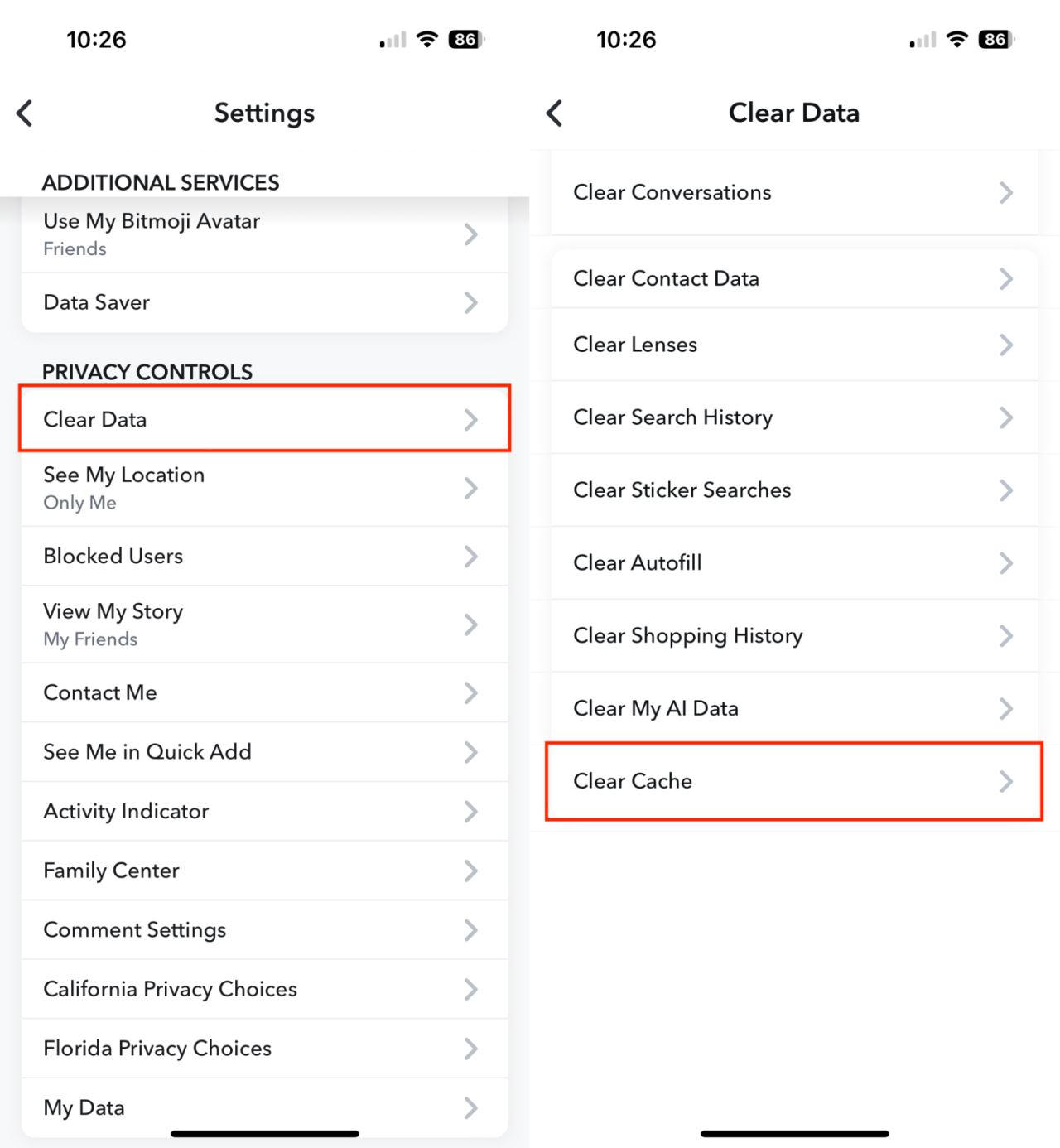
Here’s how to clear your Snapchat cache on most devices:
- Open Snapchat: Launch the Snapchat app on your smartphone.
- Access your Profile: Tap on your Bitmoji or profile icon, usually located in the top-left corner of the screen.
- Go to Settings: On your profile page, tap the gear icon (⚙️) in the top-right corner to access the settings menu.
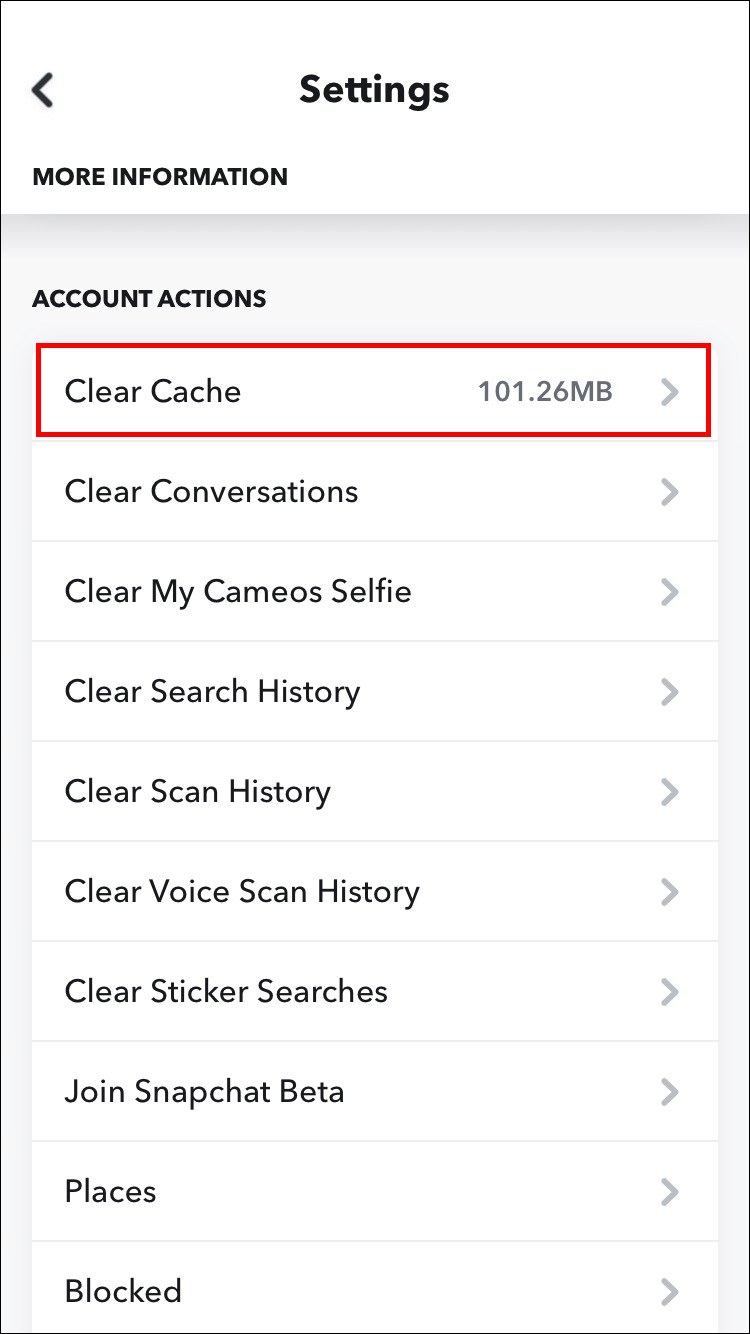
- Scroll Down to “Account Actions”: Within the settings menu, scroll down until you find a section labeled “Account Actions.”
- Tap “Clear Cache”: In the “Account Actions” section, you will find an option for “Clear Cache.” Tap on it.
- Confirm Your Action: A pop-up will appear, warning you that clearing the cache will remove cache data from your device. It will reiterate that your snaps, chats, and other personal information will not be deleted. Tap “Continue” or “Clear” to proceed.
Once you confirm, Snapchat will begin deleting the temporary files. This process might take a few moments, depending on the size of your cache. After it’s complete, you might notice that the app takes a little longer to load the first time you open it again, as it will need to re-download some of the data it previously had cached. This is perfectly normal and a sign that the process was successful.
The Impact on Your Digital Brand and Online Reputation
While the immediate benefit of clearing cache is improved app performance, it also touches upon broader themes related to our digital presence and online reputation. In the realm of Brand building, particularly personal branding, maintaining a seamless and professional online presence is paramount.
Consider this: if your Snapchat is constantly crashing or exhibiting slow performance when you’re trying to communicate with friends, potential collaborators, or even potential employers who might check your social media footprint, it can create a negative impression. A glitchy or unresponsive digital persona can inadvertently suggest disorganization, lack of attention to detail, or even unreliability.
By regularly performing simple maintenance tasks like clearing your cache, you ensure that your chosen platforms function as intended. This contributes to a more polished and professional digital brand. It shows that you are mindful of your online tools and take steps to ensure they represent you effectively. Furthermore, for businesses that utilize Snapchat for marketing or customer engagement, a well-performing app translates directly into a better customer experience and a stronger brand perception. A frustrated user due to app lag is a lost opportunity for brand interaction.
Cache Management and Digital Security: A Subtle Connection
When we talk about Tech and Digital Security, the cache might not be the first thing that comes to mind. However, there’s a subtle yet important connection. While clearing the cache primarily addresses performance issues, it can also play a role in mitigating certain digital security risks.
Temporary files stored in the cache can, in rare instances, become targets for malicious actors. If an app’s cache is compromised, it could potentially expose sensitive but temporary data. By regularly clearing your cache, you are essentially reducing the footprint of this temporary data, making it less accessible to potential threats.
Moreover, corrupted cache files can sometimes be a symptom of underlying malware or a security breach on your device. While clearing the cache itself isn’t a security solution, it can be a troubleshooting step that, when combined with other security practices (like keeping your operating system and apps updated, using strong passwords, and being cautious about downloads), contributes to a more secure digital environment. It’s a proactive measure that helps maintain the integrity of your apps.
Financial Implications of App Performance: Beyond the Obvious
While the direct financial implications of clearing Snapchat cache might seem negligible, the connection to Money and financial management lies in efficiency and productivity. For individuals who use Snapchat for side hustles, networking for business opportunities, or even managing social aspects of their personal finances (e.g., coordinating with family on shared expenses), a well-functioning app is crucial.
Imagine you’re trying to finalize a freelance project detail via a Snapchat message, and the app is lagging, or worse, crashing. This delay can lead to missed deadlines, frustrated clients, and potential loss of income. Similarly, if you rely on Snapchat for coordinating with a team on a business venture, app instability can hinder communication and slow down progress, impacting the financial health of that venture.
On a more personal level, time spent troubleshooting a malfunctioning app is time taken away from more productive activities. This could be time you could be spending on your primary job, pursuing a side hustle, or managing your investments. By keeping your apps running smoothly, you optimize your digital workflow, indirectly contributing to your overall financial efficiency and earning potential.
Conclusion: A Simple Act for a Smoother Digital Life
In conclusion, “what does clear cache on Snapchat mean” is more than just a technical query; it’s an inquiry into the health and performance of a crucial digital tool. Clearing the cache on Snapchat is a simple yet effective maintenance task that can resolve a myriad of performance issues, from lagging to crashing. It’s a form of digital hygiene that ensures your app functions optimally, providing a smoother and more enjoyable user experience.
Beyond the immediate technical benefits, understanding and utilizing cache clearing practices contributes to a more robust digital brand, a subtly more secure digital environment, and ultimately, a more efficient approach to managing your digital life, which can have indirect but positive implications for your financial well-being. So, the next time you encounter a glitch or simply want to ensure your Snapchat is running at its best, remember the power of a clean cache – a small act for a significant improvement in your digital world.
aViewFromTheCave is a participant in the Amazon Services LLC Associates Program, an affiliate advertising program designed to provide a means for sites to earn advertising fees by advertising and linking to Amazon.com. Amazon, the Amazon logo, AmazonSupply, and the AmazonSupply logo are trademarks of Amazon.com, Inc. or its affiliates. As an Amazon Associate we earn affiliate commissions from qualifying purchases.