
In an increasingly complex digital world, where individuals and businesses alike often juggle multiple computing devices, the physical workspace can quickly become a tangled mess of cables, keyboards, mice, and monitors. From a professional managing a powerful workstation alongside a secure network terminal, to a home user balancing a gaming rig with a work-from-home laptop, the challenge of maintaining an organized, efficient, and productive setup is universal. Enter the KVM switch – a remarkably elegant and powerful solution designed to simplify this very predicament. Far from being just another gadget, a KVM switch is a foundational tool for anyone looking to optimize their digital environment, streamline workflows, and reclaim valuable desk space.

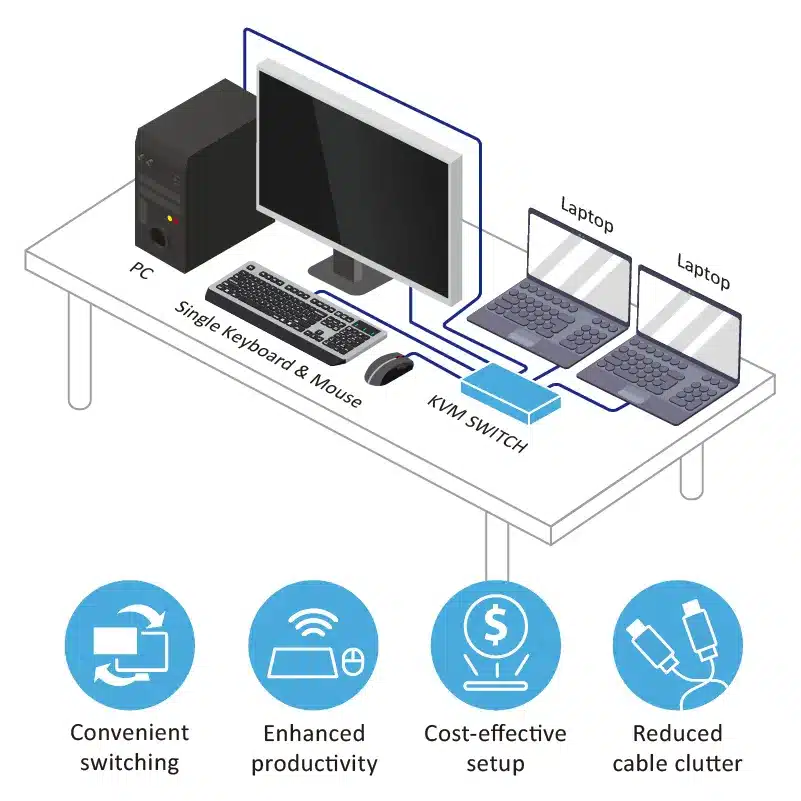
At its core, a KVM switch serves as a centralized hub, allowing a single set of peripherals – specifically a Keyboard, Video (monitor), and Mouse – to control multiple computers. It acts as a digital traffic controller, seamlessly rerouting the input and output signals from your chosen peripherals to whichever connected computer you select. This seemingly simple function unlocks a cascade of benefits, from enhanced productivity and digital security to significant cost savings and improved workspace aesthetics.
The Core Functionality: Unpacking KVM’s Purpose
Understanding what a KVM switch does begins with dissecting its name and primary operation. The acronym KVM stands for Keyboard, Video, and Mouse – the three fundamental interface components required to interact with a computer.
The “KVM” Explained
Imagine you have two desktop computers, each requiring its own keyboard, mouse, and monitor. Without a KVM switch, your desk would be cluttered with two sets of these peripherals, forcing you to physically move your hands between them or even unplug and re-plug cables every time you wanted to switch control. This is where the KVM switch shines.
- Keyboard (K): The KVM switch connects to the keyboard ports (typically USB, though older models might use PS/2) of all your computers. When you type on your single keyboard, the KVM directs those keystrokes to the active computer.
- Video (V): This is where your display(s) connect. The KVM routes the video signal from the currently selected computer to your monitor. This means you only need one monitor (or one set of monitors for advanced KVMs) to view the output from any connected PC.
- Mouse (M): Similar to the keyboard, your single mouse connects to the KVM, and its movements and clicks are transmitted to the active computer.
By consolidating these essential interfaces, a KVM switch eliminates the need for redundant peripherals, creating a more cohesive and less chaotic workspace.
Beyond the Basics: Expanding Connectivity
While the core KVM function remains paramount, modern KVM switches have evolved significantly to meet the demands of contemporary computing environments. Today’s KVMs often extend their capabilities far beyond just keyboard, video, and mouse.
Many contemporary KVM switches include:
- USB Peripheral Ports: These allow you to share other USB devices like printers, scanners, external hard drives, webcams, USB headsets, or even graphic tablets among all connected computers. This is a massive boon for productivity, as it means you don’t need dedicated peripherals for each machine.
- Audio Connectivity: Integrated audio ports (typically 3.5mm jacks) enable you to share a single set of speakers and a microphone across multiple PCs, perfect for conference calls or multimedia consumption.
- Advanced Video Support: As display technology progresses, so do KVM switches. You’ll find KVMs supporting a wide array of video interfaces, including DVI, HDMI, and DisplayPort, often capable of handling high resolutions like 4K, 8K, and even ultra-high refresh rates (e.g., 144Hz, 240Hz) crucial for gaming or professional design work. Multi-monitor KVMs are also common, allowing users to control several computers, each with two, three, or even four displays, using a single set of peripherals.
This expanded functionality transforms the KVM switch from a simple peripheral consolidator into a central hub for your entire computing environment, providing unparalleled flexibility and control.
Why You Need a KVM Switch: Benefits for Productivity and Beyond
The implications of a KVM switch’s core functionality extend far beyond mere convenience. For both individuals and organizations, integrating a KVM switch into their setup brings tangible advantages in terms of efficiency, organization, and resource management.
Streamlining Your Workspace
One of the most immediate and visually apparent benefits of a KVM switch is its ability to dramatically declutter and streamline your physical workspace.
- Reduce Cable Clutter: Multiple computers often mean a spaghetti bowl of cables. A KVM switch funnels all peripheral connections into a single device, significantly reducing the number of wires running across your desk and behind your machines.
- Free Up Desk Space: By eliminating redundant keyboards, mice, and monitors, you reclaim valuable desk real estate. This allows for a cleaner, more organized setup, which can subtly contribute to a more focused and less stressful working environment. From a brand and design perspective, a tidy desk projects professionalism and efficiency, both for personal branding and corporate identity.
- Enhanced Aesthetics: A minimalist setup with fewer peripherals and cables isn’t just functional; it’s visually appealing. This is particularly important for professionals whose workspaces might be visible to clients or colleagues, or for content creators who often showcase their setups.
Boosting Efficiency and Productivity
The real power of a KVM switch lies in its capacity to enhance operational efficiency and productivity.
- Seamless Switching: The ability to switch between computers with a simple button press or hotkey command means no more physically unplugging and replugging cables, or waiting for systems to re-detect devices. This instant transition keeps your workflow fluid and minimizes interruptions, allowing you to maintain focus on the task at hand.
- Multi-Platform Mastery: Many professionals, especially developers, designers, or IT administrators, work across different operating systems (Windows, macOS, Linux) or even distinct hardware configurations. A KVM switch allows you to manage all these environments from a single workstation, eliminating the need to have multiple dedicated setups. This is a huge productivity booster, enabling quick testing, development, and administration across diverse platforms.
- Optimized Task Management: For roles requiring interaction with separate, often isolated, systems (e.g., a development environment, a production server, and a personal browsing machine), a KVM switch provides the perfect bridge without compromising the security or integrity of each system.
Cost-Effectiveness and Resource Optimization
Beyond convenience and productivity, KVM switches also offer significant financial and resource benefits, appealing to the “Money” aspect of modern computing.
- Reduced Hardware Costs: The most obvious financial saving comes from not needing to purchase multiple sets of expensive peripherals – high-resolution monitors, ergonomic keyboards, or precision mice. One premium set shared across several computers represents a substantial saving.
- Lower Power Consumption: Fewer active peripherals generally translate to slightly lower overall power consumption. While incremental for a single user, this can add up in larger deployments.
- Simplified IT Asset Management: For businesses, KVM switches simplify IT asset management by reducing the number of peripherals to track, maintain, and replace. It’s easier to manage inventory and ensure consistent hardware across different workstations. This contributes to better business finance practices through optimized resource utilization.
Who Benefits Most from a KVM Switch? Diverse Applications
The utility of a KVM switch spans a wide spectrum, catering to various user profiles from home enthusiasts to large enterprises.

For the Tech Enthusiast and Home User
In the modern home, it’s common to find multiple computers serving different purposes.
- Gaming and Streaming Setups: Many gamers use one high-performance PC for gaming and a separate, often less powerful, machine for streaming to offload CPU resources. A KVM switch allows seamless switching between these two machines using the same monitor, keyboard, and mouse, eliminating the need for a duplicate setup.
- Home Office Productivity: With the rise of remote work, professionals often have a dedicated work laptop or desktop and a separate personal computer. A KVM allows them to switch between work and personal tasks instantly without leaving their ergonomic setup, enhancing productivity and maintaining work-life boundaries.
- Media Servers and Development Environments: Hobbyists running home servers, virtual machines, or multiple development environments can easily manage these systems from a central workstation.
In Professional and Business Environments
KVM switches are indispensable tools in many professional settings, contributing to digital security, IT efficiency, and overall business productivity.
- IT Administration and Data Centers: KVM switches, particularly rack-mountable or IP-based models, are fundamental in data centers and server rooms. They allow IT professionals to access and manage numerous servers from a single console, often remotely, without needing a dedicated monitor, keyboard, and mouse for each server. This is critical for efficient monitoring, maintenance, and troubleshooting.
- Software Development and Testing: Developers often need to test applications across different operating systems, hardware configurations, or isolated network segments. A KVM switch facilitates rapid switching between these test beds, significantly accelerating the development cycle.
- Design Studios and Workstations: Graphic designers, video editors, and CAD professionals often utilize powerful, specialized workstations. A KVM can help them manage multiple high-performance machines, perhaps one for rendering and another for interactive design, sharing high-end displays and input devices.
- Digital Security and Isolation: For environments where digital security is paramount, a KVM switch allows for physical isolation of systems. For instance, a highly secure system might be kept completely separate from a general-purpose internet-connected machine. The KVM facilitates interaction with both using the same peripherals without direct network connection between them, acting as a physical air gap for input/output. This aligns directly with digital security best practices.
Niche and Advanced Use Cases
Beyond common applications, KVM switches find their way into highly specialized fields:
- Medical Imaging: In healthcare, KVMs can connect diagnostic workstations to multiple specialized display units.
- Broadcast Control: In television and radio studios, KVMs manage the array of computers controlling broadcasts and production equipment.
- Educational Labs: Computer labs can use KVMs to allow instructors to quickly switch between student stations or demonstration PCs.
Choosing the Right KVM Switch: Key Considerations
Selecting the ideal KVM switch requires understanding your specific needs and the technical specifications available. This process is essentially a miniature exercise in gadget review, a core part of the “Tech” topic.
Number of Computers and Monitors
- Port Count: KVMs come in various port configurations: 2-port, 4-port, 8-port, 16-port, and even higher for enterprise solutions. Choose based on the number of computers you need to connect.
- Monitor Support: Determine if you need a single-monitor, dual-monitor, triple-monitor, or quad-monitor KVM. Each computer connected will require the corresponding number of video inputs on the KVM for each monitor.
Video Interface and Resolution
- Connector Types: Identify the video output ports on your computers (VGA, DVI, HDMI, DisplayPort) and ensure the KVM supports them. Many modern KVMs offer a mix or are specific to one type.
- Resolution and Refresh Rate: If you have 4K/8K monitors or high-refresh-rate gaming monitors (e.g., 144Hz, 240Hz), ensure the KVM supports the required bandwidth and refresh rates to avoid bottlenecking your display performance. Lower-end KVMs might not pass through signals cleanly at very high resolutions or refresh rates.
USB and Audio Support
- USB Standards: Most KVMs use USB for keyboard and mouse. Check if you need USB 2.0, USB 3.0/3.1 for shared peripherals (like fast external drives) and ensure dedicated peripheral ports are available and sufficient.
- Audio Jacks: If you want to share speakers and microphones, confirm the KVM has the appropriate analog (3.5mm) or digital audio ports.
Switching Methods and Advanced Features
- Switching Options: Common methods include front-panel push buttons, keyboard hotkeys (e.g., Ctrl+Ctrl or Scroll Lock+Scroll Lock), or an On-Screen Display (OSD) menu for more complex KVMs.
- Keyboard and Mouse Emulation: Some KVMs use emulation to ensure immediate keyboard/mouse recognition during switching, which can be critical for certain operating systems or BIOS access. Others offer “pass-through” mode, which might be preferred for specialized gaming mice or keyboards with custom drivers.
- Remote IP KVM: For managing servers in a data center or remotely, IP KVMs allow access over a network, effectively making the KVM accessible from anywhere with an internet connection. This is a crucial “Tech Trend” for remote IT management and digital security.
- Operating System Compatibility: While most KVMs are OS-agnostic, it’s always wise to confirm compatibility, especially with niche operating systems or older hardware.
The KVM Switch in the Modern Tech Landscape
Even with the advancements in cloud computing, virtualization, and remote access tools, the KVM switch maintains its relevance and continues to evolve.
Evolving with Technology Trends
While some might argue that cloud-based virtual machines reduce the need for physical KVMs, the reality is that many critical tasks still require direct, low-latency interaction with physical hardware. Developers building on specific hardware, IT pros managing on-premise servers, or creative professionals needing raw local processing power will always benefit from physical machine control. KVMs are adapting by supporting newer interfaces, higher resolutions, and integrating more advanced features, ensuring their place as a vital component in modern tech setups.
A Tool for Digital Security and Efficiency
The KVM switch contributes to digital security by facilitating the physical isolation of sensitive systems. For environments handling highly classified data or critical infrastructure, maintaining air-gapped systems and using KVMs to switch between them is a robust security measure. Furthermore, by consolidating peripherals and simplifying the workspace, KVMs implicitly boost overall system efficiency. They contribute to a more disciplined and organized approach to managing technology, which is a cornerstone of productivity. In a world increasingly focused on AI tools and complex software, having a clean, efficient hardware foundation provided by a KVM switch allows users to focus their mental energy on higher-level tasks, rather than wrestling with physical connectivity.
Conclusion
The KVM switch, though often overlooked in the dazzling array of modern gadgets, remains a foundational and exceptionally practical piece of technology. Its core function – to allow a single set of keyboard, video, and mouse peripherals to control multiple computers – translates into a wealth of benefits. From significantly boosting productivity and streamlining cluttered workspaces to delivering tangible cost savings and enhancing digital security, the KVM switch proves its value across diverse environments.
Whether you’re a gamer meticulously crafting a dual-PC setup, a developer juggling multiple operating systems, an IT professional managing a server rack, or simply a home user balancing work and personal computing, a KVM switch provides a seamless, efficient, and elegant solution. It allows you to maintain focus, reduce friction in your workflow, and optimize your digital life. In an era where efficiency and organization are key to navigating technological complexity, the KVM switch stands as a testament to intelligent design, proving that sometimes, the simplest solutions yield the most profound impact. It’s not just about switching computers; it’s about switching to a smarter way of working.
aViewFromTheCave is a participant in the Amazon Services LLC Associates Program, an affiliate advertising program designed to provide a means for sites to earn advertising fees by advertising and linking to Amazon.com. Amazon, the Amazon logo, AmazonSupply, and the AmazonSupply logo are trademarks of Amazon.com, Inc. or its affiliates. As an Amazon Associate we earn affiliate commissions from qualifying purchases.