
Snapchat, a platform that revolutionized social media with its ephemeral messaging and playful filters, has a unique way of connecting users. Unlike other social networks where friend requests might be a formal, often lengthy process, Snapchat’s approach is more immediate and integrated into its visual-first experience. Understanding what a friend request looks like on Snapchat is crucial for navigating its social landscape, whether you’re a seasoned user or just diving in. This exploration delves into the visual cues, the different ways you can receive and send requests, and the underlying technical and branding considerations that make this seemingly simple interaction work.

The Visuals of Connection: How Snapchat Friend Requests Appear
At its core, Snapchat is about quick, visual communication. This philosophy extends to how friend requests are presented. Forget lengthy profiles or detailed “About Me” sections; Snapchat prioritizes recognition and immediate understanding.
Incoming Friend Requests: The Notification Trail
When someone sends you a friend request on Snapchat, the platform employs a multi-pronged notification system to ensure you don’t miss it.
- The Snapcode Spotlight: The most iconic visual element is the Snapcode. Each Snapchat user has a unique Snapcode – a personalized QR code that can be scanned by others to add them as a friend. When someone is trying to add you, they might be scanning your Snapcode directly, or they might be searching for you by username.
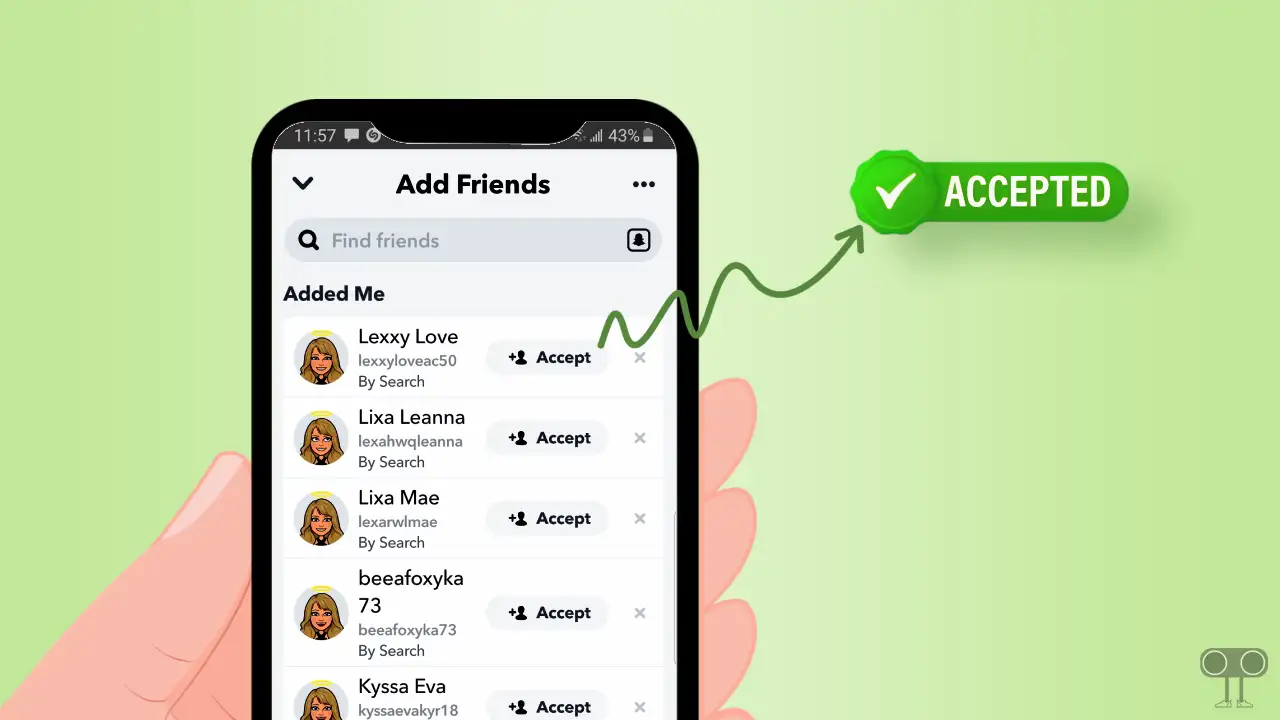
- The “Add Friends” Screen: The primary place where you’ll encounter pending friend requests is within the “Add Friends” section of the app. Accessible from the main camera screen by swiping down from the top or tapping the Bitmoji in the top-left corner, this section is a hub for managing your connections. Here, you’ll see a list of people who have sent you requests. Each entry will typically display the user’s display name, their username, and often their Bitmoji. This provides a quick visual identifier, allowing you to decide if you recognize them.
- The “Pending” List: Within the “Add Friends” screen, there’s usually a specific section or tab labeled “Pending” or “Friend Requests.” This is where all the incoming invitations reside. You’ll see each request clearly separated, allowing you to accept or deny them individually. The visual layout is designed for swift decision-making, presenting just enough information to jog your memory or confirm your identity.
- Notifications: Snapchat also sends push notifications to your device when you receive a new friend request. These notifications can appear as a banner at the top of your screen or within your device’s notification center. The notification itself will usually state “X has added you as a friend” or “You have a new friend request.” Tapping on this notification will typically take you directly to the “Add Friends” screen where you can manage the request.
- “Friends Who Aren’t Your Friends” Feature: Snapchat has a clever feature within the “Add Friends” screen that shows you people you might know. This section often surfaces individuals who are friends with some of your existing friends. If someone you know adds you through this method, their request will appear here, making it easier to identify them through mutual connections.
Outgoing Friend Requests: The Search and Add Process
Sending a friend request on Snapchat is equally intuitive and visually guided.
- Searching by Username or Name: The most common way to add someone is by searching for them. You can do this by typing their username or their display name into the search bar at the top of the “Add Friends” screen. As you type, Snapchat will provide suggestions based on your input.
- Scanning Snapcodes: This is a direct and highly visual method. You can scan someone’s Snapcode by pointing your phone’s camera at it within the Snapchat app. Alternatively, you can upload a Snapcode image from your photo gallery. Once scanned, you’ll be presented with the user’s profile and an option to add them.
- Adding from a Story: If you’re viewing someone’s public Story and want to add them as a friend, you can often do so directly from the Story viewer. There’s usually an option to “Add Friend” or a similar prompt, which will then lead you to their profile and the ability to send a request.
- From Mutual Friends: When viewing the friend list of a mutual friend, you may see an option to “Add Friend” next to their names, provided they haven’t made their friend list private.
- The “Add” Button: Once you’ve found the person you want to add, there will be a clear “Add” button next to their name or profile. Tapping this button initiates the friend request. On their end, they will then see your request appear in their “Pending” list.

The Technology Behind the Connection: From Bitmoji to Backend
While the visual presentation of a friend request is straightforward, a sophisticated technological infrastructure underpins the entire process, blending user-friendly design with robust backend systems.
User Identification and Matching Algorithms
Snapchat employs several technologies to ensure accurate friend request delivery and to suggest potential connections.
- Unique Usernames and IDs: Every Snapchat account is assigned a unique username, which acts as a primary identifier. This ensures that when you search for someone, you’re finding the exact person you intend to connect with. Beyond the username, there are internal user IDs that the backend uses for data management and relationship tracking.
- Snapcodes as Unique Identifiers: The Snapcode is more than just a pretty picture; it’s a graphical representation of a user’s unique identifier. When scanned, the app decodes this image to retrieve the associated user ID, allowing for immediate addition. This technology leverages QR code principles but is specifically tailored for Snapchat’s ecosystem.
- Matching Algorithms for Suggestions: The “People You May Know” feature or similar suggestion engines rely on sophisticated algorithms. These algorithms analyze various data points to identify potential connections. This can include:
- Mutual Friends: The most straightforward indicator of a potential connection.
- Contact Uploads: If you’ve granted Snapchat access to your phone’s contacts, the app can identify users in your contact list who are also on Snapchat.
- Location Data (with permission): In some cases, if users have shared their location and are in proximity, Snapchat might suggest them as potential friends, although this is often a more opt-in feature.
- Engagement Patterns: While not explicitly used for initial friend requests, engagement patterns might indirectly influence suggestions over time, showing who you interact with frequently.
- Real-time Data Synchronization: When you send or receive a friend request, the status needs to be updated across both users’ accounts in near real-time. This requires a robust backend infrastructure capable of handling millions of simultaneous requests and updates. This involves efficient database management and communication protocols between the app and the servers.
- Digital Security in Connection: While friend requests are generally straightforward, digital security is a constant consideration. Snapchat employs security measures to prevent account hijacking and to ensure that friend request data is transmitted and stored securely. This includes encryption protocols and regular security audits. The system is designed to verify user identities and prevent unauthorized access or manipulation of friend lists.
The Brand Implications: Trust, Recognition, and User Experience
The way Snapchat handles friend requests is not just a functional aspect of the app; it’s deeply intertwined with its brand identity and user experience strategy.
Building a Social Graph and Brand Loyalty
The ease and visual nature of adding friends contribute significantly to Snapchat’s brand positioning and user engagement.
- Fostering a Sense of Community: By making it simple and intuitive to connect with others, Snapchat encourages the rapid growth of users’ social graphs. This sense of connection and community is vital for retaining users and fostering loyalty to the platform. A user with a rich network of friends is more likely to engage with the app regularly.
- The Power of Bitmoji: Bitmoji avatars are a cornerstone of Snapchat’s brand. They provide a personalized and playful representation of users, making friend requests more engaging. Seeing a friend’s Bitmoji alongside their name instantly adds a layer of recognition and personality, contributing to the app’s friendly and informal atmosphere. This visual branding element helps differentiate Snapchat from more text-heavy or profile-centric social networks.
- Intuitive User Interface as a Brand Differentiator: Snapchat’s interface is deliberately minimalist and gesture-based. The way friend requests are integrated – through easily accessible menus, clear visual cues, and straightforward actions – reinforces the brand’s commitment to simplicity and ease of use. This design choice is a significant part of its brand identity, appealing to users who might find other platforms overwhelming.
- Brand Perception of Inclusivity and Fun: The entire process, from scanning Snapcodes to accepting requests with a tap, is designed to feel accessible and fun. This aligns with Snapchat’s overall brand perception as a lighthearted and engaging platform for connecting with close friends, rather than a place for formal networking or broadcasting to a wide audience.
- Data and Personalization in Brand Building: While not directly visible in a friend request, the data collected through these interactions plays a role in Snapchat’s ability to personalize the user experience. This includes how it suggests friends, what content it prioritizes, and how it targets advertisements. This data-driven approach, while behind the scenes, contributes to the overall brand strategy of delivering a tailored experience.
- Reputation Management and Safety: For Snapchat as a brand, managing the safety and privacy associated with friend requests is paramount. Clear reporting mechanisms, blocking features, and privacy controls are essential for building trust. A negative experience with friend requests could significantly damage the brand’s reputation, highlighting the importance of these features in maintaining a positive user perception.
In conclusion, a Snapchat friend request is more than just a digital handshake. It’s a visually driven interaction, facilitated by underlying technology that prioritizes ease of use and accurate identification. From the distinctive Snapcode to the intuitive “Add Friends” screen, every element is crafted to reinforce Snapchat’s brand as a fun, accessible, and personal platform for connecting with your world. Understanding these nuances allows users to navigate the app more effectively and appreciate the thought that goes into every connection made.
aViewFromTheCave is a participant in the Amazon Services LLC Associates Program, an affiliate advertising program designed to provide a means for sites to earn advertising fees by advertising and linking to Amazon.com. Amazon, the Amazon logo, AmazonSupply, and the AmazonSupply logo are trademarks of Amazon.com, Inc. or its affiliates. As an Amazon Associate we earn affiliate commissions from qualifying purchases.