
In an increasingly interconnected world, where every facet of our lives, from communication and entertainment to work and finance, hinges on seamless digital access, the WiFi router stands as an unsung hero. Often perceived as just another unassuming box blinking lights in a corner, its role is far more pivotal than many realize. At its core, a WiFi router is the central nervous system of your home or office network, a sophisticated device that broadcasts a wireless signal, allowing multiple gadgets to connect to the internet and communicate with each other without the tangles of physical cables. It is the indispensable gateway that transforms a single internet connection into a shared digital highway, empowering everything from smart home devices and streaming services to remote work setups and online learning platforms. Understanding what a WiFi router is, how it functions, and its broader implications for technology, branding, and personal finance, is crucial for anyone navigating the modern digital landscape.
The Core Functionality: How a WiFi Router Works
To truly appreciate the power of a WiFi router, one must first grasp its fundamental operating principles. It’s not merely a signal broadcaster; it’s a traffic controller, a translator, and a security guard, all rolled into one compact device.
Bridging the Digital Divide: Modem vs. Router
A common point of confusion for many is distinguishing between a modem and a router. While often housed in a single unit provided by Internet Service Providers (ISPs), they perform distinct, yet complementary, functions.
A modem (short for modulator-demodulator) is your gateway to the internet itself. Its primary job is to translate digital signals from your ISP (delivered via cable, fiber optic, or DSL lines) into a format your computer can understand, and vice versa. It establishes the connection to the wider internet.
A router, on the other hand, takes that single internet connection provided by the modem and creates a Local Area Network (LAN) within your home or office. It assigns unique local IP addresses to all connected devices (laptops, smartphones, smart TVs, etc.) and routes data packets between them and the modem. Essentially, the modem brings the internet to your door, and the router distributes it throughout your living space, either wirelessly (WiFi) or via Ethernet cables.
The Wireless Magic: Protocols and Frequencies
The “WiFi” in WiFi router refers to the IEEE 802.11 family of wireless networking standards. These standards dictate how devices communicate wirelessly, evolving over time to offer faster speeds, greater range, and improved efficiency. We’ve moved from Wi-Fi 4 (802.11n) to Wi-Fi 5 (802.11ac), Wi-Fi 6 (802.11ax), and now Wi-Fi 6E/7 (802.11be), each iteration bringing significant advancements in bandwidth and performance.
Modern routers typically operate on two primary radio frequency bands: 2.4 GHz and 5 GHz, with Wi-Fi 6E and Wi-Fi 7 introducing the 6 GHz band.
- 2.4 GHz band offers wider coverage and better penetration through walls and obstacles, but at lower speeds. It’s ideal for devices that don’t require high bandwidth, like smart home sensors, or for extending range in larger spaces.
- 5 GHz band provides significantly faster speeds but has a shorter range and is more susceptible to interference from physical barriers. It’s perfect for bandwidth-intensive activities like 4K video streaming, online gaming, and large file transfers.
- 6 GHz band (Wi-Fi 6E/7) offers even higher capacity and lower latency, thanks to a much wider spectrum of available channels. This band is designed for demanding applications in dense environments, offering a dedicated “fast lane” for compatible devices, reducing congestion and interference from older WiFi devices.
Routers also employ technologies like MIMO (Multiple-Input, Multiple-Output) and Beamforming to enhance signal quality and direct wireless signals more efficiently towards connected devices, further boosting performance and reliability.
Wired Connections and Ports
While the allure of wireless connectivity is undeniable, routers also provide essential wired connections.
- Ethernet Ports (LAN/WAN): Routers feature a dedicated WAN (Wide Area Network) port (often distinguished by color or label) which connects directly to the modem. Multiple LAN (Local Area Network) ports allow you to hardwire devices like desktop computers, gaming consoles, or smart TVs for maximum speed and stability, bypassing potential wireless interference.
- USB Ports: Many modern routers include USB ports, enabling you to connect external hard drives to create a network-attached storage (NAS) system accessible by all devices, or to share a printer wirelessly, adding to their versatility as a central home server.
Types of WiFi Routers and Evolving Tech Trends
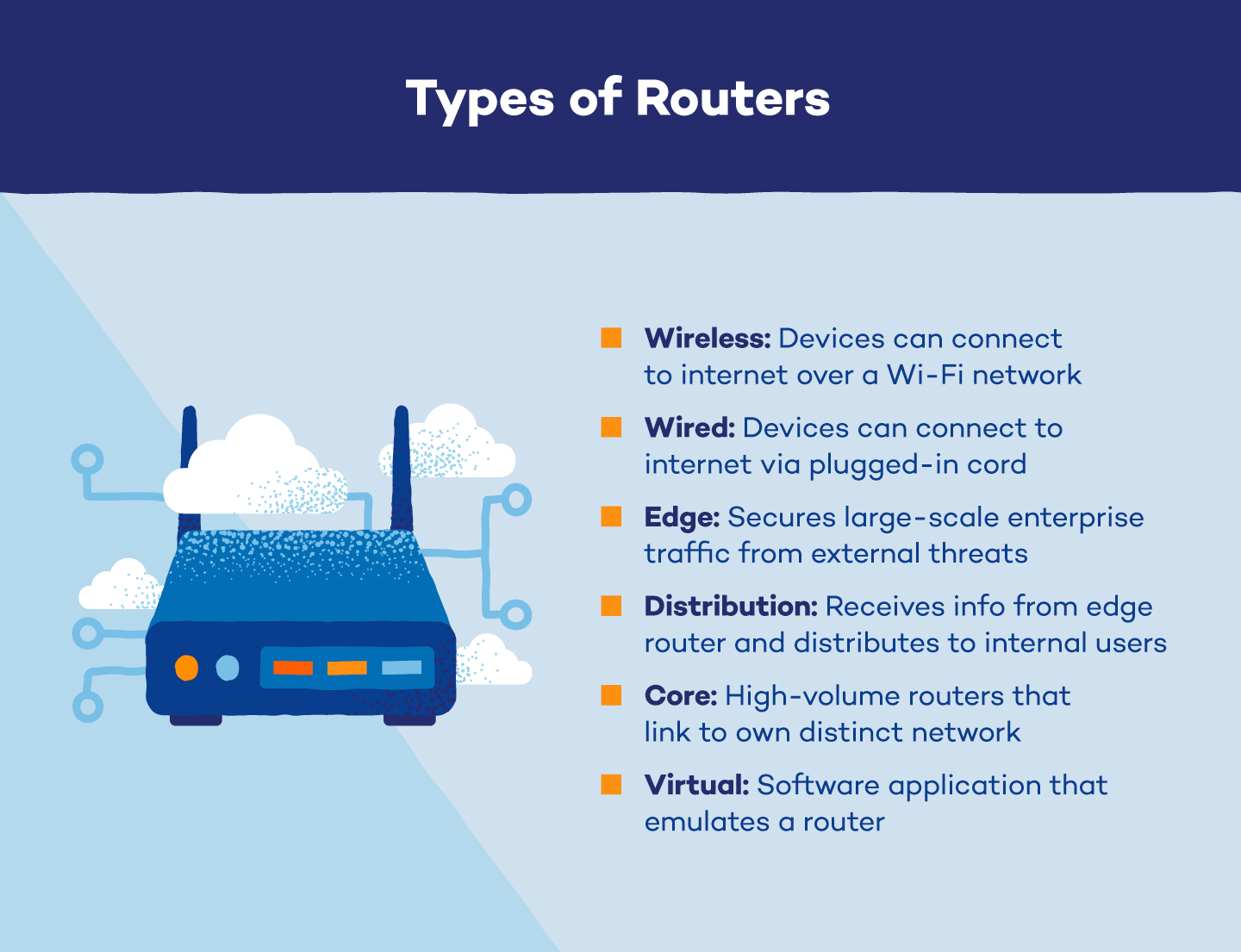
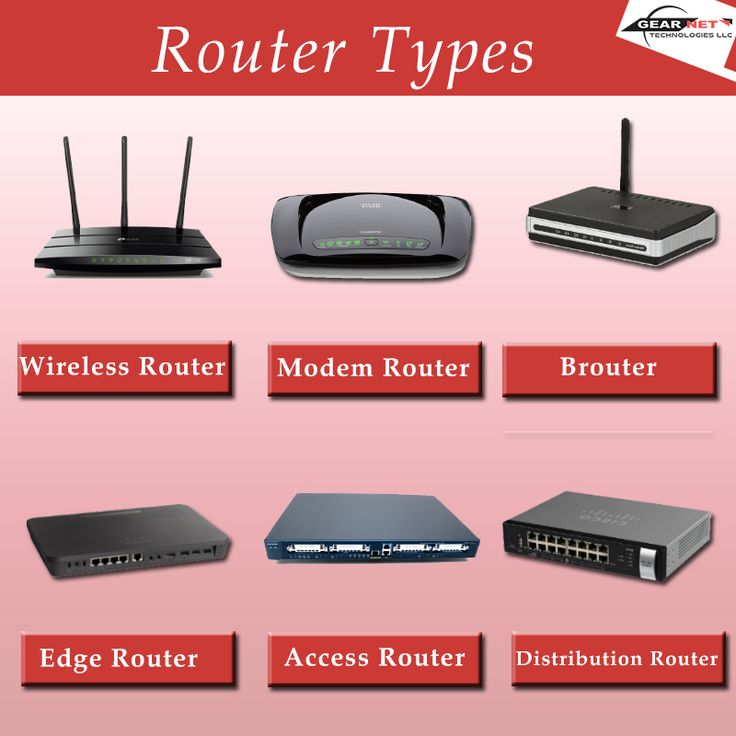
The router market has diversified significantly, offering specialized solutions to meet varying needs and embrace emerging technological trends. The choice of router greatly influences your overall digital experience, directly impacting productivity and connectivity.
Standard Home Routers
These are the most common type, often provided by ISPs or purchased for general home use. They are designed to cover typical residential spaces, offering a balance of features, performance, and affordability. While effective for basic browsing, streaming, and light work, they can struggle in larger homes or with a high density of connected devices.
Mesh WiFi Systems
A game-changer for larger homes, multi-story buildings, or spaces plagued by WiFi dead zones, mesh systems consist of multiple satellite units (nodes) that communicate with each other to create a single, seamless WiFi network. Instead of extending a signal from a single point, mesh networks blanket an entire area with strong, consistent WiFi, allowing devices to automatically switch to the node with the best signal as users move around. This technology significantly enhances whole-home coverage and is particularly beneficial for smart homes with numerous interconnected gadgets.
Gaming Routers
Built for speed, low latency, and advanced control, gaming routers prioritize network traffic to ensure a smooth, lag-free online gaming experience. They often feature powerful processors, advanced Quality of Service (QoS) settings to prioritize game data, higher-gain antennas, and often striking, aggressive designs. Some even include built-in VPN client support and dedicated gaming ports. These are gadgets optimized for peak performance, crucial for competitive gamers.
Portable/Travel Routers
Compact and often powered by USB, portable routers are designed for those on the go. They can connect to public WiFi networks (like in hotels or airports) and create a private, secure network for your devices, or they can use a cellular modem to broadcast WiFi. They offer enhanced security and convenience for travelers or individuals requiring temporary network setups.
5G/LTE Routers
Leveraging the power of cellular networks (4G LTE or the newer, faster 5G), these routers provide internet access without the need for traditional wired broadband connections. They are an excellent solution for rural areas lacking fiber or cable infrastructure, for temporary sites, or as a reliable backup internet source. As 5G networks expand, these routers offer competitive speeds and lower latency, potentially disrupting traditional ISP models. This represents a significant technology trend, offering greater flexibility in how we connect.
Beyond Connectivity: Security, Performance, and Productivity
A router isn’t just about getting online; it’s about getting online securely, efficiently, and in a way that maximizes your digital productivity. These aspects are deeply intertwined with the “Tech” core of the website’s topics.
Digital Security at the Gateway
Your WiFi router is the first line of defense against cyber threats targeting your home network. Neglecting its security is akin to leaving your front door unlocked.
- Strong Passwords: The most basic yet crucial step is changing the default administrator password (for accessing the router settings) and setting a robust, unique password for your WiFi network itself.
- Encryption: Always ensure your network uses the latest and strongest encryption protocol available, ideally WPA3. WPA2 is still widely used and secure, but WPA3 offers enhanced protection against brute-force attacks.
- Firewall: Most routers come with a built-in firewall that filters incoming and outgoing network traffic, blocking unauthorized access attempts. Ensure it’s active.
- Guest Networks: For visitors, utilize the guest network feature. This provides internet access while isolating guests from your main network and private devices, significantly enhancing security.
- Firmware Updates: Regularly updating your router’s firmware is paramount. These updates often include critical security patches for newly discovered vulnerabilities, protecting your network from evolving threats.
- VPN Integration: Some advanced routers allow you to configure a Virtual Private Network (VPN) directly on the router. This means every device connected to your network benefits from VPN protection without needing individual client installations, a powerful tool for enhancing digital security and privacy.
Optimizing Your Wireless Experience
A well-configured router can dramatically boost your productivity by ensuring a stable, fast connection.
- Optimal Placement: Position your router centrally, away from obstructions (walls, large appliances), and off the floor. Signal strength can significantly impact speed and reliability.
- Channel Selection: Wireless networks operate on specific channels. In congested areas, interference from neighbors’ networks can degrade performance. Most routers have an auto-channel selection feature, but you can manually choose less congested channels (using tools like WiFi analyzer apps) for better throughput.
- Quality of Service (QoS): This feature allows you to prioritize certain types of traffic or specific devices. For example, you can give priority to video conferencing during work hours or gaming traffic in the evenings, ensuring critical applications always have the bandwidth they need. This directly impacts your productivity and user experience.
- Band Steering: In dual-band routers, band steering automatically directs devices to the optimal frequency band (2.4 GHz or 5 GHz) based on their capabilities and signal conditions, balancing range and speed for all connected gadgets.
The Router’s Impact on Modern Living: Branding and Financial Implications
Beyond its technical specifications, the WiFi router plays an intriguing role in brand perception and has tangible financial ramifications, touching upon aspects often discussed under “Brand Strategy” and “Money” on the website.
The Brand Behind the Bandwidth
The market for WiFi routers is competitive, featuring well-known brands like TP-Link, Netgear, Linksys, Asus, D-Link, and newer players like Google Nest Wifi and Eero (Amazon’s brand).
- Brand Reputation: Consumers often choose a router based on brand reputation for reliability, performance, ease of setup, customer support, and the intuitiveness of their accompanying mobile apps. A strong brand identity, often built on consistent positive reviews and user experience, significantly influences purchasing decisions.
- Design and Integration: For many, the router is no longer just a functional box to hide. Brands like Google Nest and Eero emphasize sleek, minimalist designs that blend into modern home decor, turning the router into a branded lifestyle gadget. These brands also focus on creating cohesive smart home ecosystems where the router is a central, seamlessly integrated component. This strategic branding elevates the perception of a mundane tech gadget into an integral part of a connected lifestyle.
- Marketing and Positioning: Router brands employ distinct marketing strategies, targeting gamers with performance-focused messaging, families with ease-of-use and parental control features, and tech enthusiasts with advanced customization options. The “brand” of your internet experience often starts with the router you choose.
A Financial Hub for the Digital Economy
In today’s digital age, a reliable and fast internet connection, facilitated by a capable WiFi router, is not just a convenience—it’s a financial necessity and an investment.
- Online Income and Side Hustles: For remote workers, freelancers, online entrepreneurs, and those engaged in side hustles (e.g., e-commerce, content creation, online tutoring), a robust internet connection is the backbone of their income. A slow or unstable connection directly translates to lost productivity, missed deadlines, and potentially lost earnings. Investing in a good router is an investment in your financial stability and growth.
- Access to Financial Tools: Personal finance management, online banking, investing platforms, and budgeting apps all rely on internet access. A secure and reliable router ensures you can safely access and manage your financial resources, from paying bills to monitoring investments, without interruption or security concerns.
- Cost Savings and Efficiency: A high-performing router can enable smooth streaming services, potentially allowing households to “cut the cord” from expensive cable TV packages, leading to significant monthly savings. Furthermore, efficient network management (e.g., via QoS) can ensure that crucial work tasks are not hampered by recreational use, boosting overall household productivity.
- ISP-Provided vs. Personal Routers: While many ISPs offer routers as part of their service, purchasing your own router can often be a shrewd financial move. It can save you monthly rental fees, offer superior performance, better security features, and greater control over your home network, leading to long-term cost savings and enhanced user experience. The cost of a good router, therefore, isn’t just an expense; it’s a strategic investment in a resilient and productive digital life.
Conclusion
The WiFi router, far from being a simple, static piece of hardware, is a dynamic and essential component of our modern existence. It is the silent workhorse that powers our digital lives, enabling the constant flow of information and connectivity that underpins everything from our entertainment to our careers. As technology continues to evolve, bringing faster standards, more integrated smart home ecosystems, and new ways to connect, the router will remain at the forefront. Understanding its functionality, embracing its security features, and making informed choices about its brand and financial implications empowers users to build a more robust, secure, and productive digital environment. In an age defined by connectivity, the WiFi router is not just a gadget; it’s the indispensable heart of our interconnected world.
aViewFromTheCave is a participant in the Amazon Services LLC Associates Program, an affiliate advertising program designed to provide a means for sites to earn advertising fees by advertising and linking to Amazon.com. Amazon, the Amazon logo, AmazonSupply, and the AmazonSupply logo are trademarks of Amazon.com, Inc. or its affiliates. As an Amazon Associate we earn affiliate commissions from qualifying purchases.