
In the rapidly evolving landscape of technology, data is often described as the “new oil.” It powers our applications, stores our financial records, and maintains the digital identities of global brands. However, for most users, data remains invisible until they encounter a file extension they don’t recognize. One such extension that frequently causes confusion among developers, business owners, and tech enthusiasts alike is the .mdf file.
Whether you are a database administrator managing a company’s financial records, a developer building the next big AI tool, or a curious user trying to access legacy software, understanding what an MDF file is—and how to handle it—is essential. This guide will break down the technical nuances of MDF files, their critical role in business and finance, and how they impact your digital brand and security.
Decoding the MDF Extension: Master Database vs. Media Descriptor
The term “MDF” primarily refers to two distinct types of files depending on the context of your software environment. Understanding the difference is the first step toward managing your digital assets effectively.
SQL Server Master Database Files (The Business Backbone)
In the world of professional software and enterprise technology, an MDF file most commonly stands for a Master Database File. This is the primary file format used by Microsoft SQL Server, one of the most widely used relational database management systems (RDBMS) in the world.
An MDF file contains the heart of a database. It stores the schema, tables, stored procedures, and the actual data that powers everything from e-commerce websites to internal payroll systems. When a developer creates a database in SQL Server, the MDF file is the “bucket” that holds all the structured information. It is often accompanied by an .ldf (Log Database File), which records all the transactions and changes made to the database to ensure data integrity in case of a system crash.
Media Descriptor Files (The Legacy Disc Image)
Outside the realm of professional databases, you might encounter an MDF file in the context of disc imaging. In this scenario, MDF stands for Media Descriptor File. This format was popularized by software like Alcohol 120% and is used to create a digital “carbon copy” of an optical disc (like a CD or DVD).
Unlike a standard ISO file, an MDF file is usually paired with an .mds file. The MDF contains the actual raw data from the disc, while the MDS contains the metadata—information about how the tracks are laid out. While this format is becoming less common as physical media fades, it remains a staple for archivists and those maintaining legacy software libraries.
How to Open and Access MDF Files: A Technical Walkthrough
Because MDF files are not standard document formats like PDFs or Word files, you cannot simply double-click them to see their contents. The method you use to open them depends entirely on which type of MDF file you are dealing with.
Using SQL Server Management Studio (SSMS)
For professional tech environments, the primary tool for interacting with a Master Database File is SQL Server Management Studio (SSMS).
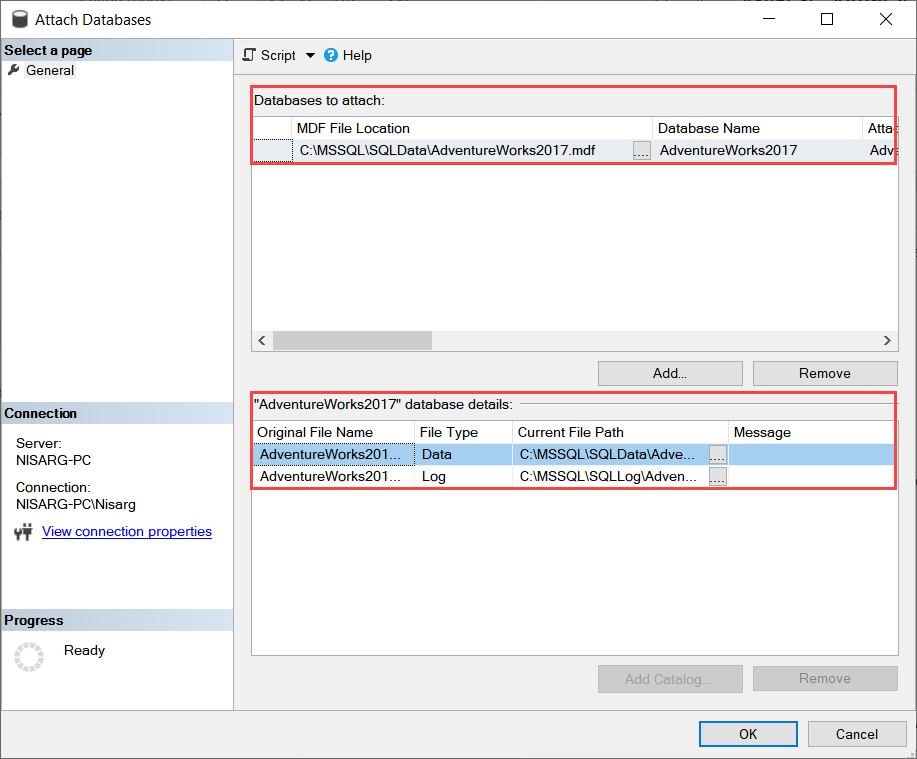
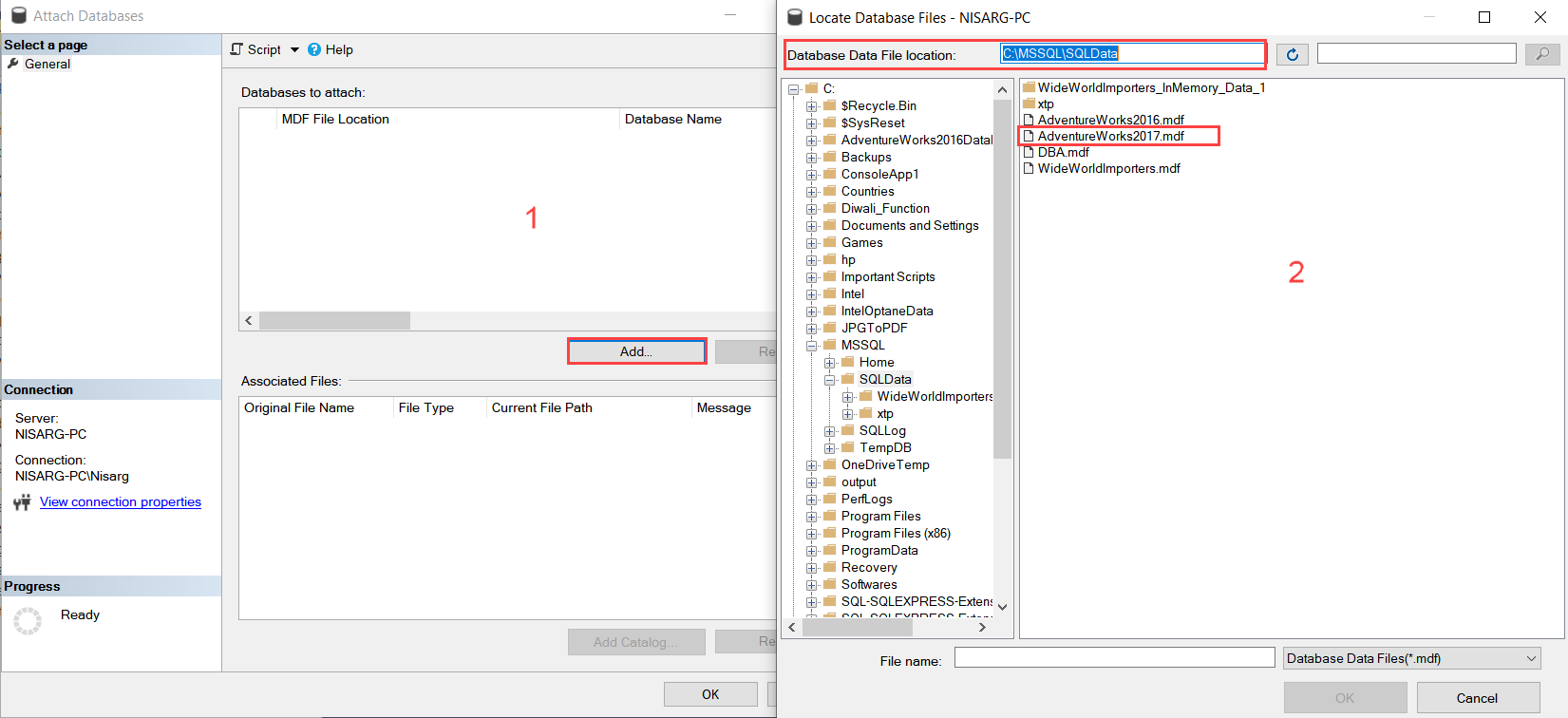
To access the data within an MDF file, you typically “attach” it to a SQL Server instance. The process involves:
- Launching SSMS and connecting to your server.
- Right-clicking on the “Databases” folder and selecting “Attach.”
- Locating the MDF file on your hard drive.
- Ensuring the associated LDF file is present (though SQL can sometimes rebuild a missing log file, it’s not always recommended for critical data).
This allows the server to mount the data, making it queryable via SQL (Structured Query Language). For businesses, this is the standard way to migrate data from one server to another or to restore a backup.
Third-Party Viewers and Recovery Tools
Sometimes, you may have an MDF file but lack the full SQL Server infrastructure to host it. In such cases, developers often turn to MDF Viewers. These are lightweight productivity tools that allow you to browse tables and data without a full server installation. Furthermore, if an MDF file becomes corrupted—perhaps due to a sudden power loss or hardware failure—specialized recovery tools can “repair” the file structure to salvage the financial or customer data stored within.
Mounting Disc Images on Modern Systems
If your MDF file is a disc image, you don’t need a database server. Instead, you need “mounting” software. Tools like Daemon Tools Lite or AnyBurn can create a “virtual drive” on your computer. Once the MDF file is mounted, your computer treats it as if you had inserted a physical disc into a drive. This is particularly useful for running old software or accessing archived media collections that were never converted to ISO format.
The Financial Impact: Why MDF Files Are Crucial for Business and Money Management
From a “Money” and “Business Finance” perspective, the integrity of MDF files is directly linked to a company’s bottom line. Most modern accounting software, ERP (Enterprise Resource Planning) systems, and fintech applications rely on SQL databases to store transactions.
Ensuring Audit Trails and Compliance
In the world of finance, every penny must be accounted for. MDF files store the granular details of every transaction. If these files are poorly managed or lack proper backups, a business risks losing its audit trail. For a corporation, this could lead to massive fines or legal issues. For a small business or side hustle, it could mean the difference between a successful tax season and a financial nightmare.
Data as an Asset for Online Income
For those generating online income through e-commerce or SaaS (Software as a Service) platforms, the MDF file represents their most valuable asset: customer data. This data allows for behavioral analysis, sales forecasting, and personalized marketing. When you understand the structure of your database files, you can better leverage AI tools to analyze this data, leading to smarter investment decisions and more efficient scaling of your business.
Protecting Your Brand: Data Security and Digital Reputation
In the “Brand Strategy” and “Personal Branding” space, your reputation is built on trust. A significant part of that trust involves how you handle the data you collect. If your brand stores customer information in SQL databases, the security of your MDF files is a direct reflection of your brand’s commitment to its audience.
The Cost of a Data Breach
A leaked or stolen MDF file is a goldmine for cybercriminals. Because these files contain entire database structures, a breach can expose thousands of customer records at once. Beyond the immediate financial loss, the damage to your “Corporate Identity” can be permanent. Customers are unlikely to return to a brand that allowed their personal or financial information to be compromised.
Implementing Digital Security Best Practices
To protect your brand, MDF management must include:
- Encryption at Rest: Ensuring that even if an MDF file is stolen, it cannot be read without the proper cryptographic keys.
- Access Control: Limiting who can “attach” or download these files within your organization.
- Regular Backups: Utilizing cloud-based backup solutions to ensure that if your primary server fails, your brand remains operational without downtime.
Conversion and Compatibility: Moving Data to Modern Formats
As technology trends shift toward AI and cloud-native applications, the way we use MDF files is changing. Staying productive means knowing how to migrate your data into more flexible formats.
Converting MDF to CSV or Excel for Financial Analysis
While SQL Server is powerful, it’s not always the best tool for quick financial modeling. Many professionals use scripts or software tools to export data from an MDF file into a CSV or Excel format. This allows for easier manipulation in tools like Google Sheets or Power BI, enabling better visualization of “Personal Finance” trends or “Business Finance” health.
Transitioning to the Cloud and AI Tools
The modern trend is moving away from local MDF files toward cloud-hosted databases like Azure SQL or Amazon RDS. This transition allows businesses to integrate their data with AI tools more seamlessly. For example, by connecting a cloud-hosted version of your database to an AI-driven analytics engine, you can automate customer support or predict market shifts in real-time. This shift represents the pinnacle of “Technology Trends,” where the static MDF file becomes a dynamic, living asset in the cloud.
Conclusion
Understanding “what are MDF files” is more than just a technical curiosity—it is a fundamental skill for navigating the digital economy. Whether they are acting as the silent engine of a multi-million dollar finance app or preserving a piece of legacy software, MDF files are a cornerstone of modern data storage.
For tech enthusiasts, they represent the complexity of structured data. For business owners and investors, they represent the security and integrity of their financial assets. And for brands, they represent the sacred trust between a company and its customers. By mastering the tools to open, manage, and protect these files, you position yourself at the forefront of the digital age, ready to turn raw data into actionable insights and long-term value.
aViewFromTheCave is a participant in the Amazon Services LLC Associates Program, an affiliate advertising program designed to provide a means for sites to earn advertising fees by advertising and linking to Amazon.com. Amazon, the Amazon logo, AmazonSupply, and the AmazonSupply logo are trademarks of Amazon.com, Inc. or its affiliates. As an Amazon Associate we earn affiliate commissions from qualifying purchases.