
The subtle vibrations, the gentle nudges, the satisfying clicks that accompany certain actions on your iPhone – these are not accidental quirks of design. They are the manifestation of haptic feedback, a sophisticated technology that enriches our interaction with our devices by engaging our sense of touch. While often perceived as a minor feature, haptics on the iPhone represents a significant leap forward in human-computer interaction, transforming passive screen taps into a more immersive and intuitive experience. Understanding what haptics are, how they work, and how they enhance your iPhone usage can unlock a deeper appreciation for the technology you hold in your hand every day.
Haptic feedback, in its broadest sense, refers to the use of touch to communicate information or provide tactile sensations. On your iPhone, this is primarily achieved through a Linear Resonant Actuator (LRA), a miniature vibration motor that precisely controls the intensity, duration, and pattern of vibrations. This is far more advanced than the simple buzzing of older mobile phones. Apple has meticulously engineered its haptic engine to deliver a nuanced range of tactile responses, from the crisp tap of a virtual keyboard to the immersive feel of in-game actions. These are not just random vibrations; they are carefully crafted sensory cues designed to inform, guide, and delight users, making digital interactions feel more tangible and real. This article will delve into the technological underpinnings of iPhone haptics, explore the diverse applications and benefits, and offer insights into how you can customize and leverage this powerful feature to its fullest potential.
The Technological Foundation of iPhone Haptics
At the core of the iPhone’s haptic capabilities lies a sophisticated piece of engineering: the Taptic Engine. This is not your average vibrator motor; it’s a precisely calibrated system designed to deliver a wide spectrum of tactile feedback. Understanding its components and operational principles is key to appreciating the depth of this technology.
The Taptic Engine: A Deeper Dive
The Taptic Engine is an advanced LRA. Unlike older eccentric rotating mass (ERM) motors, which spin an off-center weight to create vibrations, LRAs move back and forth along a single axis. This linear motion allows for much finer control over the frequency and amplitude of the vibrations. The Taptic Engine utilizes a magnetic field to oscillate a mass along a spring. By precisely modulating the current sent to the electromagnet, Apple can control the speed and force of this oscillation with remarkable accuracy. This precision is what allows for distinct and nuanced tactile sensations. For instance, a quick, sharp tap feels different from a prolonged, gentle pulse, and the Taptic Engine can reliably reproduce these differences.
The design of the Taptic Engine is also crucial. It’s often mounted in a way that allows it to resonate with the iPhone’s chassis, amplifying the tactile feedback and ensuring it’s felt clearly by the user. This integration is so thorough that it feels as though the entire phone is responding to your touch, rather than just a localized component. This integration also contributes to the illusion of physical buttons, even on a flat glass surface.
Software and Hardware Integration: The Symphony of Touch
The magic of iPhone haptics isn’t solely in the hardware; it’s in the seamless integration of the Taptic Engine with iOS. Apple’s operating system is programmed with a vast library of haptic patterns and intensities, each designed to correspond with specific on-screen actions. This means that every interaction, from unlocking your phone with Face ID to selecting an item in a menu, can be accompanied by a unique tactile cue.
This integration is driven by the software framework that allows developers to incorporate haptics into their applications. When you perform an action within an app, the software can trigger specific haptic responses through the Taptic Engine. This enables a consistent and intuitive user experience across the entire iOS ecosystem. The goal is to provide “just enough” feedback – enough to confirm an action without being overwhelming or annoying. This delicate balance is a testament to the thoughtful design and engineering that goes into iPhone haptics.
Enhancing the User Experience Through Tactile Feedback
The primary purpose of haptics on the iPhone is to enhance the user experience by providing intuitive, informative, and even delightful tactile cues. These sensations add a layer of realism and responsiveness that goes beyond visual and auditory feedback.
The Psychology of Touch in Digital Interfaces
Our sense of touch is one of our most primal and fundamental senses. It plays a crucial role in how we perceive and interact with the physical world. By incorporating haptic feedback into digital interfaces, Apple leverages this innate human connection. The tactile confirmation of an action, like the satisfying “click” when you toggle a switch in settings, reinforces the completion of that action. This reduces cognitive load, as users don’t have to visually scan to confirm their input. Instead, the touch confirms it instantly.
Furthermore, haptics can help build a sense of familiarity and comfort with a device. When a virtual keyboard feels responsive and provides tactile feedback with each keystroke, it mimics the experience of typing on a physical keyboard, making the transition to a touchscreen device more natural and less alienating. This psychological effect contributes to user satisfaction and a feeling of mastery over the technology.
Practical Applications and Use Cases
The applications of haptic feedback on the iPhone are diverse and constantly expanding. Here are some of the most common and impactful examples:
- Virtual Keyboard: The subtle tap you feel with each key press on the iPhone’s virtual keyboard is a prime example of effective haptic feedback. It provides confirmation of your input and makes typing feel more tactile and less prone to errors. You can even adjust the intensity of this feedback.
- System Alerts and Notifications: Beyond simple buzzing, haptics can be used to differentiate between types of notifications. A gentle pulse might indicate a less urgent message, while a sharper vibration could signal an important alert.
- System Interactions: Actions like unlocking your iPhone with Face ID, adjusting the volume, or toggling settings are often accompanied by distinct haptic responses. These confirm that the action has been registered and executed.
- Gaming: In games, haptic feedback can dramatically increase immersion. Developers can use it to simulate the impact of a collision, the recoil of a weapon, or the rumble of an engine, making the gaming experience much more visceral and engaging.
- Accessibility Features: Haptics play a vital role in making the iPhone accessible to users with visual impairments. For example, VoiceOver, Apple’s screen reader, can utilize haptic feedback to provide information about on-screen elements and their positions, augmenting the auditory cues.
- Creative Applications: Haptic feedback is also being explored in creative contexts, such as digital art and music production, where it can allow artists to “feel” their creations in new ways.
Customizing Your Haptic Experience
While the default haptic settings on your iPhone are thoughtfully designed, Apple provides a degree of customization, allowing you to tailor the tactile feedback to your personal preferences. This ensures that your interaction with your device is as comfortable and intuitive as possible.
Adjusting Haptic Intensity and System Haptics
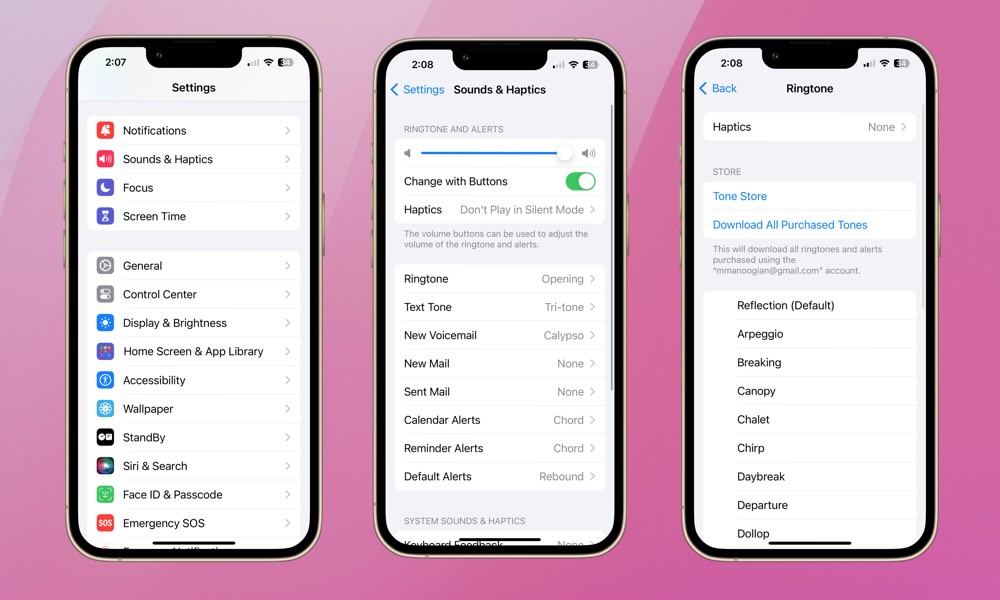
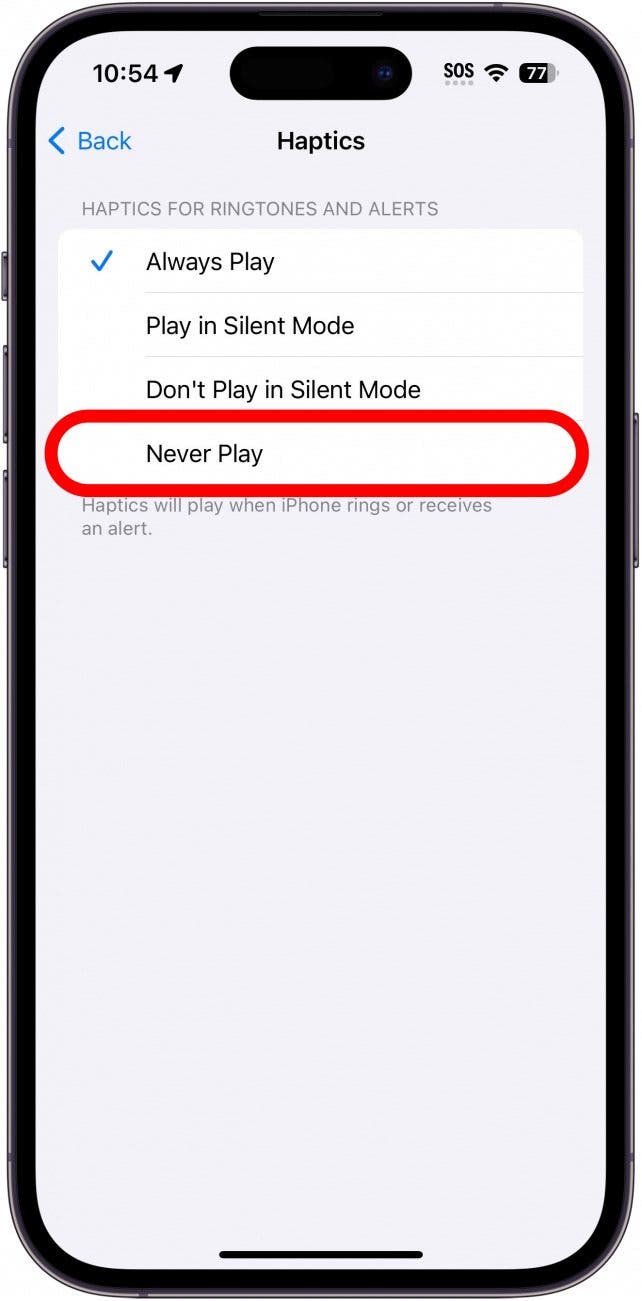
Within the iPhone’s Settings app, you can fine-tune your haptic experience. Under “Sounds & Haptics,” you’ll find options to control the overall intensity of haptic feedback. This allows you to make the vibrations more or less pronounced, depending on your sensitivity and environment. For example, if you find the vibrations too strong or too subtle, this setting is your first port of call.
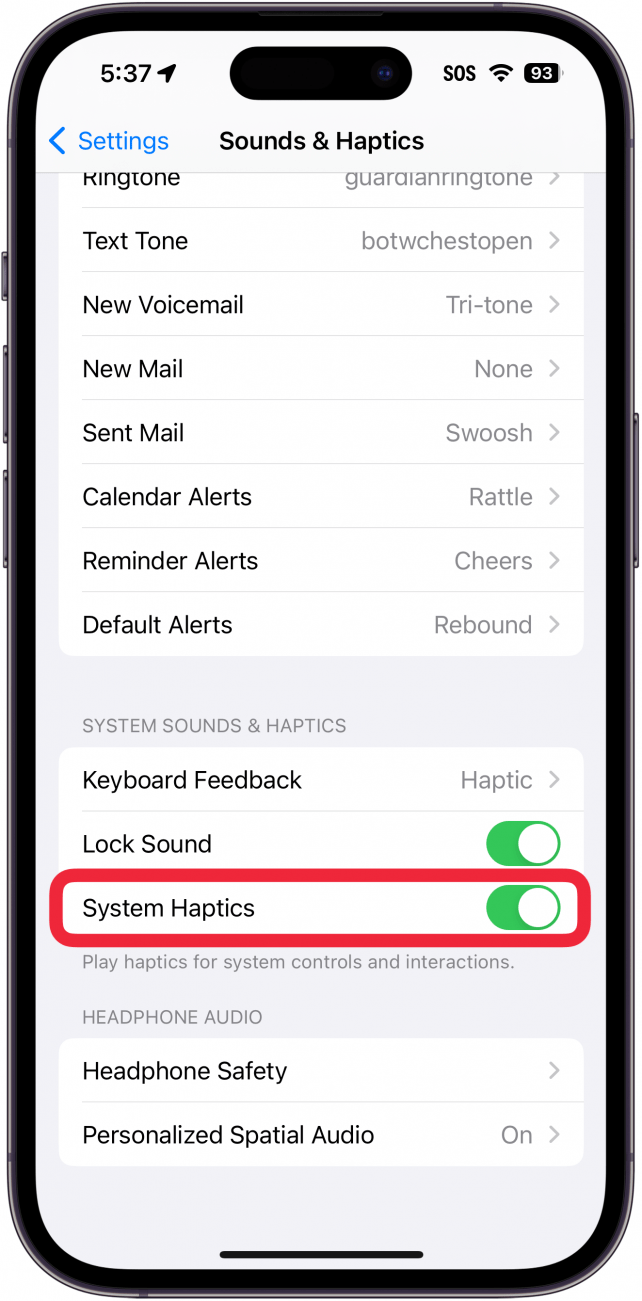
Additionally, there’s a specific toggle for “System Haptics.” When enabled, this allows for tactile feedback on system-wide interactions like locking the device, scrolling through lists, and interacting with controls. Disabling System Haptics will remove these tactile cues from core iOS functions, which can be useful for users who prefer a completely silent and vibration-free experience. However, for most users, keeping System Haptics enabled significantly enhances the feeling of responsiveness and confirmation.
Exploring Haptics in Third-Party Apps
The true potential of iPhone haptics is realized when developers integrate them thoughtfully into their applications. While the operating system provides a foundational layer of haptic feedback, individual apps can offer even richer tactile experiences. For instance, a note-taking app might provide a satisfying “scratch” sensation as you write with the Apple Pencil, or a photo editing app could offer subtle feedback as you adjust sliders.
It’s worth noting that not all apps utilize haptics, and the implementation can vary. Some developers may offer in-app settings to control or disable haptic feedback, giving you granular control over your experience. As you explore different apps, pay attention to how they use haptics; you might discover new and delightful ways to interact with your iPhone that you hadn’t previously considered. Many apps are beginning to leverage the Taptic Engine in innovative ways, pushing the boundaries of what’s possible in mobile user interfaces.
In conclusion, haptics on your iPhone are a sophisticated technological feature designed to enhance your interaction with the device through the sense of touch. From the precise engineering of the Taptic Engine to the intelligent integration within iOS and third-party applications, these tactile cues add a crucial layer of intuitiveness, confirmation, and immersion. By understanding and customizing your haptic experience, you can unlock a more engaging, efficient, and enjoyable relationship with your iPhone. They transform the intangible world of digital interfaces into something you can truly feel.
aViewFromTheCave is a participant in the Amazon Services LLC Associates Program, an affiliate advertising program designed to provide a means for sites to earn advertising fees by advertising and linking to Amazon.com. Amazon, the Amazon logo, AmazonSupply, and the AmazonSupply logo are trademarks of Amazon.com, Inc. or its affiliates. As an Amazon Associate we earn affiliate commissions from qualifying purchases.