
In the contemporary digital landscape, the phrase “Just Venmo me” has transitioned from a colloquialism into a standard operational procedure for social and professional interactions. Venmo, owned by PayPal, has redefined the architecture of peer-to-peer (P2P) transactions, blending financial utility with a social media interface. As mobile hardware and software continue to evolve, understanding the technical nuances of this application is essential for anyone looking to navigate the modern digital economy. This guide provides a deep dive into the technological framework of Venmo, offering a step-by-step technical walkthrough from initial configuration to advanced security protocols.

1. The Architecture of Digital Payments: Getting Started with Venmo
At its core, Venmo is a mobile-first software application designed to facilitate the electronic transfer of funds between two parties using a smartphone. The underlying technology relies on secure APIs (Application Programming Interfaces) that bridge the gap between traditional banking infrastructures and modern mobile interfaces.
Downloading and System Requirements
To begin, users must access the application via the Apple App Store or Google Play Store. From a technical standpoint, Venmo requires a relatively modern operating system (typically iOS 15.0 or later, or Android 6.0 or later) to support its encryption protocols and biometric security features. Once downloaded, the app occupies a modest footprint on device storage, but its reliance on real-time data means a stable LTE, 5G, or Wi-Fi connection is mandatory for transaction processing.
Account Configuration and Identity Verification
Upon launching the app, the “Sign Up” process initiates a series of data entries. Users must provide a legal name, email address, and mobile phone number. Venmo utilizes a “Know Your Customer” (KYC) framework, a mandatory regulatory requirement for fintech apps. This involves verifying your identity through a Social Security Number (SSN) or other government-issued identification if you intend to carry a balance within the app or transfer large sums. This verification process happens on the backend, cross-referencing user data with national databases to prevent identity theft and money laundering.
Linking Financial Nodes: Cards and Bank Accounts
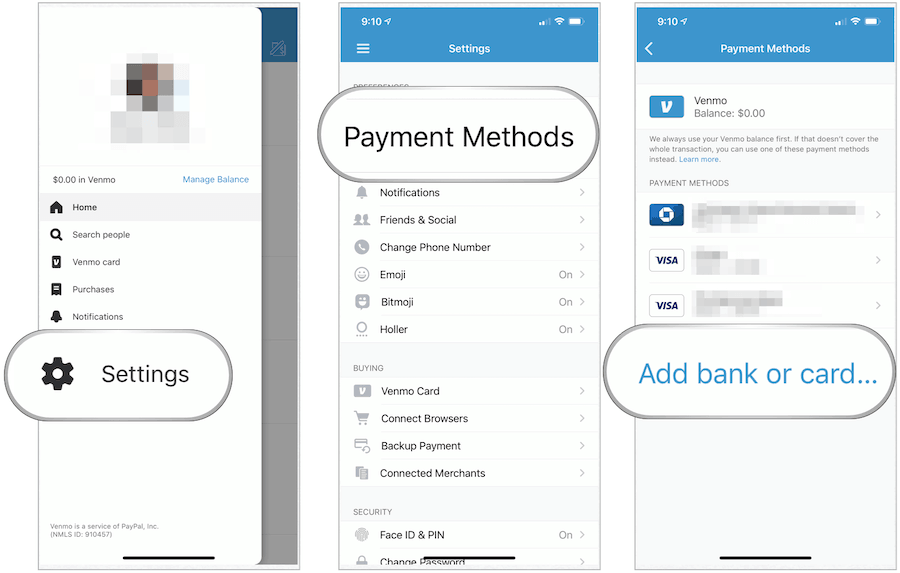
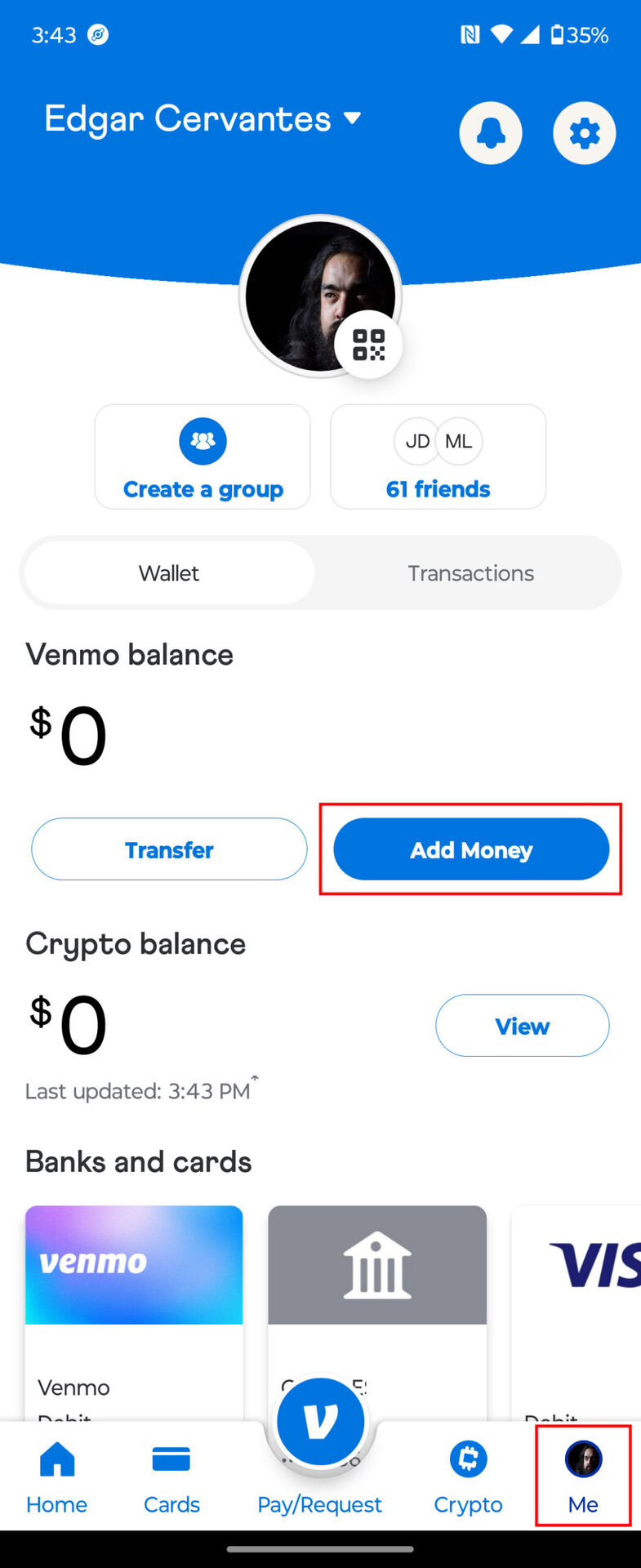
The engine of the Venmo experience is the link between the app and your existing financial institutions. Users can link three primary types of financial instruments:
- Bank Accounts: Utilizing service providers like Plaid, Venmo creates a secure, encrypted tunnel to your checking account. This allows for ACH (Automated Clearing House) transfers, which are generally free of charge.
- Debit Cards: Linking a debit card allows for “Instant Transfers,” a technical feature that utilizes the Visa or Mastercard “Push to Card” rails to move money in minutes rather than days.
- Credit Cards: While supported, these transactions incur a standard 3% processing fee, reflecting the cost of the credit network’s interchange fees.
2. Navigating the Interface: Executing Transactions
Venmo’s User Interface (UI) is designed for high-velocity interaction. The technical layout prioritizes the “Pay or Request” function, which is the primary driver of the app’s utility.
Sending Payments and Requesting Funds
To initiate a transaction, the user taps the “Pay or Request” icon (often represented by a pencil and square). The app then accesses the user’s contact list via system permissions or allows for a manual search of “Venmo Handles” (usernames starting with @).
Once a recipient is selected, the user enters a numerical value. A critical technical component here is the “Note” field. Venmo’s software requires at least one character or emoji in this field to proceed. This is not just a social feature; it serves as a metadata tag for the transaction, allowing both the sender and receiver to categorize the expenditure in their digital ledgers.
Understanding Social Feeds and Privacy Settings
One of Venmo’s unique technical identifiers is its social API. By default, transactions can be visible to a global feed, a friends-only feed, or kept private.
- Public: Metadata (the note) is visible to anyone on the app.
- Friends: Visibility is limited to the contacts both parties have in common.
- Private: The transaction is visible only to the sender and the recipient.
Navigating to the “Settings” menu and selecting “Privacy” allows users to set a global preference. From a data security perspective, many tech-savvy users opt for “Private” to minimize the digital footprint of their spending habits.
Utilizing QR Codes for Contactless Interaction
To streamline the “handshake” between two devices, Venmo utilizes dynamic QR code technology. Each user is assigned a unique QR code. When scanned by another device’s camera, the app automatically parses the encoded data and opens a payment screen for that specific user. This eliminates the risk of “fat-finger” errors—sending money to the wrong person due to a typo in their username.
3. Advanced Features: Beyond Simple Transfers
As the app has matured, its feature set has expanded from simple P2P transfers into a multi-faceted financial tool, incorporating business modules and decentralized finance (DeFi) elements.
Venmo for Business and Merchant Profiles
For freelancers and small business owners, Venmo offers “Business Profiles.” Technically, this creates a distinct sub-account linked to the primary user identity but governed by different Terms of Service. Business profiles allow for the acceptance of payments for goods and services, providing the sender with “Purchase Protection.” In the backend, these transactions are flagged differently for tax reporting (1099-K forms), highlighting the app’s integration with federal tax software systems.
Cryptocurrency Integration and Management
Venmo has integrated a simplified cryptocurrency exchange within its ecosystem. Users can buy, sell, and hold assets like Bitcoin, Ethereum, and Litecoin. The tech behind this involves a partnership with Paxos Trust Company. While the UI makes it look like a simple “Buy” button, the backend executes a trade on a digital asset exchange and updates the user’s ledger within the Venmo database. Users can also transfer crypto to external “cold” or “hot” wallets, a feature that requires an understanding of blockchain addresses and network fees (gas fees).
The Venmo Debit and Credit Card Ecosystem
Venmo has moved into the physical hardware space with its branded debit and credit cards. The Venmo Debit Card (a Mastercard) allows users to spend their Venmo balance at physical point-of-sale (POS) terminals. Technically, when the card is swiped, the merchant’s system pings Venmo’s servers to check for available funds. If the balance is insufficient, Venmo can be configured to “Top Up” automatically from a linked bank account, a sophisticated automation of liquid asset management.
4. Security Protocols and Digital Safety
In the realm of financial technology, security is the paramount concern. Venmo employs several layers of technical defense to protect user data and funds.
Multi-Factor Authentication (MFA) and Biometrics
To prevent unauthorized access, Venmo utilizes Multi-Factor Authentication. If a login attempt occurs from an unrecognized device or IP address, the system triggers a push notification or a SMS-based short-code verification. Furthermore, the app leverages smartphone hardware for biometric security, such as Apple’s FaceID/TouchID or Android’s fingerprint sensors. Enabling these features ensures that even if a physical device is stolen, the “financial layer” of the phone remains encrypted and inaccessible.
Identifying and Avoiding Common Digital Scams
While the technology is secure, the “human element” remains a vulnerability. Scammers often use “Social Engineering” to bypass technical safeguards. Common tactics include:
- The Accidental Transfer: A scammer sends money using a stolen credit card, then asks you to “send it back.” When the original stolen card transaction is reversed by the bank, you lose the money you “sent back” from your own balance.
- Phishing: Technical-looking emails or texts claiming your account is locked, designed to harvest your login credentials.
Venmo’s technical support suggests never using the app to pay strangers for items (like concert tickets) unless using a Business Profile with Purchase Protection, as P2P transfers are essentially “digital cash” and are difficult to claw back once authorized.
Managing Data Permissions and Visibility
In the app’s settings, users can audit which third-party applications have access to their Venmo data. This is a critical aspect of digital hygiene. Furthermore, users should regularly review their “Active Sessions” to ensure no unauthorized browsers or devices are logged into their account. By limiting data permissions, users can maintain a tighter perimeter around their financial information.
Conclusion: The Future of the Venmo Interface
Venmo is more than just a payment app; it is a sophisticated piece of financial software that has successfully merged social networking with banking. By understanding the technical setup—from linking bank accounts via Plaid to managing cryptocurrency and utilizing biometric security—users can leverage the platform for maximum efficiency and safety. As fintech continues to evolve toward more decentralized models, Venmo’s role as an accessible, user-friendly gateway ensures it will remain a central pillar of the digital transaction landscape for years to come. Whether you are splitting a dinner bill or running a small business, mastering “how to Venmo” is an essential skill in the modern tech toolkit.
aViewFromTheCave is a participant in the Amazon Services LLC Associates Program, an affiliate advertising program designed to provide a means for sites to earn advertising fees by advertising and linking to Amazon.com. Amazon, the Amazon logo, AmazonSupply, and the AmazonSupply logo are trademarks of Amazon.com, Inc. or its affiliates. As an Amazon Associate we earn affiliate commissions from qualifying purchases.