
In an increasingly digital economy, navigating various payment methods efficiently is a cornerstone of sound personal finance. American Express gift cards, frequently received as gifts or purchased for specific spending purposes, represent a unique financial instrument. While widely accepted at many retailers, their integration with vast online marketplaces like Amazon can sometimes present a slight learning curve. This guide delves into the practicalities and financial strategies for effectively utilizing your Amex gift card on Amazon, transforming a simple transaction into an opportunity for smarter spending and enhanced financial control.
Understanding Amex Gift Cards as a Financial Tool
Before diving into the specifics of using an Amex gift card on Amazon, it’s crucial to understand what these cards are and how they differ from other payment methods. Viewing them through a personal finance lens reveals their distinct advantages and limitations.
What is an Amex Gift Card?
An American Express gift card is a prepaid payment card loaded with a specific amount of money. Unlike a credit card, it does not draw from a line of credit, nor is it linked to a bank account like a debit card. Instead, you’re spending funds that have already been paid for. This characteristic makes them a form of “closed-loop” or “open-loop” prepaid card, depending on the issuer and network, but in Amex’s case, they function like a universally accepted prepaid debit card within the Amex network. They are typically non-reloadable, meaning once the funds are exhausted, the card becomes inactive. This pre-funded nature positions them as an excellent tool for controlled spending and budgeting, as you can only spend what’s on the card, eliminating the risk of debt.
Key Characteristics and Limitations
While versatile, Amex gift cards come with specific features that savvy users should be aware of:
- Fixed Value: Each card is loaded with a set amount, making it impossible to overspend beyond that limit.
- No PIN for Online Purchases: Most Amex gift cards do not require a Personal Identification Number (PIN) for online transactions. They function more like a credit card in this regard, requiring only the card number, expiration date, and security code (CVV).
- Expiration Dates and Fees: While the funds on an Amex gift card generally do not expire, the card itself may have an expiration date. If the card expires with funds remaining, you can usually request a replacement card. Some gift cards might also carry purchase fees or inactivity fees, though Amex consumer gift cards typically do not have these hidden charges for the recipient. Always check the terms and conditions printed on the card or its packaging.
- Non-Reloadable: Once the initial funds are spent, the card cannot be reloaded with more money. This reinforces their role as a finite spending tool.
Why They’re Popular
Amex gift cards are popular for several reasons that align with sound financial practices:
- Thoughtful Gifting: They offer recipients the flexibility to choose exactly what they want, avoiding unwanted presents while still providing a tangible gift.
- Budgeting Tool: For individuals, they can serve as a powerful budgeting mechanism. By pre-loading a card with a specific amount for discretionary spending categories (e.g., entertainment, clothing, online shopping), consumers can prevent overspending and stick to their financial plans.
- Enhanced Security for Online Purchases: Using a gift card for online transactions can offer a layer of security. In the event of a data breach, only the limited funds on the gift card are at risk, rather than your primary bank account or credit line. This makes them ideal for purchases from less familiar online vendors, though Amazon is generally very secure.
The Step-by-Step Process: Integrating Amex Gift Cards with Amazon
Using your Amex gift card on Amazon isn’t complicated, but it requires understanding Amazon’s payment system, especially when dealing with partial balances. Here’s a detailed walkthrough to ensure a smooth transaction.
Preparing Your Amex Gift Card for Online Use
Before attempting a purchase, a crucial preparatory step is to verify and, if necessary, register your gift card.
- Check Your Balance: Locate the customer service number or website on the back of your Amex gift card. Call the number or visit the specified URL to check the exact remaining balance. This is vital for managing your purchase, especially on Amazon.
- Register Your Card (Optional but Recommended): Some Amex gift cards allow for online registration. This step typically involves associating your name and address with the card. While not always mandatory for online purchases, it can sometimes help prevent transaction declines, especially if the online merchant’s system attempts to verify billing information. More importantly, registering the card can also help if you need to report it lost or stolen or retrieve a balance.
Adding the Gift Card as a Payment Method on Amazon
Amazon treats Amex gift cards much like any other credit card, making the process straightforward.
- During Checkout: When you’re ready to complete your purchase on Amazon, proceed to the checkout page.
- Select Payment Method: On the “Select a payment method” screen, choose “Add a credit or debit card.”
- Enter Card Details:
- Card Number: Carefully enter the 15-digit number from the front of your Amex gift card.
- Name on Card: Enter your own name (or “Gift Card Holder” if you haven’t registered it with your name).
- Expiration Date: Input the month and year printed on the card.
- Security Code (CVV): Enter the 4-digit code located on the front of the card, above the card number.
- Add Your Address: Amazon will ask for the billing address associated with the card. Use your own billing address. If you registered the card, use the address you registered it with.
Navigating Split Payments
This is often the trickiest part but crucial for maximizing the card’s value. If your Amazon order total exceeds the balance on your Amex gift card, you’ll need to use a second payment method.
- Apply Gift Card First: After adding the Amex gift card, Amazon will attempt to charge the full amount to it. If the gift card balance is less than the order total, Amazon will automatically indicate that there are insufficient funds.
- Select a Second Payment Method: Amazon will then prompt you to select an additional payment method for the remaining balance. You can choose a credit card, debit card, or Amazon gift card balance.
- Confirm Order: Once both payment methods are configured, Amazon will charge the Amex gift card for its full remaining balance and charge the remainder to your second payment method. This split payment functionality is key to ensuring no money is left on your gift card.
Troubleshooting Common Issues
- Card Not Accepted: Double-check that all card details (number, expiration, CVV) are entered correctly. Ensure your card is truly an American Express gift card and not a different type of prepaid card or a brand-specific merchant card.
- Insufficient Funds: If the card is declined for insufficient funds, this means the order total is greater than the card’s balance. You must use the split payment method described above.
- Expired Card: While funds don’t expire, the physical card does. If your card has expired, contact Amex customer service for a replacement card with your remaining balance.
- “Card Requires Registration”: If you encounter this, try registering your card online at the Amex gift card website before attempting the purchase again.
Maximizing Value and Managing Your Spending on Amazon
Beyond the transactional “how-to,” smart financial management dictates that you maximize the utility of every financial instrument, including gift cards.
Strategic Use for Budgeting
Amex gift cards can be excellent budgeting tools, particularly for discretionary spending. For example, if you allocate $100 per month for “fun money” or online impulse buys, you could hypothetically load an Amex gift card with that amount. Using this card specifically for Amazon purchases within that category ensures you stick to your budget and prevents those “one-click” purchases from eating into essential funds. It creates a physical and mental barrier against overspending.
Converting Small Balances to Amazon Gift Card Credit
One of the most astute financial moves for residual gift card balances is to convert them into Amazon account credit. If you have, say, $3.47 left on an Amex gift card that you can’t use for a meaningful purchase, you can use that exact amount to buy an Amazon e-gift card for yourself.
- Go to Amazon’s e-gift card purchase page.
- Select “Email.”
- Enter your own email address as the recipient.
- Crucially, select “Other” for the amount and enter the exact remaining balance of your Amex gift card.
- Use your Amex gift card as the payment method.
Once processed, you’ll receive an Amazon gift card code via email, which you can then apply to your Amazon account balance. This ensures no money is left stranded on an expiring or soon-to-be-discarded gift card and instead resides as readily available credit within your Amazon account for future purchases, no matter how small.
Monitoring Your Gift Card Balance
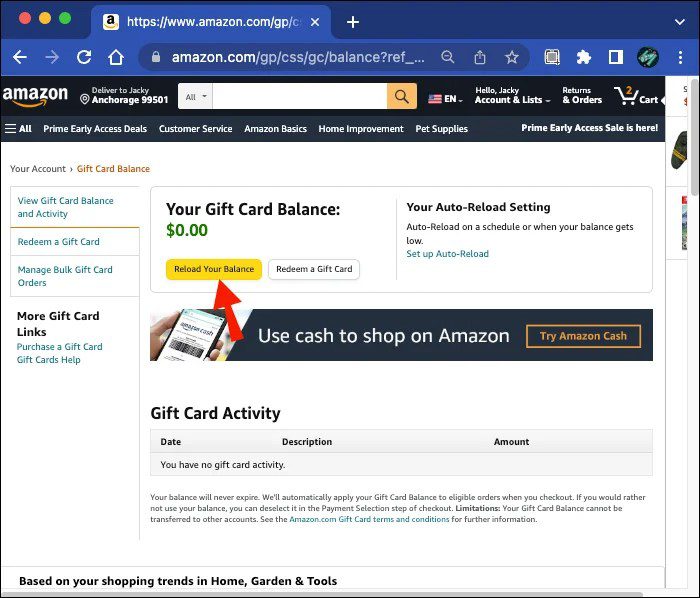
Just like monitoring your bank account or credit card statements, regularly checking the balance of your Amex gift card is good financial practice. This prevents declined transactions, helps you plan future purchases, and ensures you fully deplete the card’s value. Make it a habit to check the balance online or via phone before initiating a significant purchase.
Broader Financial Implications and Best Practices
The use of gift cards, while seemingly minor, fits into a larger framework of personal finance and digital security. Adopting best practices can enhance your overall financial well-being.
Security Considerations When Using Prepaid Cards Online
While generally safer than using primary accounts for certain transactions, keep these security tips in mind:
- Treat Like Cash: Once a gift card is gone, it’s gone. Keep it secure, just as you would physical cash.
- Avoid Phishing Scams: Never provide your gift card details in response to unsolicited emails or calls claiming to be from Amazon or Amex. Legitimate companies won’t ask for this information over insecure channels.
- Monitor Transactions: Even though gift cards have limited funds, occasionally review the transaction history (if available online) to ensure no unauthorized purchases have occurred.
The Role of Gift Cards in a Personal Finance Strategy
Gift cards, both given and received, can play a strategic role:
- For Gifting: They offer a financially responsible way to give without dictating the recipient’s choice, ensuring the gift’s value is fully utilized.
- For Personal Use: They can be a segment of your budgeting strategy, carving out specific funds for specific purposes, thereby reducing the mental load of tracking varied expenses from a primary account. They promote discipline and conscious spending.
- Emergency Fund Diversion Prevention: If you’re disciplined, using gift cards for discretionary spending can prevent accidental dips into your savings or emergency funds for non-essential items.
Avoiding Common Pitfalls
- Ignoring Expiration Dates: While Amex consumer gift card funds don’t typically expire, the physical card might. Mark down expiration dates or convert balances promptly.
- Losing Track of Small Balances: As discussed, convert small residual balances to Amazon credit to avoid losing the money altogether.
- Confusing Gift Cards with Other Card Types: Always remember an Amex gift card is not a credit card and does not offer the same consumer protections (e.g., chargebacks for fraudulent activity).
When to Opt for Other Payment Methods
While Amex gift cards are useful, they aren’t always the best choice:
- Large Purchases: For very large Amazon purchases, using a credit card that offers rewards, purchase protection, or extended warranty benefits might be more advantageous.
- Recurring Subscriptions: Avoid using gift cards for Amazon Prime or other subscription services, as they are non-reloadable and will eventually expire or run out of funds, disrupting the service. Use a credit or debit card for these.
- Returns: While Amazon typically processes returns from gift card purchases as an Amazon gift card balance, understanding the return policy for gift card-funded purchases is essential.
Mastering the use of your Amex gift card on Amazon extends beyond simply entering numbers; it’s about making financially astute decisions that contribute to better budgeting, enhanced security, and the complete utilization of your financial resources. By following these insights, you can confidently integrate Amex gift cards into your personal finance toolkit, making your Amazon shopping experience both seamless and strategically sound.
aViewFromTheCave is a participant in the Amazon Services LLC Associates Program, an affiliate advertising program designed to provide a means for sites to earn advertising fees by advertising and linking to Amazon.com. Amazon, the Amazon logo, AmazonSupply, and the AmazonSupply logo are trademarks of Amazon.com, Inc. or its affiliates. As an Amazon Associate we earn affiliate commissions from qualifying purchases.