
In the digital age, an email account serves as the cornerstone of our online identity, connecting us to everything from banking services and social media to professional networks and cloud storage. Among the multitude of email providers, Yahoo Mail has long held a significant place, with millions of users worldwide relying on it for personal and professional communications. However, like any digital service, access can sometimes be lost – forgotten passwords, suspicious activity, or technical glitches can lock you out of your invaluable inbox. The ability to efficiently and securely recover your Yahoo email account is not just a convenience; it’s a critical skill for maintaining your digital presence and protecting your personal data.
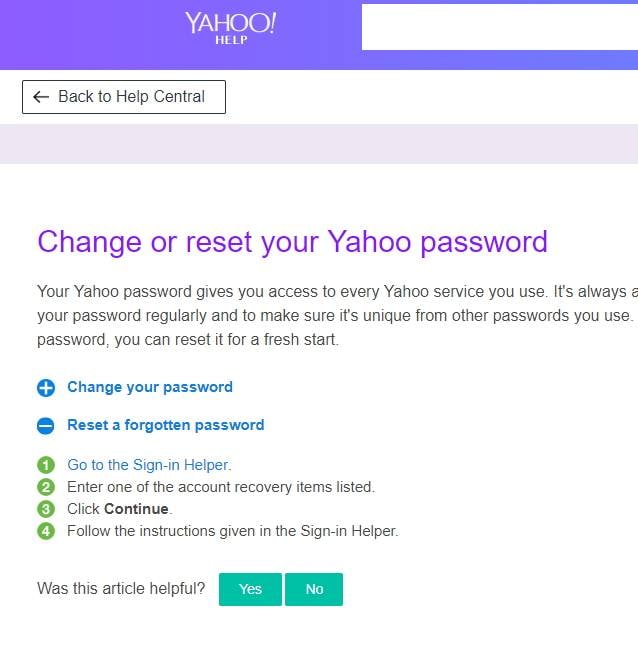
This comprehensive guide delves into the intricacies of Yahoo email recovery, offering a step-by-step walkthrough, proactive security measures, and solutions for common troubleshooting scenarios. Our aim is to equip you with the knowledge and tools necessary to regain control of your account swiftly and safely, ensuring uninterrupted access to your digital life.
The Critical Importance of Email Account Recovery
Losing access to your email account can feel like losing your digital compass. It disrupts communication, prevents access to other linked services, and can even pose a security risk if malicious actors gain control. Understanding why Yahoo Mail remains relevant and the common pitfalls that lead to account lockouts is the first step toward effective recovery.
Why Yahoo Email Remains Relevant
Despite the rise of newer email providers, Yahoo Mail continues to be a go-to for many users. Its long-standing presence, robust storage options, and integration with other Yahoo services (such as Yahoo News, Finance, and Sports) make it a familiar and functional choice for a diverse user base. For many, a Yahoo email address is deeply embedded in their online history, linked to countless accounts and services accumulated over years. This deep integration underscores the urgency and importance of recovery when access is compromised, as losing a Yahoo account can cascade into a domino effect across one’s entire digital footprint. Furthermore, businesses that have historically relied on Yahoo Small Business or related services also find their foundational communication often rooted in Yahoo infrastructure, making recovery procedures crucial for operational continuity.
Common Scenarios Leading to Account Lockout
Various circumstances can lead to a Yahoo email account lockout. The most frequent culprit is a forgotten password, a common occurrence in an era where we manage dozens of unique login credentials. Beyond simple forgetfulness, other scenarios include:
- Suspicious Activity Detected: Yahoo’s security systems might detect unusual login attempts or activities, leading to a temporary lock to protect your account from potential hacking.
- Account Hacking or Compromise: If your password has been stolen or your account accessed by an unauthorized third party, Yahoo may lock it down to prevent further damage.
- Multiple Failed Login Attempts: Repeated incorrect password entries can trigger a security lockout, temporarily blocking access.
- Lack of Activity: While less common now, very old accounts with prolonged periods of inactivity might be subject to closure or require more stringent verification for recovery.
- Changing Devices or Locations: Logging in from an unfamiliar device or a geographically distant location can sometimes flag your account for security verification.
Recognizing these scenarios helps users understand the necessity of recovery protocols and the importance of having up-to-date recovery information.
Step-by-Step Guide to Yahoo Email Recovery
Yahoo has developed a robust recovery system designed to help users regain access securely. The process typically involves verifying your identity through pre-registered recovery options.
Initiating the Recovery Process
The journey to recover your Yahoo email account begins at the Yahoo login page.
- Navigate to the Yahoo Mail Login: Go to
mail.yahoo.comoryahoo.comand click “Sign in.” - Enter Your Yahoo Email Address or Phone Number: On the login screen, instead of entering a password, click on the “Forgot password?” link (or “Trouble signing in?”).
- Choose a Recovery Method: Yahoo will present you with options to verify your identity. These typically include:
- Sending a code to a recovery phone number: This is usually a text message (SMS).
- Sending a code to an alternate recovery email address: This will be an email to a different account you own.
- Answering security questions: If you set these up previously.
Verifying Your Identity (Phone Number, Alternate Email)
This is the most common and straightforward method.
- Select Phone Number or Alternate Email: Choose the option that you currently have access to. Yahoo will display a partially masked version of the number or email for your confirmation.
- Receive and Enter the Verification Code:
- If you chose phone number, you’ll receive a text message containing a six-digit verification code. Enter this code into the prompt on the Yahoo recovery page.
- If you chose alternate email, check the inbox of that email account for an email from Yahoo containing the verification code. Enter this code.
- Create a New Password: Once the code is successfully entered, Yahoo will allow you to set a new password. Choose a strong, unique password that you haven’t used before and combine uppercase and lowercase letters, numbers, and symbols.
Answering Security Questions
If you don’t have access to your recovery phone or email, security questions might be your last resort, provided you set them up and remember the answers accurately.
- Select “I don’t have access to this phone/email” or “Try another way.” You may then be prompted to answer the security questions you configured.
- Provide Accurate Answers: Carefully type in the answers exactly as you set them up, paying attention to spelling and capitalization. Incorrect answers can lead to further lockout.
- Set a New Password: If you answer correctly, you’ll be able to create a new password.
Utilizing Yahoo’s Account Key or Two-Step Verification
If you previously enabled Yahoo’s Account Key or Two-Step Verification, the recovery process might leverage these features for enhanced security.
- Yahoo Account Key: If enabled, you might receive a notification on your linked mobile device (via the Yahoo Mail app) asking you to approve the login attempt.
- Two-Step Verification: If two-step verification is active, even if you successfully enter your password, you’ll need to provide a second form of verification, usually a code from an authenticator app or a text message to your registered phone. If you’ve lost access to this second factor, you’ll need to use the “recovery options” link during the 2FA prompt to revert to primary recovery methods.
When Standard Methods Fail: Contacting Yahoo Support
In rare cases where you cannot access your recovery options, have forgotten security questions, or suspect a complete account compromise that prevents any self-service recovery, contacting Yahoo support becomes necessary.
- Yahoo Help Central: Start by visiting
help.yahoo.com. Search for “account recovery” or “forgot password” and look for options to contact support directly. - Community Forums: Sometimes, the Yahoo community forums can offer insights or links to specific support channels not immediately obvious.
- Prepare Information: When contacting support, be ready to provide as much detail as possible to prove ownership, such as:
- The exact Yahoo email address.
- Any associated names, dates of birth, or ZIP codes.
- Approximate dates of account creation.
- Recently sent or received email subjects or contacts.
- Details of any linked services.
- Previous recovery phone numbers or alternate emails, even if you no longer have access.
Be patient, as verifying identity through support can be a longer process designed to protect your account.
Proactive Measures for Future Account Security and Recovery
Prevention is always better than cure. By taking proactive steps, you can significantly reduce the likelihood of losing access to your Yahoo email account and streamline any future recovery processes.
Strengthening Your Password
A strong, unique password is your first line of defense.
- Complexity: Use a mix of uppercase and lowercase letters, numbers, and symbols.
- Length: Aim for at least 12-16 characters. Longer passwords are harder to crack.
- Uniqueness: Never reuse passwords across different accounts. If one service is compromised, all your accounts are at risk.
- Password Managers: Consider using a reputable password manager (e.g., LastPass, 1Password, Bitwarden) to generate and securely store complex, unique passwords for all your accounts.
Enabling Two-Step Verification (2SV)
Two-step verification adds an extra layer of security, requiring a second verification method in addition to your password.
- How it Works: After entering your password, Yahoo will send a code to your phone or through an authenticator app, which you must also enter to log in.
- Configuration: Go to your Yahoo account security settings and enable 2SV. You can typically choose between SMS codes, an authenticator app (like Google Authenticator), or Yahoo Account Key.
- Recovery Codes: Ensure you save any backup recovery codes provided when setting up 2SV. These are crucial if you lose your phone or access to your authenticator app.
Keeping Recovery Information Updated
This is perhaps the most critical proactive step for seamless recovery.
- Verify Regularly: Periodically check your Yahoo account settings to ensure your recovery phone number and alternate email address are current and accessible.
- Redundancy: If possible, add multiple recovery options (e.g., both a recovery phone and an alternate email from a different provider).
- Emergency Access: Consider sharing your recovery information (or the means to access it, e.g., via a trusted password manager’s emergency access feature) with a very trusted family member for extreme circumstances.
Regular Security Checks
Make it a habit to review your Yahoo account’s security settings periodically.
- Recent Activity: Check your login history for any unfamiliar activity.
- Authorized Apps: Review which third-party applications have access to your Yahoo account and revoke access for any you no longer use or recognize.
- Security Notifications: Pay attention to any security alerts or emails from Yahoo regarding unusual activity or login attempts.
Troubleshooting Common Recovery Issues
Even with proactive measures, issues can arise. Knowing how to troubleshoot common recovery problems can save time and frustration.
“Recovery Options Not Working”
This is a common hurdle if your recovery phone number is outdated or your alternate email is also inaccessible.
- Double-Check Access: Ensure you truly cannot access the recovery options. Sometimes, a forgotten password for the alternate email or a dead phone battery might be the immediate cause.
- Try All Options: If Yahoo offers multiple recovery paths, attempt each one.
- Contact Support: If all self-service recovery options are genuinely inaccessible, contacting Yahoo customer support is your next and only viable step. Be prepared for a thorough verification process.
Dealing with Hacked Accounts
If you suspect your Yahoo account has been hacked and the password changed, immediate action is crucial.
- Initiate Recovery Immediately: Follow the “Forgot password?” steps. Even if the hacker changed recovery options, Yahoo’s system might still have your original ones on file for a short period, or allow you to use security questions.
- Scan for Malware: Your computer or device might be compromised. Run a full scan with reputable antivirus software.
- Inform Contacts: If you regain access, inform your contacts that your account was compromised and to be wary of suspicious emails sent during the period it was out of your control.
- Change Passwords for All Linked Accounts: Assume that if your Yahoo account was hacked, the hacker might have access to other services linked to it. Change passwords for banking, social media, and other critical accounts immediately.
What to Do After Recovery
Once you’ve successfully regained access to your Yahoo email account:
- Change Your Password: Even if you just created a new one during recovery, change it again to ensure it’s truly unique and strong.
- Update Recovery Information: Immediately update your recovery phone number and alternate email address to current, accessible ones.
- Enable Two-Step Verification: If you haven’t already, enable 2SV for an added layer of security.
- Review Account Activity: Check your recent login activity and sent mail for any suspicious actions taken by an unauthorized party.
- Remove Unauthorized Access: Go to your security settings and review “Apps and websites connections” or “Recent activity” to revoke access for any unfamiliar devices or third-party applications.
Beyond Recovery: Enhancing Your Digital Security Posture
Recovering your Yahoo email is a critical step, but it also serves as a valuable reminder to bolster your overall digital security posture.
Recognizing Phishing Attempts
Phishing is a common tactic hackers use to gain access to your accounts.
- Beware of Suspicious Emails: Never click on links or download attachments from emails that look suspicious, especially those asking for your password or personal information.
- Verify Sender: Always check the sender’s email address – slight misspellings or unusual domains are red flags.
- Official Channels: If you receive a security alert, navigate directly to
yahoo.comand log in to check your account directly, rather than clicking links in the email.
Best Practices for Email Management
Effective email management goes beyond just organization; it’s about security.
- Minimize Sensitive Information: Avoid sending highly sensitive information (like credit card numbers or social security numbers) via email.
- Regularly Clean Out Inbox: Delete old emails with personal information that you no longer need.
- Secure Public Wi-Fi: Avoid accessing sensitive accounts like email when connected to unsecured public Wi-Fi networks. Use a VPN if you must.
The Role of Password Managers
As previously mentioned, password managers are invaluable tools for digital security. They help you:
- Generate Strong Passwords: Create complex, unique passwords for every account.
- Securely Store Credentials: Encrypt and store all your login information.
- Auto-Fill Login Forms: Conveniently log in to sites without manually typing passwords, reducing phishing risk.
- Identify Weak/Reused Passwords: Many managers can audit your existing passwords and alert you to vulnerabilities.
By understanding the recovery process, implementing proactive security measures, and adopting best practices for digital hygiene, you can ensure your Yahoo email account remains a secure and accessible cornerstone of your online life. Losing access can be stressful, but with the right approach, recovery is always within reach.
aViewFromTheCave is a participant in the Amazon Services LLC Associates Program, an affiliate advertising program designed to provide a means for sites to earn advertising fees by advertising and linking to Amazon.com. Amazon, the Amazon logo, AmazonSupply, and the AmazonSupply logo are trademarks of Amazon.com, Inc. or its affiliates. As an Amazon Associate we earn affiliate commissions from qualifying purchases.