
In an increasingly digital world, where our lives and livelihoods are intertwined with technology, encountering technical glitches is an inevitable part of the journey. For the vast ecosystem of Microsoft users—spanning Windows operating systems, Office productivity suites, Xbox gaming consoles, and an array of hardware and cloud services—the need for reliable support is paramount. While self-help guides and online forums offer initial recourse, there are often complex scenarios that necessitate direct human intervention. Knowing how to effectively phone Microsoft Support isn’t just about finding a number; it’s about navigating a multi-layered system to secure timely and accurate assistance for critical tech issues.

This comprehensive guide will demystify the process, providing insights into Microsoft’s support structure, outlining best practices for engaging with their agents, and helping you optimize your experience when your digital world hits a snag. Our focus will be exclusively on the technical aspects of seeking help, from identifying the right channels to preparing for your call and understanding the types of issues best resolved through direct communication with a support professional.
Understanding Microsoft Support Ecosystems
Microsoft, a titan in the technology industry, operates a vast and intricate support network designed to cater to its diverse user base. This ecosystem is not monolithic; it’s a carefully structured web of resources, each optimized for different types of queries and user preferences. Before picking up the phone, it’s beneficial to understand where phone support fits into this larger picture.
Beyond the Phone: A Multi-Channel Approach
Microsoft’s support strategy is inherently multi-channel, recognizing that users have varied needs and comfort levels with different communication methods. While phone support offers a direct, real-time conversation, it coexists with several other vital avenues:
- Online Knowledge Base (support.microsoft.com): This extensive library of articles, FAQs, and troubleshooting guides is often the first and most efficient stop for common issues. It covers everything from basic how-to instructions to advanced problem resolution for Windows, Office, Surface, Xbox, and more.
- Community Forums: Microsoft hosts active community forums where users can post questions and receive assistance from other experienced users, MVPs (Most Valuable Professionals), and sometimes Microsoft staff. These forums are excellent for niche problems or when you seek peer-to-peer advice.
- Virtual Agent/Chat Support: For many product lines, Microsoft offers a virtual agent or live chat option. These can be particularly useful for quick queries, guiding you to relevant resources, or even escalating your issue to a human agent without requiring a phone call.
- Email Support: While less common for immediate resolution, some specific product lines or highly detailed issues may offer an email support option, allowing for asynchronous communication and detailed documentation.
- Social Media: Microsoft has support presence on platforms like Twitter, where users can sometimes get quick advice or be directed to appropriate support channels.
The existence of these diverse channels underscores a key point: phone support is a specific tool within a larger toolkit, best utilized for particular situations that demand immediate, in-depth, or personalized assistance.
When to Opt for Phone Support
Given the array of options, discerning when to use phone support becomes crucial for an efficient resolution. You should generally consider calling Microsoft Support when:
- Your issue is complex and difficult to explain in writing: Sometimes, a live conversation allows for better contextualization and real-time clarification.
- You require immediate, interactive troubleshooting: A support agent can guide you step-by-step through a diagnostic or repair process over the phone.
- Your account or security is compromised: Critical security incidents, account lockout issues, or suspected fraud often require direct verification and immediate action that phone support can provide.
- You are dealing with activation or licensing problems: These often involve sensitive product keys and account details best handled through a secure, direct channel.
- Online resources have failed to resolve your specific problem: After exhausting self-help options, a live agent can offer advanced diagnostics or solutions not publicly available.
- You need support for a hardware device (e.g., Surface, Xbox) under warranty: Hardware issues often necessitate specific troubleshooting steps and potential replacement procedures that are best coordinated by phone.
Navigating the Phone Support Process
Once you’ve determined that phone support is the most appropriate channel, preparing for and executing the call effectively will significantly impact the outcome. The process involves more than just dialing a number; it requires a systematic approach to ensure you get to the right person with the right information.
Pre-Call Preparations: What You’ll Need
Before you even pick up the phone, gather all relevant information. This foresight can drastically reduce call times and improve the agent’s ability to assist you. Key items to have on hand include:
- Account Information: Your Microsoft account email address, password (though you won’t share it, it’s good to have it accessible if you need to log in), and any associated phone numbers or alternative recovery emails.
- Product Information: For software, have your product key, license type (e.g., retail, OEM, subscription), and the exact version number. For hardware, note the serial number, model number, and purchase date.
- Clear Description of the Issue: Write down a concise summary of the problem, including when it started, what steps you’ve already taken to resolve it, and any error messages (verbatim, including codes).
- Device Information: If the issue is hardware-related, have your device’s make, model, operating system version, and any recent changes (e.g., new software installations, hardware upgrades).
- Access to Your Device: Be at the computer or device experiencing the issue. Support agents often need to walk you through troubleshooting steps in real-time.
- Pen and Paper (or Digital Note-taking): For jotting down case numbers, agent names, steps taken, and future instructions.
Finding the Right Number and Department
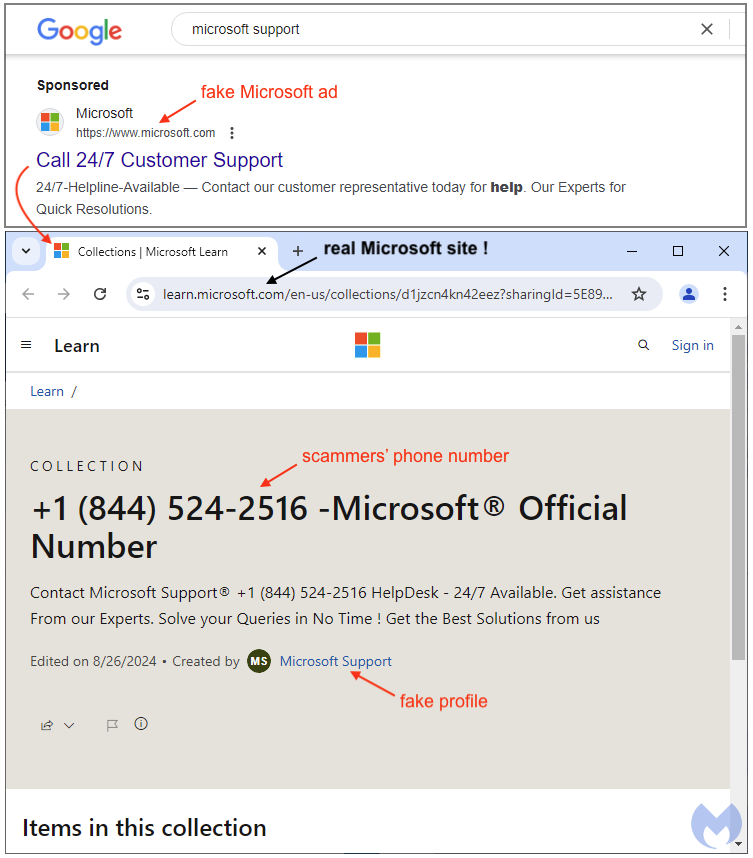
Microsoft does not have a single, universal support number for all products and regions. Support numbers are typically specific to your geographical location and often to the product or service you’re calling about.
- Official Microsoft Support Page: The most reliable way to find the correct number is to visit support.microsoft.com. Navigate to the specific product you need help with (e.g., Windows, Office, Xbox, Surface) and look for the “Contact Us” or “Get Support” option. This will often lead you to a page with regional phone numbers.
- Product-Specific Websites: For some products (like Xbox), their dedicated support websites will have direct contact information.
- Regional Variations: Be mindful that toll-free numbers are usually region-specific. Dialing an incorrect region’s number might lead to long hold times or an inability to receive support.
The Automated System: Patience and Precision
Once you dial, you’ll almost certainly encounter an Interactive Voice Response (IVR) system. These automated menus are designed to triage calls, directing users to the appropriate department.
- Listen Carefully: Don’t rush through the options. Listen to each prompt fully before making a selection.
- Use Keywords or Number Selection: You may be asked to describe your issue in a few words or select a number corresponding to your product or problem type. Be precise. Saying “Windows not working” is less helpful than “Windows activation issue” or “Windows blue screen error.”
- Have Your Case Number Ready: If you’ve previously initiated support online or received a case number, have it ready to input when prompted. This can sometimes bypass certain menu options.
- Patience is Key: IVR systems can be frustrating, but remember their purpose is to connect you efficiently. Resist the urge to randomly press buttons, as this can misdirect your call and lead to longer resolution times.
Speaking with a Live Agent: Maximizing Your Interaction
Once you connect with a live agent, your goal is to convey your issue clearly and cooperate with their diagnostic process.
- Be Polite and Respectful: A courteous demeanor can go a long way. Support agents are there to help, and a positive interaction benefits everyone.
- Provide Your Case Number: If you have one, give it to the agent immediately.
- Clearly State Your Issue: Start with a concise summary of your problem. Avoid jargon if possible, but be technically accurate when necessary.
- Explain Troubleshooting Steps Taken: Inform the agent about any steps you’ve already attempted, so they don’t suggest redundant solutions.
- Follow Instructions: The agent will likely guide you through a series of diagnostic steps. Follow them precisely and report results accurately.
- Ask for Clarification: If you don’t understand an instruction or explanation, don’t hesitate to ask for clarification.
- Document: As the conversation progresses, note down key information: the agent’s name, the time of the call, the new case number (if issued), and the steps they advised.
Common Scenarios for Contacting Microsoft Support
Microsoft’s diverse product portfolio means their support agents are equipped to handle a wide array of technical challenges. Understanding the types of issues that commonly warrant a direct call can help you decide if phone support is right for your situation.
Software Activation and Licensing Issues
These are frequent reasons for calls. Problems can include:
- Product Key Not Working: When a valid product key is rejected during activation.
- Reactivation Challenges: Difficulties reactivating Windows or Office after a hardware change or reinstallation.
- License Transfer Issues: Problems moving a software license from one device to another.
- Subscription Management: Issues with billing, renewals, or cancelling Microsoft 365 subscriptions.
Troubleshooting Operating System Problems (Windows)
Windows, being the most widely used operating system, naturally generates a significant volume of support requests. Common issues include:
- Blue Screen of Death (BSOD) Errors: Critical system failures indicated by a blue screen with an error code.
- Boot-Up Problems: When Windows fails to start correctly.
- Driver Conflicts: Issues arising from incompatible or corrupted device drivers.
- System Crashes and Freezes: Unexplained system instability.
Microsoft Office Suite Assistance
From Word to Excel, PowerPoint, and Outlook, the Office suite is indispensable for many. Support calls often relate to:
- Application Crashes: Individual Office applications failing to open or crashing frequently.
- Installation/Uninstallation Issues: Problems installing or completely removing Office software.
- Outlook Connectivity: Difficulties connecting Outlook to email servers or synchronizing data.
- Feature Malfunctions: Specific features within Office applications not working as expected.
Hardware Support for Surface Devices and Xbox
Microsoft also produces its own line of hardware, each with specific support needs:
- Surface Devices: Troubleshooting screen issues, battery problems, keyboard detachment failures, or stylus connectivity.
- Xbox Consoles: Resolving issues like console freezing, disc read errors, connectivity problems with Xbox Live, or hardware malfunctions.
- Accessory Support: Problems with official Microsoft mice, keyboards, or webcams.
Security Concerns and Account Recovery
In an age of cyber threats, securing your Microsoft account is critical. Phone support is often essential for:
- Account Lockout: When you’re unable to access your Microsoft account due to forgotten credentials or security blocks.
- Suspicious Activity: Reporting unauthorized access or changes to your account.
- Malware Removal Guidance: While Microsoft doesn’t directly remove malware, they can guide you through using their security tools or recommended third-party solutions.
- Two-Factor Authentication Issues: Resolving problems with receiving or using verification codes.
Optimizing Your Support Experience
Getting the most out of your interaction with Microsoft Support goes beyond just reporting an issue. It involves strategic communication and an understanding of the support process itself.
Articulating Your Issue Clearly
The clearer you are, the faster and more effectively an agent can help.
- Be Specific: Instead of “My computer is slow,” try “My computer started running slowly after the latest Windows update, specifically when opening Chrome.”
- Use Technical Terms Accurately: If you know the name of an error code or a specific component, use it.
- Focus on the Problem, Not the Solution: Describe what’s happening, not what you think should happen. Let the agent diagnose.
Documenting Your Interaction
Keeping records is crucial for continuity and accountability.
- Case Numbers: Always request and note down the case number. This is vital if you need to follow up or if your call gets disconnected.
- Agent Names: Note the name of the agent you spoke with.
- Date and Time: Record when you called and how long the call lasted.
- Summary of Discussion and Steps Taken: Briefly summarize the diagnosis, the steps you followed, and any advice given. This is invaluable if you need to speak with a different agent later.
Understanding Service Level Agreements (SLAs)
While not always explicitly stated for consumer support, large organizations like Microsoft operate with internal service level agreements that dictate response times and resolution targets. For general consumer support, immediate resolution is the goal, but complex issues may require escalation. Business and enterprise customers typically have more formal SLAs defining their expected support levels.
Escalation Paths and Feedback
If you feel your issue is not being adequately addressed, or if you encounter persistent problems after multiple attempts, you generally have options.
- Requesting a Supervisor: Politely ask to speak with a supervisor or a more senior technician if you believe the current agent is unable to resolve your issue.
- Providing Feedback: Microsoft values feedback. You may receive an email survey after your call, or there might be an option on their support website to leave comments. Providing constructive feedback helps them improve their services.
The Future of Tech Support: AI and Beyond
The landscape of tech support is continuously evolving, with artificial intelligence playing an increasingly significant role. While human phone support remains indispensable for complex, sensitive, and emotionally charged issues, AI-driven tools are enhancing the efficiency of the overall support ecosystem.
Self-Help Resources and Knowledge Bases
AI algorithms are improving the search capabilities and relevance of articles within Microsoft’s vast knowledge base. This means users can more quickly find answers to common questions without needing human intervention, reducing the load on phone support.
Community Forums and Peer Support
AI-powered moderation and search functionalities in community forums can help users find existing solutions faster, connect with relevant experts, or even get automated suggestions based on their queries, further empowering self-service.

The Role of AI in Initial Diagnostics
Many virtual agents and chat bots use AI to perform initial diagnostics, gather information, and even offer basic troubleshooting steps. This can resolve simple issues quickly or ensure that when a user does reach a human agent, the agent already has a detailed report of the problem and the steps already attempted, making the interaction more efficient. While AI can handle routine tasks, the nuanced problem-solving, empathy, and security required for complex personal tech issues will likely keep phone support as a critical component of Microsoft’s customer service strategy for the foreseeable future.
In conclusion, knowing how to effectively phone Microsoft Support is a valuable skill for any user of their products. By understanding their multi-channel approach, preparing diligently for your call, navigating the automated systems with patience, and engaging clearly and respectfully with live agents, you significantly increase your chances of a swift and successful resolution to your technical challenges. In an era where technology underpins so much of our daily lives, mastering the art of seeking support ensures that minor glitches don’t become major roadblocks.
aViewFromTheCave is a participant in the Amazon Services LLC Associates Program, an affiliate advertising program designed to provide a means for sites to earn advertising fees by advertising and linking to Amazon.com. Amazon, the Amazon logo, AmazonSupply, and the AmazonSupply logo are trademarks of Amazon.com, Inc. or its affiliates. As an Amazon Associate we earn affiliate commissions from qualifying purchases.