
In the dynamic world of iOS customization, users are constantly seeking greater control and freedom over their devices. For years, sideloading apps – installing applications outside of Apple’s official App Store – has been a popular avenue for accessing unofficial tools, emulators, and modified versions of apps. However, the traditional methods often come with a significant drawback: the dreaded 7-day signing certificate expiration, necessitating frequent re-signing via tools like AltStore.
Enter TrollStore, a game-changer for a specific range of iOS versions. TrollStore leverages a unique system exploit to permanently sign apps directly on your device, liberating you from the constant need for a computer, AltStore, or developer accounts for refreshing. It offers a truly “install-and-forget” experience for sideloaded applications, making it an invaluable tool for power users and enthusiasts.
While AltStore is a fantastic utility for many, its reliance on a computer connection for certificate refreshing (or being on the same Wi-Fi network for background refresh) can still be a hurdle. This guide is dedicated to exploring methods for installing TrollStore without needing AltStore, providing a more robust and self-sufficient path to permanent app signing on your iOS device. We’ll delve into the necessary prerequisites, walk through various installation methods, and provide insights into managing your TrollStore-enabled applications.
Understanding TrollStore: The Power of Permanent Sideloading
Before diving into the installation process, it’s crucial to grasp what TrollStore is, how it functions, and why it represents such a significant leap forward for iOS customization. Unlike conventional sideloading tools that inject a developer certificate which expires after a set period (7 days for free accounts, 1 year for paid developer accounts), TrollStore bypasses this system entirely.
What is TrollStore and How Does it Work?
TrollStore is essentially an on-device utility that exploits a specific vulnerability in iOS to achieve permanent signing of applications. This vulnerability allows TrollStore to install apps as if they were system applications, thus circumventing the standard certificate validation process. Once an app is installed via TrollStore, it remains signed and fully functional indefinitely, without requiring any further intervention or re-signing.
The core of TrollStore’s magic lies in its ability to write to system directories that are normally restricted. It installs a “Persistence Helper” within a system app (often Tips or a similar stock app) that allows TrollStore itself to survive reboots and system updates (within the compatible iOS range) and maintain its privileged access. This means that once TrollStore is set up, you can simply download any .ipa file (the iOS application package) directly on your device and install it with a tap, enjoying full functionality without expiration worries.
Key Benefits of Using TrollStore
The advantages of TrollStore are compelling, particularly for users frustrated by the limitations of traditional sideloading:
- Permanent App Signing: This is the flagship feature. Install an app once, and it stays signed forever, eliminating the tedious 7-day refresh cycle.
- No Computer Needed (After Initial Setup): While the initial TrollStore installation might require a computer for some methods (though the “without AltStore” methods we’ll discuss often minimize or eliminate this), subsequent app installations and management are entirely on-device.
- No Developer Account Required: You don’t need a paid Apple Developer account to enjoy permanent signing. Free accounts are sufficient for the initial helper installation if that method is chosen, but many methods bypass even that.
- No Revokes: Unlike enterprise certificates sometimes used for third-party app stores, TrollStore installed apps are immune to widespread certificate revokes by Apple.
- True App Freedom: Install emulators, tweaked apps, utility tools, and more without concern for their lifespan.
- Enhanced Productivity: Spend less time troubleshooting expired certificates and more time using your preferred applications.
TrollStore Compatibility: The Crucial Factor
TrollStore’s functionality relies on specific iOS exploits, making its compatibility highly dependent on your device’s iOS version. This is the single most critical factor to consider before attempting installation.
- General Compatibility: TrollStore generally supports iOS versions ranging from iOS 14.0 to iOS 17.0.
- Specific Exploit Windows: Within this range, different exploits are used:
- iOS 14.0 – 15.4.1 (and some 15.5 beta versions): Often uses the
CoreTrustbug. - iOS 15.5 – 16.6.1 (and some 16.7 beta versions): Utilizes the
MDC (MacDirtyCow)exploit orKFDexploit. - iOS 17.0: Exploits like
KFDmight be present, but often require specific tools and are highly version-dependent.
- iOS 14.0 – 15.4.1 (and some 15.5 beta versions): Often uses the
- Important Note: Apple actively patches these exploits with new iOS updates. If you’re on a newer iOS version (e.g., iOS 17.1 or later), TrollStore is currently not compatible. It is imperative to check your exact iOS version before proceeding. If you’ve updated beyond the compatible range, you will need to wait for a new exploit to be discovered and incorporated into TrollStore, which may or may not happen.
To check your iOS version, go to Settings > General > About > iOS Version.
Prerequisites and Essential Considerations
Before embarking on the TrollStore installation journey, gathering the necessary tools and understanding potential pitfalls is paramount. Preparation ensures a smoother process and minimizes the risk of issues.
Essential Prerequisites:
- Compatible iOS Device: As detailed above, your iPhone or iPad must be running an iOS version within the supported range (generally iOS 14.0 – 17.0).
- Internet Connection: Required for downloading files, tools, and
IPAs. - Basic Understanding of iOS File Management: While not strictly mandatory, familiarity with downloading files, navigating folders, and understanding
IPAfiles will be beneficial. - A Computer (Optional but Recommended for Backups): While some “without AltStore” methods can be entirely on-device, having a computer can be useful for downloading initial files, transferring them, or for creating a backup.
- A Sense of Caution: While TrollStore is generally safe when used correctly, installing unofficial software always carries a degree of risk. Proceed with care.
Crucial Considerations Before Installation:
- Backup Your Device: Always, always, always create a full backup of your device using iCloud or iTunes/Finder before attempting any significant system modifications. This ensures you can restore your data if anything goes awry.
- Understand Your iOS Version’s Specific Method: The “without AltStore” method you choose will heavily depend on your exact iOS version. A tool that works for iOS 15.4.1 will likely not work for iOS 16.5. This guide will focus on the most prevalent methods, primarily exploit-based installations.
- Source of
IPAFiles: Only download TrollStore HelperIPAs and other apps from trusted sources (e.g., official GitHub repositories, reputable communities like r/jailbreak or Discord servers) to avoid malware. - Stability of Exploits: Exploits like MacDirtyCow or KFD, while powerful, can sometimes be a bit finicky. You might need to attempt the process a few times for it to succeed.
- System Integrity: TrollStore modifies system integrity. While designed to be safe, installing poorly developed or malicious
IPAs can still cause instability or security risks. Exercise discretion when choosing what to install.
Method 1: Exploit-Based Installation (Leveraging MacDirtyCow/KFD)
This is often the preferred method for installing TrollStore without AltStore or a computer for the initial helper installation, as it directly leverages on-device exploits. This method is particularly relevant for iOS 15.5 up to 16.6.1 (and some 16.7 beta versions), and potentially iOS 17.0 depending on exploit availability.
The general principle here is to use a specific utility app that utilizes an exploit (like MacDirtyCow or KFD) to install the TrollStore Helper IPA directly onto your device.
Step 1: Identify Your Exact iOS Version and Find the Correct Tool
First, confirm your exact iOS version (e.g., 16.5, 15.6.1). Then, you need to find the specific “TrollStore Installer” or “TrollStore Helper” IPA that is compatible with your version and leverages the appropriate exploit.
- Search for “TrollStore Installer [Your iOS Version] MacDirtyCow” or “TrollStore Installer [Your iOS Version] KFD”.
- Trusted Sources: Always prioritize GitHub repositories from known developers (e.g., opa334, Mineek, Sourcelocation). Look for tools like:
- TrollInstallerMDC: For MacDirtyCow compatible devices (iOS 15.5-16.1.2).
- Misaka (for KFD): Sometimes used as a launcher/installer for KFD exploits on compatible iOS 16.2-16.6.1 versions.
- TrollStar: Another tool that might pop up for specific versions.
- Download the appropriate
.ipafile for the installer/helper. You can download this directly on your iPhone using Safari.
Step 2: Sideloading the Initial Exploit-Based Installer
Since you’re aiming to install TrollStore without AltStore, you’ll need a temporary way to get the initial exploit-based installer app onto your device. For many MacDirtyCow/KFD-based installers, they are designed to be run from an unsigned state or through another temporary sideloading method.
- Option A: On-Device (If Supported by the Exploit Tool): Some specific exploit tools are designed to be installed by simply downloading them from a website and running them directly, often leveraging web-based installation methods or configuration profiles. This is rare but possible for very specific exploits.
- Option B: Using a Temporary Sideloading Tool (No AltStore, But Still Needs a Computer): If the chosen exploit installer isn’t directly installable on-device, you might need to temporarily sideload that single installer app using a free tool like Sideloadly or Xcode (for Mac users). This is a one-time requirement to get the exploit tool onto your device.
- Sideloadly (Windows/macOS):
- Download and install Sideloadly on your computer.
- Download the TrollStore Installer/Helper IPA (from Step 1) to your computer.
- Connect your iPhone/iPad to your computer.
- Open Sideloadly, drag the Installer/Helper IPA into it.
- Enter your Apple ID and password (this is used to sign the app with your free developer certificate, similar to AltStore, but only for this one initial installer).
- Click “Start” and wait for the app to install on your device.
- On your device, go to
Settings > General > VPN & Device Managementand trust the developer profile associated with your Apple ID.
- Sideloadly (Windows/macOS):
- Option C: If Jailbroken (See Method 2): If your device is already jailbroken, you can often install the TrollStore Helper directly from a package manager, bypassing any sideloading tools.
Step 3: Running the TrollStore Installer/Helper App
Once the exploit-based installer app (e.g., TrollInstallerMDC, Misaka) is on your device:
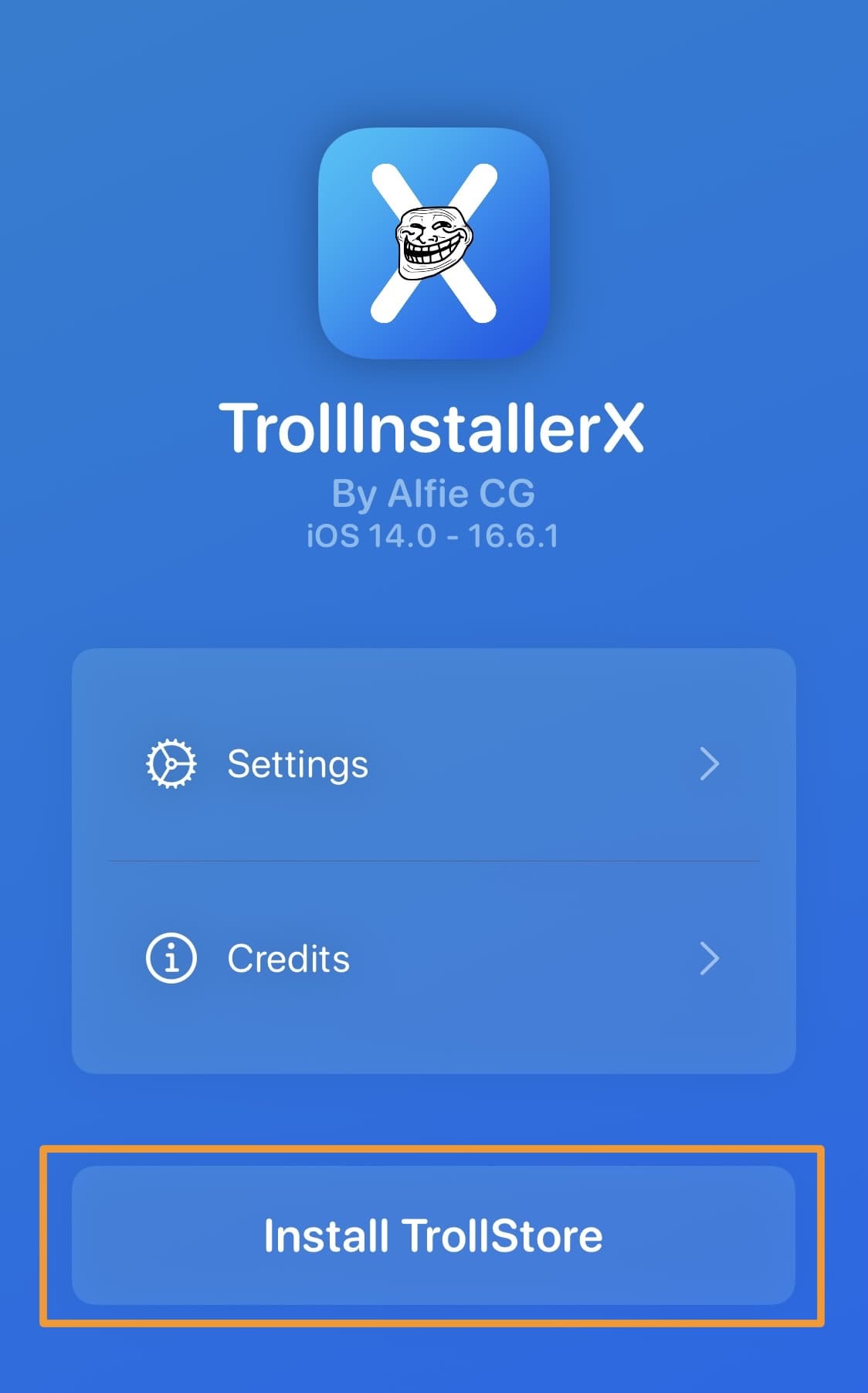
- Launch the app. It will typically present a simple interface.
- Follow the on-screen instructions. This usually involves tapping a button like “Install TrollStore Helper” or “Install TrollStore.”
- Wait for the process to complete. The app will leverage the exploit to install the TrollStore Persistence Helper and then the full TrollStore application. Your device might respring or reboot during this process.
- If it fails: Don’t panic. Exploit-based tools can be temperamental. Try again. Ensure your device isn’t low on battery, close all background apps, and sometimes a fresh reboot helps.
Step 4: Installing TrollStore and the Persistence Helper
After the initial exploit tool has run successfully and your device has respringed/rebooted, you should find a new app icon on your home screen: TrollStore.
- Open the TrollStore app.
- It will prompt you to install a “Persistence Helper.” This is crucial. The Persistence Helper is injected into a stock system app (like Tips, Stocks, or a chosen user app) and ensures TrollStore remains active even after reboots, without needing re-signing.
- Tap “Install Persistence Helper” and select a stock app (e.g., Tips, Books, Calculator – avoid frequently updated apps). If you accidentally pick an app that gets deleted, you can reinstall the Persistence Helper later.
- TrollStore will respring your device. Once it’s back up, the installation is complete!
Congratulations, TrollStore is now permanently installed on your device without reliance on AltStore.
Method 2: Jailbreak-Based Installation (For Already Jailbroken Devices)
If your device is already jailbroken within the compatible iOS range (e.g., using Palera1n, unc0ver, Taurine, Dopamine, RootlessJB), installing TrollStore is significantly simpler and entirely bypasses the need for AltStore or other sideloading tools.
Step 1: Add the Official TrollStore Repository
- Open your preferred package manager (Cydia, Sileo, Zebra, Installer, etc.) on your jailbroken device.
- Add the official TrollStore repository. This is usually:
https://opa334.github.io/
Step 2: Install TrollStore Helper
- Search for “TrollStore Helper” within your package manager.
- Install the package. Your package manager will handle all dependencies and inject the necessary files.
- Your device will likely respring after installation.
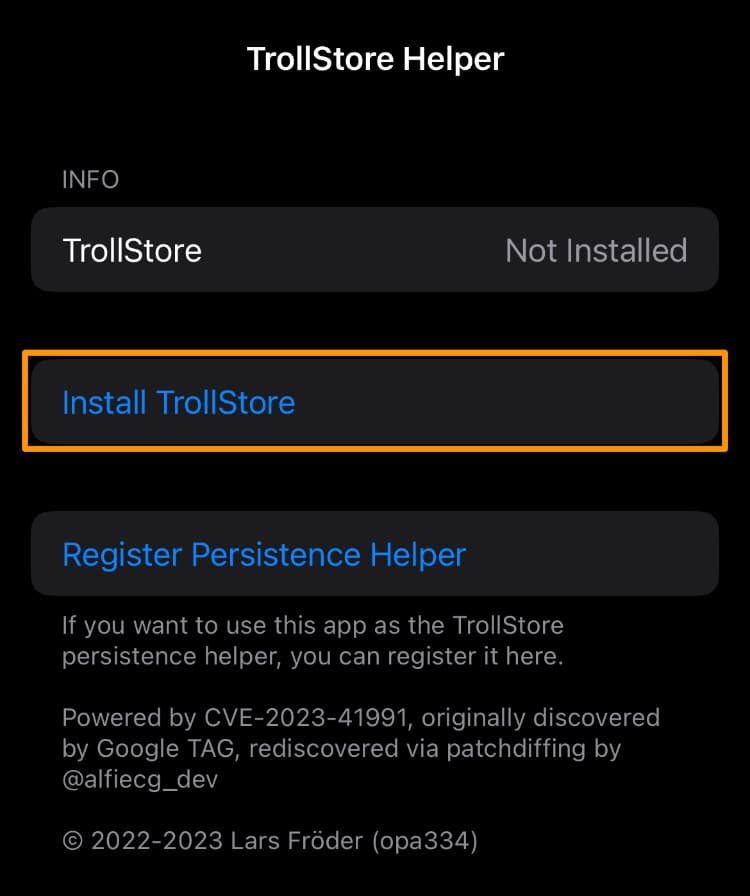
Step 3: Install TrollStore from the Helper App
- Locate the “TrollStore Helper” app on your home screen. It might be named “TrollHelper” or similar.
- Open the TrollStore Helper app.
- Tap the “Install TrollStore” button.
- Your device will respring or reboot.
- Once your device is back, you should see the TrollStore app icon on your home screen.
Step 4: Install Persistence Helper
- Open the newly installed TrollStore app.
- Tap “Install Persistence Helper” and choose a stock app (e.g., Tips, Books). This ensures TrollStore’s longevity.
- Your device will respring.
You now have TrollStore permanently installed via your jailbreak. This method is generally the most straightforward if you already have a jailbroken device.
Post-Installation: Managing Apps with TrollStore
Once TrollStore is successfully installed using either of the methods above, you’re ready to enjoy the freedom of permanent app sideloading.
Installing IPAs with TrollStore:
- Download the
.ipafile of the app you want to install. You can do this directly in Safari on your iPhone/iPad. Ensure you’re downloading from trusted sources. - Open the downloaded
.ipafile:- From Safari: After downloading, tap the download icon in Safari, then tap the
.ipafile. It will typically open in a “Share Sheet.” - From Files app: Navigate to where you downloaded the
.ipa(e.g., Downloads folder). Tap the.ipafile.
- From Safari: After downloading, tap the download icon in Safari, then tap the
- Select “Open with TrollStore” from the Share Sheet or context menu.
- TrollStore will automatically install the app. A progress bar will show the installation.
- The app will appear on your home screen once installed. It’s permanently signed and ready to use!
Key TrollStore Features and Tips:
- Uninstalling Apps: Open TrollStore, go to “Apps,” swipe left on an app, and tap “Delete.”
- Rebuilding Icon Cache: If app icons don’t appear correctly, go to TrollStore Settings and tap “Rebuild Icon Cache.”
- Updating TrollStore: TrollStore itself might receive updates. When available, TrollStore will usually notify you. You can often update it directly from within the app’s settings.
- Troubleshooting:
- App won’t install: Ensure the
.ipais valid and not corrupted. Check TrollStore’s “Settings” for any error messages. - TrollStore disappears after reboot: This means the Persistence Helper wasn’t installed correctly or was removed. Re-open the TrollStore Installer/Helper (from Method 1 or 2) and reinstall the Persistence Helper within TrollStore.
- Apps crash on launch: This could indicate an issue with the
.ipaitself or a compatibility problem with your iOS version.
- App won’t install: Ensure the
Troubleshooting Common Issues and FAQs
While the “without AltStore” installation methods aim for simplicity, issues can still arise. Here’s a quick troubleshooting guide:
- “Error: Unsupported iOS Version”: This is the most common issue. Your device is either too new (beyond iOS 17.0) or on an unsupported version within the compatible range for the specific installer tool you’re using. Double-check your iOS version and find an installer explicitly stating compatibility.
- Installer App Crashes/Doesn’t Launch:
- Ensure you have trusted the developer profile (if you used Sideloadly or a similar temporary signing method).
- Try rebooting your device and running the installer again.
- Close all background apps before attempting.
- If using an exploit, sometimes multiple attempts are needed.
- TrollStore Helper App is Missing:
- If jailbroken, ensure the package installed correctly from your package manager. Try reinstalling.
- If using an exploit-based installer, the installer itself might not have completed successfully. Re-run the initial installation steps.
- TrollStore is installed, but apps won’t appear on the home screen: Go to TrollStore settings and tap “Rebuild Icon Cache.”
- “Failed to install Persistence Helper”: This is critical. Without it, TrollStore won’t survive reboots. Try installing it into a different stock app. Ensure the chosen stock app isn’t deleted or offloaded. If all else fails, you may need to re-run the initial TrollStore Helper installation and then try installing the Persistence Helper again.
- Downloaded
IPAwon’t open in TrollStore:- Ensure it’s a valid
.ipafile. Some “IPA” files are actually just HTML or other data. - Try saving the
IPAto the Files app first, then tapping it and using the Share Sheet. - Confirm TrollStore is properly installed and not corrupted.
- Ensure it’s a valid
Frequently Asked Questions:
- Is TrollStore a jailbreak? No. While it uses exploits similar to jailbreaks, it doesn’t provide root access or the ability to install Cydia tweaks. It’s purely for permanent app signing.
- Will TrollStore void my warranty? Officially, any modification outside Apple’s intended use could be cited. However, since TrollStore is reversible (you can uninstall it), it’s generally less risky than a full jailbreak.
- Can I update iOS with TrollStore installed? It is highly recommended not to update your iOS version if you want to keep TrollStore. Newer iOS versions will patch the exploits, making TrollStore cease to function. If you accidentally update, TrollStore will break, and you’ll have to wait for a new compatible exploit.
- Are TrollStore apps safe? TrollStore itself is developed by trusted members of the jailbreak community. The safety of the apps you install with TrollStore depends entirely on their source. Only download
IPAs from reputable developers and sources.
Conclusion: Embracing Digital Autonomy with TrollStore
Installing TrollStore without AltStore represents a significant step towards greater digital autonomy on your iOS device. By leveraging specific exploits or a pre-existing jailbreak, you unlock the ability to permanently sideload applications, freeing you from the cumbersome cycle of certificate expirations and computer dependencies. This tutorial has provided a detailed roadmap for navigating these advanced installation methods, empowering you to take control of your app experience.
Whether you’re an avid emulator user, a privacy-conscious individual seeking alternative apps, or simply someone who craves more flexibility from their iPhone or iPad, TrollStore offers an unparalleled solution within its compatible iOS window. Remember to always proceed with caution, back up your device, and source your IPAs responsibly. With TrollStore, the world of iOS customization becomes more accessible and enduring, truly putting the power back in your hands.