
Red Dead Redemption 2, Rockstar Games’ epic Western masterpiece, captivated millions with its breathtaking open world, compelling narrative, and unparalleled attention to detail. Yet, for many PC gamers, the adventure doesn’t end with the credits. It truly begins when the vibrant modding community steps in. Modding transforms the game, injecting new life, features, and visual enhancements that push the boundaries of the original experience. From subtle tweaks that improve quality of life to expansive overhauls that introduce entirely new gameplay mechanics, mods offer a personalized journey through the untamed American frontier. This guide will walk you through the comprehensive process of installing Red Dead Redemption 2 mods, ensuring you can unlock the full potential of this incredible title on your PC.

As a platform dedicated to exploring the cutting edge of technology, software, and digital solutions, we understand the desire to customize and enhance digital experiences. Modding RDR2 is a prime example of leveraging technology to extend entertainment value and foster creativity within a gaming ecosystem. While the official game offers a meticulously crafted world, the modding scene allows players to become co-creators, tailoring the game to their exact preferences. However, diving into the world of modding requires a structured approach and an understanding of the necessary tools and precautions. This article will equip you with the knowledge to navigate this exciting landscape safely and effectively, ensuring your journey into the wild west of modding is as smooth as possible.
I. Understanding the Essentials of RDR2 Modding
Before you begin downloading every intriguing mod you find, it’s crucial to understand the foundational tools that make RDR2 modding possible. These core utilities act as the bedrock upon which all other modifications are built, enabling the game to recognize and integrate custom content. Familiarizing yourself with these essentials will not only simplify the installation process but also aid in troubleshooting should any issues arise.
A. What You’ll Need: Core Modding Tools
The majority of Red Dead Redemption 2 mods rely on a few key programs to function correctly. Think of these as the operating system for your mods, allowing them to interact with the game engine.
- Script Hook RDR2: This is arguably the most fundamental tool for RDR2 modding. Developed by Alexander Blade, Script Hook RDR2 allows custom scripts (written in various programming languages) to be executed within the game. Many complex mods that introduce new features, character abilities, or gameplay alterations depend on this tool to inject their code into the game’s processes. Without Script Hook RDR2, most script-based mods simply won’t work. It often comes with an ASI Loader as part of its package, but it’s important to understand their distinct functions.
- ASI Loader: An ASI (Another Scripting Interface) Loader is a small plugin that allows the game to load custom
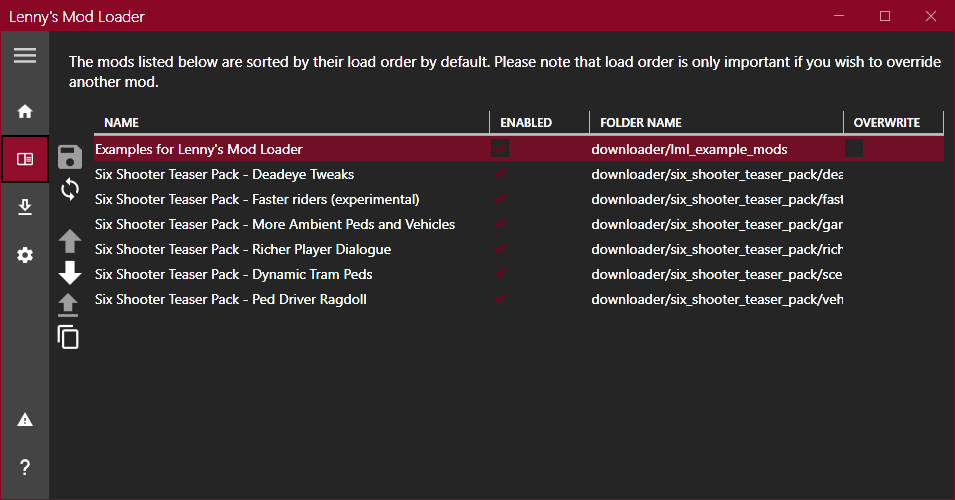
.asifiles. These.asifiles are essentially dynamic link libraries (DLLs) that contain code for mods. Many popular mods, especially those offering specific functionalities or enhancements, are packaged as.asifiles. The ASI Loader detects and loads these files when the game starts, integrating their functionalities seamlessly. While often bundled with Script Hook RDR2, ensuring you have a functional ASI Loader is vital for a broad range of mods. - Lenny’s Mod Loader (LML): For Red Dead Redemption 2, Lenny’s Mod Loader is an indispensable tool, particularly for managing texture, model, and script mods that don’t rely solely on Script Hook RDR2. LML provides a structured framework for installing, organizing, and easily enabling or disabling various types of mods. It creates a dedicated “lml” folder within your game directory, allowing you to keep your core game files clean and separate from your modifications. This system is invaluable for preventing conflicts between mods and simplifying the process of adding or removing them without directly altering core game assets. LML is highly recommended for anyone planning to install more than just a couple of simple mods, as it dramatically improves mod management.
- A Reliable Archive Extractor: Most mods you download will come in compressed formats like
.zip,.rar, or.7z. You’ll need a utility like WinRAR, 7-Zip, or similar software to extract these files. These tools are standard across PC gaming and general tech use, but ensuring you have one installed and updated is a small but necessary prerequisite.
B. Safety First: Preparing for Mod Installation
Modding, while incredibly rewarding, carries inherent risks. Incorrect installations, conflicting mods, or downloading from untrustworthy sources can lead to game instability, crashes, or even corrupt game files. Taking a few precautionary steps can save you a lot of headaches down the line.
- Back Up Your Original Game Files: This is perhaps the most critical step before embarking on any modding adventure. Before you install any modding tools or mods, make a copy of your main Red Dead Redemption 2 game directory. At the very least, back up essential files like
RDR2.exeand any.rpffiles that mods might target. This way, if something goes wrong, you can easily revert to a clean, unmodded state without needing to re-download the entire game. You can copy the entire game folder to another location on your hard drive, or simply copy the critical executables and data files. - Understand the Risks and Limitations: While RDR2 modding is generally safe for single-player content, it’s crucial to understand that using mods in online modes (Red Dead Online) is strictly prohibited by Rockstar Games. Doing so can lead to temporary bans or even permanent account suspensions. This guide focuses exclusively on single-player modding. Always ensure your mods are configured only for single-player use and never active when attempting to access Red Dead Online.
- Always Download from Reputable Sources: The modding community is vibrant, but not all sources are equally trustworthy. Stick to well-known modding websites like Nexus Mods, which have robust moderation systems, user reviews, and endorsement tracking. These platforms help ensure that the mods you download are legitimate, free of malicious software, and have community support. Avoid obscure forums or direct downloads from unfamiliar websites.
- Keep Your Game Updated (Initially): Ensure your Red Dead Redemption 2 game is fully updated to the latest version before you start modding. Modding tools and mods are typically designed for specific game versions. While game updates can sometimes break existing mods, it’s best to start with a current, patched game. If a game update does occur after you’ve modded, you may need to wait for mod authors to update their tools and mods to be compatible with the new game version.
II. Step-by-Step Guide to Installing Core Modding Tools
With the necessary background knowledge and safety precautions in mind, let’s dive into the practical installation of the foundational modding tools. These steps are crucial and must be completed accurately for most RDR2 mods to function.
A. Installing Script Hook RDR2 and ASI Loader
Script Hook RDR2 and its accompanying ASI Loader are the gateway to a vast majority of mods. Their installation is straightforward but requires precise file placement.
- Download Script Hook RDR2: Visit the official website (usually by Alexander Blade) or a reputable modding site that hosts it. Ensure you are downloading the latest version compatible with your current RDR2 game version.
- Extract the Files: Once downloaded, the file will typically be a
.ziparchive. Use your archive extractor (WinRAR, 7-Zip) to extract the contents. You’ll usually find abinfolder and possibly aREADMEfile. - Locate Your RDR2 Game Directory: This is the folder where your
RDR2.exeexecutable file is located. Common paths include:- Steam:
C:Program Files (x86)SteamsteamappscommonRed Dead Redemption 2 - Rockstar Games Launcher:
C:Program FilesRockstar GamesRed Dead Redemption 2 - Epic Games Store:
C:Program FilesEpic GamesRedDeadRedemption2
- Steam:
- Copy Essential Files: Open the
binfolder from the extracted Script Hook RDR2 archive. You will see files likeScriptHookRDR2.dllanddinput8.dll(this is the ASI Loader).- Copy both
ScriptHookRDR2.dllanddinput8.dlldirectly into your main Red Dead Redemption 2 game directory (whereRDR2.exeis located). - Do NOT copy any example scripts (like
NativeTrainer.asiif included) unless you explicitly want to use them, as they are often just for demonstration. For this tutorial, we are focusing on the core tools.
- Copy both
B. Setting Up Lenny’s Mod Loader (LML)
Lenny’s Mod Loader streamlines the management of various mod types, especially those that replace or add assets. Its setup is also relatively simple.
- Download Lenny’s Mod Loader: Head to its official page on Nexus Mods or other trusted sources. Download the main file.
- Extract the Files: Unzip the downloaded archive. You’ll likely find a folder named
lmland aninstall.xmlor similar setup files. - Install LML:
- Manual Installation: The most common method involves copying the
lmlfolder and a few other files. - Copy the entire
lmlfolder from the extracted archive directly into your main Red Dead Redemption 2 game directory (the same folder whereRDR2.exeand the Script Hook files are). - Additionally, check if the LML archive contains an
.asifile (e.g.,lml.asi) or similar configuration files. Copy these directly into your RDR2 game directory as well. These are crucial for LML to load correctly via the ASI Loader.
- Manual Installation: The most common method involves copying the
- Understand the LML Folder Structure: Inside your newly created
lmlfolder, you’ll find subfolders likestream,replace, andmods.stream: This folder is for mods that stream new textures, models, or sound files into the game.replace: This is used for mods that directly replace existing game assets (like character models, clothing, or weapon textures).mods: This folder is designed for LML-specific mod packages, which usually contain their own internal structure of assets and sometimes scripts. Many complex LML mods will instruct you to place their entire folder withinlml/mods.
This foundational setup now prepares your game to accept a wide array of modifications, allowing you to move onto the exciting part: installing actual mods!
III. Installing Your First Red Dead Redemption 2 Mods
With Script Hook RDR2, ASI Loader, and Lenny’s Mod Loader successfully installed, your game is now primed for transformation. The next step involves acquiring and integrating the mods themselves. It’s crucial to remember that every mod can have unique installation instructions, so always prioritize the guidance provided by the mod author.
A. Manual Mod Installation
Some simpler mods, especially those that are standalone .asi scripts or minor configuration changes, can be installed manually by simply dropping files into the game directory.
- Download Your Chosen Mod: Select a mod from a reputable source like Nexus Mods. For your first mod, perhaps try a simple quality-of-life script or a minor visual tweak.
- Read the Mod’s Instructions Carefully: This cannot be stressed enough. Mod authors often provide very specific instructions, including file paths, prerequisites, and compatibility notes.
- Extract the Mod Files: Unzip the downloaded archive.
- Copy Files to the Correct Location:
- For
.asiScript Mods (dependent on Script Hook RDR2): If the mod is a single.asifile (and does not specify an LML installation), simply copy it directly into your main Red Dead Redemption 2 game directory (whereRDR2.exeandScriptHookRDR2.dllare). The ASI Loader will detect and load it. - For Configuration Files (
.ini,.xml): Some mods, particularly reshades or specific game setting tweaks, might consist of.inior.xmlfiles. These are typically placed in the main game directory or a designated subfolder as specified by the mod author. - For Basic Texture/Model Replacements (without LML): While less common for RDR2, some older or very specific texture mods might instruct you to place files directly into game archives using tools like OpenIV (primarily a GTA V tool, but sometimes used for RDR2 viewing/minor editing). However, for most RDR2 texture/model mods, LML is the preferred and safer method.
- For
B. Utilizing Lenny’s Mod Loader for Organized Modding
Lenny’s Mod Loader shines when it comes to managing multiple texture, model, and script mods, especially those that aren’t single .asi files. It helps keep your game directory clean and makes troubleshooting easier.
- Download an LML-Compatible Mod: Look for mods on Nexus Mods that explicitly state they are compatible with, or require, Lenny’s Mod Loader.
- Read the Mod’s LML-Specific Instructions: These instructions will guide you on where to place the mod’s files within the
lmlfolder structure. - Extract the Mod Files: Unzip the downloaded archive. You’ll often find a folder that already matches LML’s internal structure (e.g., a folder named after the mod, containing
stream,replace, or other folders). - Install the Mod into LML:
- For
lml/modsType Mods: If the mod comes as a self-contained folder (e.g.,MyAwesomeMod_LML), simply copy this entire folder into yourRed Dead Redemption 2lmlmodsdirectory. LML will then detect and load it. - For
streamorreplaceType Mods: Some mods might give you individual.ytd(texture dictionary),.ydd(drawable dictionary), or other asset files. These generally go into the correspondingRed Dead Redemption 2lmlstreamorRed Dead Redemption 2lmlreplacesubfolders, as guided by the mod author. This is often the case for character re-skins, weapon textures, or minor environmental changes.
- For
After installing mods, launch RDR2. If everything is correctly installed, you should see your modifications in action. Some mods might require a specific key press or in-game menu interaction to activate, so refer to their documentation.
C. Exploring Different Mod Types
The beauty of RDR2 modding lies in its diversity. Understanding the types of mods available can help you decide what experiences you want to pursue.
- Script Mods: These introduce new functionalities, mechanics, or cheats. Examples include “Rampage Trainer” (a popular in-game menu for spawning items, teleporting, changing weather), “Ped Damage Overhaul” (realistic damage models for NPCs), or “Improved Horse Handling.” They typically rely on Script Hook RDR2.
- Visual/Texture Mods: These aim to enhance the game’s aesthetics, from subtle texture improvements to dramatic graphical overhauls. “Photorealistic Reshades,” “HD Reworked Project,” or individual character/weapon re-textures fall into this category. Many of these utilize LML’s
streamorreplacefunctionality. - Gameplay Overhauls: More ambitious projects that significantly alter core gameplay loops or introduce entirely new content. While less common than script or visual mods, they offer profound changes to the RDR2 experience, potentially adding new missions, dynamic events, or challenging survival elements.
- Weapon/Vehicle Mods: Adding new weapons, custom weapon variants, or even new vehicles (though the latter is less common and more lore-breaking for RDR2 compared to GTA V) are popular choices to expand gameplay options. These often involve a mix of LML for assets and scripts for functionality.
IV. Common Issues and Troubleshooting
Even with careful installation, modding can sometimes lead to unexpected issues. Knowing how to diagnose and resolve common problems is an essential skill for any modder.
A. Game Crashes and Instability
This is arguably the most frequent problem encountered in modding.
- Causes: Conflicting mods, outdated modding tools, incorrect file placement, or an incompatible game version.
- Solutions:
- Check Mod Compatibility: Ensure all your mods are designed for the same RDR2 game version.
- Remove Recently Installed Mods: If your game starts crashing after installing a new mod, that mod is likely the culprit. Remove it, test the game, and if it stabilizes, re-examine the mod’s instructions or search for known conflicts.
- Update Modding Tools: Ensure Script Hook RDR2 and LML are the latest versions compatible with your RDR2 game. Game updates often require corresponding updates for modding tools.
- Verify Game Files: For Steam or Rockstar Launcher versions, use the “Verify Integrity of Game Files” option. This will check for corrupted or missing original files and restore them (which might remove some mods, necessitating reinstallation).
- Perform a Clean Installation (Last Resort): If all else fails, delete your RDR2 directory, reinstall the game, and then carefully add mods one by one to identify the problematic one. This is where your original game backup becomes invaluable.
B. Mods Not Showing Up
Sometimes, mods install without crashing the game, but simply don’t appear or function as expected.
- Causes: Incorrect file placement, missing dependencies (e.g., a script mod requiring Script Hook RDR2 that wasn’t properly installed), outdated mod, or activation issues.
- Solutions:
- Double-Check File Directories: Re-read the mod’s installation instructions and verify that every file is in its exact specified location. Pay close attention to whether files go into the main game folder,
lml/mods,lml/stream, or other specific subfolders. - Ensure Dependencies Are Met: Make sure Script Hook RDR2, ASI Loader, and LML are all correctly installed and up-to-date if the mod relies on them.
- Check for In-Game Activation: Some mods require activation through an in-game menu (like a trainer), a specific keybind, or by interacting with an NPC or item.
- Look for Error Logs: Script Hook RDR2 often generates
ScriptHookRDR2.login your game directory. This log can provide clues if a script mod failed to load.
- Double-Check File Directories: Re-read the mod’s installation instructions and verify that every file is in its exact specified location. Pay close attention to whether files go into the main game folder,
C. Dealing with Game Updates
Rockstar Games occasionally releases updates for Red Dead Redemption 2. While these bring new content or bug fixes, they are almost guaranteed to break your modded setup.
- How Updates Break Mods: Game updates often modify the game’s executable (
RDR2.exe) or core data files. Modding tools like Script Hook RDR2 rely on specific memory addresses and code structures in the executable. When these change, the tools become incompatible and cause crashes. - Waiting for Modding Tool Updates: The most common solution is patience. Modding tool developers (like Alexander Blade for Script Hook RDR2) typically update their tools shortly after a major game patch. Monitor their official sites or Nexus Mods for these updates.
- Disabling Auto-Updates (Caution Advised): To preserve a stable modded game, some users opt to disable automatic game updates. For Steam, you can set updates to “Only update this game when I launch it” or “Always keep this game updated” and then launch it offline. For Rockstar Launcher/Epic Games, options vary. However, this means you’ll miss out on official game content or fixes. If you choose this route, remember to back up your game before ever letting it update, as reversing an update is often impossible.
- Maintaining a Separate Modded Install: For serious modders, having two separate installations of RDR2 (one vanilla, one modded) can be an option, but it requires significant disk space.
V. Elevating Your RDR2 Experience: Responsible Modding and Beyond
Once you’ve mastered the basics of mod installation and troubleshooting, the true potential of RDR2 modding unfolds. It’s not just about adding features; it’s about engaging with a passionate community and continuously refining your personal gaming journey.
A. Discovering the Best RDR2 Mods
The sheer volume of available mods can be overwhelming. Focusing on highly endorsed and well-maintained mods from reputable sources will yield the best results.
- Nexus Mods (RDR2 Section): This is the premier destination for Red Dead Redemption 2 mods. Utilize its powerful search filters to find mods by category (e.g., gameplay, visual, tools), popularity, or recent updates.
- Popular Categories and Examples:
- Visual Enhancements: Look for “Reshade Presets” for dramatic graphical improvements, “Improved Animals” for more realistic wildlife, or “Better Textures” for environmental upgrades.
- Gameplay Overhauls: Explore mods like “Realistic Reloading,” “Dynamic Weather,” or “Law Rebalance” to significantly alter core game mechanics.
- Trainers and Utilities: “Rampage Trainer” is a must-have for those who enjoy spawning items, teleporting, or experimenting with game features. “Outfit Changer” allows for instant wardrobe changes.
- Character Customization: Find new clothing, hairstyles, or character models to make Arthur Morgan truly unique.
- Engage with the Community: Read mod comments, check the “Posts” section on Nexus Mods, and look for “Endorsements.” High endorsements and active comments often indicate a quality, well-supported mod. Don’t hesitate to ask questions in the mod’s comment section if you encounter issues, but always be polite and respectful.
B. The Modding Ethos: Contribution and Appreciation
The modding community thrives on the passion and dedication of countless individuals who create and share their work for free.
- Acknowledge Mod Creators: If you enjoy a mod, endorse it on Nexus Mods. A brief thank-you in the comments can also go a long way. These gestures encourage mod authors to continue their work.
- Respect Intellectual Property: Always be aware that modding involves altering copyrighted game content. While tolerated for single-player games, responsible modding means not trying to profit from others’ work or distributing pirated content.
- Follow Community Guidelines: Adhere to the rules and etiquette of modding forums and websites. This fosters a positive and helpful environment for everyone.
C. The Broader Impact: Tech, Creativity, and Gaming Value
Modding RDR2 is more than just adding features; it’s a testament to the power of technology and the boundless creativity of the gaming community. It allows players to not only consume but also actively participate in shaping their digital entertainment.
From a Tech perspective, modding represents the ultimate form of software customization. It demonstrates how users can extend and adapt sophisticated applications (like a AAA game engine) beyond their original design, often pushing performance boundaries or introducing novel features that even the original developers hadn’t considered. This grassroots innovation often foreshadows future official game updates or entirely new gaming trends.
In terms of Gaming Value, mods significantly extend the lifespan of a game like RDR2. When you’ve explored every corner and completed every quest, mods offer fresh challenges, renewed visual appeal, and entirely new ways to interact with the world. This effectively multiplies the entertainment return on your initial game investment, providing countless more hours of engagement.
The Creativity unleashed by modding is staggering. Artists design new textures, programmers craft complex scripts, and lore enthusiasts develop new narratives. It’s a collaborative ecosystem where individuals contribute their unique skills to enhance a shared passion, creating a vibrant subculture around their favorite games. Modding is a powerful reminder that technology, when put in the hands of a creative community, can transform and enrich experiences in unforeseen ways.
Conclusion
Installing mods for Red Dead Redemption 2 opens up a treasure trove of possibilities, allowing you to tailor your journey through the Wild West like never before. By understanding the core tools like Script Hook RDR2, ASI Loader, and Lenny’s Mod Loader, and by following a disciplined approach to installation and troubleshooting, you can confidently navigate the world of RDR2 modding. Remember to always prioritize safety through backups and reputable download sources, and to show appreciation for the talented mod creators who enrich our gaming lives.
The RDR2 modding community is a testament to the enduring appeal of this magnificent game and the power of player-driven innovation. Whether you seek enhanced visuals, expanded gameplay mechanics, or simply more ways to enjoy Arthur Morgan’s adventures, mods are an essential part of the PC RDR2 experience. So, saddle up, dive into the vast ocean of modifications, and forge your own legendary path in a truly personalized Red Dead Redemption 2.
aViewFromTheCave is a participant in the Amazon Services LLC Associates Program, an affiliate advertising program designed to provide a means for sites to earn advertising fees by advertising and linking to Amazon.com. Amazon, the Amazon logo, AmazonSupply, and the AmazonSupply logo are trademarks of Amazon.com, Inc. or its affiliates. As an Amazon Associate we earn affiliate commissions from qualifying purchases.