
In today’s interconnected educational environment, school computers serve as vital tools for learning, research, and collaboration. However, these networks are often equipped with content filters and restrictions designed to ensure a focused, safe, and appropriate learning atmosphere. While these measures are implemented with good intentions, students and sometimes staff may seek ways to bypass them, often turning to Virtual Private Networks (VPNs) for greater digital freedom, privacy, or access to blocked content. This guide delves into the technical aspects of installing a VPN on a school computer, but more importantly, it critically examines the ethical, legal, and practical implications that must be thoroughly understood before attempting any such action.
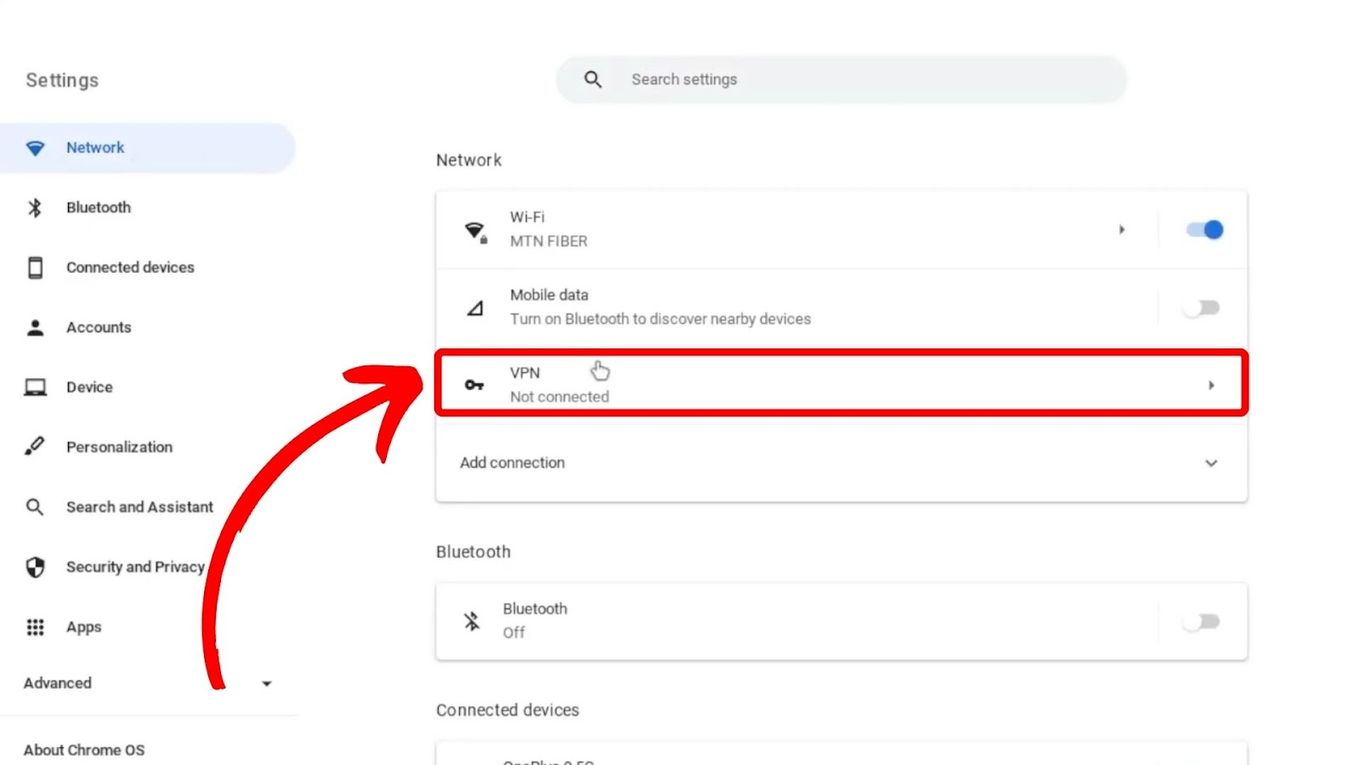
The desire to use a VPN on a school-issued or network-connected computer stems from various motivations: accessing educational resources blocked by school filters, maintaining personal privacy online, or simply bypassing recreational content restrictions during downtime. While a VPN can indeed offer these functionalities, the unique context of a school computer introduces a complex web of challenges, risks, and responsibilities that extend far beyond typical personal use. Navigating this landscape requires not just technical know-how, but a deep appreciation for digital citizenship and the potential repercussions for both the individual and the educational institution.
Understanding the “Why” and the “What” of VPNs
Before exploring any methods, it’s crucial to grasp what a VPN is and why it might be considered an attractive, albeit risky, solution for navigating school networks.
What is a VPN and How Does It Work?
A Virtual Private Network (VPN) creates a secure, encrypted connection over a less secure network, such as the internet. Imagine a private, invisible tunnel through which all your online data travels. When you connect to a VPN server, your internet traffic is routed through this encrypted tunnel to the server, and then from the server to its final destination (e.g., a website or online service). This process achieves two primary goals:
- Encryption: All data traveling through the VPN tunnel is encrypted, making it unreadable to anyone who might try to intercept it, including your Internet Service Provider (ISP) or, in this case, the school’s IT department. This significantly enhances your online privacy and security, especially when using public Wi-Fi.
- IP Address Masking: The VPN server assigns you a new, temporary IP address, effectively hiding your real IP address. This makes it appear as if you are browsing from the location of the VPN server, rather than your actual physical location. This is how VPNs can bypass geo-restrictions or content filters that block access based on your IP address.
In essence, a VPN aims to give you greater anonymity, security, and freedom online by creating a secure intermediary between your device and the internet.
The Allure on a Restricted Network
On a school computer connected to the institution’s network, a VPN’s capabilities become particularly appealing for several reasons:
- Bypassing Content Filters: Schools often employ filters that block access to social media, streaming services, certain news sites, or even specific educational resources deemed inappropriate or distracting. A VPN can effectively circumvent these filters by encrypting traffic and routing it through an external server, making it difficult for the school network to identify and block the content.
- Enhancing Online Privacy: Even if a school doesn’t actively monitor individual browsing habits, many students prefer the peace of mind that comes with knowing their online activities are private. A VPN ensures that the school’s IT department cannot easily see which websites a student visits, what they search for, or what applications they use.
- Security on Public Wi-Fi: School Wi-Fi, while password-protected, can sometimes be vulnerable to certain types of attacks, especially if not configured with the highest security standards. A VPN adds an extra layer of encryption, protecting data from potential eavesdroppers or malicious actors on the same network.
- Accessing Geo-Restricted Content: For research purposes or personal use, students might need to access websites or online services that are restricted based on geographical location. A VPN allows users to choose a server location in a different country, thus gaining access to region-specific content.
While these benefits are clear, the path to achieving them on a school computer is fraught with significant challenges and potential downsides that demand careful consideration.
The Critical Ethical and Practical Considerations
Attempting to install or use a VPN on a school computer is not a neutral act. It carries significant ethical, technical, and potentially legal implications that could have serious repercussions.
School Policies and Potential Repercussions
The most immediate and significant hurdle is the school’s Acceptable Use Policy (AUP). Virtually all educational institutions have strict AUPs that govern the use of their computers, networks, and internet access. These policies explicitly outline what is permitted and, more importantly, what is prohibited. Violating an AUP, especially by attempting to bypass security measures or content filters, can lead to severe disciplinary actions.
- Disciplinary Action: For students, this could range from loss of computer privileges, detention, suspension, or even expulsion, depending on the severity and frequency of the infraction. For staff, it could lead to formal warnings, suspension, or termination of employment.
- Academic Impact: Loss of computer access can directly hinder a student’s ability to complete assignments, research, and participate in classroom activities, thereby negatively impacting academic performance.
- Legal Implications: While less common for simple policy violations, if the VPN is used to access illegal content, engage in cyberbullying, hacking, or other illicit activities, the consequences could escalate to legal charges. Schools often have a right to monitor their networks and can report illegal activity to law enforcement.
- Erosion of Trust and Reputation: Deliberately circumventing school policies damages trust between students/staff and the administration. For students, this could impact their reputation, future recommendations, or opportunities within the school community. For professionals, it could tarnish their career “brand.”
- Data Privacy of the Institution: By installing unauthorized software or modifying network settings, there’s a risk of compromising the school’s data security or creating vulnerabilities that could be exploited by others. This extends beyond personal privacy to the integrity of the institution’s digital infrastructure.
It’s paramount to understand that a school computer is not personal property. It is provided for educational purposes, and its use is subject to the institution’s rules and oversight.
Technical Hurdles and IT Department Vigilance
Beyond policy, there are considerable technical barriers that make installing a VPN on a school computer a challenging endeavor, if not outright impossible. School IT departments are highly skilled and employ sophisticated measures to secure their networks and devices.
- Administrator Rights: Most school computers are configured with restricted user accounts, meaning students do not have administrator privileges. Installing new software, including VPN clients, almost always requires admin rights, effectively preventing direct installation.
- Firewalls and Network Filters: School networks are protected by enterprise-grade firewalls and content filtering systems. These systems are designed to detect and block traffic associated with known VPN protocols and servers. Even if a VPN client is somehow installed, its traffic might be identified and blocked.
- Deep Packet Inspection (DPI): Advanced network monitoring solutions can employ Deep Packet Inspection, which examines the data payload of network packets, not just their headers. This allows IT departments to identify and block encrypted VPN traffic, even if it’s disguised.
- Antivirus and Endpoint Detection & Response (EDR): School computers are typically equipped with robust antivirus software and potentially EDR solutions. These tools are designed to detect and quarantine unauthorized software, including VPN clients, often alerting IT administrators in the process.
- Device Management Software: Many schools use Mobile Device Management (MDM) or similar endpoint management software. These tools provide remote control over devices, allowing IT to monitor usage, enforce policies, push updates, and even remotely wipe or lock devices if unauthorized software or activity is detected.
- Performance Impact: Even if a VPN is successfully installed and used, the increased encryption and routing through external servers can significantly slow down internet speeds, impacting the performance of the school computer and the network as a whole.
The notion that one can stealthily install and use a VPN on a school computer without detection is largely a misconception. IT departments have tools and expertise specifically designed to prevent such circumvention.
Security Risks of Unauthorized Software
Attempting to install any unauthorized software, particularly a VPN client from an untrusted source, introduces significant security risks not just for the user, but for the entire school network.
- Malware and Viruses: Free VPN services, especially those not from reputable providers, are often bundled with malware, adware, or spyware. Installing such software could infect the school computer, compromise its security, steal personal data, or even provide a backdoor for malicious actors to access the school network.
- Data Breaches: A compromised school computer could become an entry point for cybercriminals to access sensitive school data, including student records, financial information, or intellectual property. This poses a severe risk to the institution’s digital security and reputation.
- System Instability: Installing incompatible or poorly coded software can lead to system crashes, software conflicts, and overall instability of the school computer, making it unusable for its intended educational purpose.
- Lack of Support: If something goes wrong due to unauthorized software, the IT department will likely refuse to provide support, and the user may be held responsible for any damage or necessary repairs.
The risks associated with installing unauthorized software far outweigh any perceived benefits of bypassing school filters.
Exploring Potential Avenues (with Extreme Caution)
Despite the extensive warnings, if one were to consider avenues for using a VPN-like service on a school computer, understanding the technical limitations and reduced effectiveness of each method is crucial. These are presented for informational purposes only, with the strong caveat that they are likely to violate school policies and carry substantial risks.

Browser Extensions: The Path of Least Resistance
Browser-based VPN or proxy extensions are often the simplest to install, as they typically don’t require administrator privileges.
- How they work: These extensions integrate directly into a web browser (e.g., Chrome, Firefox) and only encrypt and route traffic originating from that specific browser.
- Pros: Easy to install (sometimes), no admin rights needed for some, can provide basic IP masking.
- Cons:
- Limited Scope: Only protects browser traffic; any other applications on the computer (e.g., email clients, games, software) will not be protected and their traffic will remain visible.
- Detectability: School firewalls and DPI can still detect and block VPN or proxy traffic even from extensions.
- Trust Issues: Many free browser VPN extensions are known to collect user data, inject ads, or have poor security. Choosing a reputable one is critical, but even then, their effectiveness on a locked-down network is questionable.
- Performance: Can significantly slow down browsing speed.
Portable VPN Applications: A USB Drive Solution?
Portable applications are designed to run directly from a USB drive or other external storage without needing to be installed on the computer’s hard drive.
- How they work: The VPN client’s executable files reside on a USB drive. When the drive is plugged in, the application can be run directly from it.
- Pros: Leaves less trace on the computer’s hard drive; no installation required.
- Cons:
- Execution Blocked: School computers often have policies that prevent executable files from running directly from USB drives (Autorun disabled, application whitelisting).
- Detectability: Even if it runs, the VPN traffic itself will still be detectable by network monitoring tools.
- Security Risks: The USB drive itself could be scanned for unauthorized executables, potentially alerting IT. Carrying and using a USB drive with unauthorized software could be a policy violation.
- Performance: Can be slow, and the portable nature might impact stability.
Web-Based Proxy or VPN Services: A Temporary Workaround
Instead of installing software, one could simply navigate to a website that offers a web-based proxy or VPN service.
- How they work: You visit a website, input the URL you wish to access, and the proxy server retrieves that content for you, acting as an intermediary.
- Pros: No software installation at all; very simple to use.
- Cons:
- Highly Detectable: Web-based proxies are notoriously easy for school filters to identify and block. Most lists of proxy sites are quickly blacklisted.
- Less Secure: Many free web proxies do not offer strong encryption, making your data vulnerable. Some even inject ads or track your activity.
- Limited Functionality: Only works for web browsing, and often poorly with rich media content or dynamic websites.
- Performance: Typically very slow and unreliable.
The “Admin Rights Required” Roadblock: Full Software Installation
This is the most effective method for running a VPN on a computer, but it is almost universally impossible on a school computer.
- How it works: Download and install a full VPN client application (e.g., ExpressVPN, NordVPN, ProtonVPN) directly onto the computer. This provides system-wide encryption and protection.
- Pros: Full functionality, system-wide protection, often better performance and security features (kill switch, DNS leak protection).
- Cons:
- Requires Administrator Rights: This is the absolute biggest hurdle. Without admin privileges, you cannot install the software.
- Highly Detectable: Even if somehow installed, the software itself and its network traffic are easily detected by security software and network monitoring.
- Policy Violation: Installing unauthorized software is a direct violation of school policy and could lead to severe consequences.
- System Integrity: Modifying system settings without authorization can compromise the computer’s stability and security.
In summary, while there are theoretical ways to attempt to use a VPN or similar service, the technical defenses of a school network, coupled with strict policies, make these attempts largely ineffective and highly risky.
Responsible Alternatives and Best Practices
Given the significant risks and technical difficulties involved, a more responsible and effective approach involves exploring alternatives or advocating for legitimate change.
Using Your Own Devices
The most straightforward and policy-compliant way to access unrestricted content or ensure personal privacy is to use your own personal devices.
- Personal Laptop/Tablet: If you have your own laptop or tablet, you can install any VPN software you choose, connect to your personal Wi-Fi (if available) or use your phone’s hotspot, and browse without school network restrictions.
- Smartphone and Mobile Hotspot: Your smartphone can connect to its cellular data network, bypassing the school’s Wi-Fi and its associated filters entirely. Many phones can also act as a mobile hotspot, allowing you to connect your personal laptop to your phone’s data, providing an independent internet connection. This is an effective way to maintain privacy and access unrestricted content on your own device without interfering with school property.
- Home Computer: For tasks requiring a VPN or access to restricted content, using a computer at home provides complete freedom and security.
This approach completely separates your personal online activities from the school’s network and resources, eliminating any potential policy violations or security risks to school property.
Advocating for Change
If you believe certain educational websites or legitimate resources are unfairly blocked, consider engaging in a constructive dialogue with the school’s IT department or administration.
- Formal Request: Clearly articulate why a specific site or type of content is necessary for your learning or work. Present a well-reasoned argument, perhaps with supporting evidence of its educational value.
- Suggesting Alternatives: Offer to demonstrate how the resource can be used responsibly.
- Understanding the “Why”: IT departments often have valid reasons for blocking content, which might not be immediately obvious. Understanding their perspective can lead to more productive discussions.
A collaborative approach is far more beneficial than attempting to circumvent policies, which fosters an adversarial relationship and rarely leads to positive outcomes.
Understanding Digital Citizenship
Ultimately, navigating the digital world, especially within an educational institution, requires a strong sense of digital citizenship. This encompasses:
- Respecting Policies: Adhering to the acceptable use policies established by the school, understanding that these are in place to maintain a safe, secure, and productive learning environment for everyone.
- Ethical Behavior: Making ethical choices about how technology is used, considering the impact of actions on oneself and others.
- Responsible Use: Utilizing school resources for their intended educational purpose and understanding the privilege of access to technology.
- Promoting a Positive Learning Environment: Contributing to a culture where technology enhances learning rather than creating distractions or conflicts.
Conclusion
The idea of installing a VPN on a school computer to bypass restrictions or enhance privacy might seem appealing, but it is fraught with significant ethical, technical, and potentially legal challenges. School networks are designed to be secure and regulated environments, and IT departments employ advanced measures to enforce policies and protect institutional resources.
Attempting to circumvent these controls through unauthorized VPN installation carries substantial risks, including severe disciplinary action, damage to academic standing or professional reputation, and the introduction of security vulnerabilities. The technical hurdles, from administrator rights to sophisticated network monitoring, make successful and undetected operation highly improbable.
Instead of risking consequences, the most responsible and effective approach is to leverage personal devices for private or unrestricted online activities. For legitimate educational needs, constructive dialogue with school administration or IT personnel is a far more appropriate path. Ultimately, fostering strong digital citizenship and respecting the policies designed to create a safe and effective learning environment is paramount.
aViewFromTheCave is a participant in the Amazon Services LLC Associates Program, an affiliate advertising program designed to provide a means for sites to earn advertising fees by advertising and linking to Amazon.com. Amazon, the Amazon logo, AmazonSupply, and the AmazonSupply logo are trademarks of Amazon.com, Inc. or its affiliates. As an Amazon Associate we earn affiliate commissions from qualifying purchases.