
In an increasingly digital financial landscape, the humble paper check has found a sophisticated electronic counterpart: the eCheck. For individuals and businesses alike, understanding how to navigate these modern payment methods, particularly with a major institution like Bank of America, is crucial for efficient financial management. This guide delves into the specifics of eChecks, focusing on their utility within the Bank of America ecosystem, and outlining the processes involved in both receiving and, where applicable, sending these electronic payments. Whether you’re a small business owner looking to streamline incoming payments or an individual managing your personal finances, mastering the eCheck process can enhance security, speed, and convenience.
Deciphering the eCheck: A Primer for Financial Efficiency
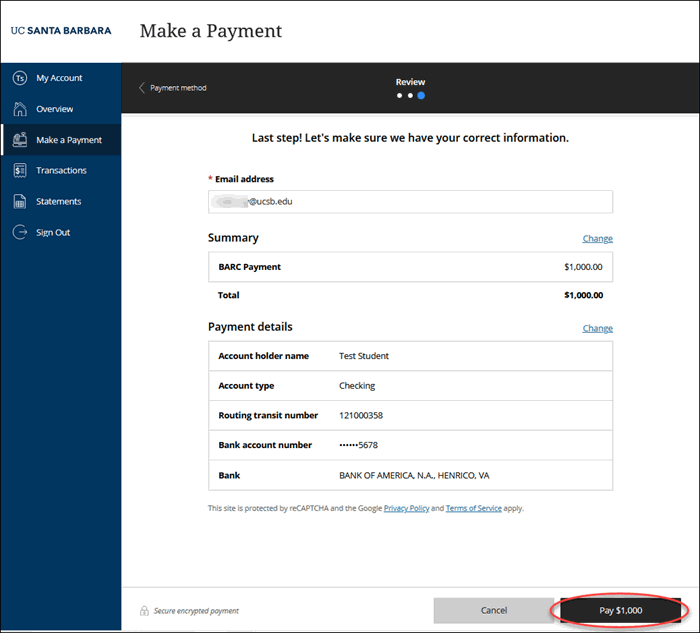
The concept of an eCheck, or electronic check, is fundamentally simple yet profoundly impactful in modern finance. It represents a digital version of a paper check, utilizing the Automated Clearing House (ACH) network to transfer funds directly from one bank account to another. This method bypasses the physical handling, mailing, and manual depositing associated with traditional paper checks, introducing a new level of efficiency and security into transactions. Understanding its mechanics and advantages is the first step toward harnessing its power for your financial goals.
What Exactly is an eCheck? Mechanics and Advantages
An eCheck functions by digitally drawing funds from a payer’s bank account and depositing them into a payee’s bank account. Instead of writing out a physical check, signing it, and sending it through the mail, the payer provides their bank account and routing numbers to an authorized third party (often a payment processor or directly to the payee through a secure portal). This information is then used to initiate an electronic debit from the payer’s account and a credit to the payee’s account via the ACH network. The process is remarkably similar to direct deposit or automatic bill payments.
The primary advantages are manifold. Firstly, speed: while not instantaneous like a wire transfer, eChecks typically clear faster than paper checks, often within 2-5 business days. Secondly, cost-effectiveness: eCheck processing fees are generally lower than credit card transaction fees, making them an attractive option for businesses looking to minimize operational expenses. Thirdly, convenience: the entire transaction can be completed online or through digital platforms, eliminating the need for physical paperwork and trips to the bank. Finally, security: eChecks often come with robust encryption and fraud prevention measures, reducing the risk of lost or stolen checks and unauthorized alterations that plague their paper counterparts.
Why eChecks Matter in Modern Personal and Business Finance
In today’s fast-paced economic environment, the ability to make and receive payments quickly, securely, and cost-effectively is paramount. For individuals, eChecks offer a convenient way to pay bills, send money to family, or receive refunds without dealing with paper. They integrate seamlessly into online banking experiences, providing a clear digital trail of all transactions. This digital record-keeping simplifies budgeting, tax preparation, and dispute resolution, contributing to a more organized personal financial life.
For businesses, particularly those operating online or with recurring payment models, eChecks are transformative. They enable merchants to accept payments directly from customers’ bank accounts, often at lower transaction costs than credit cards. This can lead to significant savings, especially for high-value transactions. Furthermore, the reduced processing time compared to paper checks improves cash flow management and operational efficiency. Businesses can also automate recurring eCheck payments for subscriptions or installments, minimizing administrative overhead and ensuring timely revenue collection. The shift towards eChecks is not just about adopting new technology; it’s about embracing a more resilient, transparent, and financially sound payment infrastructure.
Key Differences: eChecks Versus Traditional Checks and Other Digital Payments
While eChecks share conceptual similarities with traditional paper checks, their operational differences are profound. A paper check requires physical delivery, manual deposit, and days or even weeks for funds to clear, depending on bank policies and fraud checks. It’s susceptible to loss, theft, and alteration. An eCheck, by contrast, is entirely electronic, processed through secure digital networks, and typically clears much faster. The digital trail makes tracking and reconciliation far more straightforward.
Compared to other digital payment methods, eChecks carve out a distinct niche. Unlike credit or debit card transactions, which involve card networks and often higher interchange fees, eChecks leverage the ACH network, leading to lower costs. Unlike wire transfers, which are typically immediate and irrevocable but often carry higher fees, eChecks offer a more economical option for non-urgent transfers. They are often ideal for larger transactions where credit card fees would be prohibitive, or for recurring payments where the speed of a wire transfer isn’t necessary. The choice of payment method depends on the specific needs for speed, cost, security, and traceability, but eChecks certainly present a compelling balance for many financial scenarios.
Bank of America’s Role in Electronic Check Processing
As one of the largest financial institutions in the world, Bank of America plays a significant role in facilitating a wide array of electronic transactions, including those involving eChecks. While “eCheck” isn’t a proprietary Bank of America product in itself (it’s a method of payment via the ACH network), the bank provides the essential infrastructure and services that allow its customers to seamlessly send and receive funds through this mechanism. Understanding how BoA integrates eCheck capabilities into its digital ecosystem is key to leveraging them effectively.
Navigating BoA’s Digital Platforms for Payment Management
Bank of America offers a robust suite of digital tools designed to make managing your finances straightforward, including various forms of electronic payments. Through its online banking portal and mobile app, customers have direct access to features that support eCheck-like transactions. For individuals, this often means setting up recurring payments, initiating one-time transfers using account and routing numbers (which are essentially eChecks), or monitoring incoming ACH deposits. Businesses leverage more advanced platforms, such as CashPro®, for comprehensive treasury management services that include bulk ACH processing, which is the backbone of sending and receiving eChecks on a large scale. These platforms are designed for intuitive navigation, providing clear pathways to initiate payments, view transaction histories, and manage beneficiaries, all while adhering to stringent security protocols.
Services and Features Supporting eCheck Transactions
Bank of America facilitates eCheck transactions primarily through its ACH processing capabilities. For receiving an eCheck, an individual simply needs to provide the sender with their Bank of America account number and routing number. The sender then uses this information to initiate an ACH debit from their own bank account, which results in a credit to the recipient’s Bank of America account. BoA automatically processes these incoming ACH credits, making the funds available to the customer once cleared.
For sending an eCheck-like payment from your Bank of America account, consumers can utilize the “Transfers” or “Bill Pay” features within online banking. If you have the recipient’s bank account and routing number, you can often set up a payment that functions as an eCheck. For businesses, BoA’s Business Advantage Banking or treasury management services offer more sophisticated tools for initiating batch ACH payments, allowing them to send numerous electronic checks simultaneously for payroll, vendor payments, or customer refunds. The bank also provides detailed reporting and reconciliation tools, critical for businesses to track and manage their electronic transactions efficiently.
Preparing Your BoA Account for Seamless eCheck Reception
The good news is that preparing your Bank of America account to receive an eCheck requires minimal effort, as the necessary infrastructure is already in place. Essentially, any checking or savings account at Bank of America is equipped to accept ACH transfers, which is the underlying mechanism for eChecks.
To ensure a smooth reception, you simply need to have your correct Bank of America account number and the appropriate routing number. The routing number is a nine-digit code that identifies your financial institution for electronic transactions. You can usually find both your account and routing numbers on your checks, in your online banking portal, or by contacting Bank of America customer service. When a sender requests this information to send you an eCheck, providing these details accurately is the only preparation needed. There’s typically no special setup or activation required on your end to ‘turn on’ eCheck receiving capabilities; it’s a standard feature of your bank account.
The Process of Receiving an eCheck via Bank of America
Receiving an eCheck through your Bank of America account is generally a straightforward and passive process once the sender initiates the payment. The convenience stems from the fact that most of the heavy lifting is handled electronically by the banks involved. However, understanding the steps and what to expect can provide peace of mind and ensure a smooth transaction.
Providing Necessary Information to the Sender
The fundamental requirement for receiving an eCheck is that the sender has your correct bank account details. To facilitate an eCheck payment to your Bank of America account, you will need to provide the sender with two crucial pieces of information:
- Your Bank of America Account Number: This unique string of digits identifies your specific account. You can find it on your checks (usually near the bottom), within your online banking portal under your account details, or by contacting customer service.
- Bank of America’s ACH Routing Number: This nine-digit number directs the electronic payment to Bank of America itself. It’s important to use the correct routing number for ACH transactions, as banks sometimes have different routing numbers for different types of transfers or regions. The most reliable way to find this is by logging into your Bank of America online banking or mobile app, usually under your account details, or by searching their official website for “Bank of America ACH routing number.” Do not rely solely on the routing number printed on checks, as this might be for paper check processing and not always the ACH routing number.
Once you provide this information, the sender will use it to initiate an electronic payment directly from their bank account to yours. Ensure the information is accurate to avoid delays or misdirected funds.
Steps for Deposit and Confirmation through BoA
After the sender has initiated the eCheck payment using your Bank of America details, the process moves into the electronic realm. Here’s what typically happens:
- Sender Initiates Payment: The sender’s bank debits their account for the eCheck amount.
- ACH Network Processing: The transaction is then processed through the Automated Clearing House (ACH) network, a secure system that facilitates electronic funds transfers between banks.
- Bank of America Receives and Processes: Bank of America receives the incoming ACH credit instruction from the ACH network. The bank then processes this instruction, crediting the funds to your specified account.
- Funds Availability: Once processed and cleared, the funds become available in your Bank of America account. The typical clearing time for an eCheck can range from 2 to 5 business days, though some factors (like weekends, holidays, or initial transactions from new senders) might influence this. Bank of America will adhere to standard banking regulations regarding fund availability.
You will usually receive a notification from Bank of America (via email, app alert, or a message in your online banking inbox) once the funds have been successfully deposited and are available.
Monitoring Your Account for Incoming Funds and Clearing
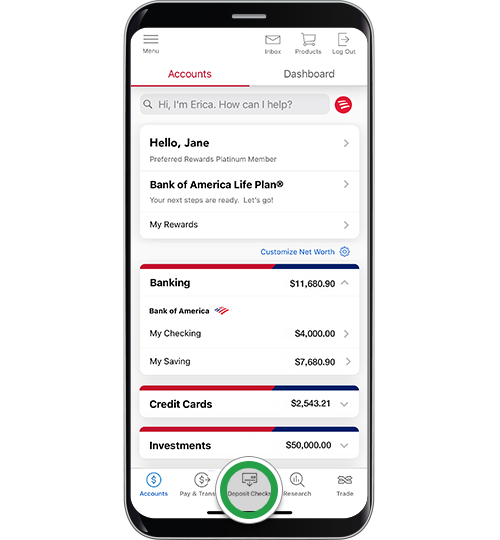
Proactive monitoring of your Bank of America account is a best practice when expecting an eCheck. You can easily do this through:
- Online Banking Portal: Log in to your Bank of America online banking account. Navigate to your checking or savings account details to view recent transactions and pending deposits. Incoming eChecks will typically appear as an “ACH Credit” or similar description once initiated, moving from “pending” to “posted” status.
- Mobile Banking App: The Bank of America mobile app provides real-time access to your account balances and transaction history. You can quickly check for the arrival of your eCheck from anywhere.
- Account Alerts: Set up custom alerts within your Bank of America online banking to receive notifications for incoming deposits over a certain amount, or for any new transactions. This can automatically inform you when the eCheck has been posted to your account.
Regularly checking your account ensures you know precisely when the funds have arrived and cleared, allowing you to manage your finances effectively and detect any potential issues promptly. If an expected eCheck doesn’t appear within the typical timeframe, contacting the sender first to confirm they initiated the payment, and then Bank of America customer service with transaction details, would be the next steps.
Security, Fees, and Best Practices for eCheck Management
While eChecks offer significant advantages in terms of speed and convenience, it’s crucial to approach them with a mindful understanding of security protocols, potential costs, and best practices. Responsible eCheck management ensures that you maximize their benefits while minimizing risks to your financial well-being.
Safeguarding Your Financial Information During Transactions
The primary security concern with eChecks revolves around the sharing of your bank account and routing numbers. Unlike credit card numbers which have fraud protection mechanisms like chargebacks built-in, direct bank account access can be more vulnerable if compromised. To safeguard your financial information:
- Share only with trusted parties: Provide your bank details only to reputable businesses, individuals, or payment processors that you trust.
- Verify legitimacy: If you receive a request for your bank details, ensure the request is legitimate and from the expected source. Be wary of unsolicited requests or suspicious links.
- Use secure platforms: When making or receiving payments online, ensure the website uses HTTPS (indicated by a padlock icon in the browser) and is from a legitimate domain.
- Monitor your accounts: Regularly review your Bank of America account statements and transaction history for any unauthorized activity. Report discrepancies immediately.
- Strong passwords and two-factor authentication (2FA): Always use strong, unique passwords for your online banking and enable 2FA if available, adding an extra layer of security.
Bank of America employs robust security measures to protect its customers’ accounts, but personal vigilance remains a critical line of defense.
Understanding Potential Fees and Transaction Limits
While eChecks are generally more cost-effective than some other payment methods, it’s important to be aware of any potential fees or limits that Bank of America or the sending institution might impose:
- Incoming eChecks (ACH Credits): For most personal and small business accounts, Bank of America typically does not charge a fee for receiving an incoming ACH credit (eCheck). However, it’s always wise to review your specific account’s fee schedule or consult with a bank representative.
- Outgoing eChecks (ACH Debits/Payments): If you are sending an eCheck-like payment through Bank of America’s online bill pay or transfer services, there may be fees depending on the type of account and the nature of the transfer. Standard online bill pay is often free, but expedited payments or certain business ACH services might incur charges.
- Transaction Limits: Bank of America, like all financial institutions, may impose daily, weekly, or monthly transaction limits on outgoing payments, especially for newer accounts or higher amounts, as a fraud prevention measure. Incoming deposits usually don’t have limits, but fund availability rules apply.
Always confirm the fee structure for your specific Bank of America account and any applicable transaction limits before initiating or expecting a large or frequent eCheck transfer.
Tips for Effective eCheck Management and Fraud Prevention
Beyond security measures, several best practices can enhance your eCheck experience and prevent potential issues:
- Communicate Clearly: When providing your banking information, double-check that all numbers are correct. Clarify with the sender the expected timeframe for the eCheck to arrive.
- Maintain Records: Keep a digital or physical record of all eCheck transactions, including sender/recipient details, amounts, and dates. This is invaluable for reconciliation and dispute resolution.
- Be Skeptical of Overpayments: A common scam involves an eCheck for more than the agreed-upon amount, with a request to send back the difference. These eChecks often turn out to be fraudulent after you’ve sent your own money.
- Understand Hold Times: Even if an eCheck appears in your account, funds may be subject to hold times by Bank of America until they fully clear. Avoid spending funds that haven’t officially “posted” as available.
- Regular Account Reconciliation: Match your incoming and outgoing eCheck records against your Bank of America statements to identify any discrepancies early.
By adopting these practices, you can confidently leverage eChecks as a reliable and efficient financial tool within your Bank of America banking experience.
When You Might Need to Send an eCheck (and BoA’s Capabilities)
While the article title specifically focuses on getting an eCheck, understanding how to send one from your Bank of America account is a complementary and equally valuable aspect of comprehensive eCheck management. Many of the same principles apply, but the process involves initiating the transaction rather than merely receiving it. Bank of America provides various mechanisms for customers to initiate electronic payments that function as eChecks, particularly through its robust online banking and business services.
Initiating Payments: Eligibility and Process with BoA
For individual customers, initiating an eCheck-like payment from Bank of America typically falls under the “Transfers” or “Bill Pay” sections of their online banking portal or mobile app. If you need to pay a person or a company and have their bank account and routing number, you can often set up a direct transfer. Eligibility usually requires:
- A valid Bank of America checking or savings account: The account must be in good standing and have sufficient funds.
- Recipient’s bank details: You must have the accurate account and routing numbers of the payee.
- Online banking access: The transaction is typically initiated through your secure online banking profile.
For businesses, Bank of America offers more advanced ACH origination services. Through platforms like CashPro® or dedicated business banking services, companies can initiate bulk payments for payroll, vendor invoices, or customer refunds. This allows for scheduled, recurring, and large-volume eCheck processing, which is crucial for modern business operations. Businesses will typically need to apply for these services and meet specific eligibility criteria, including financial stability and compliance with NACHA rules (the governing body for the ACH network).
Essential Data for Sending: Recipient and Payment Details
When sending an eCheck from your Bank of America account, accuracy is paramount to ensure the funds reach the intended recipient without delay or error. You will typically need to provide the following essential information:
- Recipient’s Full Name or Business Name: The legal name of the individual or entity receiving the funds.
- Recipient’s Bank Name: The name of the financial institution where the recipient holds their account.
- Recipient’s Account Number: The unique identifying number for the recipient’s checking or savings account.
- Recipient’s Routing Number: The nine-digit ACH routing number for the recipient’s bank. This is crucial for directing the payment to the correct financial institution.
- Payment Amount: The exact amount of money you wish to send.
- Payment Date: The date you wish the payment to be initiated. For recurring payments, you’ll specify the frequency and start/end dates.
- Memo/Description (Optional): A brief note or reference number to help the recipient identify the purpose of the payment, similar to the memo line on a paper check.
Carefully double-checking all these details before confirming the payment is a critical step to prevent costly errors or disputes.
Tracking and Verification for Outgoing eCheck Payments
Once you initiate an eCheck payment through Bank of America, it’s important to track its status and verify its successful delivery. Bank of America’s online banking platforms provide tools for this:
- Transaction History: Your online banking portal will display the initiated payment in your account’s transaction history, often showing it as “pending” initially.
- Payment Status Updates: For scheduled or recurring payments, you can typically view their status, confirming whether they have been processed, sent, or delivered.
- Confirmation Emails/Notifications: Bank of America may send email or in-app notifications confirming the successful initiation and eventual completion of the payment.
- Recipient Confirmation: The most reliable form of verification is to confirm with the recipient that they have successfully received the funds in their account. This helps reconcile your records with theirs.
Remember that eChecks, while faster than paper checks, are not instantaneous. Funds typically take 2-5 business days to clear and appear in the recipient’s account. Factor this clearing time into your payment schedule, especially for time-sensitive transactions. If an outgoing eCheck does not clear as expected, you can typically investigate the status through your Bank of America online banking or by contacting their customer support with the transaction details.
Conclusion
The eCheck stands as a testament to the ongoing evolution of financial transactions, offering a blend of security, speed, and cost-effectiveness that bridges the gap between traditional paper checks and instantaneous digital transfers. For Bank of America customers, both individuals and businesses, leveraging eChecks means engaging with a modern, efficient payment ecosystem that simplifies money management.
Whether you are receiving funds from a client or family member, or initiating payments to vendors and employees, Bank of America provides the robust digital infrastructure to support these transactions. By understanding the mechanics of eChecks, diligently safeguarding your financial information, and utilizing the bank’s online tools, you can seamlessly integrate this powerful financial instrument into your daily operations. Embracing the eCheck is not just about convenience; it’s about adopting a smarter, more secure approach to financial transactions in a world increasingly driven by digital solutions.
aViewFromTheCave is a participant in the Amazon Services LLC Associates Program, an affiliate advertising program designed to provide a means for sites to earn advertising fees by advertising and linking to Amazon.com. Amazon, the Amazon logo, AmazonSupply, and the AmazonSupply logo are trademarks of Amazon.com, Inc. or its affiliates. As an Amazon Associate we earn affiliate commissions from qualifying purchases.