
Navigating the complexities of the internal revenue system can often feel like deciphering a foreign language. Among the various acronyms and financial metrics you encounter, few are as pivotal as your Adjusted Gross Income, or AGI. Whether you are applying for a mortgage, verifying your identity to e-file your taxes, or checking your eligibility for government benefits, knowing how to retrieve this specific number is essential. Your AGI is essentially the “gateway” number that the IRS uses to determine your taxable income and your qualification for various deductions and credits.

In this guide, we will explore exactly how to get your AGI from the IRS, why this number is the cornerstone of your personal finances, and the most efficient ways to retrieve it through official channels.
Understanding AGI: Why Your Adjusted Gross Income Matters
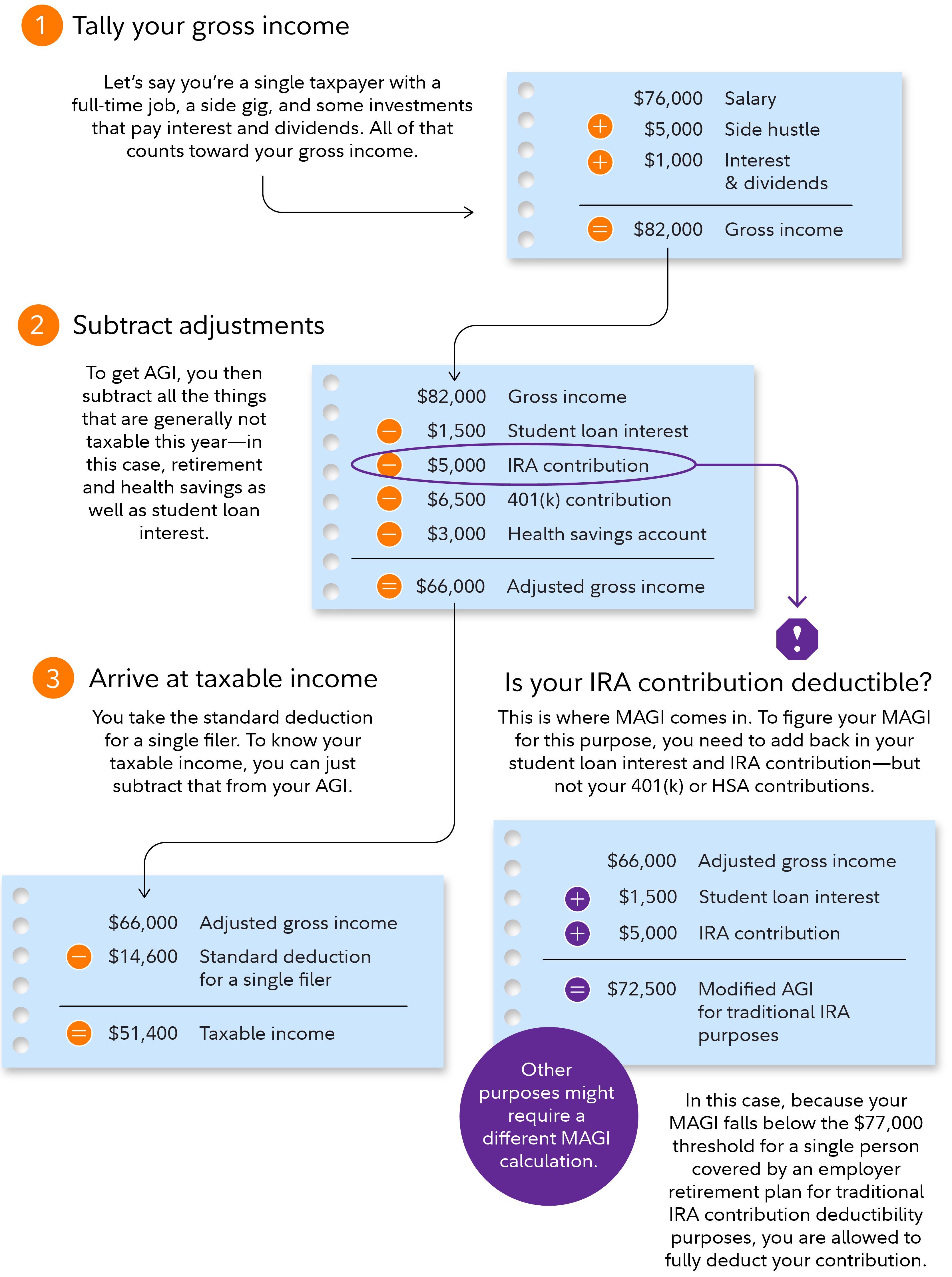
Before diving into the retrieval process, it is important to understand what AGI represents. In the realm of personal finance, your AGI is not just a random figure on a tax form; it is a calculated value that represents your total gross income minus specific “above-the-line” adjustments.
Defining AGI in the Tax Ecosystem
Your Adjusted Gross Income is calculated by taking your total income from all sources—including wages, interest, dividends, capital gains, and business income—and subtracting certain adjustments. These adjustments may include contributions to a traditional IRA, student loan interest payments, educator expenses, and alimony payments (depending on the year of the agreement).
The IRS uses this figure as the starting point for calculating your tax liability. Once your AGI is established, you then subtract standard or itemized deductions to arrive at your “Taxable Income.” Because so many financial thresholds are based on this number, having it readily available is a prerequisite for most significant financial maneuvers.
How AGI Impacts Your Eligibility for Credits and Deductions
The importance of your AGI extends beyond just filing your returns. Many federal and state tax credits are “phase-out” credits, meaning your eligibility to claim them decreases as your AGI increases. For example, the Child Tax Credit, the Earned Income Tax Credit (EITC), and various education credits all have AGI ceilings.
Furthermore, outside of the tax world, lenders and educational institutions often look at your AGI to gauge your financial health. When you fill out the Free Application for Federal Student Aid (FAFSA), your AGI is a primary component in determining your Expected Family Contribution (EFC). Understanding how to find this number ensures you are never caught off guard during an application process.
Primary Methods to Retrieve Your AGI from the IRS
If you did not keep a copy of last year’s tax return, or if you simply cannot find the digital file, there are several official ways to retrieve your AGI directly from the IRS. Each method varies in speed and the level of technological literacy required.
Accessing Your Tax Transcript via the Online Account
The fastest and most efficient way to get your AGI is through the IRS Online Account portal. Over the last several years, the IRS has significantly upgraded its digital infrastructure, allowing taxpayers to view their tax records in real-time.
To use this method, you must log in to your account on the official IRS website. Once logged in, you can view a “Tax Transcript.” Specifically, you should look for the “Tax Return Transcript.” This document will clearly list your AGI for the year in question. This is the preferred method for individuals who need their information immediately to e-file a current return, as the online system is available 24/7.
Requesting a Transcript by Mail (Form 4506-T)
For those who prefer a physical document or are unable to pass the identity verification process for the online portal, requesting a transcript by mail is a reliable alternative. You can use the “Get Transcript by Mail” feature on the IRS website or call their automated phone line.
Alternatively, you can file Form 4506-T (Request for Transcript of Tax Return). While this method is free, it requires patience. It typically takes 5 to 10 business days for the transcript to arrive at the address the IRS has on file for you. This is an excellent option for long-term financial planning or when providing documentation for a mortgage application where a “certified” feel is preferred.
Finding AGI on Your Prior-Year Tax Return (Form 1040)
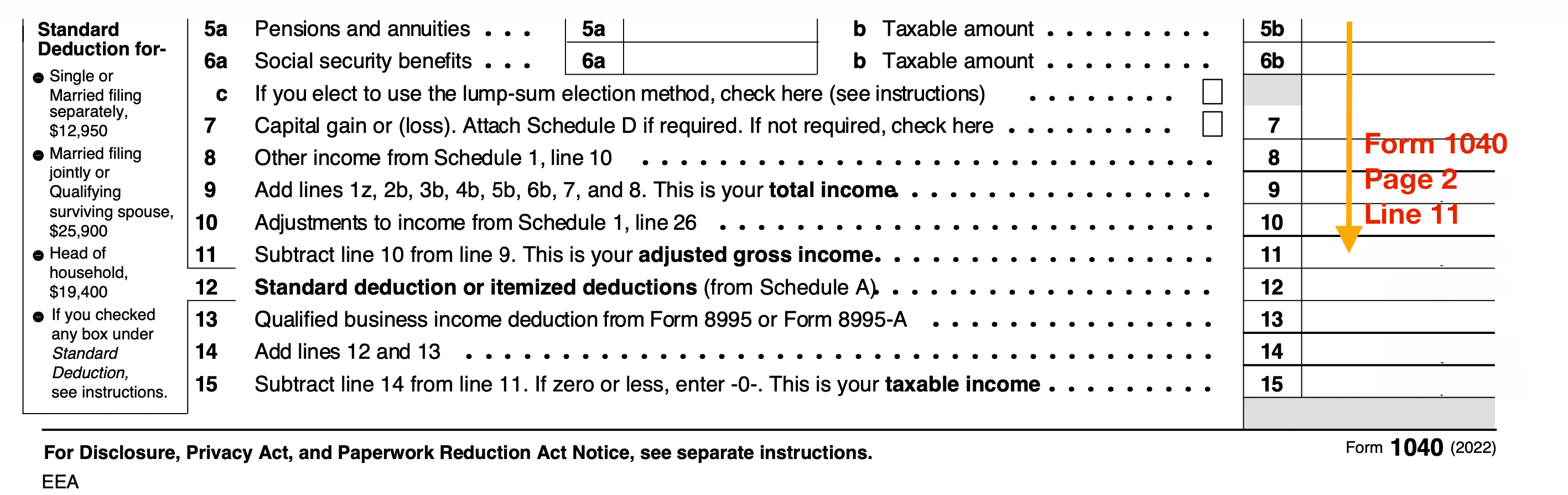
If you have access to your previous year’s tax documents, you don’t actually need to contact the IRS at all. Your AGI is a line item on your Form 1040. However, the line number can change slightly depending on the tax year due to updates in tax legislation.
For recent tax years (2020 and later), your AGI is generally found on Line 11 of Form 1040. For the 2019 tax year, it was on Line 8b. If you used a tax preparation software like TurboTax or H&R Block, you can usually log back into those platforms to download a PDF of your “Return Summary,” which will highlight the AGI prominently.
Navigating the IRS Website and Verification Tools
Because the IRS handles sensitive financial data, accessing your AGI online requires navigating several layers of security. Understanding these tools can save you hours of frustration.
Setting Up Your ID.me Account for Secure Access
The IRS currently uses a third-party identity verification service called ID.me to ensure that only you can access your tax transcripts. This is a rigorous process designed to prevent identity theft and fraud.
To set up your account, you will need a government-issued photo ID (such as a driver’s license or passport) and a smartphone with a camera. The process involves taking a photo of your ID and a “video selfie” to verify that your face matches your identification. While this might seem intrusive, it is the highest standard of digital security used by federal agencies. Once your ID.me account is linked to the IRS, you gain instant access to years of financial history, including your AGI.
Using the “Get Transcript” Tool Effectively
The “Get Transcript” tool is the specific application within the IRS website where your AGI lives. When you enter this tool, you will be presented with several transcript types:
- Tax Return Transcript: Shows most line items from your original return. (This is where you find AGI).
- Tax Account Transcript: Shows basic data such as marital status, type of return filed, and any subsequent adjustments made by the IRS.
- Record of Account Transcript: A combination of the two above.
- Wage and Income Transcript: Shows data from W-2s and 1099s.
For the purpose of identifying your AGI for e-filing or loan verification, always select the Tax Return Transcript.
What to Do If You Cannot Find Your AGI
In some instances, the standard methods of retrieval may fail. This often happens due to processing delays or if you belong to a specific subset of taxpayers.
Troubleshooting Discrepancies and Missing Records
If you are looking for your AGI to e-file your current taxes and the IRS system says your information doesn’t match, there could be a few reasons. If your previous year’s return was processed late (due to the pandemic or a manual review), the IRS system might not have updated your AGI yet. In these specific cases, the IRS often instructs taxpayers to enter $0 as their prior-year AGI to pass the electronic signature verification.
Additionally, if you filed an amended return (Form 1040-X), remember that for verification purposes, the IRS usually requires the AGI from your original return, not the amended one.
Special Cases: Non-Filers and Late Filers
If you did not file a tax return last year because your income fell below the filing threshold, you do not have a prior-year AGI. For the purposes of identity verification on current forms, your AGI is technically $0.
For late filers, the data may take up to several months to appear in the “Get Transcript” system. If you are in a rush to secure a loan or file a current return, you may need to rely on the records provided by your employer (W-2s) and manually reconstruct your AGI, though this is not an “official” IRS retrieval.
Protecting Your Financial Identity During the Retrieval Process
Whenever you are dealing with sensitive data like your AGI and Social Security Number, security should be your top priority. The quest to “get your AGI” is a common target for bad actors.
Recognizing Phishing Scams and Official IRS Communications
The IRS will never initiate contact with you via email, text message, or social media to ask for your AGI or personal financial information. If you receive an email that looks like it is from the IRS claiming you need to “click here to verify your AGI,” it is a phishing scam.
Always navigate directly to IRS.gov by typing it into your browser. Never use links provided in unsolicited communications. Scammers often use the promise of “finding your AGI” to lead you to a fake login page where they can steal your ID.me credentials or Social Security Number.
Secure Storage of Tax Documents
Once you have successfully retrieved your AGI or downloaded your tax transcript, ensure that you store these documents in a secure digital or physical environment. If you save a PDF of your transcript, use an encrypted drive or a password-protected folder.
In the world of personal finance, your AGI is a master key. It is the number that validates who you are to the government and determines how much of your hard-earned money you get to keep. By mastering the tools provided by the IRS—from digital transcripts to ID.me verification—you empower yourself to manage your financial life with confidence and precision. Whether you are preparing for tax season or planning a major life purchase, having your AGI at your fingertips is a hallmark of financial literacy.
aViewFromTheCave is a participant in the Amazon Services LLC Associates Program, an affiliate advertising program designed to provide a means for sites to earn advertising fees by advertising and linking to Amazon.com. Amazon, the Amazon logo, AmazonSupply, and the AmazonSupply logo are trademarks of Amazon.com, Inc. or its affiliates. As an Amazon Associate we earn affiliate commissions from qualifying purchases.