
In the rapidly evolving landscape of digital finance, mobile payment applications have become indispensable tools for managing transactions, sending money, and even investing. Among these, Cash App stands out as a pervasive platform, offering a streamlined approach to personal finance through a user-friendly interface. This article delves into the technical intricacies of acquiring, setting up, and effectively utilizing Cash App, focusing on the app’s technological architecture, security protocols, and feature integration that make it a cornerstone of modern digital transactions. Whether you’re a newcomer to peer-to-peer payments or looking to deepen your understanding of the app’s capabilities, this guide provides a robust technical walkthrough.
Understanding Cash App: A Technological Overview
Before diving into the “how-to,” it’s crucial to grasp the fundamental technological framework that underpins Cash App. Conceived as a simple, mobile-first solution for sending and receiving money, it has since evolved into a multifaceted digital banking platform, yet its core remains rooted in accessible software design and robust backend infrastructure.
What is Cash App? Its Core Functionality as a Payment Platform
At its heart, Cash App is a peer-to-peer (P2P) mobile payment service developed by Block, Inc. (formerly Square, Inc.). It enables users to transfer money to one another using a unique identifier called a “$Cashtag,” an email address, or a phone number. Beyond simple transfers, it facilitates direct deposits, offers a customizable debit card (Cash Card), and provides avenues for investing in stocks and Bitcoin directly within the app. From a technological standpoint, it functions as a digital ledger and transaction processing system, abstracting away the complexities of traditional banking rails for the end-user. The application integrates with existing financial institutions to pull and push funds, acting as an intermediary that simplifies the user experience.
The Underlying Technology: Secure Transactions and User Experience
The technology powering Cash App prioritizes both speed and security. Transactions are typically processed in real-time or near real-time, leveraging secure Application Programming Interfaces (APIs) to communicate with banks and payment networks. Encryption plays a critical role, protecting user data and financial information during transmission and at rest. The app employs industry-standard encryption protocols (like TLS/SSL) to secure data packets between the user’s device and Cash App’s servers. Furthermore, its user interface (UI) and user experience (UX) design are optimized for mobile, featuring intuitive navigation and clear visual cues that guide users through complex financial operations, making sophisticated tech accessible to a broad audience. This focus on a seamless UX, coupled with robust security, has been central to its widespread adoption.
Why Cash App Gained Prominence: Accessibility and Innovation
Cash App’s rapid ascent can be attributed to its strategic blend of accessibility, convenience, and early adoption of innovative features. It simplified a process that was traditionally cumbersome – transferring money between individuals – by making it as easy as sending a text message. Its embrace of features like Bitcoin trading and fractional stock investing, long before many traditional banks offered similar capabilities, positioned it as a forward-thinking fintech solution. This willingness to integrate emerging financial technologies within a consumer-friendly app ecosystem broadened its appeal, attracting users interested in both traditional P2P payments and nascent digital asset markets, all while maintaining a remarkably low barrier to entry.
The Step-by-Step Technical Process of Acquiring Cash App
Getting started with Cash App is a straightforward process, designed for maximum user accessibility. It involves downloading the application, setting up your profile, and linking your financial instruments. Each step is technologically guided to ensure a smooth and secure onboarding experience.
Downloading the Application: OS Compatibility and App Store Navigation
The first technical hurdle is merely acquiring the application itself. Cash App is available on the two dominant mobile operating systems: iOS (for Apple devices) and Android.
- For iOS users: Navigate to the Apple App Store, search for “Cash App,” and tap “Get” to download and install.
- For Android users: Go to the Google Play Store, search for “Cash App,” and tap “Install.”
Ensure your device meets the minimum operating system requirements (e.g., iOS 13.0 or later, Android 5.0 or later) for optimal performance and access to the latest features and security updates. Downloading from official app stores is critical to avoid counterfeit applications that could compromise your device’s security or steal your financial information.
Account Creation: Phone Number/Email Verification and Initial Setup
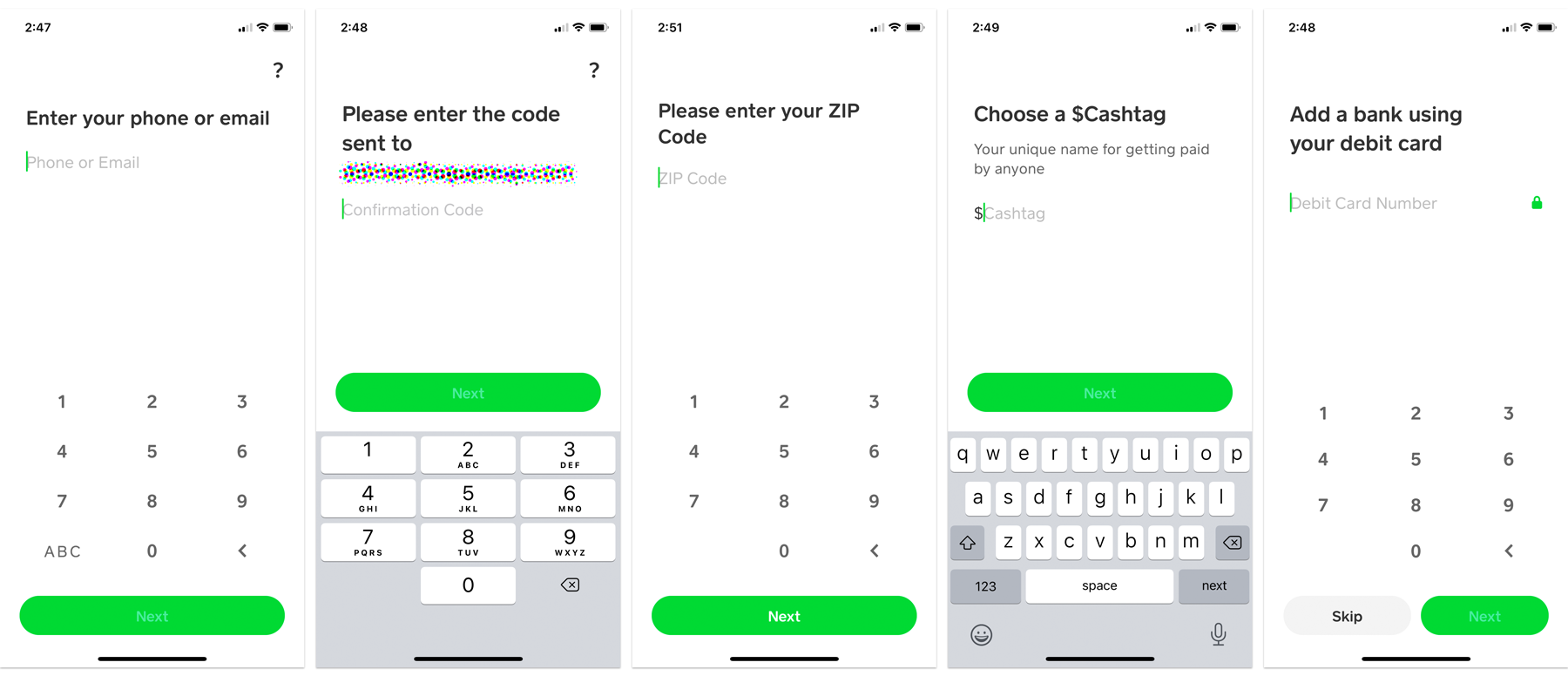
Once the app is installed, the account creation process begins. This involves a secure verification step using either your phone number or email address.
- Launch the App: Open Cash App on your device.
- Enter Contact Information: You’ll be prompted to enter your phone number or email. This serves as your primary identifier for the account.
- Verification Code: A unique verification code will be sent to the entered contact method. Input this code into the app to confirm ownership. This is a crucial security measure (often referred to as a form of two-factor authentication or OTP – One-Time Password) to ensure the person setting up the account is the legitimate owner of the phone number or email.
- Create a $Cashtag: You’ll then be asked to create a unique “$Cashtag.” This public username allows others to find and send you money without needing your phone number or email. It’s a key identifier within the Cash App ecosystem, designed for ease of transaction.
- Basic Information: Provide your name and zip code as requested. This initial information is used for regulatory compliance and to personalize your experience.
Linking Your Bank Account or Debit Card: Secure Data Integration
To send and receive money, Cash App needs to be linked to a funding source. This is perhaps the most critical technical integration step, requiring careful handling of sensitive financial data.
- Access Linking Section: From the app’s home screen, tap on the profile icon (top right) and then navigate to “Linked Banks.”
- Add Bank/Debit Card: You’ll have options to link a debit card or a bank account.
- Debit Card: This is the quickest way. You’ll enter your debit card number, expiration date, CVV, and billing zip code. This data is securely encrypted and transmitted to Cash App’s payment processing partners.
- Bank Account: For linking a bank account, Cash App typically uses Plaid, a secure third-party service that connects to thousands of financial institutions. You’ll log into your online banking portal through Plaid’s secure interface within the Cash App. This method avoids sharing your direct banking credentials with Cash App itself, instead relying on Plaid’s encrypted tokenization system to establish a connection. This is a common and secure industry practice for financial app integrations.
It’s vital to ensure you’re linking your own legitimate accounts to avoid potential fraud or account freezes.
Verifying Your Identity: KYC Protocols and Digital Security Measures
While you can perform basic transactions with just a linked debit card, full functionality (e.g., higher sending limits, direct deposit, Bitcoin/stock investing) requires identity verification. This adheres to “Know Your Customer” (KYC) regulations, a legal requirement for financial institutions to prevent money laundering and fraud.
- Initiate Verification: The app will prompt you for verification when you attempt to use features that require it.
- Provide Personal Details: You’ll typically need to provide your full legal name, date of birth, and the last four digits of your Social Security Number (SSN).
- Full SSN/ID (if needed): For certain advanced features or if the initial verification fails, Cash App may request your full SSN or even a photo of a government-issued ID (like a driver’s license). This data is transmitted and stored with robust encryption and access controls, aligning with financial industry security standards.
This verification process helps Cash App maintain a secure ecosystem and comply with federal regulations, ensuring that users are legitimate and preventing illicit activities.
Navigating and Utilizing Cash App’s Core Features (from a Tech Perspective)
Once your account is set up and verified, you can begin to explore Cash App’s diverse functionalities. Each feature is engineered for intuitive interaction, backed by sophisticated transaction processing systems.
Sending and Receiving Money: Instant Transactions and User Interface
The cornerstone of Cash App is its P2P payment functionality.
- Sending: To send money, you enter the amount, tap “Pay,” select a recipient using their $Cashtag, phone number, or email, and optionally add a note. The UI is designed for minimal steps, reflecting a focus on speed. Behind the scenes, the app initiates a push transaction from your linked bank/card or Cash App balance to the recipient’s Cash App balance, leveraging secure API calls to financial networks.
- Receiving: When someone sends you money, it lands instantly in your Cash App balance. The app sends a notification, and the balance updates in real-time. You can then choose to “Cash Out” (transfer to your linked bank account) or hold the funds within the app. “Cashing out” typically involves an ACH transfer, which can take 1-3 business days for free, or an instant transfer for a small fee, utilizing faster payment rails where available.
Cash Card: Virtual and Physical Card Integration with Mobile Wallets
The Cash Card is a free, customizable Visa debit card linked directly to your Cash App balance.
- Virtual Card: Upon ordering, a virtual Cash Card is instantly available within the app. Its card number, expiration, and CVV can be accessed for online purchases. This virtual card can also be added to mobile wallets like Apple Pay or Google Pay, enabling contactless payments via NFC (Near Field Communication) technology at physical terminals.
- Physical Card: A physical card is mailed to you, featuring a unique, user-designed aesthetic. Both virtual and physical cards draw funds directly from your Cash App balance. Technologically, the Cash Card functions like any other debit card, processing transactions through the Visa network, but its funding mechanism is exclusively tied to your in-app balance, making it a direct extension of your digital wallet.
Direct Deposit Setup: Routing and Account Numbers for Digital Banking
Cash App offers direct deposit functionality, allowing users to receive paychecks, tax refunds, and government benefits directly into their Cash App account.
- Accessing Details: Within the app, under the “Banking” or “Direct Deposit” section, you’ll find your unique Cash App routing number and account number. These are not your traditional bank account details but rather identifiers for a virtual account managed by Cash App’s banking partners.
- Setup: You provide these details to your employer or benefit provider, just as you would with a regular bank account. When funds are deposited, they appear directly in your Cash App balance. This feature effectively transforms Cash App into a primary digital banking hub for many users, bypassing the need for a traditional bank account for basic income reception.
Investing Features: Accessing Stocks and Bitcoin within the App Environment
Cash App’s foray into investing showcases its versatility as a fintech platform.
- Stocks: Users can buy and sell fractional shares of thousands of publicly traded companies. The app provides real-time market data (with a slight delay for free users) and a streamlined interface for executing trades. Orders are typically routed through Cash App’s brokerage partners. The underlying technology aggregates market data, facilitates order placement, and manages the fractional ownership of shares, making investing accessible with small amounts of capital.
- Bitcoin: Cash App was one of the first mainstream apps to allow easy purchase and sale of Bitcoin (BTC). The app acts as a custodial service, holding Bitcoin on behalf of users. It simplifies the complex process of buying cryptocurrency by abstracting away wallet management and exchange interfaces, providing a simple “buy” or “sell” button. Transactions are recorded on Cash App’s internal ledger, and when users “withdraw” Bitcoin, it’s sent to an external blockchain address, engaging with the actual cryptocurrency network.
Enhancing Your Cash App Experience: Advanced Technical Tips and Security
Beyond basic usage, optimizing your Cash App experience involves understanding its security features and technical nuances to ensure smooth, secure operations.
Maximizing Security: PIN, Fingerprint, and Two-Factor Authentication
Security is paramount for any financial application. Cash App provides several layers of protection:
- PIN Lock: Set a Personal Identification Number (PIN) for opening the app and authorizing transactions. This is your first line of defense.
- Biometric Authentication: Enable fingerprint or Face ID (on compatible devices) for quick and secure access, leveraging your device’s native biometric sensors.
- Two-Factor Authentication (2FA): While the initial setup uses SMS/email verification, ensuring your linked email and phone number are secure (e.g., with 2FA on those accounts) further fortifies your Cash App. Any sensitive action within Cash App often triggers an additional verification step, such as entering a code sent to your registered phone or email, protecting against unauthorized access even if your password is compromised. Regularly reviewing linked devices and logging out from unused ones is also a good practice.
Troubleshooting Common Issues: App Performance and Connectivity
Like any software, Cash App can encounter issues.
- App Crashes/Freezes: Try force-closing and reopening the app. If the problem persists, clear the app’s cache (Android) or reinstall the app (iOS/Android) after ensuring you remember your login details.
- Transaction Delays: While most transactions are instant, occasional delays can occur due to network congestion, bank processing times, or system maintenance. Check Cash App’s status page or social media for widespread outages.
- Login Problems: Double-check your phone number/email and password. Ensure you have good network connectivity to receive verification codes. If locked out, use the “Forgot PIN” or account recovery options.
- Connectivity Issues: Ensure you have a stable internet connection (Wi-Fi or cellular data). Poor signal strength can prevent transactions from processing or data from loading correctly.
Understanding Cash App Limits: Transaction Thresholds and Verification Tiers
Cash App implements transaction limits that vary based on your verification status.
- Unverified Accounts: Typically have lower limits (e.g., sending $250 per week, receiving $1,000 per month). This is a technical control to manage risk before full identity verification.
- Verified Accounts: After completing KYC, limits significantly increase (e.g., sending $7,500 per week, unlimited receiving). These limits are in place due to regulatory requirements and Cash App’s internal risk management systems, designed to balance user convenience with financial security and fraud prevention. Understanding these tiers helps manage your expectations for transaction volumes.
Staying Updated: App Updates, New Features, and OS Compatibility
Software is dynamic. Regularly updating the Cash App is crucial:
- Security Patches: Updates often include critical security fixes that protect against newly discovered vulnerabilities.
- New Features: Cash App frequently rolls out new functionalities, performance enhancements, and user interface improvements.
- OS Compatibility: Ensure your device’s operating system is also up-to-date. Running an outdated OS can lead to compatibility issues with app updates and may expose your device to security risks. Enable automatic updates for the Cash App in your device’s app store settings to ensure you always have the latest, most secure version.
The Future of Digital Payments: Where Cash App Fits In
Cash App, as a prominent example of a mobile financial tool, plays a significant role in shaping the future of digital payments. Its continuous evolution showcases trends that are likely to define the next generation of financial technology.
Interoperability and Ecosystem Integration
The trajectory for apps like Cash App is towards greater interoperability. While currently somewhat self-contained, future developments might see more seamless integration with other financial platforms, both traditional and decentralized. The ability to easily move funds between different digital wallets, investment platforms, and even international payment systems without friction is a key technological goal. Cash App’s support for Bitcoin already points towards a future where various digital assets and currencies are handled within a single, unified financial ecosystem, blurring the lines between traditional banking, investment, and cryptocurrency.
Emerging Technologies and Cash App’s Evolution
The future of Cash App will undoubtedly be influenced by emerging technologies. Potential areas for integration include enhanced AI for personalized financial insights, deeper blockchain integration beyond just Bitcoin for more robust and transparent transaction processing, and even exploration of Central Bank Digital Currencies (CBDCs) as they become a reality. As biometric security advances, we might see more sophisticated authentication methods. The ongoing challenge for Cash App, and similar platforms, will be to adapt these cutting-edge technologies into a user-friendly and secure application that continues to meet the evolving needs of its diverse user base, solidifying its position as a leader in the digital finance revolution.
aViewFromTheCave is a participant in the Amazon Services LLC Associates Program, an affiliate advertising program designed to provide a means for sites to earn advertising fees by advertising and linking to Amazon.com. Amazon, the Amazon logo, AmazonSupply, and the AmazonSupply logo are trademarks of Amazon.com, Inc. or its affiliates. As an Amazon Associate we earn affiliate commissions from qualifying purchases.