
Amazon Prime has become an indispensable digital companion for millions worldwide, transforming the way we shop, stream, and access a multitude of services. From expedited shipping to an expansive library of digital content, its value proposition is undeniable. Yet, like any subscription, there comes a time when its utility might wane for an individual. Whether due to evolving consumption habits, a shift in financial priorities, or simply a desire to streamline digital subscriptions, understanding the precise, step-by-step process of discontinuing Amazon Prime is crucial for any tech-savvy consumer. This guide offers a comprehensive, professional, and insightful walkthrough, ensuring you can navigate Amazon’s digital ecosystem with confidence to manage your membership effectively. We’ll delve into the technicalities of the process, ensuring clarity and precision at every turn.

Understanding the Amazon Prime Ecosystem and Its Digital Touchpoints
Before diving into the specifics of cancellation, it’s vital to grasp how Amazon Prime integrates into the broader Amazon digital ecosystem. Prime isn’t merely a shipping service; it’s a comprehensive bundle of digital and physical perks managed entirely through Amazon’s sophisticated online platforms. Understanding these digital touchpoints is the first step towards an informed decision and a smooth cancellation process.
The Digital Interface: Navigating Amazon’s Platforms
The primary interface for managing your Amazon Prime membership is Amazon’s official website and, to a lesser extent, its mobile application. These platforms are engineered to be user-friendly, yet the specific pathways to subscription management can sometimes be obscured by other functionalities or promotional content. Accessing your account securely through a web browser on a desktop or laptop often provides the most comprehensive view and control over your membership settings, though the mobile app offers a streamlined experience for common tasks. Familiarity with these digital environments is key to efficiently locating and interacting with your Prime membership details. This involves understanding where account settings reside, how to navigate menu hierarchies, and recognizing the specific terminology Amazon uses for subscriptions.
Membership Tiers and Billing Cycles: Digital Mechanics of Your Subscription
Amazon Prime offers various billing cycles, primarily monthly and annual, along with specialized student or EBT cardholder discounts. The digital mechanics of these tiers directly impact the cancellation process and potential refund eligibility. An annual membership, for instance, typically offers a cost saving over 12 monthly payments but ties you into a longer commitment. Understanding your current billing cycle (visible in your Prime membership settings) is critical, as it dictates when your current benefits conclude and whether you might be eligible for a pro-rata refund if you cancel mid-cycle. Amazon’s system is designed to allow you to end your membership immediately, at the end of the current billing period, or even to pause it—each option presenting different digital pathways and outcomes. The system aims for flexibility but requires user attention to detail to select the desired outcome.
Associated Digital Services: The Bundle Beyond Shipping
When you subscribe to Amazon Prime, you gain access to a host of integrated digital services: Prime Video, Amazon Music Prime, Prime Reading, Prime Gaming, and more. From a technical perspective, discontinuing Prime means revoking access to these digital entitlements. It’s not just about losing free two-day shipping; it’s about the cessation of access to vast libraries of streaming content, digital books, and gaming benefits. While your Amazon account itself remains active, the specific digital permissions tied to Prime are removed. This understanding helps set expectations for what digital services will no longer be available post-cancellation, preventing surprises. Any digital content previously downloaded or accessed via these Prime-exclusive services will typically become inaccessible unless you own it outright or subscribe to individual services separately.
Navigating the Cancellation Process: A Step-by-Step Digital Tutorial
Discontinuing Amazon Prime is a multi-step digital process that requires careful attention to detail. Amazon’s interface is designed to make the initial sign-up intuitive, but the cancellation path involves several confirmation screens and potential retention offers. Following these steps methodically will ensure a smooth and successful discontinuation.
Accessing Your Amazon Account and Prime Membership Settings
The journey begins by securely logging into your Amazon account. For optimal results, use a web browser on a computer.
- Open your browser and navigate to
amazon.com. - Log in: Click on “Accounts & Lists” in the top right corner and select “Sign In.” Enter your registered email address or phone number and password. If you have two-factor authentication (2FA) enabled (which is highly recommended for digital security), complete that verification step.
- Locate Prime Membership: Once logged in, hover over “Accounts & Lists” again. From the dropdown menu, locate and click on “Prime Membership.” This will take you to your dedicated Prime membership management page.
Initiating the Cancellation: The Core Technical Action
On the Prime membership management page, you’ll find an overview of your benefits, your next billing date, and options to manage your membership.
- Find “Manage Membership”: On the left side of the page, or sometimes directly under your membership details, you’ll see a section or button labeled “Manage Membership” or “Update, Cancel, and More.” Click on it.
- Select “End Membership”: From the options that appear, you’re looking for the clear instruction to cancel or end your membership. This is often labeled as “End Membership” or “End Trial and Benefits.” Clicking this button initiates the cancellation flow. Be prepared for several subsequent screens.
Addressing Retention Prompts and Offers: Navigating Digital Nudges
Amazon’s system is optimized to retain subscribers, and you will likely encounter several screens designed to make you reconsider or offer alternatives. These are digital nudges that require deliberate navigation.
- Review the “Are you sure?” Screens: You’ll typically be presented with screens highlighting the benefits you’ll lose (e.g., free shipping, Prime Video, etc.). Often, there will be buttons like “Keep My Benefits,” “Remind Me Later,” or “End My Benefits.” Focus on selecting the option that moves you closer to cancellation.
- Decline Alternative Offers: Amazon might offer to pause your membership, switch to a monthly plan if you’re annual, or even offer a discounted period to entice you to stay. While these can be valid options for some, if your goal is full discontinuation, you must consistently choose options that lead to “Continue to Cancel” or “End Membership.” Read each prompt carefully to ensure you’re making the intended selection. These steps are a crucial test of user intent within the digital interface.
Confirming Discontinuation: The Final Technical Verification
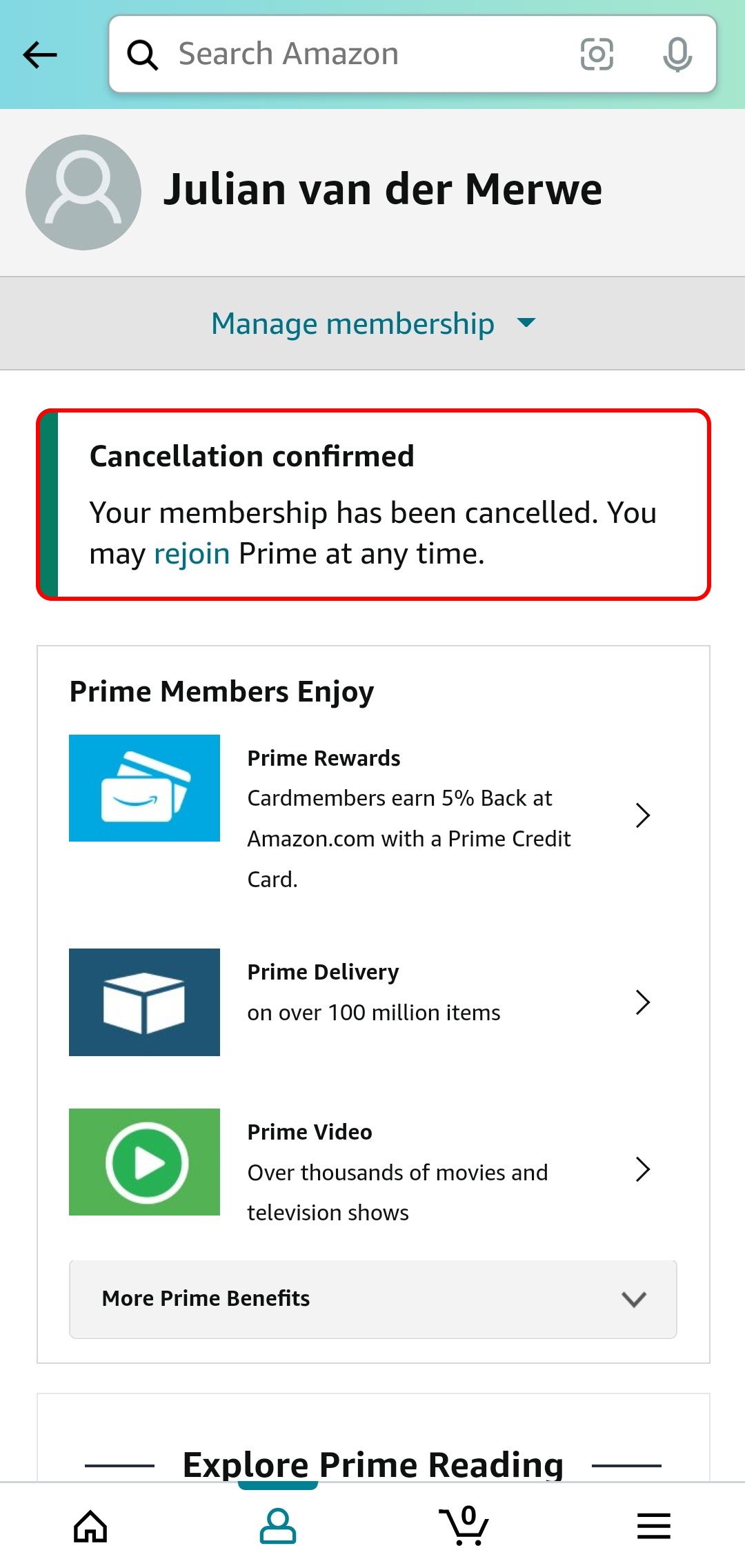
The final step ensures your decision is registered in Amazon’s system.
- Click “End Prime Benefits”: After navigating through the retention prompts, you will eventually reach a final confirmation screen. This screen will explicitly state your decision and typically ask you to confirm by clicking a button like “End Prime Benefits.” This is the last and most critical click.
- Look for Confirmation: Upon successful cancellation, Amazon will usually display a confirmation message on the screen. More importantly, you should receive a confirmation email to the address associated with your Amazon account. This email serves as your official digital receipt of the cancellation. Keep this email for your records, as it verifies the date and time of your discontinuation. Your Prime membership status on your account page should also reflect the change, indicating either that it’s cancelled immediately or that it will end on your next billing date.
Post-Cancellation Considerations and Digital Housekeeping
Successfully discontinuing your Amazon Prime membership is not just about clicking buttons; it involves understanding the digital aftermath and performing some necessary housekeeping to ensure a clean break and secure digital footprint.
Verifying Your Cancellation and Refund Eligibility
Once you’ve completed the cancellation steps, immediate verification is paramount.
- Check Your Email and Account Status: Within minutes, you should receive a confirmation email from Amazon detailing the cancellation. Simultaneously, revisit your “Prime Membership” page on Amazon.com. It should clearly state that your membership has been cancelled or will not renew, along with the effective date.
- Understand Refund Eligibility: Amazon’s policy typically offers a full refund if you cancel a paid Prime membership without having used any Prime benefits (like shipping or streaming) during the current billing period. If you’ve used some benefits, you might be eligible for a partial refund based on the remaining period. For annual memberships cancelled mid-term, a pro-rata refund is often issued. The confirmation email or your Prime membership page will usually detail any refund amount and when to expect it. This refund is processed digitally back to your original payment method.
Managing Digital Content and Downloaded Assets
Your access to certain digital content changes significantly after Prime cancellation.
- Prime Video, Music, Reading, Gaming: Any content you were streaming, borrowing, or accessing exclusively through Prime will no longer be available. This includes downloaded Prime Video titles (which expire if not watched within a specific timeframe or if Prime is cancelled) and Kindle books borrowed via Prime Reading. It’s a fundamental shift in digital access permissions.
- Purchased vs. Borrowed: Crucially, any digital content you purchased outright (e.g., movies, music albums, Kindle ebooks) remains yours and accessible through your Amazon account. Only Prime-exclusive, “borrowed,” or “included with Prime” content is affected. This distinction is vital for managing your digital library post-Prime.
Data Retention, Account Security, and Future Reinstatement
Your Amazon account itself remains active, separate from your Prime membership. This has implications for data retention and future interactions.
- Your Amazon Account: Your purchase history, payment methods, shipping addresses, and wish lists associated with your Amazon account are retained. Discontinuing Prime does not delete your Amazon account.
- Digital Security: It’s a good practice to periodically review security settings for any online account, including Amazon. Ensure you have a strong, unique password and 2FA enabled, even without an active Prime membership.
- Rejoining Prime: Should your needs change, you can easily rejoin Prime at any time using your existing Amazon account. The digital path to reinstatement is typically more straightforward than cancellation.
Troubleshooting Common Issues and Digital Security Best Practices
Even with a clear tutorial, users might encounter unforeseen technical glitches or have concerns related to their digital footprint. Being prepared for these eventualities and adhering to best practices ensures a secure and frustration-free experience.
Account Access Problems and Technical Support
Difficulty accessing your account can halt the cancellation process before it even begins.
- Forgotten Passwords: Use Amazon’s “Forgot Password” utility immediately if you can’t log in. This typically involves email or phone verification.
- Two-Factor Authentication (2FA) Issues: If you’re having trouble with 2FA codes, check your spam folder, ensure your phone number is correct, or use the recovery options Amazon provides. It’s a crucial security layer, but can sometimes be a bottleneck.
- Persistent Billing or Unknown Charges: If you continue to see Prime charges after cancellation, first verify your account status and look for the cancellation confirmation email. If the issue persists, document everything and use Amazon’s direct customer support channels.
Safeguarding Your Digital Footprint: Proactive Measures
Managing online subscriptions goes hand-in-hand with digital security best practices.
- Review Recurring Charges: Regularly audit your bank statements or credit card bills for all recurring charges, not just Amazon Prime. This helps catch forgotten subscriptions and prevents unexpected expenses. Many banks and financial tools offer features to identify and categorize these.
- Unique, Strong Passwords: Always use strong, unique passwords for each online service. A password manager can significantly simplify this. This prevents a breach on one service from compromising your entire digital life.
- Enable Two-Factor Authentication (2FA): Where available, 2FA adds an essential layer of security. Even if your password is stolen, access to your account is protected by a second device or method.
- Beware of Phishing: Be vigilant against suspicious emails or messages claiming to be from Amazon. Always navigate directly to
amazon.comfor account management, rather than clicking links in emails, to avoid phishing scams.
Contacting Amazon Support When the Digital Path Fails
While the self-service cancellation path is robust, sometimes direct human intervention is necessary.
- Amazon Help Pages: Start by exploring Amazon’s extensive help pages. They often contain FAQs and troubleshooting guides that can resolve common issues.
- Live Chat: Amazon’s live chat support is usually the most efficient way to get assistance for account-specific issues that the automated system can’t handle. It offers real-time interaction.
- Phone Support: For more complex problems, especially those involving billing discrepancies or account access issues, phone support might be preferable. Look for the direct phone number on Amazon’s help pages, under “Contact Us.” Be prepared with your account details and any relevant confirmation numbers.

Conclusion
Discontinuing Amazon Prime is a common task in the landscape of modern digital subscriptions. By approaching the process systematically, understanding the technical steps involved, and being aware of Amazon’s interface design, you can navigate the cancellation with ease and precision. This guide has aimed to empower you with the knowledge to manage your digital subscriptions effectively, ensuring a seamless transition and a clear understanding of your online financial commitments. In an increasingly interconnected digital world, mastering the art of subscription management is not just about saving money; it’s about taking control of your digital footprint and ensuring that your online services truly align with your needs and preferences.
aViewFromTheCave is a participant in the Amazon Services LLC Associates Program, an affiliate advertising program designed to provide a means for sites to earn advertising fees by advertising and linking to Amazon.com. Amazon, the Amazon logo, AmazonSupply, and the AmazonSupply logo are trademarks of Amazon.com, Inc. or its affiliates. As an Amazon Associate we earn affiliate commissions from qualifying purchases.