
In the rapidly evolving landscape of financial technology (Fintech), the peer-to-peer (P2P) payment ecosystem has become a staple of modern digital interaction. Among these platforms, Venmo has long stood as a dominant force, bridging the gap between social media and digital banking. However, as cybersecurity threats evolve and users become more conscious of their digital footprint, many are choosing to streamline their app ecosystems. Whether you are migrating to a more secure platform, consolidating your financial tools, or simply practicing digital hygiene, deleting a Venmo account is a process that requires more than a simple app uninstallation.
From a technical perspective, “deleting” an app is merely removing the client-side interface from your hardware. To truly terminate your relationship with a service, you must execute a server-side closure. This guide provides a comprehensive technical walkthrough for permanently deleting your Venmo account while ensuring your data and financial security remain uncompromised.
Preparing Your Digital Footprint: Essential Pre-Deletion Steps
Before initiating the deletion protocol, there are several technical prerequisites that must be satisfied. Because Venmo functions as a digital ledger, the software will block any closure attempts if the account state is not “neutral.”
Liquidating Your Digital Wallet
Venmo cannot close an account that holds a balance. To the software, a non-zero balance represents an active liability or asset that must be resolved. You must transfer any remaining funds to your linked bank account. This process typically utilizes the Automated Clearing House (ACH) network, which can take 1–3 business days, or an “Instant Transfer” via the RTP (Real-Time Payments) network for a small fee. Ensure the balance is exactly $0.00 before proceeding to the settings menu.
Resolving Pending API Transactions and In-App Transfers
If you have payments that are marked as “Pending,” the system’s database will prevent account termination to ensure transactional integrity. This often occurs when a payment is sent to an unverified email or phone number. You must either wait for the recipient to claim the funds or cancel the transaction within the “Incomplete” tab of your activity feed. Until every line item in your digital ledger is finalized, the “Close Account” trigger will remain inactive.
Decoupling Connected Bank Accounts and Cards
While the account closure process theoretically severs your connection to the platform, best practices in digital security suggest manually unlinking your financial instruments first. By removing your bank account and credit card details manually from the “Payment Methods” section, you minimize the risk of “ghost” authorizations or data remnants remaining accessible in the event of a legacy system vulnerability.
Navigating the User Interface: A Platform-Specific Tutorial
Venmo’s User Interface (UI) is designed for high engagement, which occasionally makes the “off-boarding” path less intuitive than the onboarding process. Depending on whether you are using the mobile application or a desktop browser, the technical steps vary slightly.
Deactivating via the Venmo Mobile Application (iOS/Android)
For most users, the mobile app is the primary touchpoint. To begin the deletion, launch the app and navigate to the “Me” tab (indicated by your profile icon).
- Tap the Settings gear icon in the top right corner.
- Select Account from the menu.
- Scroll to the bottom and locate Close Venmo Account.
- The system will prompt a final review of your balance and history. If everything is clear, tap the confirmation button.
From a software standpoint, this action sends a request to Venmo’s backend servers to flag your User ID (UID) as “Terminated.” It is important to note that you must do this for each individual profile if you have a business profile linked to your personal one.
Using the Web-Based Interface for Permanent Deletion
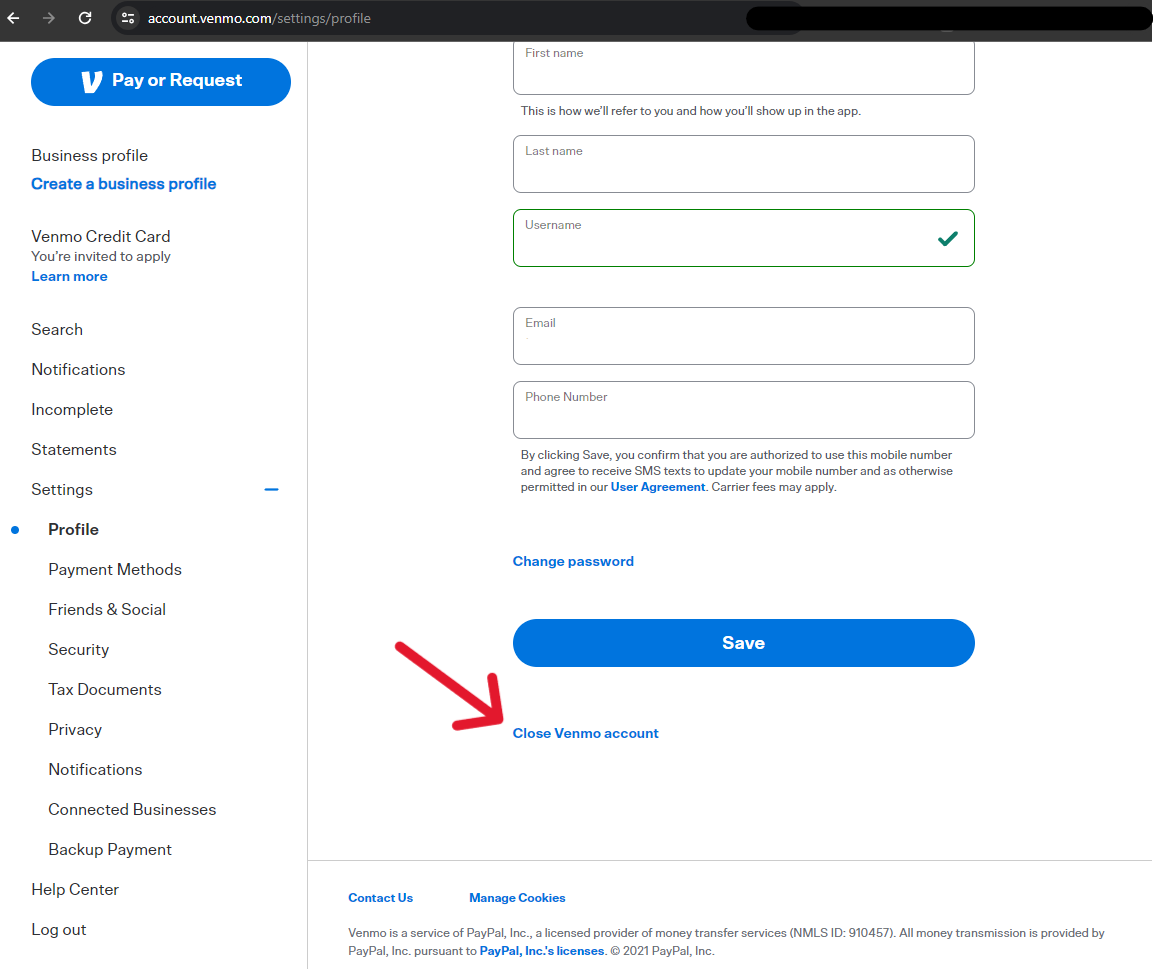
If you no longer have access to a mobile device, or if the app is glitching, the web interface is the more robust option. Log in to your account at Venmo.com via a secure browser.
- Navigate to Settings on the left-hand sidebar.
- Select Account.
- Locate the Close my Venmo account link at the bottom of the page.
- Follow the prompts to confirm your identity.

The web-based method is often preferred by power users because it provides a clearer view of any “Pending” status alerts that might be hidden by the mobile UX’s simplified layout.
The Data Security Implications of Closing a Fintech Account
In the realm of digital security, account deletion does not equate to immediate data erasure. Understanding how Venmo handles your metadata and financial records post-deletion is crucial for maintaining long-term privacy.
How Venmo Handles Your Financial Metadata Post-Deletion
Under the Gramm-Leach-Bliley Act (GLBA) and other financial regulations, Fintech companies are legally required to retain certain transactional data for a specific period—often up to five or seven years. This is done to combat money laundering and facilitate audits. Even after your account is deleted, your transaction history, name, and previous banking links are archived in a secure, non-active database. While this data is no longer accessible via the app, it remains part of Venmo’s corporate records.
Mitigating Risks of Identity Theft and Account Hijacking
Deleting an unused account is one of the most effective ways to reduce your “attack surface.” Old, unmonitored accounts are prime targets for credential stuffing attacks. If a data breach occurs at a different service where you used the same password, hackers could gain access to your dormant Venmo account. By terminating the account, you deactivate the login credentials and the associated OAuth tokens, effectively slamming the digital door shut on potential intruders.
Troubleshooting Common Technical Barriers
Despite following the correct steps, users sometimes encounter technical hurdles that prevent the smooth closure of their accounts.
Overcoming “Error Processing Request” Messages
If you receive a generic error message during the deletion phase, it is usually due to one of three technical reasons:
- Active Disputes: If you have an open chargeback or a disputed transaction, the platform’s “risk engine” will lock the account.
- Verification Status: If your identity hasn’t been fully verified but you’ve reached certain transaction thresholds, the system may require a document upload before it allows any further changes, including deletion.
- App Cache Corruption: On mobile, a bloated cache can prevent the “Submit” command from reaching the server. Clearing the app cache or attempting the deletion through a mobile browser can resolve this.
Managing Business Profiles vs. Personal Profiles
A common technical friction point is the dual-profile system. Venmo recently introduced specialized Business Profiles. You cannot delete a personal account if it has an active, underlying Business Profile. You must first navigate to the business settings, terminate that specific professional entity, and only then will the system allow the master personal account to be closed. This hierarchical dependency is built into the app’s architecture to prevent orphaned business accounts.

The Evolving Fintech Landscape: Why Technical Clean-up Matters
The decision to delete a Venmo account often coincides with a shift toward more robust or integrated financial tools. As the “Big Tech” era of finance matures, the architecture of P2P apps is changing. Users are increasingly moving toward solutions that offer end-to-end encryption or those directly integrated into their banking core, such as Zelle, to avoid the middleman risk.
From a technical perspective, maintaining a lean digital profile is the hallmark of sophisticated digital citizenship. Every app you keep installed, and every account you leave open, represents a potential vulnerability and a node for data harvesting. By successfully navigating the deletion of your Venmo account, you are not just closing a wallet; you are reclaiming a portion of your digital identity.
In conclusion, deleting Venmo is a straightforward technical procedure, but it requires meticulous attention to your account’s “state”—ensuring a zero balance, resolving pending items, and understanding the retention policies of the service provider. In an age where data is the new currency, knowing how to securely “spend” or “withdraw” your presence from a platform is a vital skill. Once the confirmation email hits your inbox, you can rest assured that your financial data is no longer live on the P2P social grid, marking a successful step in your journey toward enhanced digital security and streamlined software management.
aViewFromTheCave is a participant in the Amazon Services LLC Associates Program, an affiliate advertising program designed to provide a means for sites to earn advertising fees by advertising and linking to Amazon.com. Amazon, the Amazon logo, AmazonSupply, and the AmazonSupply logo are trademarks of Amazon.com, Inc. or its affiliates. As an Amazon Associate we earn affiliate commissions from qualifying purchases.