
In the rapidly evolving landscape of blockchain technology, the security of digital assets is paramount. SafePal has emerged as a leader in the non-custodial wallet space, offering a sophisticated blend of hardware and software solutions designed to protect decentralized identities. However, as with any high-tech ecosystem, users may encounter technical hurdles—ranging from firmware update glitches to synchronization errors. Understanding how to navigate the official support channels of SafePal is not just about resolving a ticket; it is a critical component of digital security hygiene. This guide provides an in-depth exploration of the technical support infrastructure of SafePal, ensuring users can access assistance without compromising their cryptographic integrity.
Understanding the SafePal Technical Ecosystem
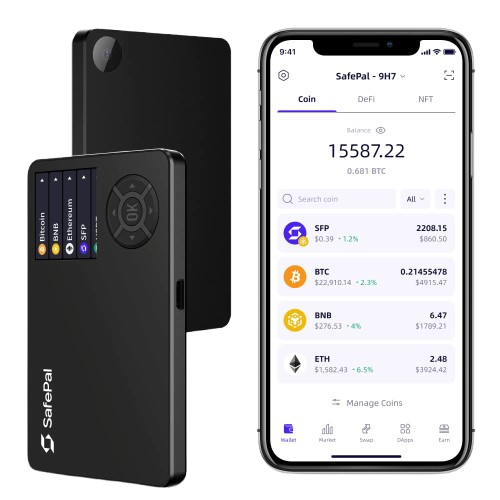
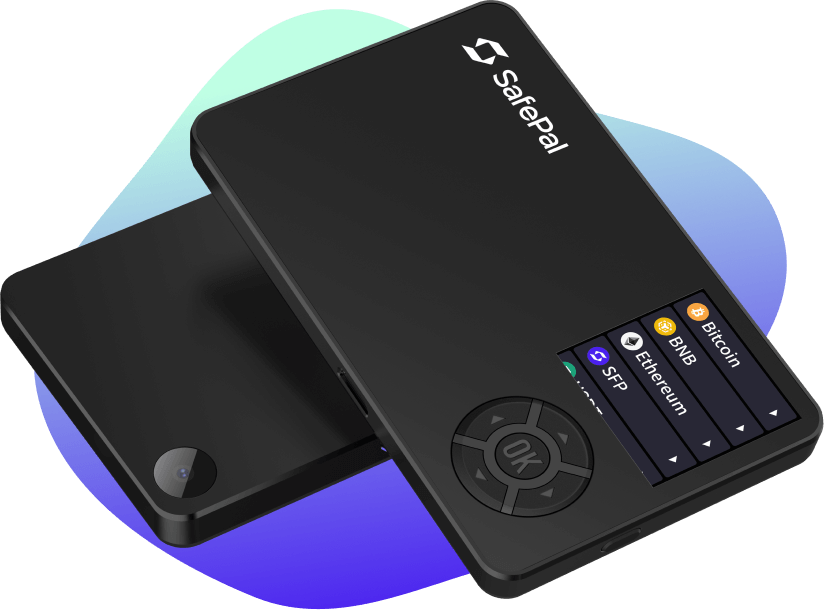
Before reaching out to support, it is essential to understand the technical architecture of the tools you are using. SafePal operates as a multi-layered security platform, comprising the SafePal S1 Hardware Wallet, the SafePal Cypher, and the SafePal App. Each component serves a specific function in the cold and hot storage pipeline.
The Hardware-Software Integration
The SafePal S1 utilizes an air-gapped signing mechanism. This means the device never connects to the internet, Bluetooth, or NFC, significantly reducing the attack surface for remote hackers. Communication with the SafePal App occurs via encrypted QR codes. When a technical issue arises, it is often related to the handshake between the app’s software and the hardware’s optical sensor.
Firmware and Software Dependencies
SafePal regularly releases firmware updates to support new blockchains and improve security protocols. Many support inquiries stem from unsuccessful firmware flashes. From a technical perspective, ensuring that your USB connection is stable and that you are using the official SafePal upgrade tool is the first step in self-troubleshooting. Understanding these dependencies allows users to provide more granular information when they finally contact the support team.
Official Channels for Technical Support
In the digital asset industry, “support numbers” are a rarity and often a red flag for phishing attempts. Legitimate technical support for decentralized wallets is almost exclusively handled through encrypted ticket systems and official community forums.
The SafePal Help Center and Ticketing System
The primary gateway for technical assistance is the official SafePal Help Center. This platform is powered by a robust knowledge base that addresses common software bugs, API integration issues, and hardware malfunctions.
- Submitting a Request: Users should navigate to the “Submit a Request” section. Here, you are required to categorize your issue—whether it involves the S1 Hardware, the Software Wallet, or an integrated DApp (Decentralized Application).
- Technical Documentation: For developers and advanced users, the documentation provides insights into the BIP39/BIP44 standards that SafePal employs, which can help troubleshoot recovery phrase issues without direct intervention.
Community-Based Technical Assistance
SafePal maintains an active presence on platforms like Discord and Telegram. However, from a security standpoint, these should be used for general inquiries only. Technical staff (identified by “Admin” or “Staff” tags) will never initiate a Direct Message (DM) or ask for your private keys. The technical value of these communities lies in real-time updates regarding server status or known bugs affecting the broader user base.
Essential Troubleshooting for SafePal Hardware and Software
Many technical issues can be resolved through standardized protocols before a formal support ticket is processed. Mastering these “Tier 1” troubleshooting steps can save time and improve your understanding of the wallet’s functionality.
Resolving QR Code Scanning Issues
Since the SafePal S1 relies on optical communication, environmental factors often interfere with the technical process.
- Lux Levels: Ensure the lighting is adequate but not reflective.
- Screen Brightness: Adjusting the smartphone’s brightness can help the S1’s camera capture the QR code data packets more efficiently.
- Camera Calibration: If the app fails to recognize the hardware, checking for software updates in the App Store or Google Play is a vital technical step.
Firmware Update Troubleshooting
Updating the S1 firmware requires a specific sequence:
- Connection: Use the original data cable to connect the S1 to a PC/Mac.
- Mode Activation: Put the S1 into “Upgrade Mode” via the settings menu.
- File Integrity: Always verify the hash of the downloaded firmware to ensure it hasn’t been tampered with during transit. If the update hangs at 99%, it usually indicates a driver conflict on the host computer rather than a failure of the wallet itself.
Wallet Synchronization and Node Issues
Sometimes, the SafePal App may display an incorrect balance. This is rarely a loss of funds and usually a “node synchronization” error. In the tech settings of the app, users can often switch between different RPC (Remote Procedure Call) nodes to refresh the blockchain data. Understanding how the app fetches data from the blockchain allows users to diagnose “visual bugs” versus “on-chain issues.”
Digital Security Protocols: Protecting Your Assets While Seeking Help
The most critical aspect of contacting support in the tech world is maintaining the “Zero Trust” principle. Because SafePal is a non-custodial wallet, the company does not have access to your funds, your password, or your seed phrase.
The Golden Rule of Tech Support
Under no circumstances should you provide your 12, 18, or 24-word recovery phrase to anyone—including someone claiming to be “SafePal Support.” From a technical architecture standpoint, there is no scenario where a support agent requires your seed phrase to fix a software bug. If a “support number” or agent asks for this information, it is a definitive indicator of a scam.
Verifying Official Links
Phishing is the most common threat in the digital security niche. Always verify that the URL in your browser is safepal.com. Scammers often use typosquatting (e.g., safepall.com or safe-pal.support) to trick users into entering sensitive data into a fake interface. Utilizing a hardware security key (like a YubiKey) for your email account associated with the support ticket adds an extra layer of protection to your communications.
Avoiding “Support Numbers”
While the prompt mentions a “support number,” it is vital to note that established crypto-security firms like SafePal do not offer telephonic support. In the tech industry, phone lines are easily spoofed and lack the end-to-end encryption necessary for discussing sensitive digital security configurations. If you find a “SafePal support number” on a search engine, treat it with extreme skepticism.
The Future of Decentralized Support and Self-Custody Solutions
As we move toward Web3, the nature of technical support is shifting from centralized “call centers” to decentralized, community-driven, and AI-assisted models.
AI-Driven Technical Diagnostics
SafePal is increasingly integrating AI chatbots into its Help Center to provide instantaneous technical diagnostics. These tools use machine learning to parse user descriptions and match them with known hardware error codes. This represents a significant trend in tech: the move toward self-healing software ecosystems where the user is empowered with automated tools to fix common issues.
The Philosophy of Self-Custody
The ultimate goal of using a tool like SafePal is to “be your own bank.” This comes with the technical responsibility of managing your own security. The “support” provided by the company is intended to facilitate your use of their interface, not to manage your assets. As the software matures, we can expect more robust “in-app” troubleshooting features that reduce the need for external contact altogether.
Conclusion: Mastering the Interface
Contacting SafePal support effectively requires a blend of technical literacy and security awareness. By utilizing the official Help Center, understanding the hardware’s air-gapped limitations, and strictly adhering to security protocols regarding recovery phrases, users can ensure their journey through the decentralized web is both productive and secure. In the world of high-tech digital security, the best support is the knowledge that allows you to navigate the system independently and safely.
aViewFromTheCave is a participant in the Amazon Services LLC Associates Program, an affiliate advertising program designed to provide a means for sites to earn advertising fees by advertising and linking to Amazon.com. Amazon, the Amazon logo, AmazonSupply, and the AmazonSupply logo are trademarks of Amazon.com, Inc. or its affiliates. As an Amazon Associate we earn affiliate commissions from qualifying purchases.