
In the modern digital economy, the “Software as a Service” (SaaS) and subscription-based models have become the standard for consumer interaction. Among these, Amazon Prime stands as a titan, offering a multifaceted ecosystem that blends e-commerce, cloud storage, streaming media, and logistics. However, as digital hygiene becomes a priority for tech-savvy users, the ability to effectively manage and terminate these digital tethers is a critical skill. Navigating the technical architecture of Amazon’s cancellation process requires more than just a cursory click; it requires an understanding of user interface (UI) design, account hierarchy, and the technical implications of losing access to a centralized digital hub.
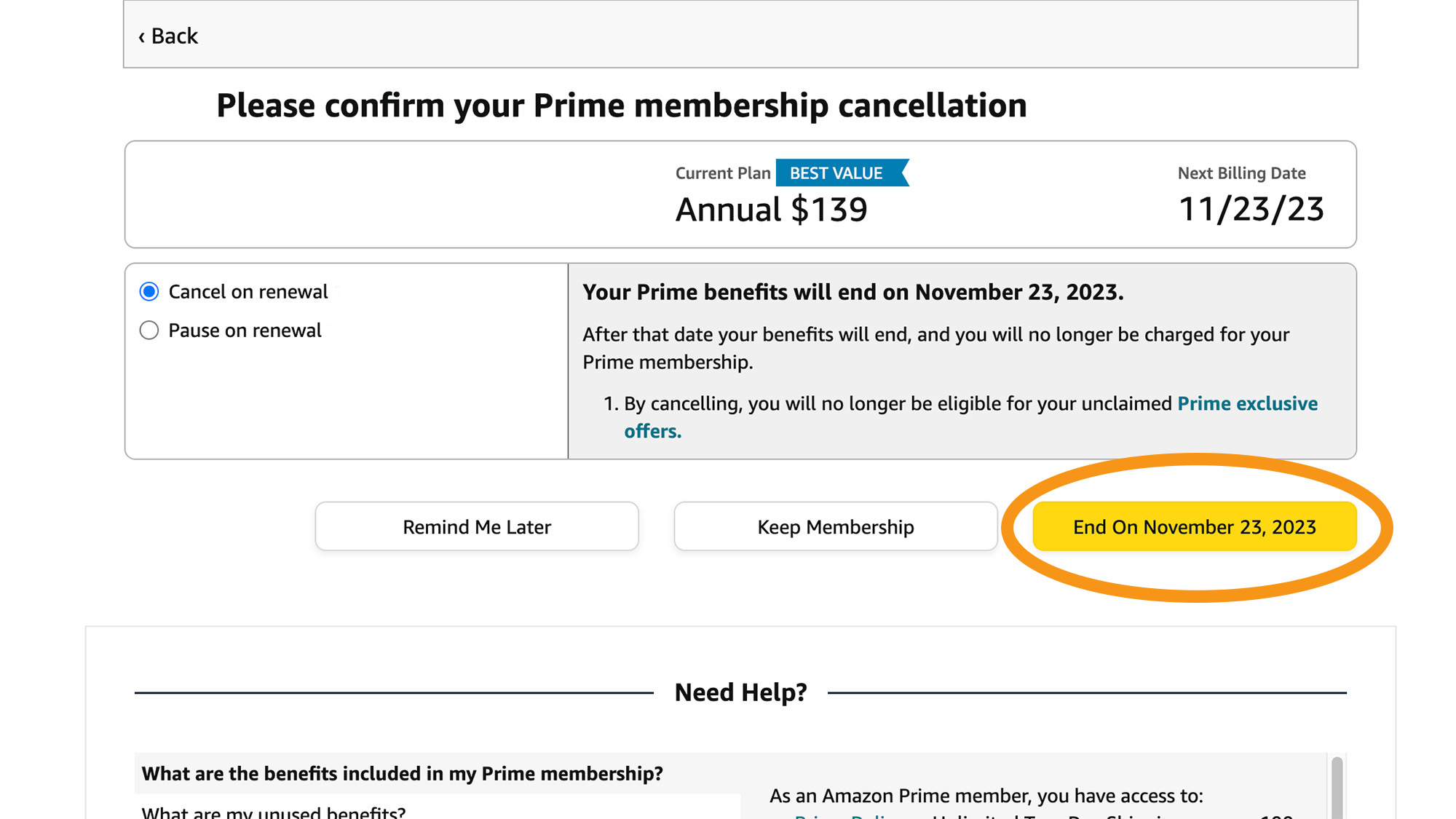
Navigating the Amazon Interface: The Technical Roadmap to Cancellation
The process of cancelling an Amazon Prime membership is a study in complex UI navigation. Amazon’s interface is designed for high “stickiness,” meaning the path to exit is often less intuitive than the path to purchase. To successfully terminate the service, one must navigate through several layers of the account management stack.
Accessing Account Settings via Web Browser
For the most stable technical experience, using a desktop web browser is recommended over mobile interfaces. Once logged in, the technical path begins at the “Accounts & Lists” header. This element functions as the primary gateway to the user’s relational database on Amazon’s servers.
From the “Your Account” dashboard, users must locate the “Prime” sub-section. Technically, this is a distinct module within the Amazon architecture that handles subscription metadata, billing cycles, and tier statuses. Clicking this brings you to the Prime Management hub. Here, the interface displays the “Update, cancel and more” link. This triggers a specific workflow designed to verify user intent through a series of server-side requests.
Managing Subscriptions via the Mobile App Ecosystem
Cancelling through the Amazon Shopping app involves a different technical stack, utilizing mobile-optimized API calls. On iOS or Android, the user navigates to the “profile” icon (the person silhouette) and selects “Your Account.”
In the mobile environment, the “Manage Prime Membership” section is often nested under “Account Settings.” The challenge here is the limited screen real estate, which Amazon utilizes to present “save” offers—discounts or alternative plans—before reaching the final cancellation trigger. From a technical standpoint, each “Continue to Cancel” button press sends a POST request to Amazon’s membership API, moving the account state one step closer to the “Pending Termination” status.
Deconstructing the “Roach Motel”: Understanding UX Dark Patterns
In the tech world, the term “Roach Motel” refers to a UI design where it is incredibly easy to get into a situation (signing up) but difficult to get out (cancelling). Amazon’s cancellation flow is frequently cited by UX researchers as an example of intentional friction.
Why the Cancellation Process is Multi-Layered
When you initiate a cancellation, you aren’t simply toggling a boolean value from “True” to “False” in a database. Instead, the system initiates a multi-stage logic gate. Amazon’s software architecture is programmed to interrupt the user journey with “retention logic.”
Technically, this involves dynamic content injection. As you click through the cancellation pages, the system queries your usage data in real-time. If the algorithm detects that you frequently use Prime Video or have pending deliveries, it will generate custom UI components highlighting those specific losses. This is not a static webpage; it is a data-driven intervention aimed at reducing churn.
The Psychology of Confirmations and “Wait” Screens
The technical “friction” is most evident in the three-click rule. Amazon typically requires at least three distinct pages of confirmation before the membership is officially set to expire. Each page serves a technical and psychological purpose:
- The Loss Aversion Screen: Shows the benefits you are forfeiting.
- The Alternative Offering Screen: Suggests switching to a monthly or student plan.
- The Final Execution Screen: The actual termination of the auto-renewal.

Understanding this flow allows a user to move through the technical hurdles without being distracted by the “dark patterns” of the interface.
Technical Checklist Before Terminating Your Digital Access
Amazon Prime is not a siloed service; it is an integrated ecosystem. Terminating the membership has cascading effects on other software services and hardware devices linked to your Amazon ID. Before finalizing the cancellation, a technical audit of your digital assets is necessary.
Evaluating Connected Cloud Services (Amazon Photos and Drive)
One of the most overlooked technical consequences of cancelling Prime is the impact on cloud storage. Prime members often receive unlimited full-resolution photo storage via Amazon Photos.
Upon cancellation, your account status reverts to the “Free” tier, which typically offers significantly less storage (usually 5GB). If your data footprint exceeds this limit, the system’s backend logic may eventually restrict your ability to upload new files or, in some cases, begin a data retention countdown. It is vital to use an FTP client or Amazon’s desktop sync tool to migrate these assets to a local drive or an alternative cloud provider like Google Drive or iCloud before the billing cycle ends.
Impact on Peripheral Devices (Echo, Fire Stick, and Kindle)
Amazon’s hardware—Echo speakers, Fire TV Sticks, and Kindle E-readers—functions as “thin clients” that rely heavily on Prime-integrated APIs. While these devices will not cease to function, their software experience will change:
- Fire TV: The UI will prioritize ad-supported content and paid rentals over “Included with Prime” titles.
- Echo/Alexa: The default music streaming service will shift from Amazon Music Prime to Amazon Music Free (ad-supported) or a secondary linked service like Spotify.
- Kindle: Access to the “Prime Reading” library—a rotating database of e-books—will be revoked, and titles will be digitally scrubbed from your device during the next sync.
Troubleshooting and Verifying Account Status
Once the technical process of cancellation is complete, users must verify that the state change has been successfully committed to Amazon’s global servers. Occasionally, session timeouts or browser cache issues can lead to “phantom” subscriptions where the user believes they cancelled, but the billing cycle remains active.
Confirming Termination via Email Headers and Metadata
The most reliable confirmation of a successful cancellation is the automated confirmation email. From a technical perspective, this email serves as a transaction receipt. You should inspect the email for the specific “End Date.”
Unlike some SaaS platforms that terminate access immediately, Amazon’s software logic usually allows the “Prime” flag to remain active on the account until the end of the current paid billing period. You can verify this in the “Manage Membership” section, where the status should change from “Next Payment On [Date]” to “Membership Ends On [Date].”
Reversing the Process: Reactivation and Technical Recovery
If a cancellation was performed in error, Amazon’s database architecture makes reactivation relatively seamless. Because your “Customer ID” remains constant, all preferences, watchlists, and historical data are retained in a “dormant” state for a period of time.
Re-subscribing simply re-authorizes the payment token associated with your account. However, if you requested a “full refund” (available if no Prime benefits were used in the current cycle), the technical termination is immediate, and the system triggers a series of API calls to revoke access across all platforms simultaneously. This “hard reset” is the most efficient way to clear the account of recurring liabilities.

Conclusion: Mastering Subscription Management
Cancelling an Amazon Prime account is a significant exercise in digital autonomy. In an era where “subscription fatigue” is a common technical burden, understanding how to navigate complex UI flows, recognize retention algorithms, and manage cloud data migrations is essential. By viewing the cancellation process through a technical lens, users can move beyond the “one-click” simplicity of consumption and exert true control over their digital footprint. Whether you are streamlining your software subscriptions or migrating to a different ecosystem, the technical proficiency gained from mastering the Amazon exit flow is a valuable asset in the modern tech landscape.
aViewFromTheCave is a participant in the Amazon Services LLC Associates Program, an affiliate advertising program designed to provide a means for sites to earn advertising fees by advertising and linking to Amazon.com. Amazon, the Amazon logo, AmazonSupply, and the AmazonSupply logo are trademarks of Amazon.com, Inc. or its affiliates. As an Amazon Associate we earn affiliate commissions from qualifying purchases.