
In the rapidly evolving landscape of digital finance, mobile payment applications like Cash App have become indispensable tools for millions. They offer unparalleled convenience for sending, receiving, and managing money with just a few taps. However, with this speed and ease comes the occasional human error – a payment sent to the wrong person, an incorrect amount, or a change of mind. Navigating the process of reversing such a transaction can be daunting if you’re unfamiliar with the application’s technical intricacies and protocols. This guide provides a detailed, professional, and insightful look into the mechanisms for cancelling payments on Cash App, focusing on the practical steps, underlying technological considerations, and best practices for digital security.
Understanding Cash App Payments and Their Reversibility
Before delving into the cancellation steps, it’s crucial to grasp the fundamental nature of digital payments on platforms like Cash App. Unlike traditional bank transfers that might have extended processing times, peer-to-peer (P2P) app transactions are often designed for near-instantaneous execution. This speed is a core feature that makes these apps so attractive but also introduces challenges when errors occur.
The Immediate Nature of Digital Transactions
When you initiate a payment on Cash App, the system typically attempts to process it immediately. Funds are debited from your linked bank account, debit card, or Cash App balance and credited to the recipient’s account in real-time. This instantaneity is a result of sophisticated backend systems and API integrations that facilitate rapid communication between financial institutions and the Cash App platform. The payment status transitions from “pending” to “completed” in a matter of seconds or minutes for most transactions. This rapid settlement means there’s a very narrow window, if any, for direct cancellation by the sender once the transaction is initiated.
When a Payment is Truly Irreversible
The critical distinction lies between a “pending” payment and a “completed” payment. A payment remains pending primarily if there’s a temporary technical delay, a network issue, or a security flag that requires manual review by Cash App’s automated systems. In such rare instances, the system might not have fully disbursed the funds to the recipient. Once a payment is marked as “completed,” the funds have successfully transferred to the recipient’s Cash App balance. At this point, the transaction is technically irreversible from the sender’s end within the application’s native “cancel” function. The digital ledger has been updated, and the ownership of the funds has transferred.
Distinguishing Between Pending and Completed Payments
To determine the status of your payment, you’ll need to access your activity feed within the Cash App.
- Pending Payments: These will typically appear with a “Pending” status or a clock icon. They might be awaiting final authorization, or the recipient might not have accepted the payment yet (though this is less common for established Cash App users). This is the only scenario where a sender-initiated cancellation is directly possible.
- Completed Payments: These will show a “Completed” status, often accompanied by a green checkmark. For these, the direct cancellation option will not be available, necessitating alternative recovery methods.
Step-by-Step Guide to Cancelling a Pending Payment
If you’re fortunate enough to catch a payment while it’s still pending, Cash App provides a straightforward mechanism to cancel it. This process leverages the app’s user interface to interact with its transaction management features.
Navigating the Activity Feed
- Open the Cash App: Launch the application on your smartphone or tablet.
- Access the Activity Tab: Tap the clock icon located in the bottom right corner of the home screen. This icon represents your activity feed, which lists all your past and pending transactions chronologically.
Identifying and Selecting the Payment
- Locate the Transaction: Scroll through your activity feed to find the specific payment you wish to cancel. Look for transactions marked with a “Pending” status.
- Tap on the Payment: Select the pending transaction to view its details. This will open a new screen displaying information such as the recipient, amount, date, and current status.
Executing the Cancellation
- Look for the “Cancel” Option: On the transaction details screen, if the payment is genuinely pending, you should see an option like “Cancel Payment” or “Cancel this transaction.” The presence of this option is the definitive indicator of reversibility from your end.
- Confirm Cancellation: Tap the “Cancel Payment” button. The app will usually prompt you with a confirmation message, asking if you are sure you want to cancel the transaction. Review the details one last time and confirm your decision.
Confirmation and Verification
Upon successful cancellation, the status of the payment in your activity feed will change to “Cancelled,” and the funds should be immediately returned to your Cash App balance or linked bank account. It’s always a good practice to verify that the funds have indeed been credited back to your account by checking your balance or recent bank statements. This closure of the transaction within the app’s ledger confirms the technical reversal.
Strategies for Recovering Sent Payments (When Direct Cancellation Fails)
The reality for most users is that an erroneous payment is often discovered after it has already completed. In these cases, direct sender-initiated cancellation is no longer an option. The technological architecture of Cash App prioritizes immediate settlement, meaning the onus shifts to alternative recovery methods that involve either the recipient or Cash App support.
Requesting a Refund from the Recipient
This is the most straightforward and often most successful method for recovering a completed erroneous payment. It relies on the goodwill and cooperation of the recipient.
- Access the Completed Payment: Go to your activity feed and tap on the completed transaction in question.
- Initiate a Refund Request: On the transaction details screen, you should see an option to “Request Refund” or “Ask for Refund.” Tapping this sends a formal notification to the recipient through the Cash App interface.
- Direct Communication: It’s often beneficial to follow up the in-app request with a direct message to the recipient, explaining the situation clearly and politely. This personal touch can significantly expedite the refund process. The recipient will then have the option to refund the payment directly from their end. This process involves the recipient initiating a new transaction back to the original sender, effectively reversing the flow of funds using Cash App’s built-in refund functionality.

Understanding the “Dispute Transaction” Process
If the recipient is unresponsive or uncooperative, and you believe the payment was unauthorized or fraudulent, your next step is to dispute the transaction directly with Cash App. This process is more complex and less guaranteed, as it involves an investigation by Cash App’s internal security and support teams.
- Identify the Transaction: From your activity feed, select the completed payment you wish to dispute.
- Contact Support: Within the transaction details, look for an option to “Report a Problem” or “Contact Support Regarding This Transaction.” This typically directs you to Cash App’s customer support portal or initiates a chat.
- Provide Detailed Information: When disputing, you will need to provide as much detail as possible: why you believe the payment was unauthorized, any relevant communication, and proof of your claim. Cash App’s team will review the evidence and make a determination. This process can take several business days or even weeks, as it involves digital forensics and possibly communication with the recipient’s account. It’s important to note that disputing a transaction is typically reserved for unauthorized access or fraudulent activity, not simply for sender error.
Engaging Cash App Support for Assistance
For highly complex or unusual situations where the above methods prove ineffective, direct engagement with Cash App’s customer support team is necessary.
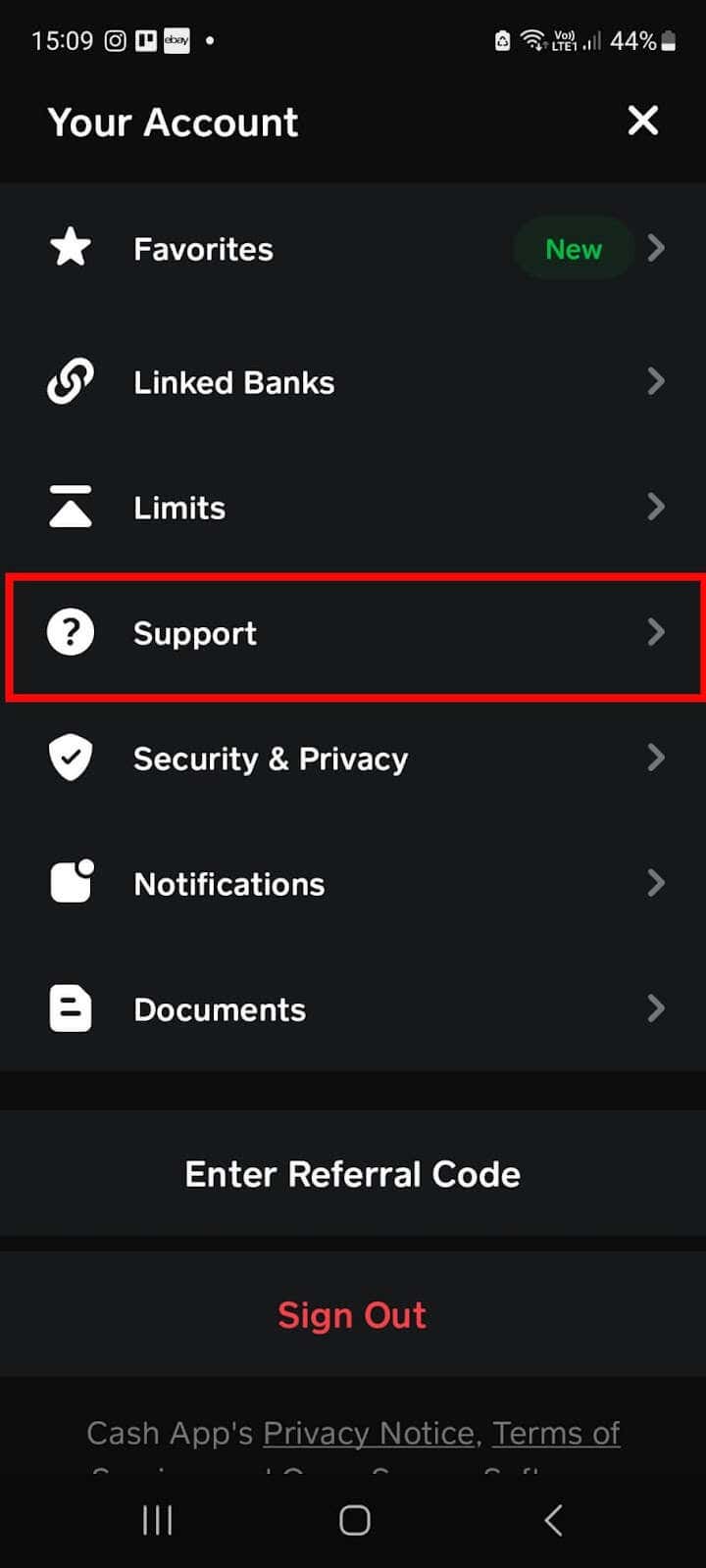
- Access Support within the App: From the Cash App home screen, tap your profile icon (top right). Scroll down and select “Support” or “Cash App Support.”
- Search for Relevant Topics: Utilize the search bar within the support section to find articles related to “disputes,” “unauthorized payments,” or “refunds.”
- Contact Support Directly: If you cannot find a satisfactory answer, look for options to “Contact Support” or “Chat.” Be prepared to explain your situation thoroughly, providing transaction IDs, timestamps, and any relevant communication. Cash App’s support agents have the technical capability to investigate transactions and potentially initiate reversals under specific, validated circumstances (e.g., proven fraud or system errors), although this is not a guaranteed outcome for user error.
Proactive Measures and Digital Security Best Practices
While knowing how to react to an erroneous payment is crucial, adopting proactive measures and adhering to robust digital security practices can significantly reduce the likelihood of such incidents in the first place. These practices leverage the app’s built-in security features and promote vigilant user behavior.
Double-Checking Recipient Information
The most common cause of misdirected payments is incorrect recipient details. Before tapping “Pay” or “Send,” always:
- Verify Cashtag: Ensure the recipient’s $Cashtag is precisely correct. Even a single character difference can send money to an unintended party.
- Confirm Name and Photo: Cash App often displays the recipient’s name and sometimes a profile picture. Cross-reference these details with your known recipient.
- Confirm Amount: Double-check the numerical amount to prevent overpayments or underpayments.
Utilizing Security Features (PIN, Biometrics)
Cash App provides several layers of security to protect your account and transactions:
- Enable Security Lock: Go to your profile icon, then “Privacy & Security,” and toggle on “Security Lock.” This requires you to enter a PIN, use Touch ID, or Face ID for payments over a certain amount or for all transactions, adding an essential barrier against unauthorized use.
- Two-Factor Authentication (2FA): Although not always a direct payment security feature, enabling 2FA for your Cash App account (often tied to your phone number or email) provides an extra layer of protection against account takeover, which could lead to unauthorized payments.
Awareness of Scams and Fraudulent Requests
Many payment errors stem from falling victim to social engineering scams.
- Be Skeptical of Unsolicited Requests: Never send money to individuals you don’t know, especially if they promise something in return (e.g., lottery winnings, investment returns).
- Verify Requests Independently: If a friend or family member requests money, verify their identity through a separate channel (e.g., a phone call) before sending, as their account might have been compromised.
- Understand Payment Purpose: Only send money for legitimate purchases or to trusted individuals. Cash App is designed for P2P transfers, not as an escrow service or for guaranteed transactions with unknown sellers.
Regular Review of Transaction History
Making it a habit to regularly review your Cash App activity feed can help you quickly identify any unauthorized or erroneous transactions. Early detection significantly increases the chances of successful recovery, whether through a refund request or by initiating a dispute with Cash App support. Consistent monitoring is a fundamental aspect of personal digital security.
The Technological Underpinnings of Payment Reversal Mechanisms
From a technological perspective, the ability to cancel or reverse a payment on a platform like Cash App is not a simple undo button. It involves intricate API calls, database updates, and adherence to financial regulations.
API Calls and Backend Processing for Refunds
When a user initiates a “cancel pending payment” or a recipient initiates a “refund,” the Cash App application makes specific API (Application Programming Interface) calls to its backend servers. These APIs trigger a sequence of events:
- Transaction Status Check: The backend system first verifies the current status of the transaction in its database. For a direct cancellation, it confirms it’s still “pending.” For a refund, it confirms “completed.”
- Funds Reallocation: If a pending transaction is cancelled, the system digitally “rolls back” the fund transfer. The entry that earmarked funds for the recipient is removed, and the funds are returned to the sender’s available balance. For a refund, a new transaction is created, originating from the recipient back to the sender, effectively reversing the flow.
- Database Updates: All changes in transaction status and fund balances are recorded in Cash App’s secure, distributed databases, ensuring data integrity and an auditable trail. This involves updating ledgers for both the sender and recipient accounts.
- Notification Systems: API calls also trigger notifications to both parties, confirming the cancellation or refund, thereby updating the user interface on their respective devices.
Integration with Financial Institutions
Cash App operates as an intermediary, integrating with traditional banking infrastructure. When you link a debit card or bank account, Cash App utilizes secure payment gateways and protocols (like ACH for bank transfers or card network APIs for debit card transactions) to move funds. The “reversal” of a payment, especially one that has touched the banking system, isn’t always an immediate reversal of the original debit. Instead, it’s often a new credit transaction initiated by Cash App back to the original funding source. This complex interplay ensures compliance with financial regulations and maintains the integrity of the broader banking ecosystem.

User Interface Design for Transaction Management
The intuitive design of Cash App’s user interface plays a crucial role in enabling users to manage their transactions. The clear distinction between “pending” and “completed” transactions, the presence of “Cancel Payment” or “Request Refund” buttons, and the easily accessible activity feed are all deliberate design choices aimed at empowering users while also guiding them through the established protocols for fund movement and recovery. Good UI/UX design is not just about aesthetics; it’s about providing clear pathways for complex technical operations, minimizing user error, and facilitating efficient problem resolution.
In conclusion, successfully managing payments on Cash App, including the challenging task of cancellation or recovery, hinges on a clear understanding of its technological framework, adherence to its procedural guidelines, and the adoption of robust digital security practices. While the instant nature of digital payments limits direct cancellation options, Cash App provides several mechanisms, from direct recipient refunds to comprehensive support channels, to address user errors and fraudulent activities. By being informed and proactive, users can navigate the digital financial landscape with greater confidence and security.
aViewFromTheCave is a participant in the Amazon Services LLC Associates Program, an affiliate advertising program designed to provide a means for sites to earn advertising fees by advertising and linking to Amazon.com. Amazon, the Amazon logo, AmazonSupply, and the AmazonSupply logo are trademarks of Amazon.com, Inc. or its affiliates. As an Amazon Associate we earn affiliate commissions from qualifying purchases.