
In an increasingly data-driven world, understanding and calculating percentages is a fundamental skill that permeates nearly every aspect of daily life, from assessing sales discounts and understanding statistics to calculating tips and interpreting financial reports. While the concept of percentages might seem straightforward, the practical application, especially when leveraging digital tools, often requires a clear understanding of calculator functionalities. This comprehensive guide will demystify the process, equipping you with the knowledge to efficiently and accurately calculate percentages using various types of calculators, firmly placing this crucial skill within the realm of practical technology mastery.
The Ubiquitous Role of Percentages in Daily Life and Digital Tools
Percentages are more than just mathematical constructs; they are a universal language for proportional representation. A percentage, literally “per hundred,” offers a standardized way to express a fraction of a whole, making comparisons and analyses remarkably intuitive. In our modern digital landscape, the ability to quickly and accurately perform these calculations is not just an academic exercise but a practical necessity, often facilitated by the ubiquitous calculator.
Understanding the Core Concept of Percentage
At its heart, a percentage is simply a way of expressing a number as a fraction of 100. For instance, 50% means 50 out of 100, or 1/2. This standardization allows for easy comparison between different quantities or proportions, regardless of the original total. Whether you’re tracking progress, comparing performance metrics, or understanding the composition of a mixture, percentages provide a clear, relatable benchmark. The simplicity of expressing fractions in terms of 100 parts makes complex data accessible and comprehensible for a wide audience.
Why Calculators Remain Essential in a Digital Age
Despite the advent of sophisticated software and powerful computing devices, the humble calculator remains an indispensable tool for percentage calculations. Its dedicated function keys, instant feedback, and straightforward interface make it exceptionally efficient for quick, on-the-spot computations. While a spreadsheet or a programming language can handle more complex, large-scale percentage analyses, the calculator excels in single, immediate calculations. From the basic handheld device to the advanced smartphone application, calculators serve as the primary gateway for most individuals to interact with and solve percentage-related problems, solidifying their role as a critical piece of tech in our daily routines. Understanding how to correctly input and interpret results from these devices is a key component of digital literacy, empowering users to make informed decisions without relying on manual, error-prone arithmetic.
Mastering Basic Percentage Calculations
The foundation of using a calculator for percentages lies in understanding how to perform the most common operations. While calculator models may vary slightly, the core principles remain consistent.
Finding a Percentage of a Number (e.g., 20% of 150)
This is perhaps the most common percentage calculation. It involves determining a specific fraction (expressed as a percentage) of a given total.
Method 1: Using the Percent Key (%)
Many calculators feature a dedicated “%” key, designed to streamline this process.
- Enter the number you want to find the percentage of. For 20% of 150, start by entering
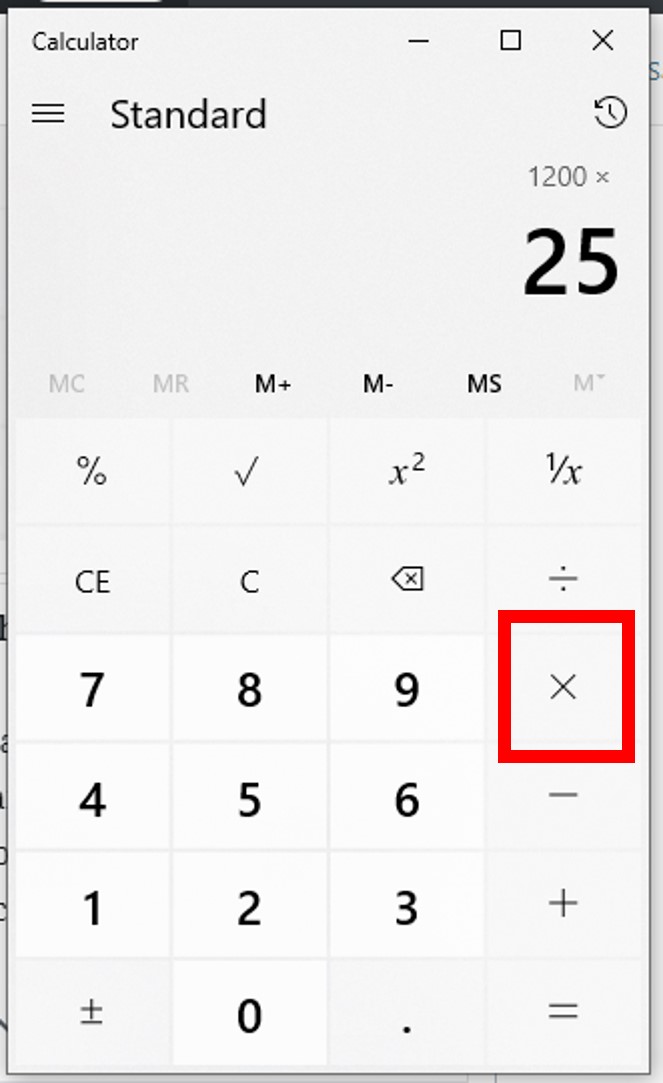
150. - Press the multiplication key (
xor*). - Enter the percentage value. In our example,
20. - Press the percent key (
%). - Press the equals key (
=).- Example Sequence:
150x20%= - Result:
30 - Insight: The percent key often automatically converts the percentage value into its decimal equivalent (e.g., 20% becomes 0.20) and then performs the multiplication. Some calculators might show
30after pressing%, before the=, depending on their internal logic.
- Example Sequence:
Method 2: Converting to Decimal
This method is universally applicable, even if your calculator lacks a dedicated percent key, or if you prefer a more explicit calculation.
- Convert the percentage to a decimal. To do this, divide the percentage by 100. So, 20% becomes
20 / 100 = 0.20. - Multiply the decimal by the original number.
- Example Sequence:
0.20x150= - Result:
30 - Insight: This method reinforces the mathematical definition of a percentage and is excellent for understanding the underlying mechanics, making it less dependent on specific calculator features.
- Example Sequence:
Calculating Percentage Increase/Decrease
These calculations are crucial for understanding growth, reduction, profit margins, or discounts.
-
To calculate a percentage increase:
- Find the percentage of the original number (as above).
- Add that result to the original number.
- Example: Price increases by 10%. Original price is $200.
200x10%=(Result:20)200+20=(Result:220)
- Alternatively (often faster on some calculators):
200+10%=(Result:220). Many calculators’%key, when used after an addition or subtraction, automatically calculates the percentage of the preceding number and applies it.
-
To calculate a percentage decrease (discount):
- Find the percentage of the original number.
- Subtract that result from the original number.
- Example: Item discounted by 25%. Original price is $80.
80x25%=(Result:20)80-20=(Result:60)
- Alternatively:
80-25%=(Result:60).
Determining What Percentage One Number Is of Another (e.g., 30 out of 120)
This calculation helps you understand the proportion of a smaller number relative to a larger total, expressed as a percentage.
- Divide the part by the whole.
- Multiply the result by 100.
- Example: What percentage is 30 of 120?
30/120=(Result:0.25)0.25x100=(Result:25)- Therefore, 30 is 25% of 120.
- Insight: Some advanced calculators or apps might allow
30/120%=to directly give you the percentage, but the two-step division and multiplication by 100 is universally reliable.
- Example: What percentage is 30 of 120?
Advanced Percentage Applications and Calculator Features

Beyond basic calculations, modern calculators offer features that simplify more complex percentage problems, turning multi-step arithmetic into streamlined operations.
Chained Percentage Operations (e.g., Discount then Tax)
Real-world scenarios often involve multiple percentage adjustments. For example, applying a discount and then adding sales tax.
- Scenario: An item costs $100. There’s a 20% discount, then an 8% sales tax is applied to the discounted price.
- Calculate the discounted price:
100-20%=(Result:80)
- Add the tax to the discounted price:
80+8%=(Result:86.4)
- Insight: By using the calculator’s chained operations, the result of the first percentage calculation (the discounted price) automatically becomes the base for the next percentage calculation (the tax), preventing manual re-entry and reducing potential errors.
- Calculate the discounted price:
Reverse Percentage Calculations (e.g., Finding Original Price After VAT)
Reverse percentages are used when you know the final value after a percentage change and need to find the original value. This is common for calculating pre-tax prices or original values before a discount.
- Scenario: An item costs $120 after a 20% sales tax was added. What was the original price before tax?
- Logic: If 20% tax was added, the $120 represents 100% + 20% = 120% of the original price.
- Formula: Original Price = Final Price / (1 + Percentage Increase/100)
- Calculator Steps:
120/1.20=(Result:100)
- (Explanation: 1.20 comes from 1 + (20/100))
- Scenario: An item is on sale for $75, which is 25% off the original price. What was the original price?
- Logic: If it’s 25% off, $75 represents 100% – 25% = 75% of the original price.
- Formula: Original Price = Final Price / (1 – Percentage Decrease/100)
- Calculator Steps:
75/0.75=(Result:100)
- (Explanation: 0.75 comes from 1 – (25/100))
- Insight: Reverse percentages are often overlooked but are powerful tools. They require a slightly different thought process, focusing on what percentage the known value represents of the unknown original.
Utilizing Memory Functions for Complex Scenarios
For highly complex calculations involving multiple intermediate percentage results, a calculator’s memory functions (M+, M-, MR/MC) can be invaluable. Instead of writing down and re-entering intermediate results, you can store them in memory.
- Example: Calculate a total cost with varying percentage contributions.
- Calculate a percentage of one value, e.g.,
500x10%=. Store this in memory (M+). - Calculate a percentage of another value, e.g.,
300x15%=. Add this to memory (M+). - Recall the total from memory (
MR).
- Calculate a percentage of one value, e.g.,
- Insight: Memory functions enhance efficiency and reduce the risk of transcription errors, especially when dealing with lengthier calculations where each step’s result contributes to a final sum or difference.
Choosing the Right Calculator for Your Percentage Needs
The “best” calculator for percentages depends on your specific requirements and environment. From physical devices to software applications, each type offers distinct advantages.
Standard vs. Scientific Calculators
- Standard Calculators: These are ideal for everyday percentage calculations. Their larger buttons and clear display often prioritize ease of use for basic arithmetic and include a prominent ‘%’ key. They are perfect for quick retail calculations, budgeting, or tip estimations.
- Scientific Calculators: While designed for more complex mathematical, scientific, and engineering functions, scientific calculators also handle percentages proficiently. They might require a slightly different approach (e.g., converting percentages to decimals manually if the ‘%’ key isn’t as intuitive) but offer greater precision and functionality for advanced users who might integrate percentages into larger formulas.
Smartphone Calculator Apps and Their Advantages
The calculator app on your smartphone or tablet is arguably the most frequently used digital tool for percentages.
- Accessibility: Always at hand, eliminating the need for a separate device.
- Advanced Features: Many built-in apps, especially when rotated to landscape mode, reveal scientific functions and memory options, mirroring standalone scientific calculators.
- Integration: Some apps can integrate with other phone features, like currency converters or unit converters, offering a more holistic calculation environment.
- Third-Party Apps: App stores offer a plethora of specialized calculator apps, some designed specifically for financial percentages, tip calculations, or loan amortization, providing tailored user experiences.
Online Calculators and Specialized Tools
The internet hosts an immense variety of online calculators, often designed for very specific percentage-related tasks.
- Specialization: Websites offer calculators for mortgage payments, body mass index (BMI), savings growth, VAT calculations, or split bills with tips. These tools often abstract away the complex formulas, allowing users to simply input raw numbers.
- Clarity and Guidance: Many online tools provide explanations of the calculation steps, making them educational as well as functional.
- Data Visualization: Some advanced online tools can even present percentage data in visual formats, like pie charts or bar graphs, adding an analytical layer.
- Considerations: While convenient, always ensure you are using reputable and secure online calculators, especially when dealing with sensitive financial data.
Common Pitfalls and Best Practices for Accuracy
Even with a calculator, errors in percentage calculations can occur. Awareness of common pitfalls and adherence to best practices will significantly improve your accuracy.
Misinterpreting the Percent Key’s Functionality
The ‘%’ key can behave differently across various calculator models.
- On some calculators,
100 + 10 %will calculate 10% of 100 (which is 10) and then add it to 100, resulting in 110. - On others,
100 + 10 %might be interpreted as100 + (10 / 100), incorrectly yielding 100.1. - Best Practice: Always test your calculator’s ‘%’ key with a simple, known calculation (e.g.,
100 + 10 %) to understand its specific behavior. If unsure, revert to the decimal conversion method (100 * 0.10) for finding a percentage of a number, or explicit addition/subtraction.
Rounding Errors and Precision
Percentages often result in decimal numbers, and rounding too early or too aggressively can lead to inaccuracies, especially in multi-step calculations.
- Example: Calculating 1/3 as 0.33 instead of 0.333333… can compound errors.
- Best Practice:
- Maintain Precision: Carry more decimal places than strictly necessary during intermediate steps. Round only at the very final result, typically to two decimal places for currency or as specified.
- Use Calculator Features: Scientific calculators often have a “FIX” or “SCI” mode to control decimal precision, or display more digits by default.
- Understand Context: The level of precision required depends on the context. A percentage of a large financial sum demands higher precision than a rough estimate for personal budgeting.

Double-Checking Your Inputs and Results
The most common source of error isn’t the calculator, but human input.
- Input Verification: Before pressing ‘=’, quickly review the entered numbers and operations on the calculator’s display. A misplaced decimal point or a forgotten operator can drastically alter results.
- Sanity Check: After getting a result, perform a quick “sanity check.” Does the answer make logical sense? If you calculate a 20% discount on a $100 item and get $8, you immediately know something is wrong.
- Alternative Methods: For critical calculations, if time permits, try to arrive at the result using a slightly different method or even a different calculator/app to cross-verify.
In conclusion, the calculator, in its various forms, stands as a pivotal technological tool for navigating the world of percentages. By understanding its functions, appreciating its nuances, and adopting best practices, you can confidently and accurately perform percentage calculations, enhancing your decision-making capabilities across personal, academic, and professional domains. This mastery isn’t just about pressing buttons; it’s about intelligent interaction with technology to derive meaningful insights from numbers.
aViewFromTheCave is a participant in the Amazon Services LLC Associates Program, an affiliate advertising program designed to provide a means for sites to earn advertising fees by advertising and linking to Amazon.com. Amazon, the Amazon logo, AmazonSupply, and the AmazonSupply logo are trademarks of Amazon.com, Inc. or its affiliates. As an Amazon Associate we earn affiliate commissions from qualifying purchases.