
In an increasingly digitized world, peer-to-peer (P2P) payment applications have become indispensable tools for managing everyday financial interactions. Among these, Venmo stands out as a ubiquitous platform, simplifying everything from splitting dinner bills to sending rent money. Its intuitive interface and social features have cemented its place in the digital payment landscape. However, to truly harness the power of Venmo, users must first understand the foundational step: how to efficiently and securely add money to their account. This comprehensive guide delves into the technological underpinnings and practical steps involved in funding your Venmo balance, ensuring you can navigate this essential feature with confidence and ease, all while keeping a keen eye on digital security.
Understanding Venmo’s Digital Wallet Ecosystem
Venmo is more than just a money transfer app; it’s a sophisticated digital wallet system designed for modern convenience. At its core, it streamlines financial transactions between individuals, offering a seamless experience that traditional banking often can’t match for speed and simplicity in social contexts.
The Core Functionality of Venmo as an App
Venmo operates as a mobile application, available on both iOS and Android platforms, acting as a digital intermediary for financial exchanges. Users link their bank accounts, debit cards, or even credit cards to their Venmo profile, creating a personal digital wallet. This wallet can hold a balance, which can then be used to send payments to other Venmo users, make purchases with authorized merchants, or be transferred back to a linked bank account. The app’s strength lies in its user-friendly interface, which abstracts the complexities of bank transfers into a few taps, making digital payments accessible to a broad demographic. Its integration with a social feed, allowing users to share and react to transactions (with varying privacy settings), further distinguishes it as a unique blend of financial tool and social platform. From a technological perspective, Venmo employs robust API integrations with financial institutions and leverages advanced data encryption to facilitate these transactions securely, all while maintaining a user experience that prioritizes ease of use.
Why a Funded Venmo Account Matters
While Venmo allows transactions directly from a linked bank account or card, having a pre-funded Venmo balance offers several distinct technological and practical advantages. Firstly, it enables instant payments without relying on the real-time processing capabilities of external banks, which can sometimes introduce delays. Payments from a Venmo balance are processed internally by the app, often completing within seconds. This is particularly useful for time-sensitive transactions or when network latency might affect external bank verification. Secondly, maintaining a balance can provide a layer of separation between your everyday spending on Venmo and your primary bank account, acting as a buffer. This can enhance security by limiting direct access to your main financial institution for frequent, smaller transactions. Furthermore, some Venmo features, such as certain merchant payments or specific instant transfer options, might operate more efficiently or exclusively when funds are drawn from your Venmo balance. It’s about optimizing the app’s native capabilities for the smoothest possible user experience.
Step-by-Step Guide: Funding Your Venmo Account
Adding money to your Venmo account is a straightforward process, designed with the app’s characteristic user-friendliness. The primary methods involve linking an external financial source and initiating a transfer through the app’s intuitive interface.
Linking Your Bank Account: The Foundation
Before you can add money directly from your bank, you must first link your bank account to your Venmo profile. This is a critical security and operational step.
- Navigate to Settings: Open the Venmo app, tap on the “Me” tab (your profile icon), then tap the “Settings” gear icon in the top right corner.
- Add Payment Method: Under “Payment Methods,” select “Add a bank or card.”
- Choose Bank: Select “Bank” from the options. Venmo offers two primary methods for linking:
- Instant Verification (Plaid Integration): This is the quickest and most common method. Venmo partners with Plaid, a secure third-party service, to allow you to log in to your online banking portal directly through the Venmo app. This securely verifies your bank account details instantly. This integration highlights Venmo’s reliance on secure fintech partnerships to streamline user setup.
- Manual Verification (Micro-Deposits): If instant verification isn’t an option or you prefer not to use it, you can manually enter your bank’s routing number and account number. Venmo will then send two small, random deposits (usually less than $0.50) to your bank account within 1-3 business days. You will then need to return to the app and enter the exact amounts of these micro-deposits to confirm ownership. This method, while slower, provides an additional layer of verification.
Once linked and verified, your bank account becomes a trusted source for adding funds.
Adding Money Directly from Your Bank
With your bank account linked, adding money to your Venmo balance is simple:
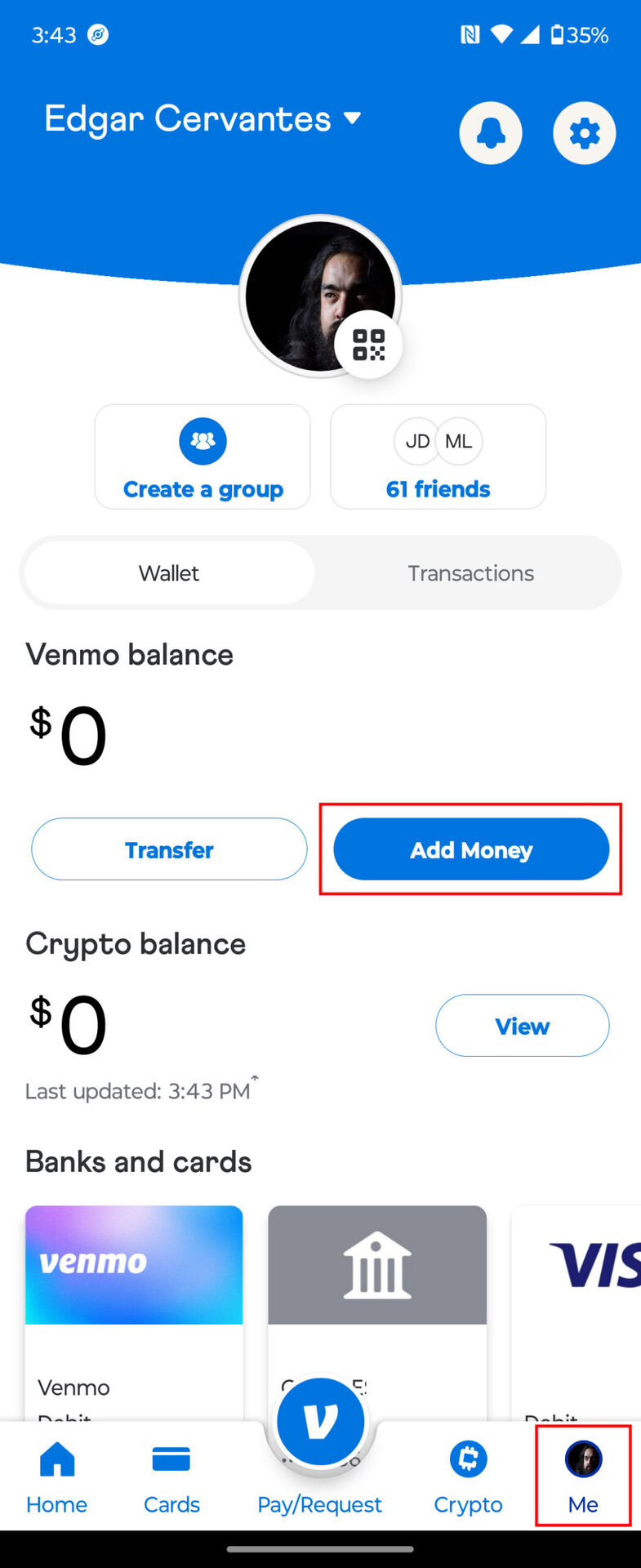
- Access Money Management: From the main Venmo feed, tap the “Me” tab (your profile icon).
- Select “Manage Balance”: Below your current Venmo balance, you’ll see options. Tap “Add Money” or “Manage Balance” and then “Add Money.”
- Enter Amount: Input the desired amount you wish to add to your balance.
- Confirm Source: Ensure your linked bank account is selected as the source.
- Review and Confirm: Double-check the amount and the source, then tap “Add Money.”
Funds transferred from a linked bank account typically take 3-5 business days to clear and appear in your Venmo balance. This standard timeframe is due to the Automated Clearing House (ACH) network, the electronic funds transfer system used by banks in the U.S. While the transfer is pending, the funds will not be immediately available in your Venmo balance. Venmo itself does not charge a fee for standard bank transfers to your balance.
Utilizing Debit Cards for Instant Transfers
For those needing immediate access to funds, Venmo also allows adding money instantly using a linked debit card.
- Link Your Debit Card: If you haven’t already, link your debit card via the “Payment Methods” section in your settings, similar to linking a bank account. This typically involves entering the card number, expiration date, and CVV.
- Initiate Instant Add Money: Follow steps 1-3 from “Adding Money Directly from Your Bank.”
- Select Debit Card: When prompted to select the source, choose your linked debit card instead of your bank account.
- Review and Confirm: Confirm the amount and source.
Venmo typically charges a 1.75% fee (with a minimum of $0.25 and a maximum of $25) for instant transfers from a debit card to your Venmo balance. This fee covers the cost of expediting the transaction, bypassing the standard ACH processing time. The funds are usually available in your Venmo balance within minutes. This feature demonstrates Venmo’s technological capability to offer both standard and expedited financial services, catering to different user needs for speed and cost.

Leveraging Venmo’s Additional Funding Features
Beyond direct bank and debit card transfers, Venmo has expanded its capabilities to include other convenient methods for adding funds, further solidifying its role as a versatile financial tool. These features leverage various financial technologies to provide seamless integration.
Direct Deposit for Consistent Funding
Venmo offers a direct deposit feature, allowing users to have a portion or all of their paycheck, government benefits, or other regular income streams sent directly to their Venmo account. This transforms Venmo into more than just a P2P app, positioning it as a primary account for some users.
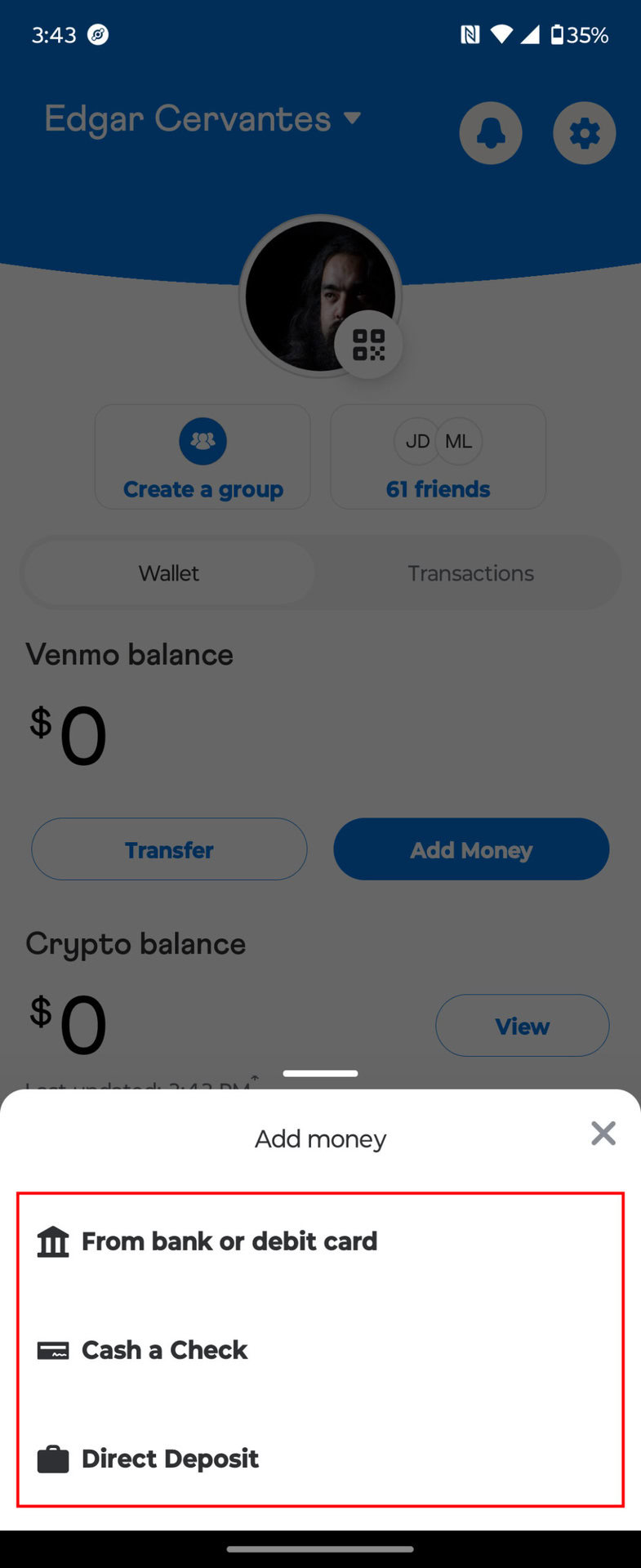
- Access Direct Deposit Information: In the “Me” tab, look for the “Direct Deposit” option, often found under “Manage Balance” or “More.”
- Generate Account Details: Venmo will provide you with unique routing and account numbers specifically for your Venmo direct deposit. These are not your personal bank account numbers but rather Venmo’s banking details tied to your individual account within their system.
- Provide to Payer: You then provide these Venmo-specific routing and account numbers to your employer or benefits provider, just as you would with a traditional bank account.
This technological integration allows funds to be deposited directly into your Venmo balance, typically appearing within 1-2 business days after your payer initiates the deposit. It’s a significant step towards making Venmo a central hub for personal finance, leveraging existing payroll systems to fund a digital wallet directly.
Cashing a Check Electronically
For those still dealing with physical checks, Venmo offers a mobile check deposit feature, allowing you to convert paper checks into digital funds directly within the app. This feature uses advanced optical character recognition (OCR) and image processing technology.
- Navigate to Check Cashing: In the Venmo app, locate the “Cash a Check” option (often found under “Manage Balance” or “Me” tab).
- Endorse and Photograph: You’ll be prompted to properly endorse the back of your check with “For Venmo mobile deposit only” and your signature. Then, you’ll use your phone’s camera within the app to take clear photos of the front and back of the check. The app’s technology guides you to ensure the image quality is sufficient for processing.
- Review and Submit: Confirm the check details extracted by the app’s OCR technology and submit it for review.
Venmo offers both standard (free, typically 5-10 business days) and instant (fee-based, usually 1.0% for payroll and government checks, 5.0% for all other checks, minimum $5.00 fee) options for check cashing. The instant option is subject to eligibility and approval, involving real-time risk assessment algorithms. This feature exemplifies how fintech applications are bridging the gap between traditional banking methods and digital convenience through sophisticated imaging and processing technologies.
Digital Security and Best Practices for Venmo Users
While the convenience of Venmo is undeniable, understanding and utilizing its security features, along with adopting personal best practices, is paramount for protecting your funds and personal information within this digital ecosystem.
Protecting Your Account: Venmo’s Built-in Security Measures
Venmo employs a multi-layered security architecture to safeguard user accounts and transactions:
- Encryption: All sensitive data, including financial details and transaction information, is encrypted both in transit and at rest, protecting it from unauthorized access.
- PIN/Biometrics: Users can set up a personal identification number (PIN) or enable biometric authentication (fingerprint or facial recognition) for accessing the app or confirming transactions, adding a crucial layer of device-level security.
- Multi-Factor Authentication (MFA): Venmo supports MFA, requiring a second form of verification (like a code sent to your phone) in addition to your password, especially when logging in from a new device or performing sensitive actions.
- Fraud Detection and Monitoring: Venmo utilizes sophisticated algorithms and machine learning to continuously monitor transactions for suspicious activity, flagging and investigating potential fraud in real-time.
- PCI DSS Compliance: As a payment processor, Venmo adheres to the Payment Card Industry Data Security Standard (PCI DSS), a set of security standards designed to ensure that all companies that process, store, or transmit credit card information maintain a secure environment.
User Responsibilities in Maintaining Digital Safety
While Venmo provides robust security, users also play a critical role in protecting their accounts:
- Strong, Unique Passwords: Always use a complex password that is unique to your Venmo account. Avoid common phrases or personal information.
- Enable MFA: Actively enable and utilize multi-factor authentication for added protection against unauthorized access.
- Be Wary of Phishing: Be highly skeptical of unsolicited emails, texts, or calls claiming to be from Venmo, especially those asking for personal information or account credentials. Always check the sender’s authenticity.
- Keep App Updated: Regularly update the Venmo app to ensure you have the latest security patches and features. Developers frequently release updates to address newly discovered vulnerabilities.
- Use Secure Networks: Avoid accessing Venmo or performing financial transactions on unsecured public Wi-Fi networks, which can be susceptible to eavesdropping.
- Review Transaction History: Regularly check your Venmo transaction history for any unauthorized activity.
Understanding Transaction Limits and Safeguards
Venmo implements various transaction limits, which serve as both operational guidelines and security safeguards. These limits (e.g., weekly spending limits, limits for adding money from a bank) are designed to mitigate risk, comply with financial regulations, and prevent large-scale fraud. For instance, new users or unverified accounts often have lower limits until their identity and banking information are fully established and trusted within Venmo’s system. Understanding these limits is crucial for planning your financial activities on the platform and helps you recognize Venmo’s proactive approach to digital safety and regulatory compliance within its technological framework.
Conclusion
Adding money to your Venmo account is a fundamental process that unlocks the full potential of this popular digital payment platform. Whether you opt for a standard bank transfer, an instant debit card deposit, leverage the convenience of direct deposit, or utilize the innovative mobile check cashing feature, Venmo provides multiple technologically advanced pathways to fund your digital wallet. By understanding these mechanisms and, crucially, adhering to sound digital security practices, users can confidently navigate the app, ensuring their financial interactions are both seamless and secure. Venmo’s commitment to user-friendly design coupled with robust security infrastructure makes it an invaluable tool in the modern digital economy, empowering individuals to manage their money with unprecedented ease and connectivity.
aViewFromTheCave is a participant in the Amazon Services LLC Associates Program, an affiliate advertising program designed to provide a means for sites to earn advertising fees by advertising and linking to Amazon.com. Amazon, the Amazon logo, AmazonSupply, and the AmazonSupply logo are trademarks of Amazon.com, Inc. or its affiliates. As an Amazon Associate we earn affiliate commissions from qualifying purchases.