
Cash App has revolutionized the way millions manage their digital finances, offering a streamlined platform for sending, spending, saving, and investing money. At the heart of this convenience lies the ability to seamlessly link payment methods, with debit and credit cards being fundamental to its operation. For new users, or even seasoned ones seeking to update their payment methods, understanding the precise technical steps and underlying security considerations for adding a card is crucial. This comprehensive guide will walk you through the process, ensuring a smooth and secure integration of your chosen card into the Cash App ecosystem.
Understanding Cash App’s Payment Ecosystem
Cash App, developed by Block, Inc., functions as a mobile payment service that facilitates peer-to-peer money transfers, direct deposits, and even stock and Bitcoin investments, all managed through a user-friendly application. Its core utility hinges on the ability to connect various financial instruments directly to your account. Unlike traditional banking apps that might focus solely on one bank account, Cash App acts as an aggregator, allowing users to link external bank accounts via debit cards or directly, as well as credit cards for specific transaction types.
The application’s architecture is designed for immediacy and accessibility. By linking a debit card, users empower Cash App to draw funds directly from their associated bank account for transactions, or to instantly deposit received funds back into that account. Credit cards, while primarily used for sending money (often incurring a fee), provide an additional layer of flexibility, particularly for those who wish to leverage credit lines for immediate transfers. Understanding this interplay is the first step in appreciating why accurately linking your card is not just a technicality but a gateway to Cash App’s full suite of features, including its Cash Card debit card and direct deposit capabilities.
The Role of Linked Cards in Cash App Functionality
A linked debit card is the primary conduit for moving money in and out of your Cash App balance. When you receive money, it typically lands in your Cash App balance, from which you can either spend it using a Cash Card or transfer it to your linked bank account. The linked debit card is essential for these instant transfers. Without it, withdrawals typically default to standard, slower transfers. Credit cards, on the other hand, are primarily for sending money. While you can fund payments using a credit card, you cannot withdraw funds to a credit card directly. This distinction is critical for users to grasp, as it defines how they interact with their funds and manage their digital wallet effectively. The technical integration ensures that whether you’re sending money to a friend, paying a bill, or cashing out your balance, the process is streamlined and secure, relying heavily on the correct setup of your chosen payment method.
Step-by-Step Guide to Adding Your Card
Adding a card to your Cash App account is a straightforward process, designed with user experience in mind. The application’s interface guides you through each stage, ensuring clarity and minimizing potential errors. Following these steps precisely will allow you to quickly integrate your debit or credit card.
Initiating the Card Linking Process
- Open the Cash App: Launch the Cash App on your smartphone or tablet. Ensure you are logged into your account.
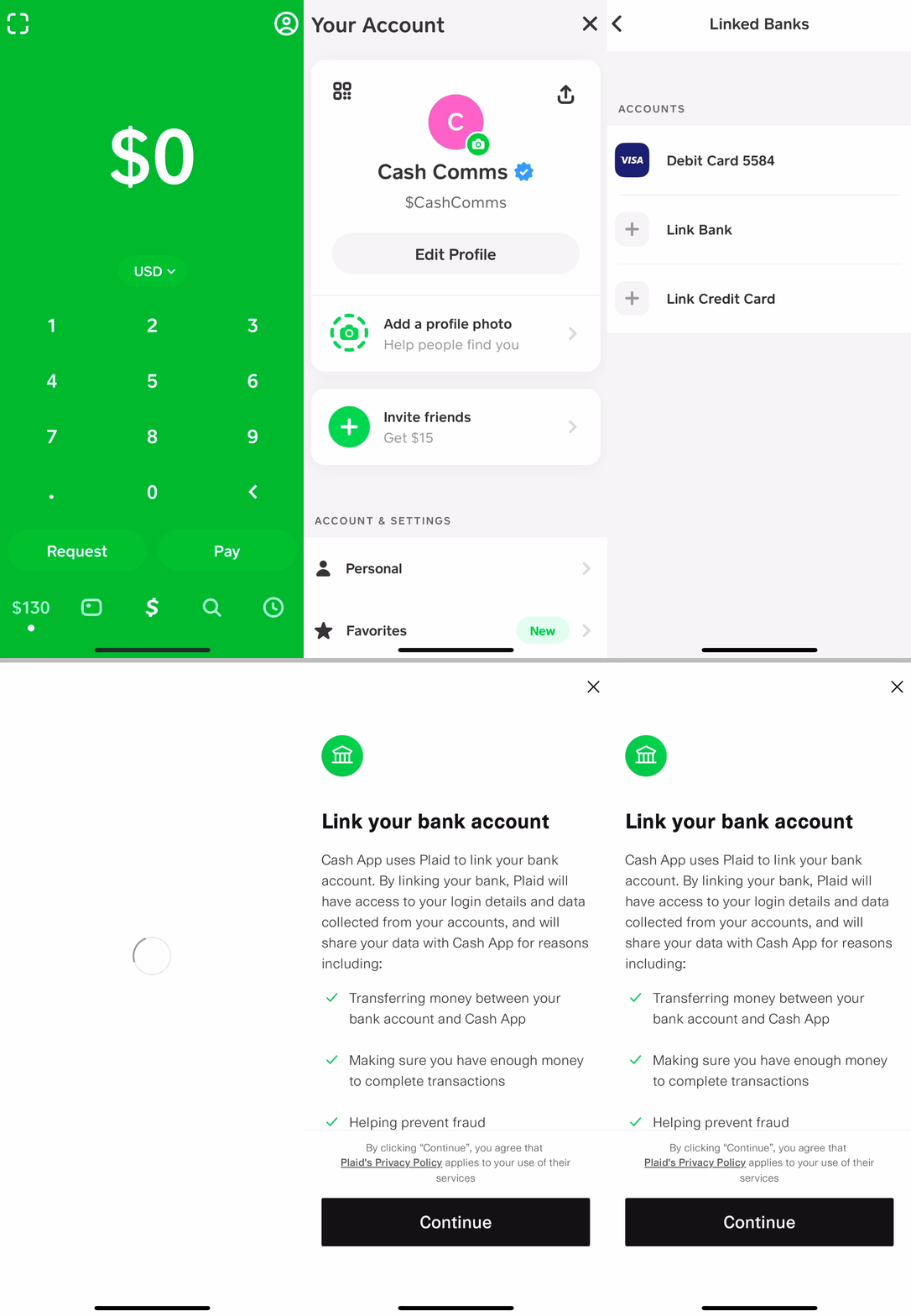
- Navigate to the Profile Icon: On the Cash App home screen, locate and tap the profile icon, usually represented by a person or circle, in the top right or left corner. This action opens your account and privacy settings menu.
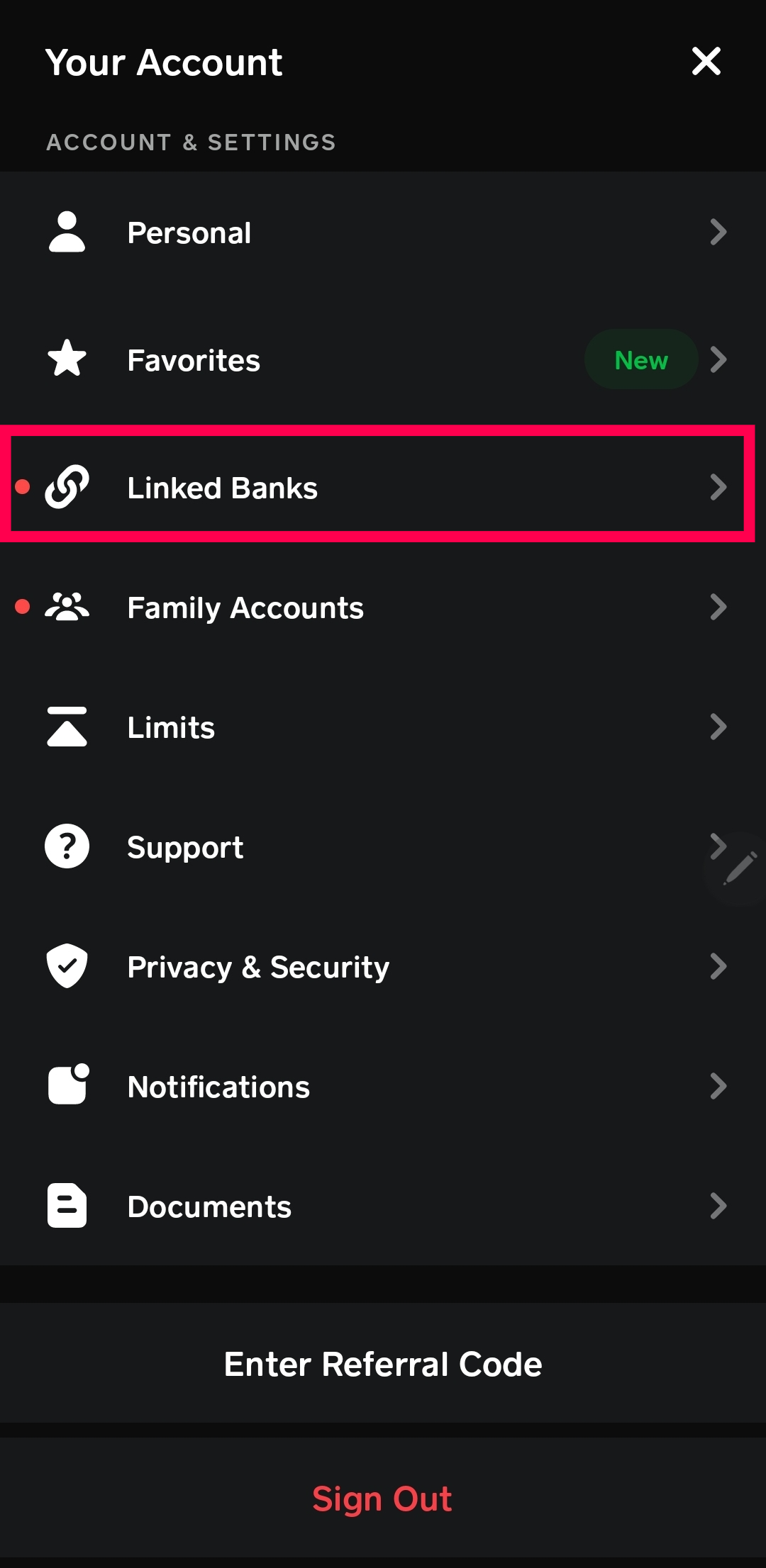
- Select ‘Linked Banks’: Within the profile menu, scroll down until you find the “Linked Banks” option. This section manages all your connected financial accounts, including debit cards and bank accounts. Tap on it.
- Choose ‘Link Debit Card’ or ‘Link Bank’: Depending on whether you have a linked account already or not, you will see an option to “Link Debit Card” or “Add a Bank.” Tap this to initiate the process of adding a new card. If you’ve previously linked a bank account, you might see options to replace or add another card.
Entering Card Details
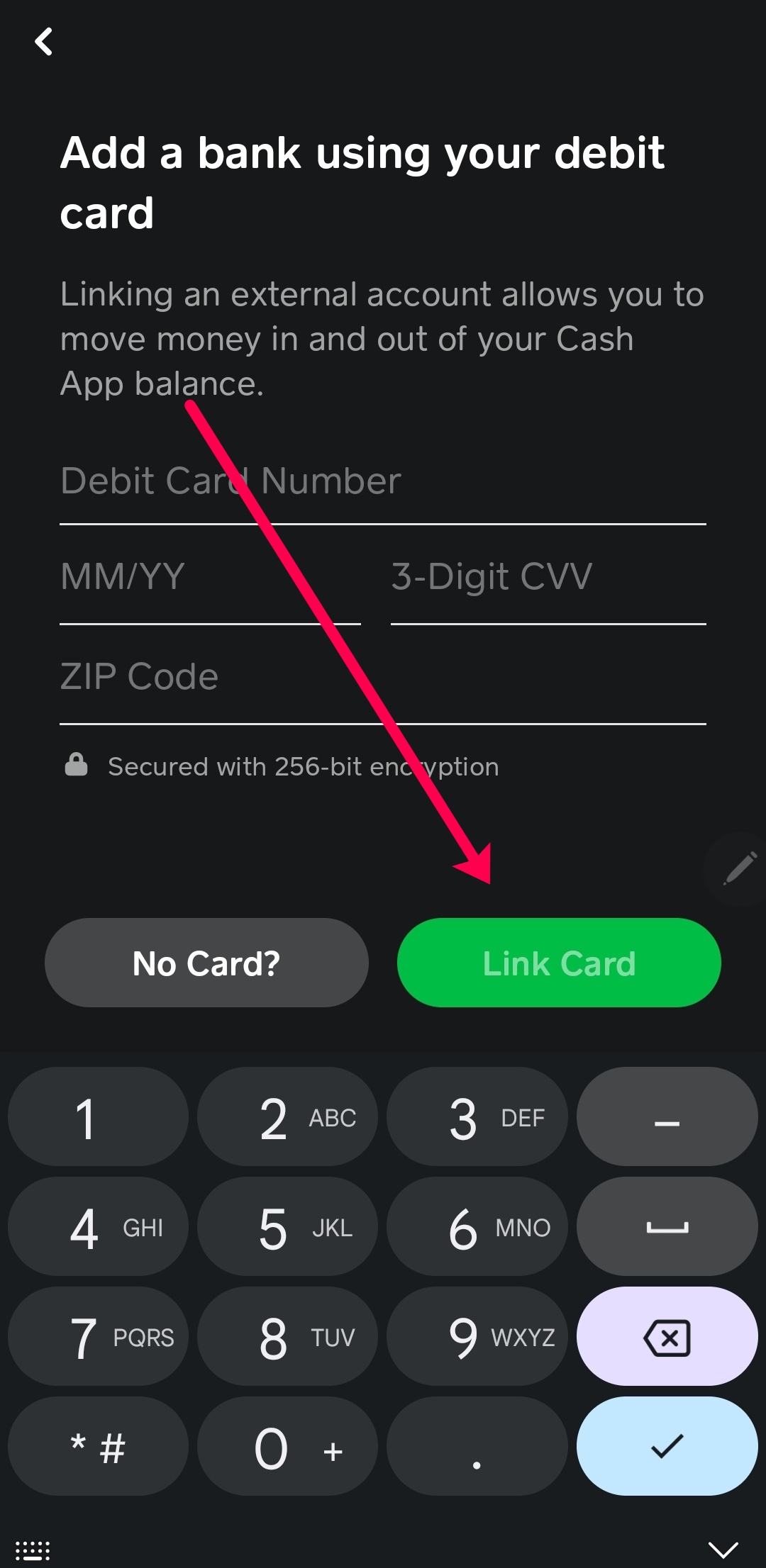
- Input Card Number: You will be prompted to enter your 16-digit debit or credit card number. Type this carefully, double-checking for any errors.
- Enter Expiration Date: Next, input the expiration date of your card (MM/YY format).
- Provide CVV/CVC Code: Locate the three- or four-digit security code (CVV for Visa/Mastercard, CVC for Discover, CID for American Express) on the back (or front for Amex) of your card and enter it.
- Enter Zip Code: Finally, input the billing zip code associated with your card. This is a crucial security measure to verify you are the legitimate cardholder.
- Confirm and Link: After entering all the details, review them for accuracy. Once satisfied, tap the “Link Card” or “Add Card” button.
Verification and Completion
Cash App will then attempt to verify your card details with your bank. This usually happens instantly. If the details are correct and your bank approves the linking, you will receive a confirmation message within the app, indicating that your card has been successfully added. You can then immediately start using your linked card for Cash App transactions, sending money, or cashing out your balance. In some rare cases, your bank might require an additional verification step, such as a micro-deposit test or a prompt within your banking app, but this is less common for standard debit card linking.
Ensuring Digital Security When Linking Cards
Digital security is paramount when linking financial instruments to any online platform, and Cash App is no exception. While the app employs robust security measures, user vigilance is an equally critical component. Understanding and leveraging Cash App’s security features, alongside adopting best practices, ensures your financial data remains protected throughout the card-linking process and beyond.
Cash App’s Built-in Security Protocols
Cash App utilizes several layers of security to protect your card information. All data transmitted between your device and Cash App’s servers is encrypted using industry-standard protocols, similar to those used by major banks. This encryption prevents unauthorized interception of your sensitive card details during the linking process. Furthermore, Cash App does not store your full card number on its servers. Instead, it uses tokenization, replacing your actual card number with a unique, encrypted digital token. If a data breach were to occur, these tokens would be useless to fraudsters without the corresponding encryption keys.
The platform also supports two-factor authentication (2FA) for logging in and for authorizing certain transactions. Users are encouraged to enable this feature, as it adds an extra layer of protection by requiring a code from a linked phone number or email, in addition to your password, to access your account. This significantly mitigates the risk of unauthorized access, even if your password is compromised.
Best Practices for Secure Card Linking
- Use Strong, Unique Passwords: Ensure your Cash App password is complex, combining uppercase and lowercase letters, numbers, and symbols. Avoid using easily guessable information or reusing passwords from other online accounts.
- Enable Two-Factor Authentication (2FA): As mentioned, 2FA is a powerful security tool. Enable it immediately after setting up your account to protect against unauthorized logins.
- Use a Secure Wi-Fi Connection: When linking your card or conducting any financial transactions, always use a secure, private Wi-Fi network. Avoid public Wi-Fi hotspots, which are often unencrypted and susceptible to eavesdropping by malicious actors.
- Keep Your App and Device Updated: Regularly update your Cash App and your smartphone’s operating system. Software updates often include critical security patches that protect against newly discovered vulnerabilities.
- Monitor Account Activity: Regularly review your Cash App transaction history and your bank or card statements for any unfamiliar charges. Report suspicious activity to Cash App support and your bank immediately.
- Be Wary of Phishing Scams: Cash App will never ask you for your full card number, CVV, or login credentials via email, text message, or social media. Be extremely cautious of unsolicited communications claiming to be from Cash App and always verify the sender before clicking links or providing information.
- Know Your Card Limits: Be aware of the daily or weekly sending and withdrawal limits associated with your linked card, as these are often tied to security protocols established by your bank and Cash App.
Troubleshooting Common Card-Linking Issues
While the card-linking process is designed to be seamless, users may occasionally encounter technical hurdles. These issues can range from simple data entry errors to more complex bank-side rejections. Understanding the common problems and their solutions can help you quickly resolve them and successfully link your card.
Identifying and Resolving Data Entry Errors
The most frequent cause of linking failures is incorrect card information. Double-check the following:
- Card Number: Ensure all 16 digits are entered correctly, with no transpositions or omissions.
- Expiration Date: Verify the month and year match exactly what’s on your card.
- CVV/CVC Code: This three- or four-digit code is critical for verification. Make sure it’s accurate.
- Billing Zip Code: The zip code must precisely match the one associated with the card’s billing address on file with your bank. A mismatch here is a very common reason for rejection.
If any of these details are incorrect, the linking process will fail, often with an generic error message. Carefully re-enter the information, paying close attention to each field.
Addressing Bank Rejections and Network Issues
Sometimes, the issue isn’t with your input but with your bank or the payment network.
- Bank Restrictions: Some banks have restrictions on linking cards to third-party apps, or they may flag the attempt as suspicious activity, especially if it’s a new card or your first time linking it. Contact your bank to inquire if there are any holds or restrictions on your card for online transactions or linking to financial apps. They might require you to explicitly authorize the transaction.
- Insufficient Funds (for verification): Although Cash App doesn’t charge to link a card, some banks might temporarily authorize a small charge (often $1) to verify the card. If your account has a zero balance or insufficient funds, this verification might fail.
- Expired or Invalid Card: Confirm that your card is still valid and has not expired. If it’s a prepaid card, ensure it’s been properly activated and has a sufficient balance.
- Network Congestion: Occasionally, temporary issues with the payment network (Visa, Mastercard, etc.) or Cash App’s servers can cause linking failures. If you’ve verified all your details and still face issues, wait a few minutes and try again.
Contacting Support
If you’ve exhausted all troubleshooting steps and still cannot link your card, it’s time to reach out for assistance:
- Cash App Support: Access Cash App support directly through the app (Profile Icon > Support). Provide them with details of the error message you received and the steps you’ve already taken.
- Your Bank’s Customer Service: If you suspect a bank-side issue, contact your bank’s customer service. Be prepared to explain that you are trying to link your card to a mobile payment app (Cash App) and inquire about any blocks or unusual activity on your account.
Managing Your Linked Cards on Cash App
Once you’ve successfully added a card to Cash App, managing it is just as important as the initial linking process. This includes updating expiration dates, replacing lost or stolen cards, and deciding which card to use as your primary payment method. Cash App provides intuitive tools within the app to handle these tasks efficiently, giving you full control over your linked financial instruments.
Updating and Replacing Cards
Life happens – cards expire, get lost, or are replaced due to security concerns. Cash App anticipates these scenarios, allowing you to update or replace your linked cards with ease.
- Access ‘Linked Banks’ Section: From the Cash App home screen, tap your profile icon (top right/left) and then select “Linked Banks.”
- Select the Card to Update: You will see a list of your currently linked debit and credit cards. Tap on the card you wish to update or replace.
- Update Card Details: If your card’s expiration date or CVV has changed (e.g., you received a new card with the same number), you can often tap on the card and find options to “Update Card” or “Edit Card.” Enter the new expiration date or CVV, then save the changes.
- Replace Card: If you’ve received a completely new card number (e.g., after reporting a card lost or stolen), you’ll typically need to “Replace Card.” This option allows you to input all new card details, similar to the initial linking process, effectively swapping out the old card information for the new one while maintaining the link to your bank.
Removing a Linked Card
There might be instances where you no longer wish to have a particular card linked to your Cash App account. Perhaps you’ve closed an account, or you simply prefer not to use that card for digital transactions.
- Navigate to ‘Linked Banks’: As before, go to your profile icon and select “Linked Banks.”
- Choose the Card to Remove: Tap on the specific card you wish to unlink.
- Select ‘Remove Card’: On the card’s detail screen, you should see an option like “Remove Card” or “Replace Card” (with a sub-option to remove). Tap “Remove Card,” and Cash App will prompt you to confirm your decision. Once confirmed, the card will be immediately unlinked from your account.
Setting a Primary Card for Transactions
While Cash App allows multiple cards, you can typically designate one as your primary payment method for convenience. When sending money, Cash App will often default to your Cash App balance first, then your linked debit card, or your credit card if no balance or debit card is available. However, for specific functions, managing your linked cards allows you to easily select which one you want to use for a particular transaction at the point of payment. This flexibility is key to leveraging Cash App effectively, whether you’re managing personal spending, sending funds to family, or utilizing its broader financial tools. Consistent review and management of your linked cards ensure that your Cash App experience remains secure, efficient, and aligned with your personal financial preferences.
aViewFromTheCave is a participant in the Amazon Services LLC Associates Program, an affiliate advertising program designed to provide a means for sites to earn advertising fees by advertising and linking to Amazon.com. Amazon, the Amazon logo, AmazonSupply, and the AmazonSupply logo are trademarks of Amazon.com, Inc. or its affiliates. As an Amazon Associate we earn affiliate commissions from qualifying purchases.