
In the modern digital landscape, video conferencing has transitioned from a niche business requirement to a fundamental utility. Whether you are a freelance consultant, a software developer, or a team leader at a growing startup, the tools you use to communicate define your professional efficiency. Among the sea of communication apps, Zoom remains the industry standard. However, as users hit the limits of the free version, the burning question arises: How much is Zoom Pro, and more importantly, what technical value does it provide to your digital workflow?
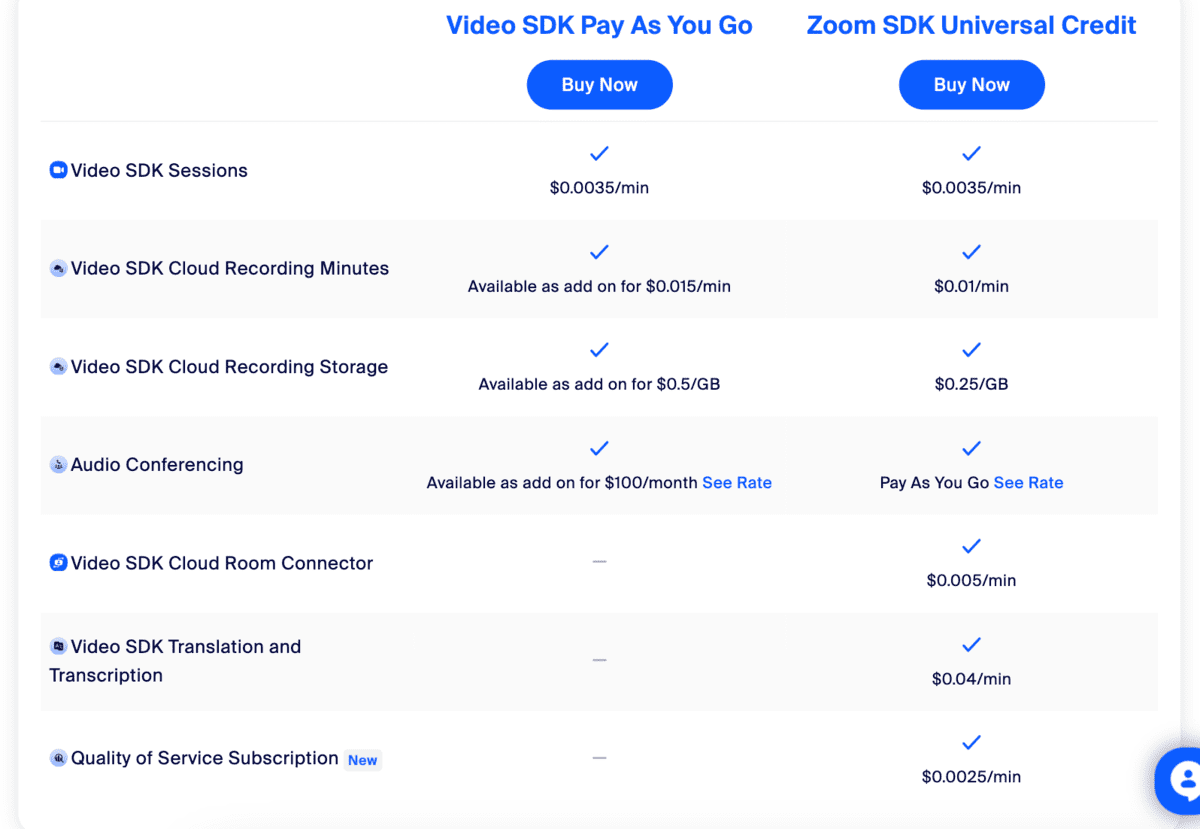
Understanding the cost of Zoom Pro requires more than just looking at a price tag; it involves evaluating the software’s architecture, its security protocols, and its ability to integrate into a broader tech stack. This guide explores the financial and technical nuances of the Zoom Pro tier to help you decide if it is the right upgrade for your digital toolkit.
Breaking Down the Costs: The Zoom Pro Pricing Structure
For many users, the transition from “Basic” to “Pro” is prompted by the infamous 40-minute time limit on free group meetings. To remove this technical barrier, Zoom offers the Pro plan, which is specifically designed for small teams and individual power users.
Monthly vs. Annual Billing
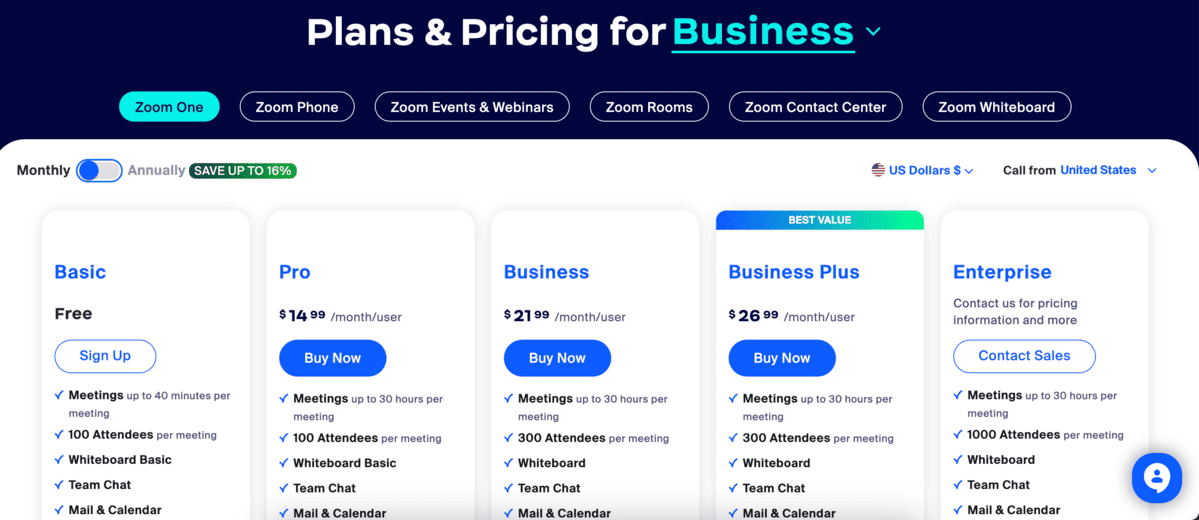
As of 2024, the standard pricing for Zoom Pro is approximately $15.99 per month per user. However, for those committed to the platform, the annual subscription offers a significant discount, typically priced at $149.90 per year per user. This brings the effective monthly cost down to about $12.49, representing a savings of roughly 20% compared to the month-to-month commitment.
Hidden Technical Costs and Add-ons
While the base price covers the core features, the “Pro” experience can be expanded with technical add-ons. Users often find they need more than the standard 5GB of cloud storage for recordings. Zoom offers additional storage plans starting at around $10 per month. Furthermore, if your tech requirements include large-scale webinars or high-volume “Zoom Phone” usage, these are separate licenses that stack on top of your Pro subscription. Understanding these variables is crucial for budgeting your software expenses for the fiscal year.
Core Software Features: What You Get Beyond the Free Tier
The jump from Basic to Pro isn’t just about time; it’s about a significant expansion of software capabilities. The Pro tier acts as a bridge between casual communication and professional-grade project management.
Unlimited Meeting Duration and Participant Capacity
The primary technical advantage of Zoom Pro is the removal of the 40-minute cap. Pro users can host meetings that last up to 30 hours. While few meetings actually require 30 hours of continuous uptime, this headroom is essential for workshops, long-form technical troubleshooting, and “co-working” sessions where a digital room stays open for an entire shift. Additionally, the Pro tier supports up to 100 concurrent participants, with the option to increase this number via the “Large Meeting” add-on.
Advanced Cloud Recording and Transcription
One of the most powerful tools for software teams and researchers is the ability to record sessions to the cloud rather than locally. Zoom Pro provides 5GB of cloud storage, allowing users to record meetings directly to Zoom’s servers. This is a vital feature for those using tablets or laptops with limited hard drive space. Beyond just storage, the Pro tier enables AI-generated transcripts. From a technical standpoint, this utilizes natural language processing (NLP) to index your meetings, making it possible to search for specific keywords within a video file—a massive boon for documentation and digital record-keeping.
Enhanced User Management and Reporting
For the “Pro” user who manages a small team, the administrative dashboard becomes a central hub. Unlike the Basic version, Pro allows for “User Management,” where an admin can add, delete, or assign roles to members within their license. It also provides “Usage Reports,” which offer data on how many meetings are occurring, the duration of those meetings, and participant engagement metrics. For data-driven managers, this technical oversight is indispensable for optimizing team performance.
Security and Privacy Infrastructure in the Pro Tier
In an era of increasing digital threats and “Zoom-bombing” risks, the technical security features of the Pro tier provide a necessary layer of defense. While Zoom has updated its security across all tiers, Pro users get more granular control over their digital environment.
Advanced Encryption and Data Routing
Zoom Pro utilizes AES 256-bit GCM encryption to protect data in transit. For organizations with high-security requirements, the Pro tier allows for more refined control over data routing. Admins can opt-in or out of specific data center regions, ensuring that their encrypted data packets do not pass through certain geographic locations—a critical feature for compliance with international data privacy laws like GDPR.
Waiting Rooms, Passcodes, and Authentication
While available to some extent on free tiers, the Pro version allows admins to enforce “Only authenticated users can join” at a domain level. This means you can restrict meeting access to users who are signed into a specific corporate or educational domain. When combined with the “Waiting Room” and mandatory passcodes, the Pro tier creates a “Digital Fortress” around your sensitive intellectual property or private technical discussions.
Personal Meeting ID (PMI) Customization
A subtle but important technical feature is the ability to customize your Personal Meeting ID. Pro users can change their PMI to a recognizable string, making it easier for clients to remember. More importantly, Pro users can toggle the security settings of their PMI independently of their scheduled meetings, allowing for a permanent “virtual office” that remains secure yet accessible to trusted colleagues.
Optimizing the Tech Stack: Integrations and AI Tools
A software tool is only as good as its ability to communicate with the rest of your ecosystem. Zoom Pro excels in its ability to act as a “connective tissue” between various apps and AI-driven workflows.
The Zoom AI Companion
One of the most significant recent additions to the Pro tier is the Zoom AI Companion. This is a generative AI tool integrated directly into the software. It can catch you up if you join a meeting late by providing a summary of what was missed, and it can automatically generate meeting summaries and “next steps” for all participants. From a tech perspective, this reduces “app fatigue” by performing tasks that previously required third-party AI note-takers.
App Marketplace and Third-Party Integrations
The Pro license unlocks the full potential of the Zoom App Marketplace. This allows for seamless technical integration with tools like Slack, Trello, Salesforce, and Google Calendar. For example, a developer can start a Zoom call directly from a Slack channel or automatically attach a cloud recording link to a Jira ticket. This level of automation is what differentiates a simple “video app” from a comprehensive productivity platform.
Standardized API Access
For teams that build their own internal tools, Zoom Pro provides access to Rest APIs and SDKs. This allows developers to embed Zoom functionality into their own websites or applications. Whether you are building a custom telehealth portal or a private tutoring platform, the Pro tier provides the technical keys needed to leverage Zoom’s infrastructure within your own proprietary software.
Making the Choice: Technical Requirements and Use Cases
Is the price of Zoom Pro justified? To answer this, one must look at the specific technical use cases that define your daily digital life.
The Freelancer and Independent Consultant
If your business relies on client-facing meetings, the 40-minute limit of the free version is more than an inconvenience; it is a technical failure that impacts your professional image. The Pro tier provides the reliability and branding (via customized PMIs and backgrounds) needed to maintain a high-tech presence. The cloud recording feature also serves as a digital paper trail for agreements and project scopes.
Small Tech Teams and Startups
For small teams, the administrative controls and user management features are the primary selling points. Being able to manage several licenses under one billing umbrella and accessing usage reports allows a startup to scale its communication infrastructure without needing a dedicated IT department. The integration with project management tools ensures that the “meeting” isn’t an island, but a integrated part of the development sprint.
The Future of Virtual Collaboration
As we look toward the future of technology, tools like Zoom Pro are evolving into “collaboration hubs” that include whiteboards, asynchronous video clips (Zoom Clips), and advanced scheduling components. By paying for the Pro tier, you aren’t just paying for minutes; you are paying for a seat at the table of evolving workplace technology.
In conclusion, “how much is Zoom Pro” is a question with a simple financial answer ($15.99/mo) but a complex technical justification. For the price of a few cups of coffee, the Pro tier transforms a basic video tool into a secure, AI-enhanced, and highly integrated communication engine. For anyone serious about their digital output, the investment in this software layer is not just a cost—it is a technical necessity for staying competitive in a remote-first world.
aViewFromTheCave is a participant in the Amazon Services LLC Associates Program, an affiliate advertising program designed to provide a means for sites to earn advertising fees by advertising and linking to Amazon.com. Amazon, the Amazon logo, AmazonSupply, and the AmazonSupply logo are trademarks of Amazon.com, Inc. or its affiliates. As an Amazon Associate we earn affiliate commissions from qualifying purchases.