
In the current era of digital transformation, the physical wallet is rapidly becoming a vestigial accessory. At the forefront of this shift is Google Pay, a sophisticated payment platform that has evolved from a simple mobile app into a complex ecosystem of financial technology. To understand how Google Pay works, one must look beyond the user interface and delve into the intricate layers of Near Field Communication (NFC), tokenization, and cloud-based security protocols that facilitate seamless, contactless transactions.
Google Pay does not simply store your credit card information; it acts as a highly secure intermediary between your hardware, your financial institution, and the merchant’s point-of-sale (POS) terminal. By abstracting the sensitive data of a traditional plastic card into a digital format, Google has created a system that is arguably more secure than the physical cards it replaces.
The Core Technologies Powering Contactless Payments
The magic of tapping a phone against a terminal is made possible by a specific set of hardware and software protocols. At the hardware level, the primary driver is Near Field Communication (NFC).
Near Field Communication (NFC)
NFC is a short-range wireless connectivity technology that allows devices to communicate over a distance of approximately four centimeters or less. Unlike Bluetooth, which requires a pairing process, NFC creates an almost instantaneous connection. When you bring your Android device close to a payment terminal, the two devices initiate a high-frequency radio waves handshake.
The technical brilliance of NFC in Google Pay lies in its “passive” and “active” modes. The payment terminal acts as the active reader, emitting a small electromagnetic field. When the NFC chip in your smartphone enters this field, it is powered up (if it isn’t already active) and transmits the encrypted payment data required to initiate the transaction. This happens in milliseconds, ensuring that the user experience is fluid and efficient.
Host Card Emulation (HCE)
While NFC provides the physical link, Host Card Emulation (HCE) is the software architecture that allows Google Pay to function without requiring a physical “Secure Element” (a dedicated hardware chip) tied to a specific mobile carrier.
In the early days of mobile payments, data was stored on a physical chip within the phone or the SIM card. Google pioneered HCE to bypass these hardware limitations. HCE allows the Android operating system to emulate a smart card in the software. When a transaction is initiated, the Android OS intercepts the NFC signal and routes it to the Google Pay app, which then provides the necessary credentials from a secure cloud-based environment. This innovation was the catalyst that allowed Google Pay to scale across thousands of different device models globally.
Tokenization: The Security Backbone
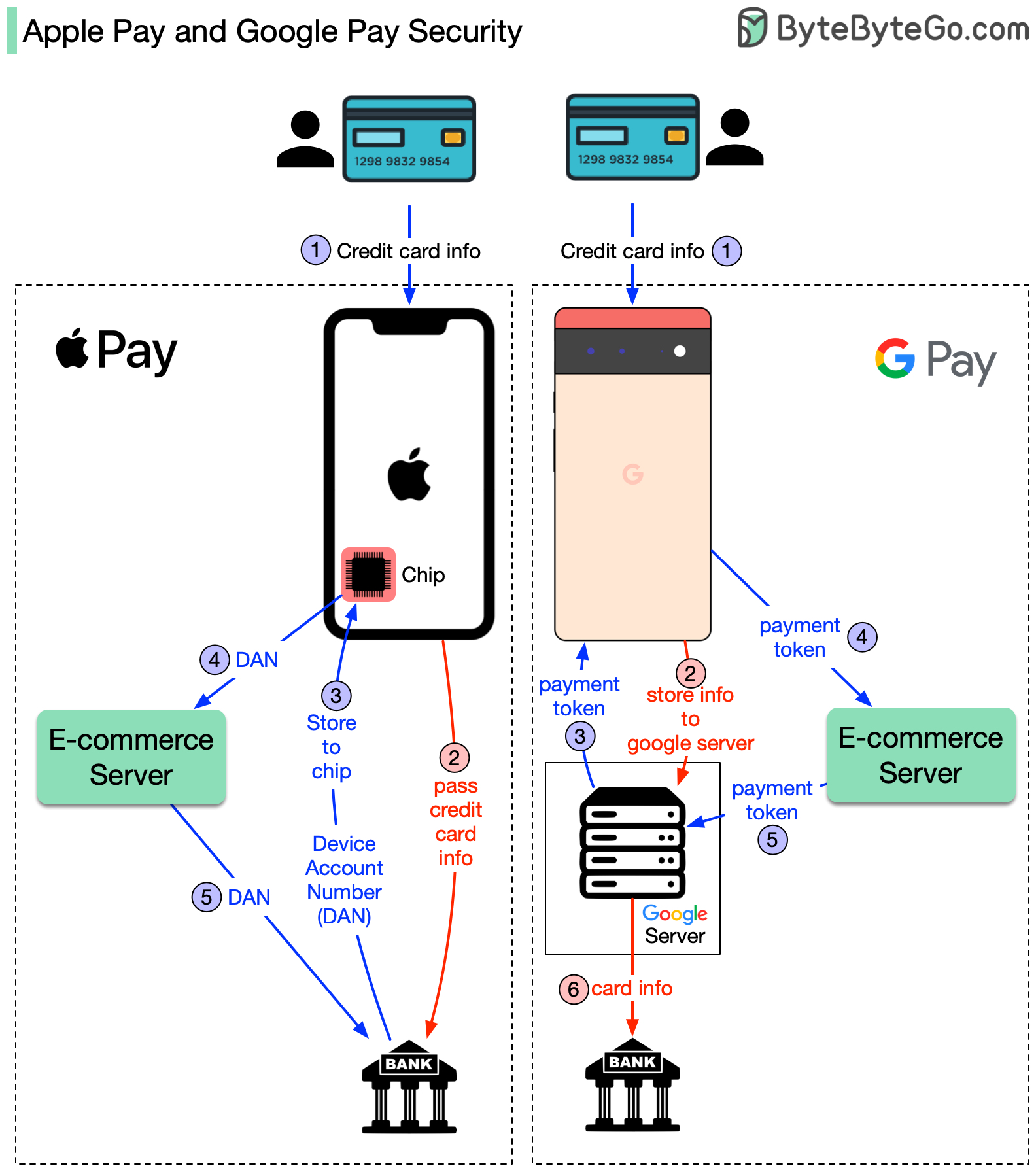
Perhaps the most critical technical aspect of how Google Pay works is “Tokenization.” Many users mistakenly believe that Google Pay sends their actual 16-digit credit card number to the merchant during a transaction. From a technical and security standpoint, this would be highly vulnerable. Instead, Google Pay utilizes a process that replaces sensitive data with a non-sensitive equivalent.
The Difference Between PAN and DAN
When you add a card to Google Pay, the service contacts the issuing bank to request a “Token.” This token is technically known as a Digital Account Number (DAN), which is distinct from your Primary Account Number (PAN) found on your physical card.
Once the bank approves the card, a unique token is assigned to your specific device. When you make a purchase, Google Pay passes this token to the merchant. The merchant never sees your real name, your CVV code, or your actual card number. Even if the merchant’s database were to be breached, the hackers would only find useless tokens that are locked to your specific smartphone hardware and cannot be used elsewhere.
Real-time Authentication Protocols
During the transaction, the token is sent through the payment network (such as Visa or Mastercard) to the issuing bank. The bank holds the “vault” that links the token back to your actual account. The bank validates the token, checks for available funds, and sends an authorization back through the network. This entire round-trip of data is encrypted using dynamic cryptograms—essentially a one-time-use digital signature that changes with every single transaction. This ensures that even if a signal is intercepted, the data cannot be reused for a second purchase.

The Ecosystem Integration: Software and Cloud Infrastructure
Google Pay is not a standalone silo; it is deeply integrated into the Android framework and Google’s global cloud infrastructure. This integration allows for features like cross-device syncing and automatic loyalty card recognition.
Android System Level Integration
Unlike third-party apps that must be manually opened, Google Pay is integrated at the system level via Google Play Services. This allows the device to listen for NFC triggers even when the app is not in the foreground. When the phone is unlocked and brought near a terminal, the system-level listener recognizes the “intent” of a payment and activates the secure payment bridge. This deep integration is what allows for the “tap-and-go” convenience that defines the modern mobile wallet experience.
Google Account and Multi-device Syncing
The technical heavy lifting of managing your various payment methods happens in the Google Cloud. When you add a card to your Google Account via Chrome or a Pixel device, it is encrypted and stored in Google’s secure servers. However, because of the tokenization mentioned earlier, each device you own (a phone, a tablet, or a Wear OS watch) receives its own unique token for that card. This distributed architecture ensures that if you lose your watch, you can de-activate the token for that specific device without needing to cancel your physical credit card or affect the Google Pay setup on your primary phone.
Biometric Security and Encryption Layers
Security in Google Pay is multi-layered, combining hardware-level encryption with software-based biometric authentication. This “defense-in-depth” strategy is what makes digital payments significantly more secure than traditional swiping or inserting a card.
FIDO Standards and On-Device Processing
Google Pay leverages the Fast Identity Online (FIDO) standards for biometric authentication. When you use a fingerprint or facial recognition to authorize a payment, the biometric data never leaves the device. The “Secure Enclave” or “Trusted Execution Environment” (TEE) within the phone’s processor handles the biometric match.
Once the match is confirmed, the TEE sends a “success” signal to the Google Pay application. This prevents “man-in-the-middle” attacks where a hacker might try to intercept biometric data over a network. The hardware and software work in a “Zero Trust” environment, where the payment app only proceeds once the hardware-level security gate has been opened.
Secure Element vs. Software-based Security
While HCE (Host Card Emulation) handles much of the communication, modern flagship Android devices also include a “Titan M” or similar security chip. These chips act as a hardware root of trust. They protect the encryption keys used to sign the payment tokens. By combining the flexibility of software-based HCE with the rigidity of hardware-based encryption chips, Google Pay creates a robust environment that is resistant to both physical tampering and sophisticated malware.
The Future of the Google Pay API and Peer-to-Peer Layers
The architecture of Google Pay is constantly expanding, moving beyond physical terminals into the realm of digital commerce and peer-to-peer (P2P) transfers.
Scaling via the Google Pay API for Developers
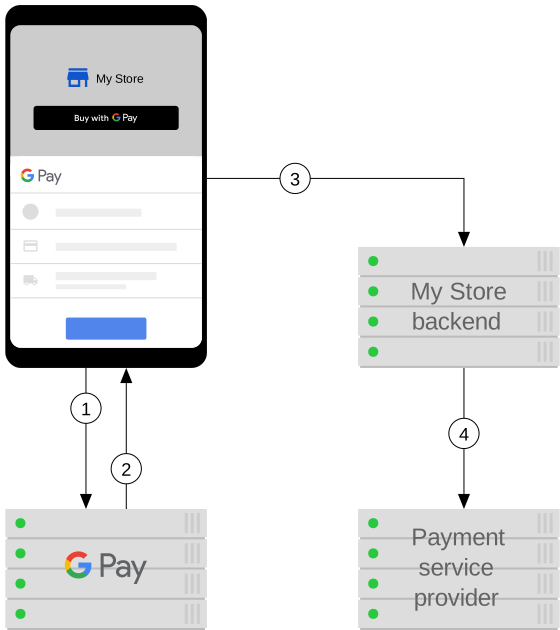
For web and app developers, the Google Pay API is a powerful tool that eliminates the need for manual data entry. From a technical perspective, the API allows a merchant’s app to request a “payment token” directly from the user’s Google account. When a user clicks “Buy with Google Pay,” the API facilitates an encrypted handshake that passes the payment token to the merchant’s payment processor (like Stripe or Adyen). This reduces friction and increases security by keeping the merchant out of the “PCI Compliance” scope, as they never actually touch the sensitive card data.
Evolution into the Google Wallet Framework
Recently, Google has transitioned much of the Google Pay “Tech” into the broader “Google Wallet” ecosystem. This shift represents a move toward a comprehensive digital identity platform. The underlying technology now supports not just payment tokens, but also digital keys (using Ultra-Wideband or UWB technology), digital driver’s licenses, and transit passes.
The mechanism remains similar: a secure, encrypted tokenization process that uses NFC or QR codes to communicate with an external reader. However, the complexity of the data being handled is increasing. Whether it is a boarding pass or a corporate ID badge, the fundamental technology remains the same—a secure handshake, an encrypted token, and a seamless bridge between the physical and digital worlds.
In conclusion, Google Pay is a masterclass in modern systems engineering. It successfully harmonizes disparate technologies—NFC, HCE, cloud computing, and biometric hardware—into a single, cohesive user experience. By prioritizing tokenization and hardware-level security, it has redefined how we perceive financial transactions, moving us closer to a future where the physical card is a relic of the past.
aViewFromTheCave is a participant in the Amazon Services LLC Associates Program, an affiliate advertising program designed to provide a means for sites to earn advertising fees by advertising and linking to Amazon.com. Amazon, the Amazon logo, AmazonSupply, and the AmazonSupply logo are trademarks of Amazon.com, Inc. or its affiliates. As an Amazon Associate we earn affiliate commissions from qualifying purchases.