
The landscape of interactive entertainment has undergone a radical transformation over the last decade. Historically, high-end gaming was a privilege reserved for those who could afford expensive local hardware—bulky towers packed with high-end GPUs, massive cooling systems, and significant power draws. However, NVIDIA’s GeForce Now (GFN) has fundamentally shifted this paradigm. By leveraging the power of the cloud, GeForce Now allows users to stream the most demanding AAA titles to modest devices like ultrabooks, smartphones, and smart TVs.
But how does this process actually function? To the end-user, it feels like magic: you click “Play,” and a game running on a remote supercomputer responds to your inputs in milliseconds. Beneath the surface, however, lies a complex orchestration of server-side rendering, low-latency video encoding, and sophisticated network management. This article explores the technical foundations of GeForce Now and how it manages to deliver a high-fidelity gaming experience over the internet.
The Core Engine: Server-Side Rendering and Virtualization
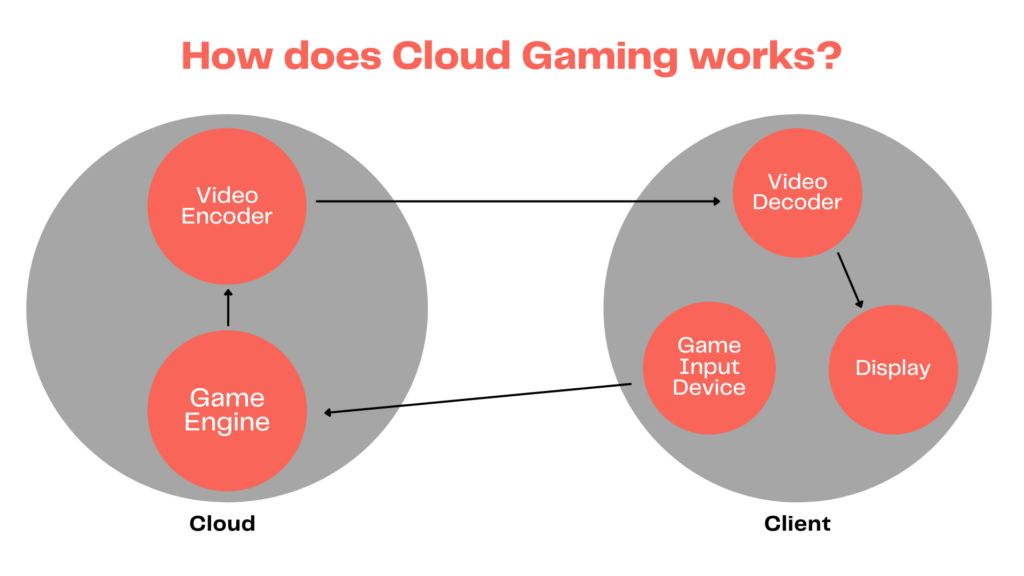
At its heart, GeForce Now is a specialized form of remote desktop technology optimized specifically for the high-frequency demands of gaming. Unlike standard cloud computing, which might prioritize data throughput or storage, GFN prioritizes real-time visual output and minimal input lag.
The Role of NVIDIA Data Centers
NVIDIA operates a global network of high-performance data centers. Inside these facilities are “SuperPODs”—massive clusters of server racks equipped with enterprise-grade versions of NVIDIA’s consumer graphics cards. When a user initiates a session, the system assigns them a “Virtual Rig” (vRig). This isn’t just a slice of a processor; it is a dedicated portion of a GPU’s power, often equivalent to an RTX 3080 or RTX 4080, depending on the user’s subscription tier. These servers handle all the heavy lifting: calculating physics, rendering lighting through ray tracing, and processing complex AI instructions within the game world.
Virtualization and Resource Allocation
The technology that makes this possible is NVIDIA Grid. This virtualization software allows multiple users to share a single physical server while maintaining isolated environments. Each user feels as though they have a dedicated Windows machine at their disposal. This efficiency is what allows GFN to scale to millions of users globally without requiring a 1:1 ratio of physical computers to players.
Input Processing and the Feedback Loop
When you move your mouse or press a key on your keyboard, that signal is digitized and sent over the internet to the data center. The server receives this input, applies it to the game engine, and renders the resulting frame. This entire loop—from your finger press to the server and back to your screen—must happen in less than 1/10th of a second (100ms) to feel “playable,” and ideally under 30ms for a “native” feel.
Video Encoding and the Streaming Pipeline
Once the server has rendered a frame of the game, that frame must be delivered to the user. This is where the “streaming” part of cloud gaming becomes highly technical. Sending raw, uncompressed 4K video frames over the internet would require bandwidth that exceeds what even the best fiber connections can provide.
Real-Time Video Compression (NVENC)
To solve the bandwidth problem, GeForce Now uses NVIDIA’s proprietary hardware encoder, NVENC. As soon as a frame is rendered, NVENC compresses it into a video stream (typically using H.264 or the more efficient H.265/HEVC codec). This compression happens in microseconds. The goal is to shrink the data size as much as possible without introducing visual artifacts or “macroblocking” that would ruin the image quality.
Overcoming Jitter and Packet Loss
The internet is a chaotic environment. Data packets can be delayed (jitter) or lost entirely. GeForce Now employs advanced error correction and “frame buffering” techniques to mitigate these issues. If a packet is lost, the GFN client on your local device uses sophisticated algorithms to “guess” or reconstruct parts of the frame, or it requests a rapid retransmission. The system constantly monitors your network health, dynamically adjusting the bitrate (the amount of data sent per second) to prevent the stream from stuttering if your local Wi-Fi temporarily dips.
Decoding on the Client Side
Once the compressed video stream reaches your device (your laptop, phone, or Shield TV), the local hardware must “decode” it. This is why GeForce Now can run on low-powered devices. Your laptop doesn’t need a powerful GPU to render the game; it only needs a basic video decoder capable of playing back a high-resolution video stream, much like how it plays a YouTube or Netflix video.
Connectivity and Network Requirements
The “how” of GeForce Now is heavily dependent on the “where.” Because the service relies on the physical speed of light traveling through fiber-optic cables, the distance between the user and the data center is a critical factor in performance.
The Importance of Latency and Ping
In the world of cloud gaming, “Ping” is king. Ping measures the time it takes for a data packet to travel from your device to the server and back. For a smooth experience, NVIDIA recommends a ping of less than 40ms, with under 20ms being the “gold standard” for competitive shooters. To achieve this, NVIDIA places its servers in strategic “edge” locations near major metropolitan hubs, reducing the physical distance data must travel.
Bandwidth Thresholds
While latency affects responsiveness, bandwidth affects visual clarity.
- 15 Mbps: Minimum for 720p at 60 FPS.
- 25 Mbps: Standard for 1080p at 60 FPS.
- 45-50 Mbps: Required for 4K resolution at 120 FPS.
GeForce Now uses an adaptive bitrate system. If someone else on your home network starts streaming a 4K movie, GFN will detect the reduction in available bandwidth and slightly lower your game’s resolution to ensure the frame rate stays smooth, prioritizing “playability” over “pixels.”
Optimized Networking: Wi-Fi 6 and Ethernet
For the best results, a wired Ethernet connection is always recommended. However, for those using wireless, 5GHz Wi-Fi (or the newer Wi-Fi 6/6E) is mandatory. The older 2.4GHz band is too prone to interference from household appliances and other networks, which leads to “stuttering” in the video feed—a death sentence for a gaming session.
Advanced Graphics Features in the Cloud
One of the most impressive technical feats of GeForce Now is its ability to support cutting-edge graphical features that usually require a $1,500 graphics card.
Ray Tracing and DLSS
The “Ultimate” tier of GeForce Now gives users access to RTX technologies. Ray Tracing simulates the physical behavior of light, providing realistic reflections and shadows. Normally, this requires immense computational power. By running these games on server-grade RTX 4080s, NVIDIA allows a Chromebook user to see the same cinematic lighting effects as someone with a high-end gaming PC. Furthermore, GFN utilizes Deep Learning Super Sampling (DLSS)—an AI-driven upscaling tech—to maintain high frame rates even when rendering at 4K.
NVIDIA Reflex and Latency Reduction
To combat the inherent delay of cloud gaming, NVIDIA integrated “Reflex” technology into the GFN pipeline. Reflex optimizes the way the game engine and the GPU communicate, shaving off precious milliseconds of “system latency.” When combined with high-polling-rate mice and 120Hz or 240Hz streaming, the perceived lag becomes almost indistinguishable from a local machine for many players.
Cloud G-Sync
Recently, NVIDIA introduced Cloud G-Sync technology. This synchronizes the refresh rate of the user’s local monitor with the frame rate of the remote server’s stream. This prevents “screen tearing”—a visual glitch where parts of two different frames appear on the screen at once—resulting in a much smoother visual experience that mimics the behavior of a high-end local gaming monitor.
The Digital Ecosystem: Bring Your Own Games
Unlike other cloud services that operate as a “walled garden” (where you must buy games specifically for that platform), GeForce Now functions as a bridge to your existing digital libraries.
Integration with Steam, Epic, and Ubisoft
The technical genius of GFN’s business logic is its integration with existing storefronts. When you log in, the service connects to your Steam or Epic Games Store account. It verifies which games you own and then launches them in a specialized Windows environment. This means you aren’t “renting” the games; you are renting the hardware to play the games you already own.
Instant Updates and Zero Maintenance
A significant technical advantage for users is the elimination of “patching.” In a traditional setup, you might wait an hour for a 50GB update to download. On GeForce Now, the games are stored on high-speed NVMe arrays within the data centers. NVIDIA handles all updates on the backend. When a developer releases a patch, it is applied to the server’s master image, and users can play the updated version instantly.
The Future of the Tech
As 5G technology matures and fiber-to-the-home becomes the global standard, the technical hurdles of GeForce Now will continue to diminish. We are approaching an era where the “device” is merely a window, and the “computer” is a shared resource in the cloud, democratizing high-end gaming for everyone, regardless of their local hardware.
aViewFromTheCave is a participant in the Amazon Services LLC Associates Program, an affiliate advertising program designed to provide a means for sites to earn advertising fees by advertising and linking to Amazon.com. Amazon, the Amazon logo, AmazonSupply, and the AmazonSupply logo are trademarks of Amazon.com, Inc. or its affiliates. As an Amazon Associate we earn affiliate commissions from qualifying purchases.