
In an increasingly data-driven world, the ability to quickly and accurately calculate percentages is an indispensable skill. From deciphering discounts on a new gadget to understanding battery life drain, percentages are woven into the fabric of our daily lives and interactions with technology. While the concept might seem elementary, efficiently executing these calculations on various digital tools—be it a dedicated scientific calculator, a smartphone app, or an online web tool—can often be a point of confusion. This article demystifies the process, transforming your calculator from a mere number-crunching device into a powerful ally for navigating percentage-based information with confidence and precision.

Understanding the Fundamentals: What is a Percentage?
Before diving into the mechanics of calculation, it’s crucial to solidify our understanding of what a percentage truly represents. At its core, a percentage is a way of expressing a number or a ratio as a fraction of 100. The word “percent” literally means “per hundred” or “out of one hundred.” It provides a standardized way to compare parts of a whole, making complex proportions easier to grasp and communicate across various contexts.
The Concept of Proportion
Imagine you’re tracking the storage on your smartphone. If it says “75% full,” it means that for every 100 units of storage capacity, 75 units are currently occupied. It’s a proportional relationship, allowing for quick mental comparisons even when the total capacity might vary widely from device to device. This inherent simplicity makes percentages a powerful tool for conveying relative magnitudes without needing to know the exact base number.
Why Percentages Matter in Everyday Tech Usage
From progress bars on software installations to battery indicators, network signal strength, and download speeds, percentages are the universal language of digital metrics. Understanding how to calculate them on your calculator empowers you to:
- Evaluate Deals: Quickly determine actual savings from “20% off” sales or understand the effective cost after sales tax.
- Analyze Data: Interpret statistics on app usage, data consumption, or website conversion rates.
- Manage Resources: Estimate remaining battery life, assess download completion times, or gauge project progress.
- Troubleshoot and Optimize: Understand performance metrics for your devices, like CPU usage or disk space allocation.
Without a solid grasp of calculator-based percentage operations, navigating these common digital scenarios can be inefficient and prone to error.
Essential Calculator Functions for Percentage Calculations
Modern calculators, whether physical or digital, offer several pathways to compute percentages. Familiarity with these methods is key to choosing the most efficient approach for a given task.
The Dedicated Percentage Key (%)
Many calculators feature a dedicated “%” key. While seemingly straightforward, its behavior can sometimes be a source of confusion, as it doesn’t always perform a single, universal operation. Generally, this key is designed to simplify calculations involving “finding a percentage of a number,” “adding a percentage,” or “subtracting a percentage.”
- Finding a percentage of a number: To find 25% of 200, you would typically input
200 x 25 %. On most calculators, this sequence will directly yield50. The calculator interprets25 %as0.25. - Adding a percentage (e.g., adding sales tax): To add 10% to 50, you might input
50 + 10 %. This usually calculates 10% of 50 (which is 5) and then adds it to 50, resulting in55. - Subtracting a percentage (e.g., applying a discount): To subtract 20% from 80, you could enter
80 - 20 %. This calculates 20% of 80 (which is 16) and subtracts it from 80, giving64.
It’s crucial to experiment with your specific calculator model, as the exact implementation of the “%” key can vary. Some older or simpler models might not have this key, or it might function differently.
Using Multiplication and Division for Percentages
The most universally applicable and often least ambiguous method for percentage calculations involves basic multiplication and division. This method relies on converting percentages to decimals. Since a percentage is “per hundred,” 25% is equivalent to 25/100, or 0.25.
-
Finding a percentage of a number: To find 25% of 200:
- Convert 25% to a decimal:
25 / 100 = 0.25 - Multiply the number by the decimal:
200 x 0.25 = 50
This method is robust and works on any calculator, regardless of whether it has a “%” key.
- Convert 25% to a decimal:
-
Calculating percentage increase: If a price increases from 50 to 60:
- Find the absolute increase:
60 - 50 = 10 - Divide the increase by the original number:
10 / 50 = 0.2 - Multiply by 100 to convert to percentage:
0.2 x 100 = 20%increase.
- Find the absolute increase:
-
Calculating percentage decrease: If a price decreases from 80 to 60:
- Find the absolute decrease:
80 - 60 = 20 - Divide the decrease by the original number:
20 / 80 = 0.25 - Multiply by 100 to convert to percentage:
0.25 x 100 = 25%decrease.
- Find the absolute decrease:
Memory Functions and Their Role
For multi-step percentage calculations, especially those involving multiple items or sequential changes, your calculator’s memory functions (M+, M-, MR/MC) can be invaluable.
- M+ (Memory Plus): Adds the current display value to the memory.
- M- (Memory Minus): Subtracts the current display value from the memory.
- MR (Memory Recall): Displays the value currently stored in memory.
- MC (Memory Clear): Clears the memory.
For instance, if you’re calculating the total cost of several items, each with a different discount, you could calculate the discounted price of each item, use M+ to add it to a running total, and then recall the final sum using MR. This minimizes manual transcription and reduces the likelihood of errors, a common pitfall in complex digital finance scenarios.
Step-by-Step Tutorials for Common Percentage Scenarios
Let’s apply these functions to real-world technological and everyday scenarios.
Calculating a Percentage of a Number (e.g., Sales Tax, Discount)
This is perhaps the most common percentage calculation.
Scenario: You want to buy a new smart speaker priced at $120, and the sales tax is 7.5%. How much is the tax, and what’s the total cost?
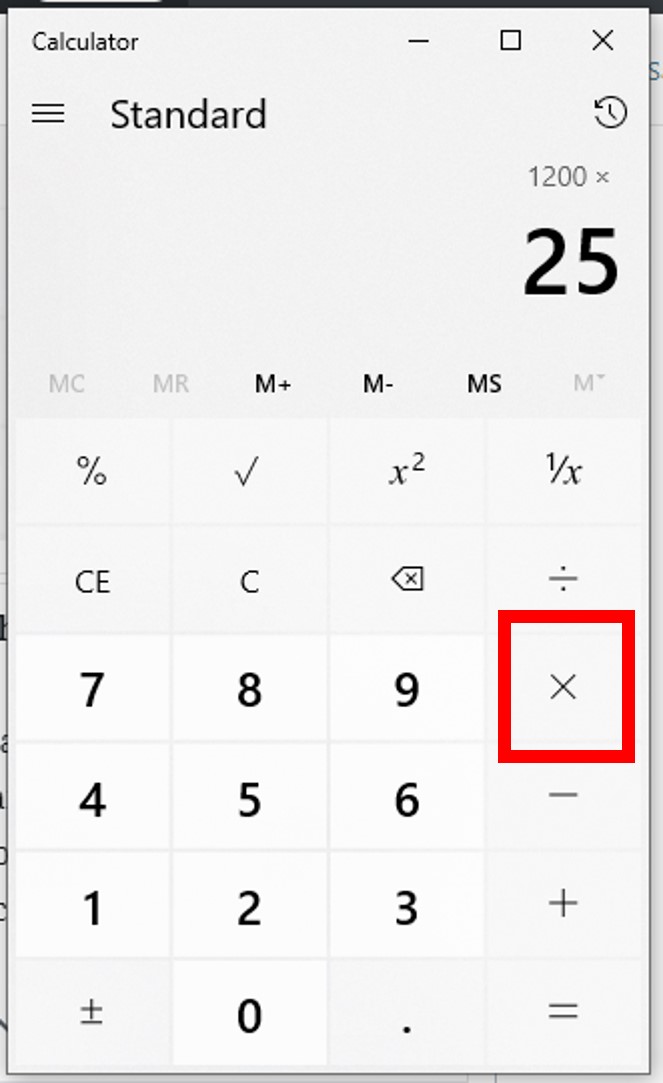
Method 1 (using % key):
- Enter the base amount:
120 - Press multiplication:
x - Enter the percentage:
7.5 - Press the percentage key:
%(Result:9, this is the tax amount) - To find total cost:
120 + 7.5 %(Result:129)
Method 2 (using decimal conversion):
- Convert the percentage to a decimal:
7.5 / 100 = 0.075 - Calculate the tax amount:
120 x 0.075 = 9 - Calculate the total cost:
120 + 9 = 129
Alternatively, calculate total cost directly:120 x 1.075 = 129(1 represents the original 100%, 0.075 is the 7.5% tax).
Finding the Percentage Increase or Decrease (e.g., Price Changes, Growth Rates)
Crucial for tracking performance metrics and financial adjustments.
Scenario 1 (Increase): Your internet speed increased from 100 Mbps to 125 Mbps. What’s the percentage increase?
- Calculate the absolute increase:
125 - 100 = 25 - Divide the increase by the original amount:
25 / 100 = 0.25 - Multiply by 100 to get the percentage:
0.25 x 100 = 25%increase.
Scenario 2 (Decrease): Your phone battery drained from 80% to 60%. What’s the percentage decrease relative to the original charge?
- Calculate the absolute decrease:
80 - 60 = 20 - Divide the decrease by the original amount:
20 / 80 = 0.25 - Multiply by 100 to get the percentage:
0.25 x 100 = 25%decrease.
Determining What Percentage One Number is of Another (e.g., Test Scores, Data Usage)
Useful for understanding proportions and performance.
Scenario: You used 15 GB of data out of your 20 GB monthly plan. What percentage of your data have you used?
- Divide the part by the whole:
15 / 20 = 0.75 - Multiply by 100 to get the percentage:
0.75 x 100 = 75%used.
Advanced: Reversing Percentage Calculations (e.g., Original Price After Tax)
This is common when you know the final price and the percentage change, but need the original value.
Scenario: You bought an app for $10.70, which included 7% sales tax. What was the original price of the app before tax?
- Understand that $10.70 represents 100% (original price) + 7% (tax) = 107% of the original price.
- Convert this total percentage to a decimal:
107 / 100 = 1.07 - Divide the final price by this decimal:
10.70 / 1.07 = 10
The original price of the app was $10.00.
Mastering Different Calculator Types and Their Nuances
While the principles remain consistent, the user experience can differ significantly across various calculator platforms.
Standard vs. Scientific Calculators
- Standard Calculators: Often simpler, with a prominent percentage key whose function you must understand through practice. Ideal for quick, basic calculations.
- Scientific Calculators: May or may not have a dedicated “%” key. Even if they do, users often prefer the decimal conversion method for greater control and consistency, especially when dealing with complex expressions involving parentheses and multiple operations. Scientific calculators excel in their ability to handle order of operations more reliably.
Smartphone Calculator Apps (iOS, Android)
Modern smartphone calculator apps are incredibly versatile.
- iOS Calculator: In portrait mode, it’s a basic calculator; rotating to landscape reveals scientific functions. The “%” key usually behaves as described for adding/subtracting percentages.
- Android Calculators: Stock apps vary by manufacturer but generally offer similar basic and scientific modes. Many third-party apps provide advanced features, including historical logs and unit conversions.
The key here is understanding touch gestures and where specific functions are located within the app’s interface. Often, a long press or a swipe can reveal hidden features.
Online Calculators and Web Tools
Numerous websites offer specialized percentage calculators. These are often intuitive, allowing you to input values into labeled fields (e.g., “What is X% of Y?”).
- Advantages: User-friendly interfaces, often provide immediate results and explanations, and are readily accessible from any device with internet access.
- Disadvantages: Requires an internet connection, and the specific functionality might be tailored, sometimes lacking the general versatility of a physical or app-based calculator for varied tasks.
Graphing Calculators and Advanced Features
Graphing calculators, common in education and engineering, are powerful computing devices. While capable of percentage calculations, they often handle them through direct algebraic input or programming. Users might enter expressions like (200 * 0.25) directly into the command line. Some offer dedicated financial functions which can involve percentages, but for basic percentage tasks, they are often overkill, with users defaulting to the decimal conversion method for clarity.
Tips, Tricks, and Troubleshooting for Efficiency
Even with a grasp of the fundamentals, optimizing your calculator workflow is key to efficiency and accuracy.
Order of Operations and Parentheses
This is critical, especially on scientific and app-based calculators. Remember PEMDAS/BODMAS (Parentheses/Brackets, Exponents/Orders, Multiplication and Division, Addition and Subtraction). If you need to add tax to a discounted price, ensure the discount is applied first.
Example: Original price $100, 20% discount, then 5% tax.
Incorrect: 100 - 20 % + 5 % (might apply 5% tax to $100, then discount)
Correct: (100 - 20%) x 1.05 or (100 x 0.80) x 1.05
Using parentheses ensures operations are performed in the correct sequence.
Dealing with Decimal Precision
When performing multi-step calculations, avoid rounding intermediate results. Your calculator retains many more decimal places internally than it displays. Round only the final answer to the appropriate number of decimal places (e.g., two for currency). This prevents cumulative rounding errors, especially critical in financial or scientific applications.
Common Mistakes to Avoid
- Misinterpreting the “%” key: As discussed, its function can vary. Always test it with a simple calculation to understand its behavior on your specific device.
- Forgetting to convert percentages to decimals: Many errors arise from directly using “25” instead of “0.25” when multiplying.
- Incorrect base for percentage change: When calculating percentage increase/decrease, always divide by the original amount, not the new or changed amount.
- Inputting numbers incorrectly: Double-check your entries, especially with long strings of digits.

Practice Makes Perfect: Integrating Percentages into Daily Tech Use
The best way to master percentages on your calculator is consistent practice. Actively seek out opportunities to use these skills:
- Calculate the percentage of storage used on your hard drive.
- Determine the percentage of battery consumed by a specific app.
- Figure out the actual percentage discount on that online tech deal.
- Calculate the percentage change in your data usage month-over-month.
By consciously applying these techniques, you’ll build muscle memory and intuitive understanding, turning your calculator into a seamless extension of your analytical toolkit. In an era where digital information is constantly presented in percentages, mastering this fundamental skill on your calculator is not just a convenience—it’s a critical component of digital literacy and empowerment.
aViewFromTheCave is a participant in the Amazon Services LLC Associates Program, an affiliate advertising program designed to provide a means for sites to earn advertising fees by advertising and linking to Amazon.com. Amazon, the Amazon logo, AmazonSupply, and the AmazonSupply logo are trademarks of Amazon.com, Inc. or its affiliates. As an Amazon Associate we earn affiliate commissions from qualifying purchases.