
In the rapidly evolving landscape of digital content creation, there comes a time when a creator or organization must evaluate the lifecycle of their digital assets. Whether it is a shift in technical strategy, a consolidation of online presence, or a move toward enhanced digital privacy, knowing how to properly decommission a YouTube channel is a fundamental skill in modern software management. While the user interface of the Google ecosystem is designed for engagement and retention, the technical pathway to permanent deletion is precise and requires a clear understanding of the underlying account architecture.
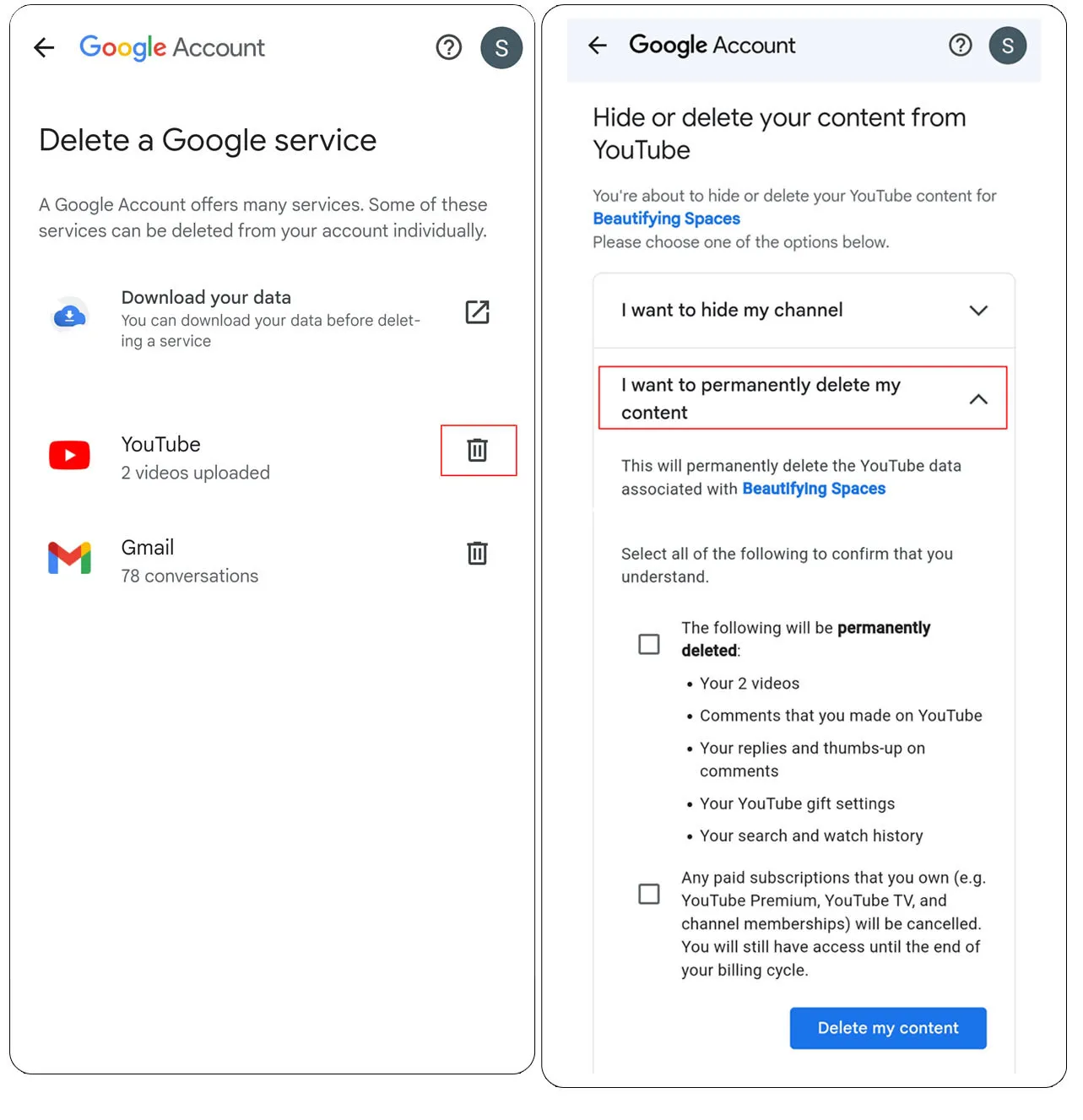
This guide provides a comprehensive technical walkthrough for deleting a YouTube channel, distinguishing between the various types of account structures and ensuring that your data is handled with the principles of digital security and integrity in mind.
1. Navigating the Architecture: Personal Channels vs. Brand Accounts
Before executing a deletion protocol, it is vital to understand the technical framework upon which your YouTube presence is built. YouTube operates under the broader umbrella of Google Identity Services, which categorizes channels into two primary structures: Personal Channels and Brand Accounts.
The Personal Channel Framework
A personal channel is directly tethered to an individual Google Account. It utilizes the same primary email address and identity as your Gmail, Google Drive, and other workspace tools. In this configuration, the channel acts as a direct extension of the user’s identity. The technical implication here is significant: while you can delete the YouTube channel without deleting the entire Google Account, the two remain intricately linked in terms of authentication and data permissions.
The Brand Account Infrastructure
Brand accounts are designed for collaborative management and organizational flexibility. They allow multiple Google Accounts to act as managers or owners without sharing login credentials. From a technical perspective, a Brand Account is a separate “layer” that sits on top of your primary account. Deleting a Brand Account channel is often a cleaner process for teams because it does not risk affecting the personal data of the individual administrators. Identifying which structure you are using is the first step in ensuring a successful deletion without unintended data loss across other Google services.
Impact on Connected Third-Party Software
Modern creators often use a suite of AI tools, SEO plugins (like VidIQ or TubeBuddy), and cross-platform distribution software. Before deletion, it is critical to audit the OAuth permissions granted to these third-party applications. Deleting a channel does not automatically revoke API access tokens stored on third-party servers. Manually revoking these permissions in your Google Security settings is a best practice for maintaining digital hygiene.
2. The Technical Protocol for Data Preservation and Backup
Permanent deletion is, as the name implies, irreversible. Once the command is processed by Google’s servers, the metadata, video files, and community interactions are purged from the active index. Therefore, a robust data preservation strategy is essential.
Utilizing Google Takeout for Data Portability
Before initiating the deletion, technical users should utilize Google Takeout. This is Google’s proprietary tool for data portability, allowing users to export a copy of their content.
- Video Files: Takeout allows you to download your original uploaded files in their native resolution.
- JSON Metadata: Comments, descriptions, and playlist configurations are often exported in JSON or CSV formats. This is invaluable if you plan to migrate your content to a decentralized video platform or a private server.
- Subscription Data: A list of your subscriptions can be exported as an OPML file, which is a standard format for feed readers and can be imported into other video aggregators.
The Importance of Metadata Archiving
While the video file itself is the most obvious asset, the metadata (titles, tags, and AI-generated transcripts) represents significant intellectual property. For tech-focused users, archiving this data allows for the potential training of localized AI models or the creation of a searchable text-based knowledge base. Tools like youtube-dl or yt-dlp are popular among the developer community for creating localized mirrors of content, though these should always be used in compliance with service terms and copyright laws.
3. A Step-by-Step Technical Walkthrough of the Deletion Process
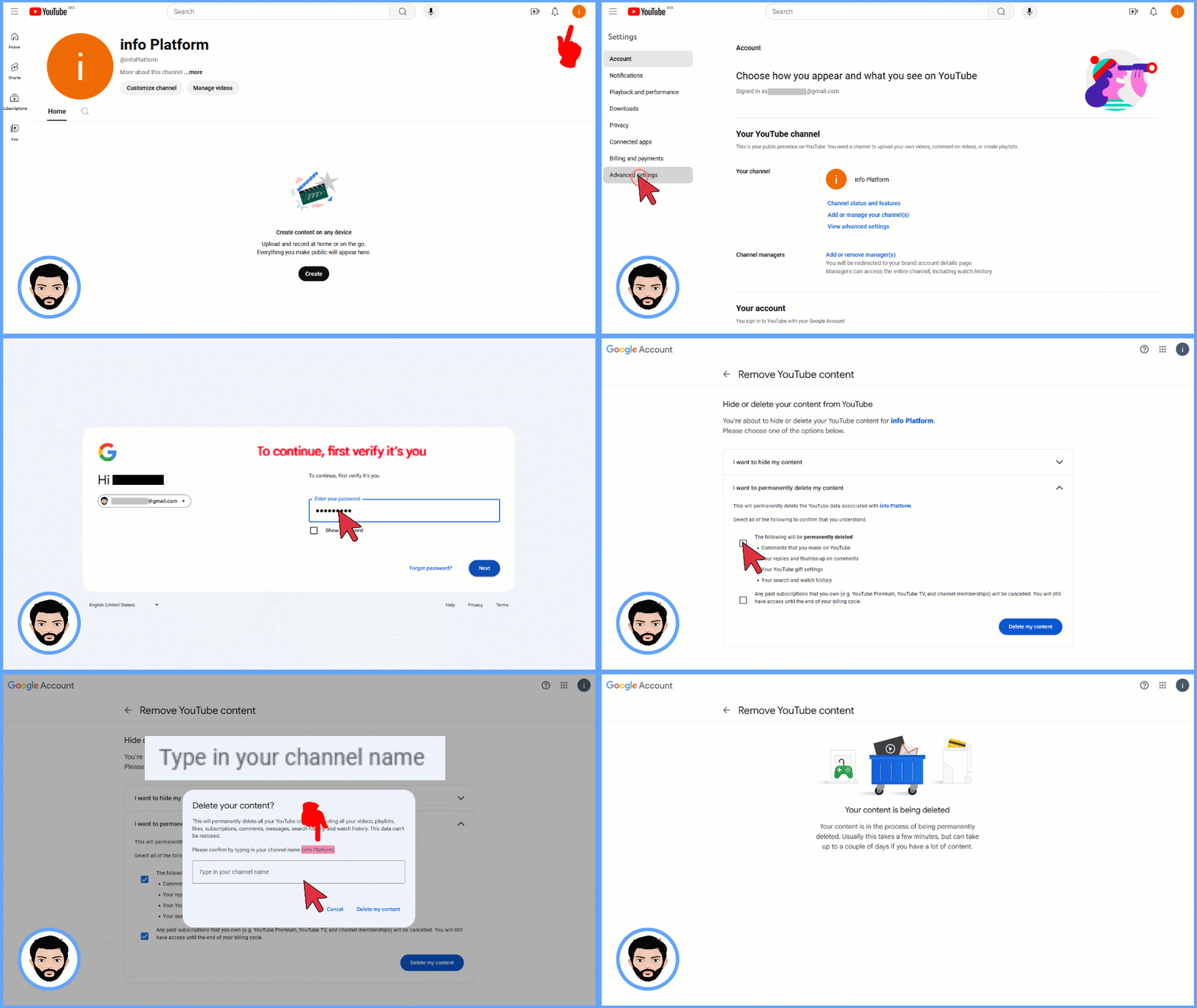
The process of deleting a channel is buried within several layers of the YouTube Studio interface to prevent accidental data loss. Below is the technical path for executing this on a desktop environment, which offers the most granular control.
Step 1: Accessing Advanced Settings
- Navigate to the YouTube Studio dashboard.
- On the left-hand navigation sidebar, click on Settings (the gear icon).
- In the pop-up modal, select the Channel tab and then navigate to Advanced Settings.
- Scroll to the bottom of this interface to find the link labeled “Remove YouTube Content.” This action will require a secondary authentication (re-entering your password or using a FIDO2 security key) to verify your identity.
Step 2: Choosing Between Hiding and Deleting
Google provides two options: “I want to hide my channel” and “I want to permanently delete my content.”
- Hiding Content: This is a “soft delete.” It sets your videos and playlists to private and removes your name from comments. However, your channel page remains on the server, and your data stays in the Google ecosystem.
- Permanent Deletion: This is a “hard delete.” This will permanently delete your videos, playlists, likes, subscriptions, and all comments made on YouTube.
Step 3: Final Verification and Execution
Once you select permanent deletion, you must check a series of boxes acknowledging that you understand the finality of the action. You will be asked to type in your email address as a final confirmation step. Upon clicking “Delete My Content,” the request is queued. Depending on the volume of data and the current server load, the process can take anywhere from a few minutes to several days to fully propagate across Google’s global content delivery networks (CDNs).
4. Post-Deletion Cleanup: Metadata, URLs, and the Digital Footprint
Even after a channel is deleted, “ghost” remnants of its existence may linger across the web. Managing this digital footprint is a critical component of professional software and brand maintenance.
Handling Cached Search Results
Search engines like Google and Bing do not update their indexes in real-time. Even after the channel is gone, your channel name and video titles may appear in search results for several weeks. To expedite the removal of these snippets, webmasters can use the Google Search Console’s “Removals Tool” if they own the associated domain, though for YouTube-hosted content, one generally has to wait for the next crawl cycle to see the cache cleared.
Reclaiming the Custom URL
If your channel had a custom URL (e.g., youtube.com/c/YourTechBrand), it is important to note that this URL is not immediately released back into the wild. Google has strict policies regarding the recycling of URLs to prevent impersonation and “username squatting.” If you intend to start a new channel under the same name, there may be a significant cooling-off period before that specific handle becomes available for re-assignment.
Managing Internal Documentation
For organizations, deleting a channel requires updating all internal documentation. This includes removing embedded video links on corporate wikis, updating API keys in your application’s codebase, and ensuring that any auto-post scripts (via Zapier or IFTTT) are disabled. Leaving dead links or active but failing API calls can lead to performance issues and “404 Not Found” errors that degrade the user experience of your other digital products.
5. Security Implications and the Future of Your Google Account
The deletion of a YouTube channel is often a move toward a more streamlined and secure digital identity. However, users must be aware of how this impacts their broader security posture.
The “All-in-One” Identity Risk
Because YouTube is part of the Google account ecosystem, the security of your channel is only as strong as the security of your primary Google login. If you are deleting a channel because it was compromised (a “channel hijacking”), simply deleting the content may not be enough. You must also audit your account’s recovery settings, check for unauthorized app access, and review the “Devices” list in your Google Security Dashboard to ensure the malicious actor no longer has a persistent session.
Strategic Deactivation in the Age of AI
As generative AI models continue to scrape public video platforms for training data, some users are opting for “digital dark mode” by deleting public-facing content. By removing your channel, you stop the future ingestion of your likeness, voice, and intellectual property by public scrapers. From a technical and ethical standpoint, this represents a reclaim of digital sovereignty.

Conclusion
Deleting a YouTube channel is more than just clicking a button; it is a technical decommissioning process that requires foresight, data management skills, and a clear understanding of account hierarchy. By following the protocols for data backup, executing the deletion through the proper administrative channels, and managing the post-deletion digital footprint, you ensure that your transition is clean, secure, and professional. Whether you are clearing out an old project or pivoting your technical focus, mastering the lifecycle of your digital assets is a hallmark of a sophisticated participant in the modern tech ecosystem.
aViewFromTheCave is a participant in the Amazon Services LLC Associates Program, an affiliate advertising program designed to provide a means for sites to earn advertising fees by advertising and linking to Amazon.com. Amazon, the Amazon logo, AmazonSupply, and the AmazonSupply logo are trademarks of Amazon.com, Inc. or its affiliates. As an Amazon Associate we earn affiliate commissions from qualifying purchases.