
In the modern digital landscape, managing your “FinTech footprint” is as essential as managing your physical wallet. PayPal has remained a cornerstone of online transactions for over two decades, but as users transition to newer software ecosystems or seek to consolidate their digital presence for security reasons, knowing how to properly decommission an account is vital. Deleting a PayPal account is not merely about clicking a button; it involves a series of technical steps to ensure data integrity, financial closure, and the removal of digital permissions.
This guide provides a professional, deep-dive tutorial into the technical process of closing a PayPal account, ensuring you leave no loose ends in your digital wake.
Pre-Deletion Checklist: Safeguarding Your Data and Funds
Before you initiate the permanent deletion of your PayPal account, you must address the underlying data and financial assets associated with the software. Unlike a social media profile that can often be “reactivated,” a PayPal deletion is permanent. Once the database entry is purged, you lose access to all historical data.
Transferring Your Remaining Balance
The PayPal interface will not allow you to close an account that holds a balance. From a technical standpoint, the system requires the balance to be exactly zero. You must initiate a transfer to your linked bank account or a debit card. Note that standard transfers may take 1-3 business days to clear the Automated Clearing House (ACH) network. If you have a “PayPal Savings” account or any cryptocurrency assets held within the platform, these must be liquidated or transferred to an external wallet before the primary account closure can proceed.
Resolving Pending Transactions and Disputes
The software’s backend is designed to prevent closure if there are active API calls or open “cases.” If you have a pending payment, a transaction that hasn’t cleared, or an open dispute in the Resolution Center, the “Close Account” option will likely return an error. Technically, this is a safeguard to prevent fraud and ensure that buyer/seller protection protocols are honored. You must wait for all transactions to reach “Completed” status and ensure all disputes are officially closed by PayPal’s mediation software.
Downloading Your Transaction History for Tax Records
One of the most overlooked aspects of account deletion is data retrieval. Once the account is gone, you lose access to years of financial logs. For security and compliance, you should download your activity.
- Navigate to the Activity tab.
- Select the Download icon (usually a cloud or arrow).
- Select a date range and file format. For technical users and those using accounting software, a CSV or TAB file is preferable as it can be imported into Excel or specialized financial tools.
- Ensure you also save copies of your annual 1099-K forms if your account reached the IRS reporting threshold.
The Step-by-Step Process for Desktop and Mobile
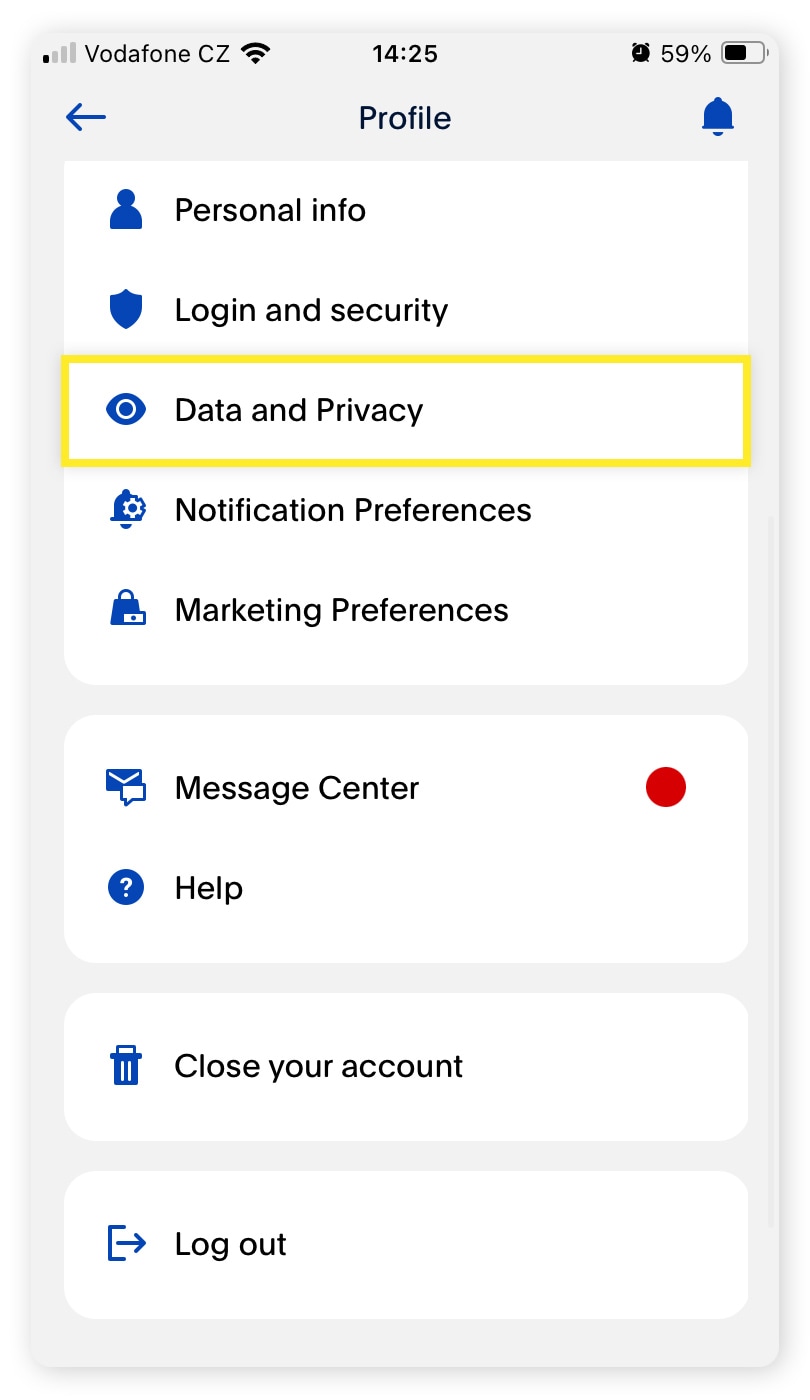
PayPal’s user interface (UI) has evolved, but the core administrative functions remain buried within the settings hierarchy to prevent accidental deletions. It is important to note that the account closure must be performed via a web browser (desktop or mobile) rather than the native PayPal app.
Deleting Your Account via Web Browser
To begin the technical decommissioning of your account, follow these steps:
- Authentication: Log in to PayPal.com using your primary credentials. If you have Two-Factor Authentication (2FA) enabled—which is a security best practice—ensure you have your physical security key or mobile device ready.
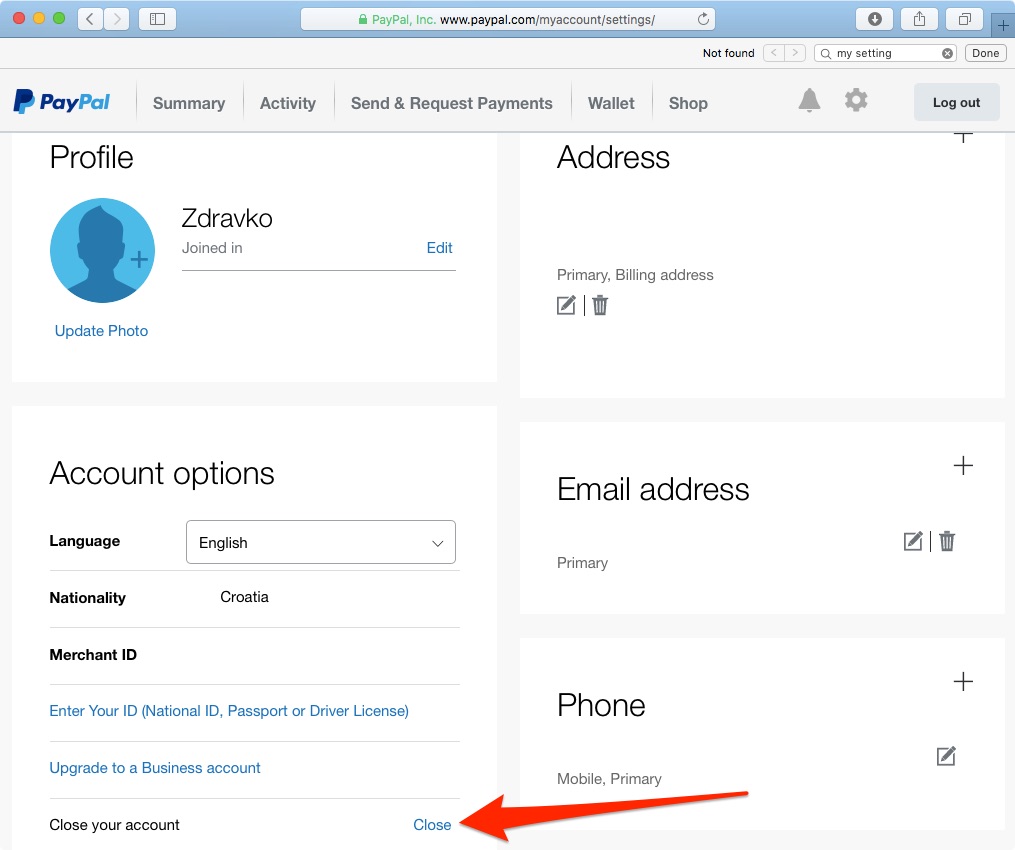
- Settings Access: Click the Settings (gear icon) located in the top-right corner of the dashboard.
- Account Options: Under the “Account” tab, scroll to the bottom of the page. You will see a section labeled “Account options.”
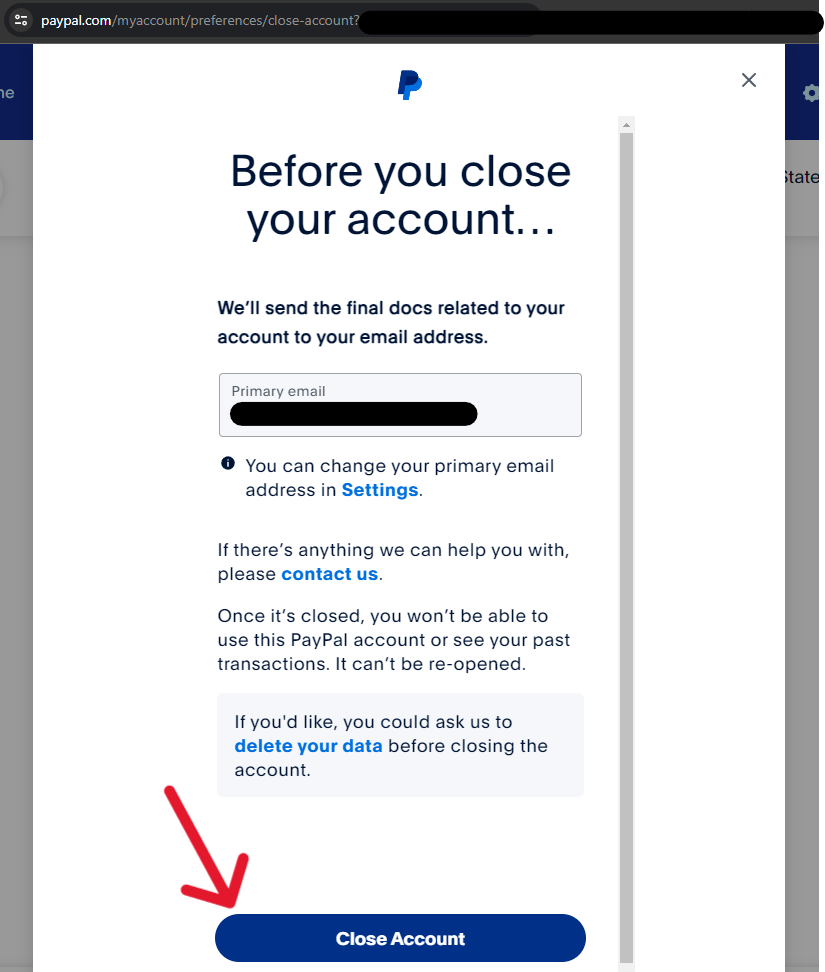
- Initiate Closure: Click Close your account.
- Verification: The system will prompt you to enter your bank account number or another verifying detail if you haven’t recently authenticated. This is a security hurdle to ensure the person closing the account is indeed the owner.
- Final Confirmation: Confirm the closure. You will receive an automated email notification confirming that the account has been closed.
Why You Can’t Delete Your Account Through the App
From a software development perspective, many users find it frustrating that the “Close Account” button is absent from the iOS and Android applications. This is a deliberate design choice. Mobile apps focus on “lightweight” transactions. Significant administrative changes—like account deletion—require the full security protocols and legal disclosures typically hosted on the web-based architecture. If you try to find this setting in the app, you will likely be redirected to an in-app browser or a help article.
Managing Third-Party Permissions Before Closure
Before you hit the final “Delete” button, you should audit your “Permissions.” Many apps and websites (like eBay, Spotify, or Uber) use PayPal as a “Vaulted” payment method or through an API integration.
- Navigate to Settings > Data & Privacy > Permissions you’ve given.
- Revoke access to all third-party services.
Technically, if you close the account without revoking these, the third-party app may still attempt to “ping” your PayPal ID for payment, leading to failed transaction errors and potential service interruptions on those platforms.
Troubleshooting Common Deletion Obstacles
Even when following the steps, users often encounter technical friction. These “account holds” are usually triggered by automated risk management algorithms.
Dealing with Account Limitations or Holds
If your account has a “limitation”—often signaled by a notification saying your account is under review—the software will lock the deletion feature. This usually happens if there is suspicious login activity or if the platform requires updated “Know Your Customer” (KYC) documentation. To resolve this, you must navigate to the Resolution Center and provide the requested information. Once the limitation is lifted by the security software, the option to delete the account will reappear.
Unpaid Balances and Negative Account Status
An account with a negative balance cannot be deleted. This typically occurs if a chargeback was issued against you and you did not have sufficient funds to cover it. The system views a negative balance as a debt. To proceed, you must link a bank account or credit card to “add money” and bring the balance back to zero. Only then will the database permit the deletion query to execute.
Outstanding Subscriptions and Recurring Payments
PayPal’s “Automatic Payments” system is a separate technical module. While closing your account should theoretically stop these, it is a technical best practice to manually cancel them first.
- Go to Settings > Payments > Manage Automatic Payments.
- Cancel any active subscriptions.
Doing this ensures that the merchant is notified via the API that the payment method is no longer valid, preventing “zombie” subscriptions that might try to bill a backup funding source.
Security Implications and the Aftermath of Deletion
Once you have successfully deleted the account, there are several technical and security-related consequences you should understand regarding your digital footprint.
What Happens to Your Personal Information?
Deleting your account does not mean your data vanishes from PayPal’s servers instantly. For regulatory and legal compliance (such as anti-money laundering laws), PayPal is technically required to retain certain data for a specific period—often up to seven years. However, this data is moved from “active” status to “archived” status. It is no longer accessible via the UI and is not used for marketing purposes. It exists solely for legal audits and law enforcement requests.
Reclaiming Your Email Address for Future Use
A common technical question is whether an email address associated with a deleted account can be reused. The answer is yes. Once an account is fully purged from the active user database, the email string is “freed up.” If you decide to return to the platform in a year, you can register a new account using that same email. However, none of your previous history, linked cards, or verified status will carry over. You will be starting from a clean slate in the eyes of the software’s risk-scoring algorithm.
Digital Alternatives to PayPal for Secure Online Payments
If you are deleting PayPal to streamline your tech stack, you may be looking for alternatives that offer different technical advantages or better UI experiences.
Peer-to-Peer vs. Merchant-Focused Platforms
For those who primarily used PayPal for sending money to friends, Zelle offers a more integrated experience for US-based users, as it operates directly within the banking infrastructure rather than as a third-party layer. This reduces the number of “hops” your data takes during a transaction.
For developers and tech-savvy users, Stripe (for receiving payments) or Apple Pay/Google Pay (for making payments) often provide superior encryption and a smoother “one-tap” checkout experience. Apple Pay, specifically, uses a technical process called “tokenization,” where your actual card number is never shared with the merchant, providing a layer of security that traditional PayPal “Standard” checkouts sometimes lack.
By following this technical roadmap, you ensure that your exit from the PayPal ecosystem is clean, secure, and professional. Managing your digital presence requires these periodic “audits,” and knowing how to correctly decommission software accounts is a vital skill in the 21st-century tech landscape.
aViewFromTheCave is a participant in the Amazon Services LLC Associates Program, an affiliate advertising program designed to provide a means for sites to earn advertising fees by advertising and linking to Amazon.com. Amazon, the Amazon logo, AmazonSupply, and the AmazonSupply logo are trademarks of Amazon.com, Inc. or its affiliates. As an Amazon Associate we earn affiliate commissions from qualifying purchases.