
In an increasingly digital financial landscape, mobile payment applications have become indispensable tools for managing everyday transactions, sending money to friends, and even handling direct deposits. Among these, Cash App stands out as a widely popular platform, offering not just peer-to-peer transfers but also a physical debit card, the Cash App Card, which allows users to spend their balance directly. For many, the utility of this card hinges on one crucial question: How do you effectively and efficiently add money to it?
This article delves into the various methods available for funding your Cash App Card, offering a comprehensive guide for both new and experienced users. Understanding these processes is vital for seamless financial management, ensuring your funds are always accessible when you need them, whether for an online purchase, an in-store swipe, or an ATM withdrawal. We will explore the primary avenues for adding cash, touch upon alternative methods, and discuss essential financial considerations to help you manage your money wisely within the Cash App ecosystem.
Understanding Your Cash App Card and Its Financial Utility
Before diving into the “how-to,” it’s important to grasp what the Cash App Card is and its significance as a financial instrument. This understanding lays the groundwork for appreciating the various funding methods and their role in your personal finance strategy.
What Exactly is the Cash App Card?
The Cash App Card is a free, customizable debit card issued by Sutton Bank and powered by the Visa network. It is directly linked to your Cash App balance, meaning any funds you have in your Cash App account are immediately available for use with this card. Unlike a traditional bank debit card that draws from a checking account, the Cash App Card draws directly from your digital wallet within the app. It functions just like any other Visa debit card, allowing you to make purchases online, in physical stores, and withdraw cash from ATMs (though ATM fees may apply). Its distinct feature is its integration with the Cash App ecosystem, providing a unified platform for sending, receiving, and spending money.
Why Funding Your Cash App Card is Crucial for Personal Finance
The ability to easily add funds to your Cash App Card transforms it from a mere peer-to-peer transfer tool into a versatile spending mechanism. Here’s why consistent and informed funding is crucial for your personal financial management:
- Direct Access to Funds: It provides instant access to your Cash App balance, allowing you to spend money received from others, direct deposits, or funds transferred from your linked bank account. This eliminates the need to transfer money to a separate bank account before spending.
- Budgeting and Expense Tracking: For some, using the Cash App Card for specific categories of spending (e.g., discretionary income, online purchases) can aid in budgeting. All transactions are logged within the app, offering a clear overview of your spending habits.
- Convenience and Flexibility: It offers the convenience of a debit card without necessarily requiring a traditional bank account for daily transactions, making it accessible for individuals who prefer mobile-first banking solutions.
- Security: By keeping a manageable balance on your Cash App, you can mitigate risks associated with carrying large amounts of cash or exposing your primary bank account details for every transaction.
Primary Methods for Adding Money to Your Cash App Card
The core functionality of spending with your Cash App Card relies on having a sufficient balance. Fortunately, Cash App offers several straightforward methods to load money onto your account, catering to various financial situations.
Linking a Bank Account or Debit Card for Transfers
This is arguably the most common and convenient method for adding funds to your Cash App Card, leveraging your existing banking relationships.
- Process for Linking:
- Open the Cash App on your mobile device.
- Tap on the “Banking” tab (the house icon) or the “Money” tab (the dollar sign icon).
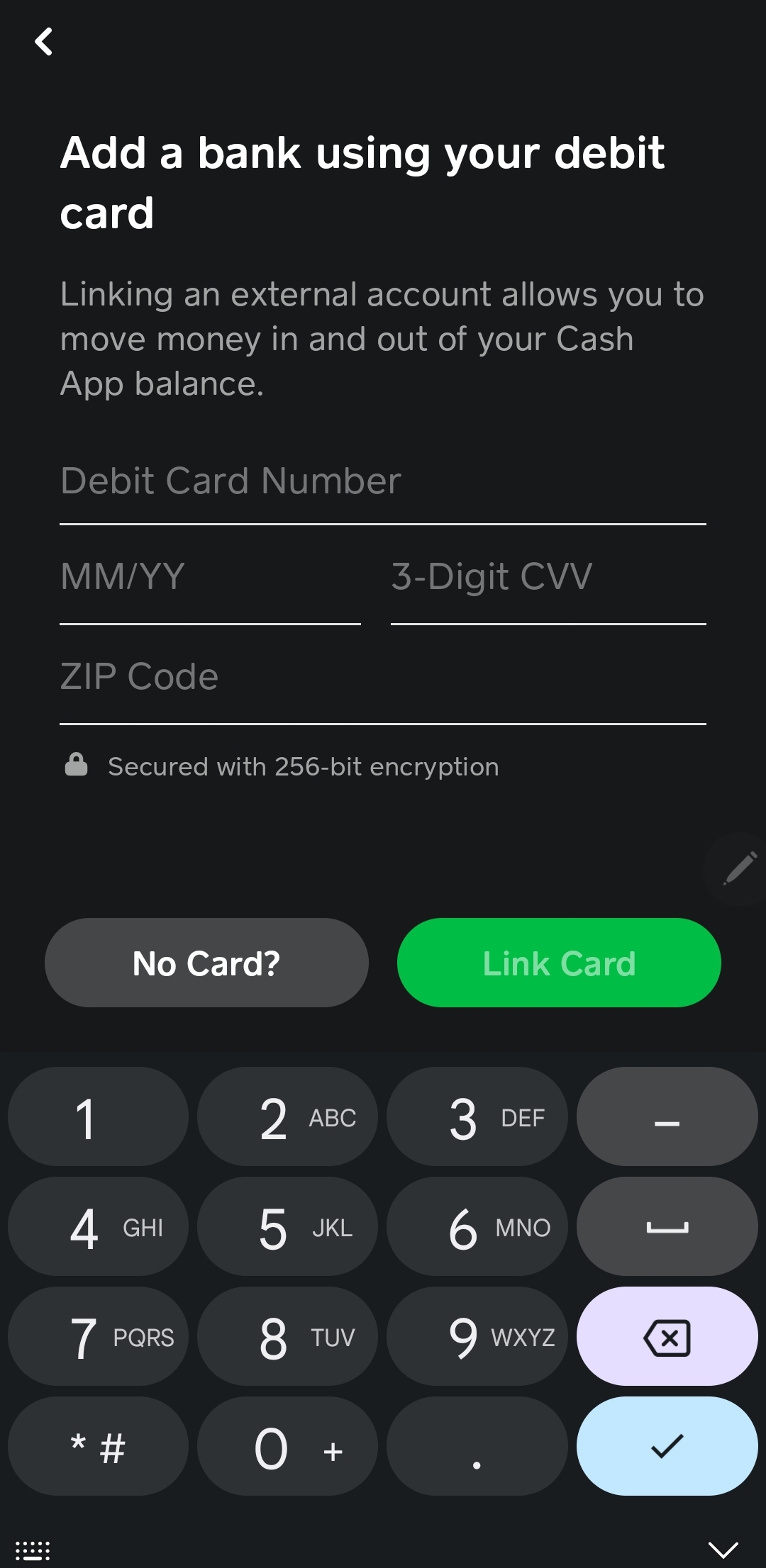
- Select “Link Bank” or “Link Debit Card.”
- Follow the on-screen prompts to securely connect your external bank account or debit card. You’ll typically need to provide your bank login credentials or debit card details.
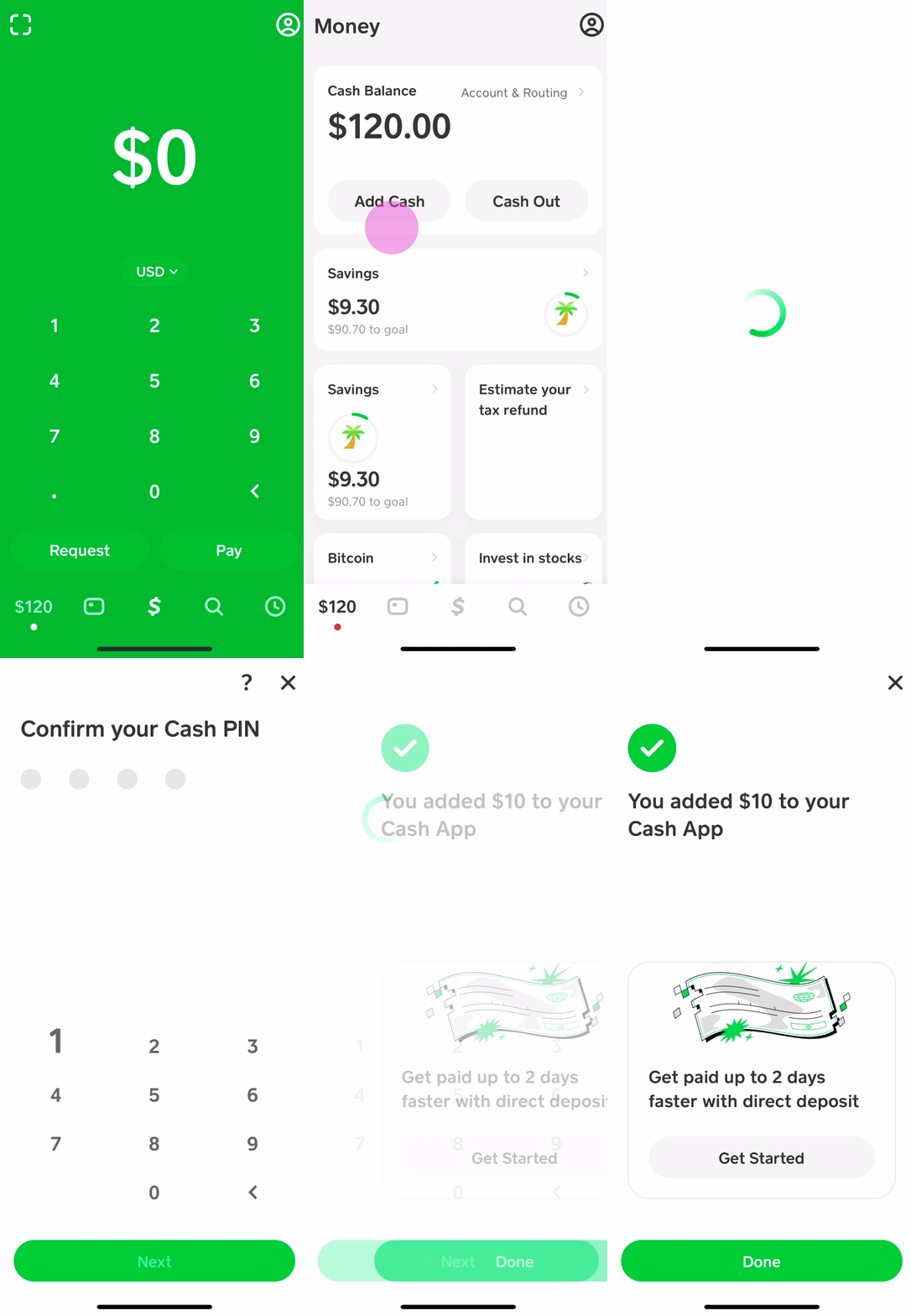
- Adding Cash from Linked Accounts:
- Once linked, return to the “Banking” or “Money” tab.
- Tap “Add Cash.”
- Enter the desired amount you wish to add to your Cash App balance.
- Confirm the transaction.
- Key Considerations: Funds added from a linked debit card are usually available instantly, while transfers from a linked bank account might take 1-3 business days, depending on your bank and Cash App’s processing times. Ensure the linked card or account is in your name to avoid complications. Cash App charges a 0.5% – 1.75% fee for instant deposits from a linked bank account, but standard deposits are free.
Receiving Funds from Other Cash App Users
One of Cash App’s foundational features is its peer-to-peer payment system. Any money you receive from other Cash App users automatically gets added to your Cash App balance, making it instantly available on your Cash App Card.
- How it Works:
- A sender initiates a payment to your unique $Cashtag, phone number, or email address.
- The funds are automatically deposited into your Cash App balance.
- You’ll receive a notification confirming the receipt of funds.
- Requesting Money: You can also initiate a request for money from another user within the app, which, once accepted, will similarly fund your balance. This method is incredibly convenient for splitting bills, receiving payments from clients, or getting money from family and friends.
Setting Up Direct Deposit
For many, direct deposit is a cornerstone of modern financial management. Cash App offers the ability to receive direct deposits, making it a viable alternative to traditional bank accounts for managing regular income.
- How to Set Up:
- In the Cash App, navigate to the “Banking” tab.
- Tap on “Direct Deposit.”
- You will find your Cash App account and routing numbers. These are unique identifiers that your employer or benefits provider needs to send funds directly to your Cash App.
- Provide these details to your employer’s payroll department, government agency (for benefits like unemployment or tax refunds), or any other entity that offers direct deposit.
- Benefits: Direct deposit into Cash App can offer earlier access to funds compared to traditional banks (sometimes up to two days earlier). It centralizes your income in an easily spendable format via the Cash App Card, simplifying your financial flow.

Alternative and Less Common Funding Methods
While linking external accounts and receiving direct deposits are the most common methods, Cash App also provides other options for adding funds, particularly useful for those who deal with cash or prefer alternative digital solutions.
Depositing Cash at Retail Stores
For users who primarily deal with physical cash, Cash App has partnered with various retail locations to facilitate cash deposits directly into your account. This bridging of the physical and digital money worlds is a significant convenience.
- Participating Retailers: Major retailers such as Walmart, Walgreens, 7-Eleven, CVS, and others often participate in this service. It’s always best to check the Cash App’s in-app map or website for the nearest participating locations.
- Process:
- Open your Cash App and tap the “Banking” tab.
- Select “Deposit Paper Money” or “Add Cash.”
- The app will generate a unique barcode.
- Present this barcode to the cashier at a participating store, along with the cash you wish to deposit.
- The cashier will scan the barcode and accept your cash. The funds are typically available in your Cash App balance instantly.
- Fees and Limits: Be aware that most retailers charge a small fee for this service (e.g., $1-$5 per transaction). There are also daily and weekly limits on how much cash you can deposit using this method, which can vary.
Transferring from Other Financial Apps (Indirectly)
While Cash App doesn’t directly integrate with every other financial app (like PayPal or Venmo) for direct transfers, you can indirectly move money. This usually involves using your linked bank account as an intermediary.
- The Indirect Route:
- Withdraw funds from the other financial app (e.g., PayPal, Venmo) to your linked bank account.
- Once the funds have settled in your bank account, use the “Linking a Bank Account or Debit Card” method described earlier to transfer the money from your bank account to your Cash App.
- Considerations: This method adds an extra step and potentially extra waiting time, as funds need to clear in your bank account before they can be transferred to Cash App. It’s less efficient but provides a workaround for consolidating funds from various digital sources.
Managing Your Cash App Funds and Card Responsibly
Effective money management extends beyond merely adding funds. To truly harness the power of your Cash App Card, it’s essential to understand the associated financial details and practice good security habits.
Understanding Limits and Fees Associated with Funding
Every financial tool comes with its own set of rules regarding limits and fees. Being informed about these is crucial for avoiding unexpected charges and ensuring smooth transactions.
- Transaction Limits: Cash App imposes limits on how much money you can add to your account over certain periods (e.g., daily, weekly). These limits can vary based on whether your account is verified (by providing personal information like your date of birth and the last four digits of your SSN). Verified accounts generally have higher limits.
- Fees for Instant Transfers: While standard transfers from a linked bank account are free, Cash App charges a small fee (typically 0.5% to 1.75%) for instant transfers. This fee allows you to access your funds immediately rather than waiting 1-3 business days.
- ATM Withdrawal Fees: While the Cash App Card can be used at ATMs, Cash App charges a fee for withdrawals unless you meet certain direct deposit criteria (e.g., receiving at least $300 in direct deposits monthly). Third-party ATM operators may also impose their own fees.
- Cash Deposit Fees: As mentioned, retailers often charge a fee for cash deposits. Factor this into your budgeting if you frequently use this method.
Security Best Practices for Your Cash App Account
Your money is only as safe as the security measures you employ. Protecting your Cash App account is paramount to safeguarding your funds.
- Enable Security Features: Always enable a PIN or fingerprint/Face ID lock for your Cash App. This adds an extra layer of protection, preventing unauthorized access even if your phone is lost or stolen.
- Be Wary of Scams: The digital payments landscape is unfortunately rife with scams. Never share your login credentials, PIN, or sensitive financial information with anyone. Be suspicious of unsolicited requests for money or offers that seem too good to be true. Cash App will never ask for your PIN or sign-in code outside of the app.
- Monitor Your Transactions: Regularly review your Cash App transaction history for any unauthorized activity. Report suspicious transactions immediately to Cash App support.
- Strong, Unique Password: Use a strong, unique password for your Cash App account and avoid reusing passwords from other online services.
Budgeting and Tracking Your Spending with Cash App
Beyond simply facilitating transactions, Cash App can be a valuable tool for personal financial management when used thoughtfully.
- Transaction History: Cash App maintains a detailed history of all your transactions, including funds added and spent. Regularly reviewing this can help you track where your money is going and identify areas for potential savings.
- Dedicated Spending: Some users choose to use their Cash App Card for specific categories of spending (e.g., groceries, entertainment) as a way to mentally budget and separate these expenses from their primary bank account.
- Savings Feature (Boosts): While not a direct funding method, Cash App’s “Boosts” feature offers instant discounts at various merchants when using your Cash App Card. Leveraging these can lead to small but cumulative savings, enhancing your financial efficiency.
Conclusion
The Cash App Card serves as a powerful extension of your Cash App balance, offering a flexible and convenient way to spend your money in the modern economy. Understanding how to effectively add money to this card is the first step towards leveraging its full potential. Whether you prefer the directness of linking a bank account, the efficiency of direct deposit, the simplicity of peer-to-peer transfers, or the accessibility of cash deposits at retail stores, Cash App provides multiple avenues to ensure your funds are always at your fingertips.
However, true financial empowerment comes not just from knowing how to add money, but also from managing it responsibly. By being aware of transaction limits, understanding fees, and diligently practicing security best practices, you can ensure a smooth, secure, and beneficial experience with your Cash App Card, integrating it seamlessly into your overall personal finance strategy.
aViewFromTheCave is a participant in the Amazon Services LLC Associates Program, an affiliate advertising program designed to provide a means for sites to earn advertising fees by advertising and linking to Amazon.com. Amazon, the Amazon logo, AmazonSupply, and the AmazonSupply logo are trademarks of Amazon.com, Inc. or its affiliates. As an Amazon Associate we earn affiliate commissions from qualifying purchases.