
In the rapidly evolving world of cryptocurrency and digital assets, the ability to securely manage and access your holdings is paramount. SafePal stands out as a prominent provider of hardware and software crypto wallets, offering a crucial layer of security for millions of users worldwide. However, even with the most robust technology, questions, technical glitches, or urgent concerns can arise. Knowing precisely how to contact SafePal’s support team is not just a convenience; it’s a critical aspect of maintaining the security and functionality of your digital assets.
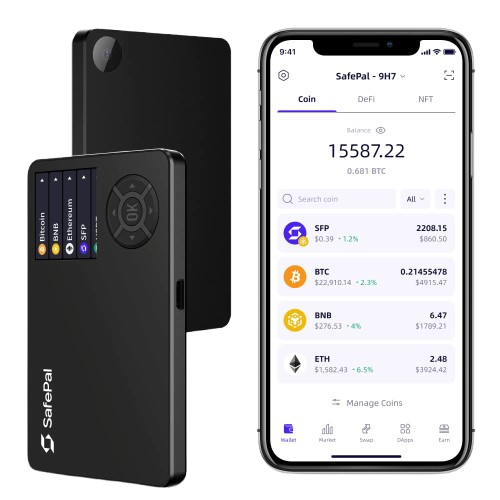
This guide is designed to empower SafePal users with clear, actionable information on how to effectively reach out for assistance, whether you’re troubleshooting a hardware issue, navigating app functionalities, or seeking general information. We’ll delve into the various official channels, best practices for engagement, and crucial security considerations to ensure your support experience is both efficient and secure within the technology landscape.
Understanding SafePal’s Ecosystem and Support Philosophy
SafePal’s reputation is built on its diverse range of products designed to secure various digital assets. Understanding this ecosystem is the first step in appreciating the nuances of their support structure. Given the technical nature of their offerings and the high stakes involved with digital security, SafePal’s approach to support is fundamentally rooted in guiding users towards self-sufficiency while providing robust channels for direct intervention when necessary.
SafePal’s Product Range and Its Implications for Support
SafePal offers a suite of products, each with its own set of potential support needs:
- Hardware Wallets (SafePal S1, SafePal X1): These physical devices are the cornerstone of SafePal’s security model, offering robust offline storage for private keys. Support queries related to hardware wallets often involve initial setup, firmware updates, device connectivity issues (e.g., with the SafePal App), troubleshooting screen malfunctions, or guidance on recovery procedures if a device is lost or damaged. The physical nature of these devices means some issues might require more specialized technical support.
- Software Wallets (SafePal App): The SafePal App serves as the primary interface for managing assets across both hardware and software wallets. It allows users to send, receive, swap, and manage a vast array of cryptocurrencies and NFTs. Support for the app typically covers issues like transaction failures, syncing problems, UI/UX bugs, difficulties connecting to dApps, or general inquiries about supported tokens and network configurations.
- Browser Extension (SafePal Extension Wallet): A newer addition, this provides convenient access to Web3 functionalities directly from your browser. Support needs here might include installation issues, connectivity with dApps, or synchronization problems with other SafePal wallets.
The decentralized nature of cryptocurrencies means that while SafePal provides the tools, users ultimately bear responsibility for their private keys and recovery phrases. This influences their support philosophy, emphasizing education and self-help, especially for issues related to transaction finality on blockchains or lost recovery phrases, which SafePal cannot recover.
The Importance of Official Channels for Digital Security
In the cryptocurrency space, security is paramount, and this extends directly to how you seek support. Scammers and malicious actors frequently impersonate legitimate support teams to trick users into revealing sensitive information, such as seed phrases or private keys.
Therefore, it is absolutely critical to always use SafePal’s official website and app as your primary sources for contact information. Never trust contact details found through unofficial search results, unsolicited emails, or direct messages on social media from unverified accounts. SafePal will never ask you for your seed phrase, private keys, or any other sensitive account information. Familiarizing yourself with official communication channels is your first line of defense against phishing and other social engineering attacks.
Direct Channels for SafePal Customer Support
When you encounter an issue that you can’t resolve through self-help, direct communication with SafePal’s support team becomes necessary. SafePal provides several structured channels to ensure your query is directed to the appropriate specialists.
The Official SafePal Support Center/Knowledge Base
Before attempting direct contact, your first and most efficient point of recourse should always be the SafePal Support Center. Accessible directly from their official website, this comprehensive knowledge base is packed with:
- Extensive FAQs: Answers to common questions about product features, security, and general usage.
- Troubleshooting Guides: Step-by-step instructions for resolving known issues with both hardware and software wallets.
- Tutorials: Visual and written guides for setting up devices, performing transactions, integrating with dApps, and managing various cryptocurrencies.
- Announcements: Information on new features, firmware updates, and critical security alerts.
The support center is equipped with a robust search functionality. By clearly articulating your problem in the search bar, you can often find an immediate solution, saving you time and expediting your problem resolution. SafePal actively updates this resource, making it an invaluable self-service tool.
Submitting a Support Ticket
For issues not covered by the knowledge base or requiring personalized assistance, submitting a support ticket is the primary formal method of contact. You can usually find a “Submit a request” or “Contact Us” link within the Support Center or on the main SafePal website.
When submitting a ticket:
- Select the correct category: This ensures your request is routed to the relevant team (e.g., Hardware Wallet, App Support, General Inquiry).
- Provide a clear and detailed description: Explain your issue comprehensively. Include error messages, the steps you’ve already taken to troubleshoot, and the exact sequence of events that led to the problem.
- Attach relevant evidence: Screenshots, short video recordings, or transaction IDs can significantly help the support team understand and diagnose your issue more quickly.
- Keep track of your ticket number: After submission, you’ll receive a unique ticket ID. Use this for any follow-up communication.
SafePal aims to respond to tickets within a reasonable timeframe, though this can vary based on the complexity and volume of requests. Patience is key, especially for non-urgent matters.
Live Chat Support
SafePal may offer live chat support during specific operating hours, primarily for more immediate or straightforward inquiries. If available, a chat icon will typically appear on the bottom corner of their official website or within the Support Center.
Live chat is generally best suited for:
- Quick questions that don’t require extensive investigation.
- Guidance on where to find specific information.
- Checking the status of an existing support ticket.
It’s important to set realistic expectations; complex technical issues or those requiring in-depth account review may still be escalated to a ticket system for thorough investigation. Always verify that you are on the official SafePal website before engaging with any live chat feature to prevent falling victim to impersonators.

Email Support
While typically integrated into the ticket submission system, SafePal might also list a direct support email address for certain types of inquiries or as an alternative to the ticket portal. If an email address is provided, ensure it’s from their official domain (e.g., support@safepal.io).
Email communication generally follows the same best practices as submitting a ticket: be detailed, provide all necessary information, and never include sensitive details like your seed phrase. This channel is usually for less urgent, more general inquiries, or for following up on an existing case.
Leveraging Community and Social Media for Assistance
Beyond direct support channels, SafePal actively fosters a vibrant online community. These platforms can be excellent resources for finding solutions, staying informed, and engaging with fellow users, but they come with specific security caveats.
SafePal’s Official Social Media Channels
SafePal maintains an active presence on various social media platforms, including:
- Twitter: Often used for announcements, news, and quick updates.
- Telegram & Discord: Popular platforms for community discussion, general questions, and peer-to-peer support. SafePal often has official groups moderated by their team members.
- Facebook: May host general updates and community interaction.
Important Caution: While these channels are excellent for general engagement, they are generally not suitable for direct technical support or sharing personal account information. SafePal’s official staff will never ask for your seed phrase, private keys, or instruct you to send funds to an address via social media. Be extremely wary of direct messages from accounts claiming to be SafePal support; always verify their authenticity. If you receive a direct message, it’s safer to report it and initiate contact through official support channels if needed.
The SafePal Community Forum
If SafePal hosts an official community forum, it can be an invaluable resource. These forums allow users to:
- Ask questions and receive answers from experienced users or community moderators.
- Search for existing threads on common issues, often finding solutions that have already been discussed.
- Share experiences and provide feedback on products and features.
Moderated forums provide a relatively safe environment for peer-to-peer assistance. However, even in official forums, exercise caution and never disclose personal or sensitive wallet information.
Best Practices for Engaging with SafePal Support
To ensure a smooth, efficient, and secure support experience, adopting certain best practices is crucial. Your proactive approach can significantly impact the speed and effectiveness of the resolution.
Before Contacting: Self-Help and Preparation
- Consult the FAQ/Knowledge Base First: As mentioned, this is often the fastest way to resolve common issues.
- Ensure Updates: Verify that your SafePal App is updated to the latest version and that your hardware wallet firmware is current. Many issues are resolved with simple updates.
- Gather Information: Have all relevant details at hand before contacting support. This includes:
- Your SafePal device model (e.g., S1, X1).
- The SafePal App version you are using.
- Specific error messages you’ve encountered.
- Transaction IDs (TxIDs) for any related transactions.
- A clear, step-by-step description of how the problem occurred.
- Relevant screenshots or short video clips.
- Never Share Sensitive Information: Reiterate this point constantly. SafePal support will never ask for your seed phrase, private keys, password, or two-factor authentication (2FA) codes. If anyone claiming to be SafePal support asks for this, they are a scammer.
Clear Communication and Patience
- Be Concise and Polite: Clearly state your problem without unnecessary jargon. A polite and patient approach often yields the best results.
- Follow Instructions: If support staff provides troubleshooting steps or requests additional information, follow them carefully.
- Understand Complex Issues Take Time: Digital asset security and blockchain technology can be intricate. Some issues may require more in-depth investigation, so allow adequate time for resolution.
- Be Aware of Language Barriers: While SafePal aims for multilingual support, minor communication nuances can sometimes occur. Try to be as clear and unambiguous as possible.
Security First: Avoiding Scams and Phishing Attempts
This point cannot be overstressed in the crypto domain.
- Verify Official Sources: Always double-check that you are interacting with SafePal’s official website, app, and social media accounts. Look for security indicators like “https://” and verify domain names.
- Beware of Impersonators: Scammers are highly sophisticated. They create fake websites, social media profiles, and email addresses that look legitimate.
- Report Suspicious Activity: If you encounter any unsolicited messages, emails, or websites claiming to be SafePal support that ask for sensitive information, report them immediately to SafePal through their official channels.
When to Contact SafePal (Common Scenarios)
Knowing when to contact SafePal support can save you time and prevent unnecessary stress. Here are some common scenarios where direct support is appropriate:
Hardware Wallet Issues
- Your SafePal hardware wallet is not turning on or charging.
- Firmware updates consistently fail, or the device appears bricked.
- Connectivity problems between your hardware wallet and the SafePal App.
- Physical damage to the device that affects functionality.
- You’ve lost your hardware wallet and need guidance on the recovery process using your seed phrase (though SafePal cannot recover your seed for you).
Software Wallet/App Issues
- Transactions consistently fail or are stuck with no resolution.
- The SafePal App is crashing, freezing, or exhibiting unusual behavior.
- Difficulties adding new custom tokens or connecting to specific blockchain networks.
- Unexpected changes in your wallet balance that are not due to transactions you initiated.
- Problems syncing your hardware wallet with the SafePal App.
General Inquiries
- Questions about specific product features or upcoming updates.
- Detailed inquiries about SafePal’s security architecture or best practices.
- Reporting a potential bug or vulnerability in the app or hardware (responsible disclosure).
- Seeking clarification on supported cryptocurrencies or integration with new dApps.
- Partnership inquiries or media requests (though these might have separate contact points).
Conclusion
Navigating the landscape of digital assets requires not only robust security tools like SafePal but also the knowledge and confidence to seek help when needed. Understanding how to effectively contact SafePal support is a critical skill for any user, enhancing both your operational efficiency and your overall digital security posture.
By prioritizing official channels, leveraging the extensive self-help resources available, practicing clear communication, and maintaining an unwavering vigilance against scams, you can ensure that your experience with SafePal is as smooth and secure as possible. Embrace these guidelines, and you’ll be well-equipped to manage any technical challenges that arise, keeping your digital assets safe and accessible.
aViewFromTheCave is a participant in the Amazon Services LLC Associates Program, an affiliate advertising program designed to provide a means for sites to earn advertising fees by advertising and linking to Amazon.com. Amazon, the Amazon logo, AmazonSupply, and the AmazonSupply logo are trademarks of Amazon.com, Inc. or its affiliates. As an Amazon Associate we earn affiliate commissions from qualifying purchases.