
In the current era of the “Streaming Wars,” the average consumer’s digital footprint is more fragmented than ever. Paramount Plus, a major player in the Video on Demand (VOD) space, offers a massive library of content ranging from live sports to exclusive cinematic franchises. However, as digital ecosystems evolve and subscription fatigue sets in, users often find themselves needing to prune their active services.
Canceling a subscription like Paramount Plus is not always a linear process. Because the service is integrated across various technical platforms—including Apple’s iOS, Google’s Android, Amazon’s Prime Video Channels, and dedicated streaming hardware—the technical workflow for termination depends entirely on the original point of purchase. This guide provides an in-depth technical analysis of how to navigate these digital interfaces and effectively manage your subscription lifecycle.
Understanding the Architecture of Subscription Billing
Before initiating a cancellation, it is critical to understand the underlying architecture of digital billing. When you subscribe to a service like Paramount Plus, your financial relationship is managed by a “Billing Agent.” This agent is either Paramount directly (via their website) or a third-party intermediary (like Apple, Google, or Amazon).
The technical challenge arises because these systems do not always sync perfectly in real-time. If you subscribed via the Apple App Store, Paramount’s internal web dashboard may not have the administrative permissions to terminate your billing; only Apple’s subscription management API can trigger that event. Identifying your billing agent is the first technical step in successfully offboarding from the service.
Identifying Your Billing Source
To determine where your subscription is hosted, log into the Paramount Plus web portal and navigate to the “Account” section. If you see a message stating “Your subscription is managed by [Third Party],” you must use that specific platform’s interface to complete the cancellation. If your credit card information is stored directly on the Paramount site, you are billed by Paramount Global directly.
Platform-Specific Technical Workflows for Cancellation
Each platform utilizes a distinct User Interface (UI) and backend logic for subscription management. Below are the technical procedures for the most common digital environments.
1. Web-Based Management (Direct Billing)
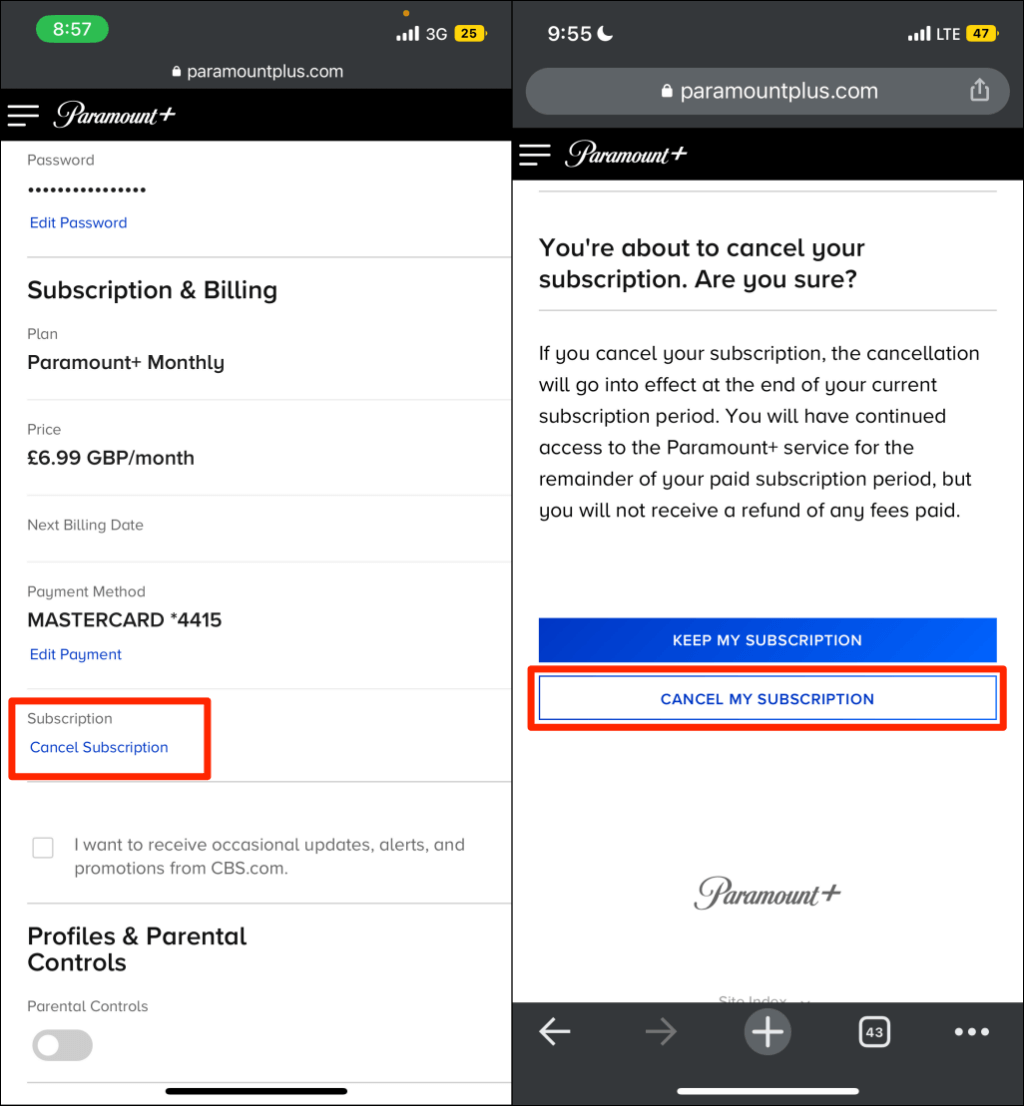
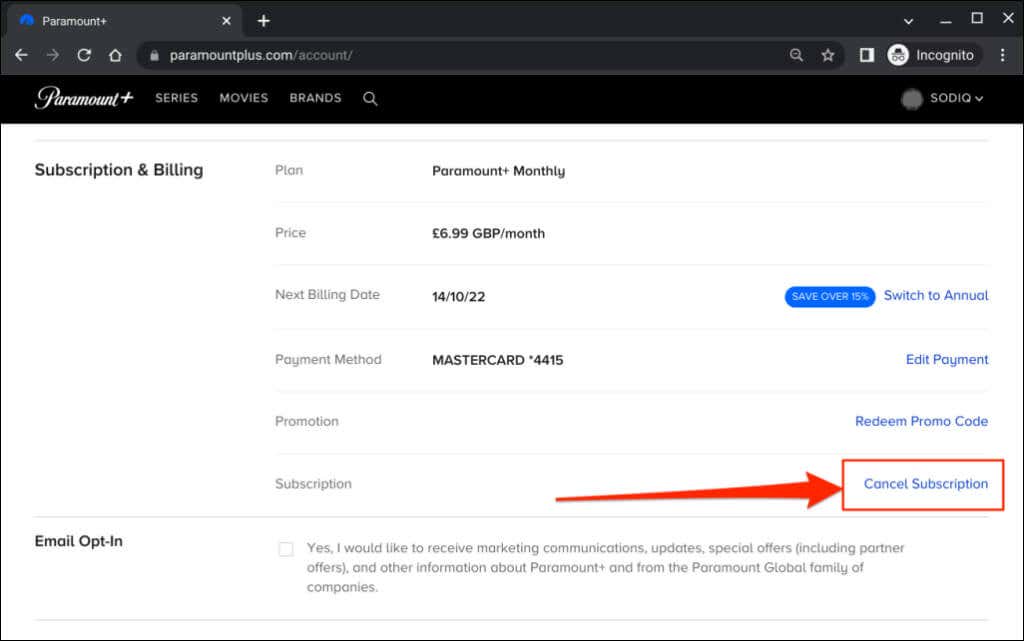
If you signed up through a desktop browser, the process is handled via Paramount’s native web infrastructure.
- Step 1: Navigate to the official Paramount Plus website and authenticate your session.
- Step 2: Access the user profile dropdown and select “Account.”
- Step 3: Locate the “Subscription & Billing” module.
- Step 4: Click on “Cancel Subscription.”
- Step 5: Complete the exit survey. This is a common UX (User Experience) tactic designed to gather churn data for product development. Ensure you receive a confirmation email, which serves as a digital receipt of the transaction termination.
2. The Apple Ecosystem (iOS, iPadOS, and tvOS)
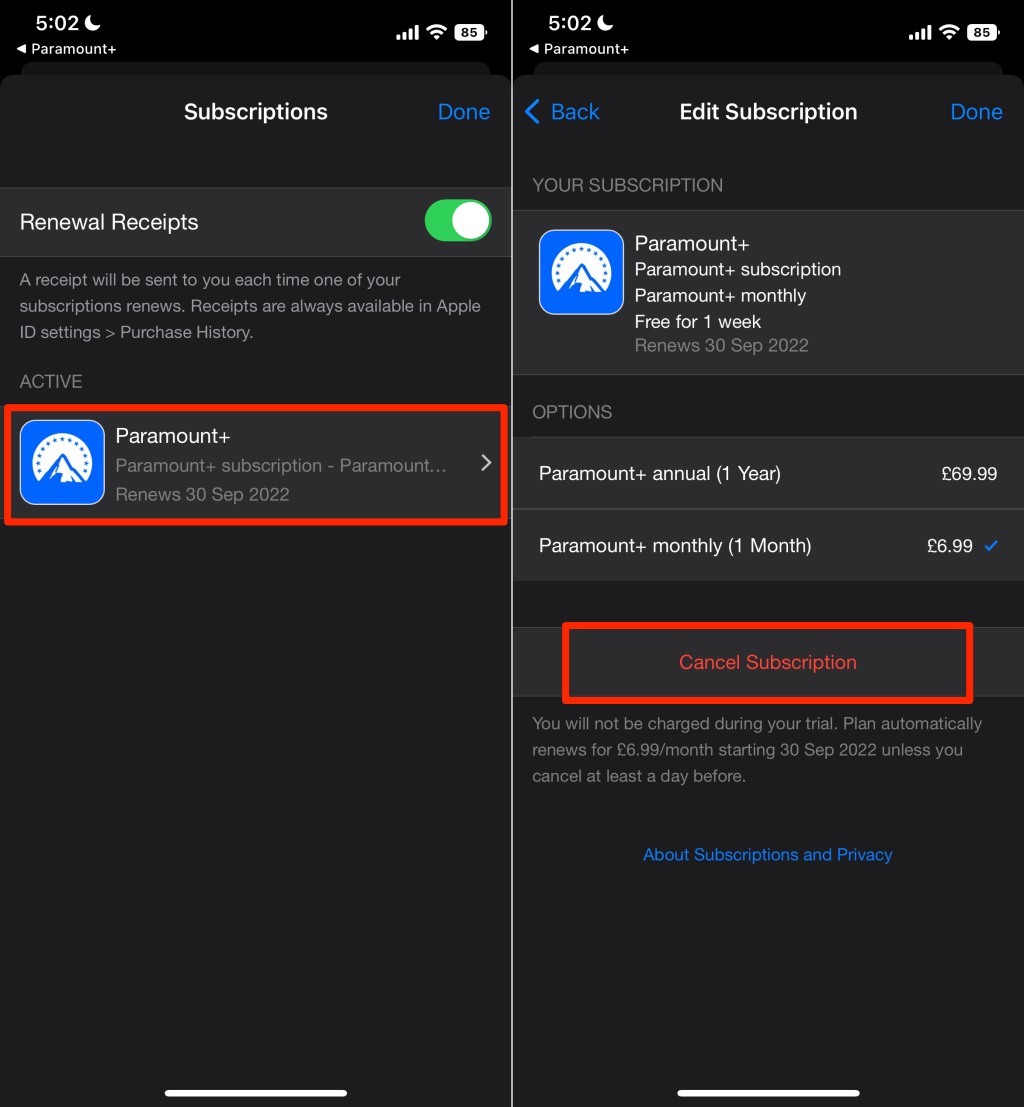
For users who subscribed through an iPhone, iPad, or Apple TV, the subscription is tied to your Apple ID. Apple uses a centralized subscription management system that acts as a secure layer between the user and the third-party app.
- On iPhone/iPad: Open the “Settings” app, tap your Apple ID (Name), and select “Subscriptions.” Locate Paramount Plus and select “Cancel Subscription.”
- On Mac: Open the App Store, click your name/profile at the bottom left, select “Account Settings,” and scroll to “Subscriptions.”
- Technical Note: Apple’s system typically keeps the service active until the end of the current billing cycle, as the “entitlement” (the digital permission to view content) remains valid for the duration already paid for.
3. The Google Play Store (Android)
Android users manage their subscriptions through the Google Play Store’s billing API.
- Step 1: Open the Google Play Store app.
- Step 2: Tap the profile icon at the top right.
- Step 3: Navigate to “Payments & Subscriptions” > “Subscriptions.”
- Step 4: Select Paramount Plus and tap “Cancel Subscription.”
- Step 5: Follow the prompts to confirm. Google’s backend will then send an asynchronous notification to Paramount’s servers to flag the account for non-renewal.
4. Third-Party Channels (Amazon Prime and Roku)
Many users subscribe to Paramount Plus as a “Channel” within another app. This adds a layer of complexity because the subscription is a subset of a larger host account.
- Amazon Prime: You must log into your Amazon account via a browser, go to “Account & Lists,” select “Memberships & Subscriptions,” and then “Prime Video Channels.”
- Roku: On the Roku home screen, highlight the Paramount Plus channel, press the star (*) button on the remote, and select “Manage Subscription” to cancel.
Troubleshooting Technical Hurdles and “Dark Patterns”
Even with a clear roadmap, users may encounter technical friction during the cancellation process. In the world of software design, companies sometimes employ “Dark Patterns”—UI choices intended to confuse or deter users from completing a task, such as canceling a service.
Resolving Account Access Issues
A common technical hurdle is the “orphaned account,” where a user forgets the specific email or social login used for the subscription. If you cannot log in, you cannot cancel through the UI. In this scenario, you must look for the “Descriptor” on your bank statement. Most billing agents use a specific code (e.g., “PAYPAL *PARAMOUNT” or “APPLE.COM/BILL”). Once the agent is identified, you can often use the agent’s “Forgot Password” or “Account Recovery” tools to regain access and terminate the service.
Dealing with Synchronization Errors
Occasionally, a user may cancel a subscription on a third-party platform, but the Paramount Plus app continues to show an active status. This is usually a caching issue. The “Entitlement Token” stored locally on your device may not have refreshed. To fix this, log out of the app, clear the application cache in your device settings, and log back in. This forces the app to ping the server for an updated subscription status.
The Role of Two-Factor Authentication (2FA)
If you have 2FA enabled on your account (which is a recommended digital security practice), ensure you have access to your secondary device or recovery codes. Losing access to a 2FA method can lock you into a subscription indefinitely until manual intervention by a customer support engineer occurs.
The Evolution of Subscription Management Software
The difficulty of managing multiple streaming services has led to the rise of specialized software tools designed to aggregate and manage digital subscriptions. As we move toward a more automated tech landscape, “Subscription Optimization” tools are becoming essential for the tech-savvy user.
Automated Cancellation Tools and API Integration
New fintech apps leverage Open Banking APIs to scan your transaction history for recurring charges. These tools can often initiate a cancellation request on your behalf by interacting with the billing agent’s customer service API. While convenient, users should be aware of the security implications of granting third-party apps access to their financial data.
The Shift Toward “One-Click” Regulation
Technological trends are pushing toward a more user-centric “one-click” cancellation mandate. Regulatory bodies are increasingly pressuring tech companies to make the “Unsubscribe” button as prominent as the “Subscribe” button. From a software engineering perspective, this requires a standardized API across all platforms—a “Universal Cancellation Protocol”—that would allow users to manage all their digital services from a single, unified dashboard regardless of the operating system.
Optimizing Your Digital Footprint Post-Cancellation
Once the technical cancellation of Paramount Plus is complete, your work as a proactive digital citizen is not finished. Managing the “data residue” left behind is a vital part of modern digital hygiene.
Revoking App Permissions and Data Access
After the subscription ends, the Paramount Plus app may still have permissions to access your local network, device storage, or tracking ID (for personalized ads). On iOS and Android, it is a best practice to go into the “Privacy & Security” settings and revoke these permissions or delete the app entirely. This reduces your attack surface and limits the amount of telemetry data sent to the cloud.
Monitoring for “Zombie Subscriptions”
A “Zombie Subscription” occurs when a service continues to bill a user despite a successful cancellation, often due to a backend database error. To prevent this, keep the confirmation email as a digital receipt. If a charge appears in the next billing cycle, you can present this receipt to your financial institution to initiate a “Chargeback” based on a technical billing error.
Managing Storage and Cache
High-definition streaming apps like Paramount Plus can accumulate significant amounts of cached data—sometimes several gigabytes. Deleting the app after cancellation is the most efficient way to reclaim this storage space on mobile devices or smart TVs with limited internal memory.
Conclusion
Canceling a Paramount Plus subscription is more than a simple administrative task; it is an exercise in navigating the complex web of modern digital commerce. By understanding the hierarchy of billing agents, mastering the UI workflows of different operating systems, and being aware of the technical pitfalls like caching errors and dark patterns, you can effectively manage your digital life. As the tech landscape continues to shift toward integrated ecosystems, staying informed on the mechanics of subscription management is essential for maintaining control over your digital footprint and your technology budget.
aViewFromTheCave is a participant in the Amazon Services LLC Associates Program, an affiliate advertising program designed to provide a means for sites to earn advertising fees by advertising and linking to Amazon.com. Amazon, the Amazon logo, AmazonSupply, and the AmazonSupply logo are trademarks of Amazon.com, Inc. or its affiliates. As an Amazon Associate we earn affiliate commissions from qualifying purchases.