
In the modern digital economy, the “Software as a Service” (SaaS) and subscription-based models have become the standard for consumer interaction. Amazon Prime stands as the titan of these ecosystems, offering a multifaceted suite of services ranging from logistics and e-commerce to streaming media and cloud storage. However, as users look to streamline their digital footprint or pivot toward more specialized platforms, the need to navigate the often-complex technical process of cancellation becomes paramount. Understanding how to dismantle this specific subscription is not just a matter of clicking a button; it is an exercise in navigating user interface (UI) design, understanding data retention policies, and managing a cross-platform digital identity.
Navigating the Amazon Ecosystem: The Technical Process of Cancellation
The process of canceling an Amazon Prime membership is a study in user experience (UX) architecture. Because Amazon operates as a cross-platform service, the technical steps vary slightly depending on whether a user is accessing the platform via a desktop browser, a mobile application, or a third-party integrated device.
Desktop vs. Mobile App: Choosing Your Interface
For the most granular control over subscription settings, the desktop web interface remains the gold standard. The web version of Amazon provides the most direct access to account management protocols without the simplified abstractions often found in mobile UI. On a desktop, the cancellation path is housed within the “Accounts & Lists” mega-menu.
Conversely, the mobile app (available on iOS and Android) utilizes a more condensed navigation drawer. While the underlying API (Application Programming Interface) calls remain the same, the visual cues are different. On mobile, users must navigate to the “User Icon” tab, then to “Your Account,” and finally to “Manage Prime Membership.” Regardless of the platform, the technical objective is to reach the “End Membership” trigger, which initiates the back-end protocol for subscription termination.
Step-by-Step UI Navigation and Verification
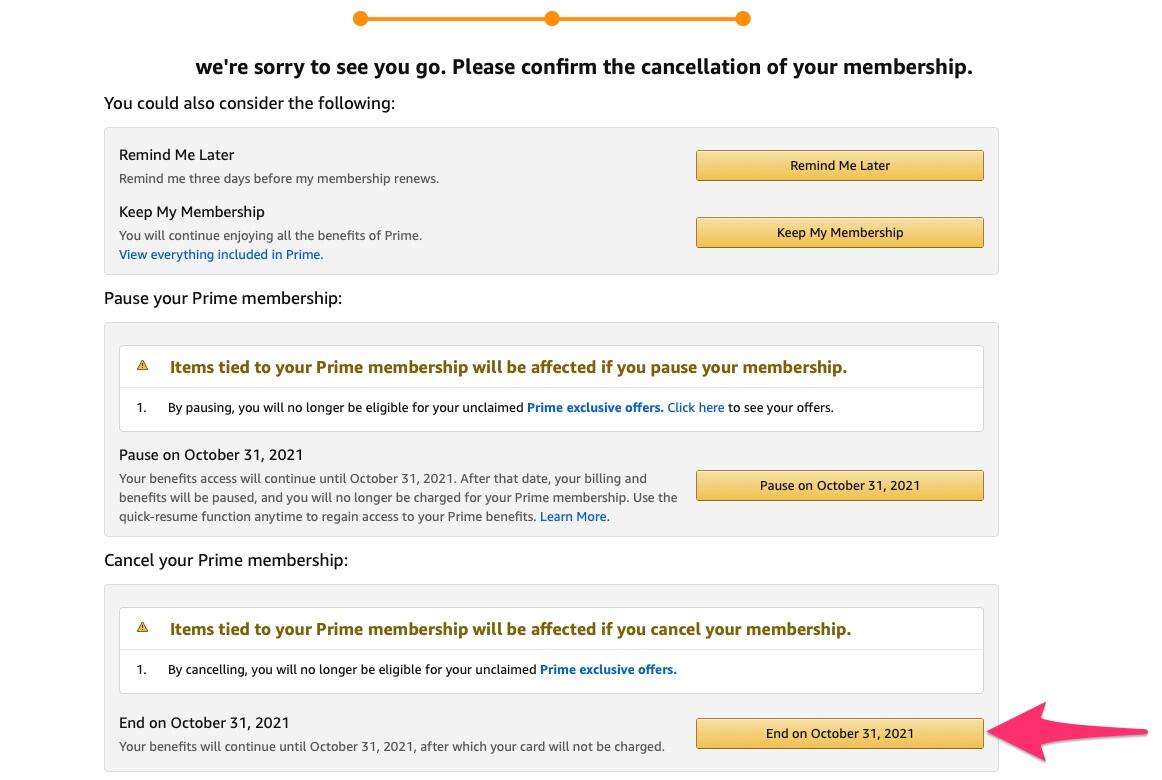
Once the “Manage Membership” section is located, the software logic typically leads the user through a three-stage confirmation process. This is technically referred to as a “friction-heavy” design.
- The Retention Tier: Upon clicking “End Membership,” the system queries the database to present the user with a summary of their usage (e.g., “You’ve saved $X in shipping”). This is an automated data visualization designed to discourage the user.
- The Alternative Tier: The UI will then offer to switch the billing cycle (e.g., from annual to monthly) or offer a “pause” state rather than a full termination.
- The Final Confirmation: The user must navigate past these prompts to hit the final “End on [Date]” button. From a technical standpoint, this action updates the user’s “Subscription Status” flag in Amazon’s relational database from
ActivetoPending Cancellation.
The Architecture of Retention: Understanding UX Friction and Dark Patterns
To understand why canceling a tech subscription feels more difficult than signing up for one, we must look at the software design principles at play. In the tech industry, “Dark Patterns” refer to UI choices that deliberately make it difficult for users to perform certain actions that are not in the company’s interest.
The Psychology of Multi-Step Cancellation
The Amazon Prime cancellation flow is often cited by UX researchers as an example of a “Roach Motel”—where the user finds it easy to get into a situation but difficult to get out of. Technically, this is achieved through a series of “interstitial pages.” Each page requires a distinct server-side request and user input. By increasing the number of clicks required to reach the final POST request that terminates the service, the software relies on “decision fatigue” to keep the user subscribed.
From an engineering perspective, these steps serve as a buffer. They allow the system to check for linked services (like Prime Video or Amazon Music) and provide warnings about loss of access. However, the intentionality behind the layout—using bright colors for “Keep My Membership” and muted tones for “Continue to Cancel”—is a classic tech strategy to manipulate user flow.
Recognizing Confirm-shaming and Divergent Paths
Another technical nuance in the cancellation process is “confirm-shaming.” This involves wording the UI elements in a way that suggests the user is making a poor technical or financial choice. For example, a button might not just say “Cancel,” but “I want to give up my shipping benefits.” Understanding these UX triggers allows a tech-savvy user to ignore the emotional interface and focus on the functional pathing required to execute the command.
Managing Your Digital Footprint Post-Cancellation
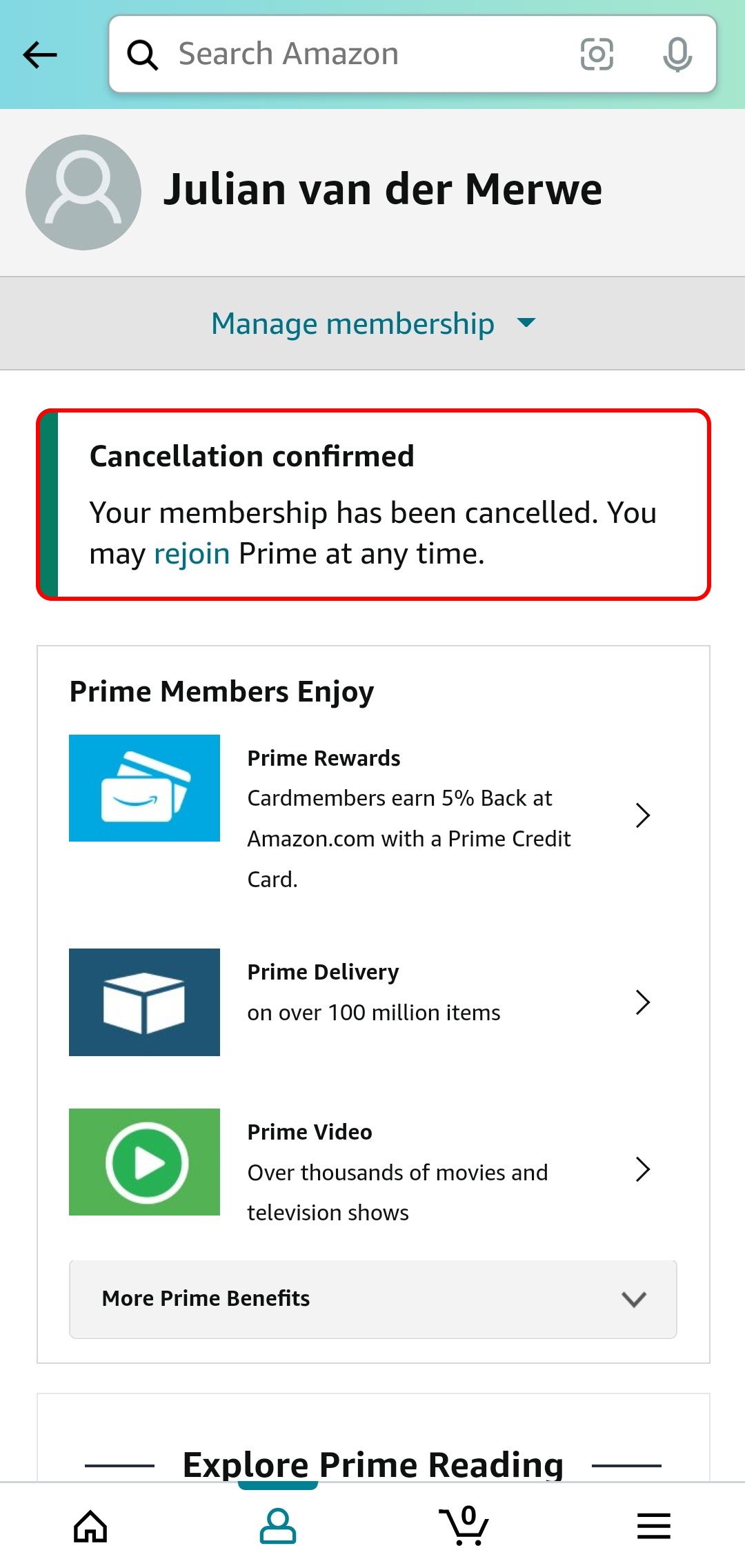
Canceling Amazon Prime is not merely about stopping a billing cycle; it involves managing the vast amount of data and interconnected services tied to the Prime account. Because Amazon is a deeply integrated tech stack, the ripple effects of cancellation can impact various digital assets.
Data Retention and Prime Video History
When a subscription is terminated, the user’s access to the Prime Video library is revoked, but the underlying metadata usually remains associated with the account. Your “Watchlist” and viewing history are stored in Amazon’s cloud databases indefinitely. This is a technical convenience: if you choose to resubscribe in six months, your profile is instantly restored. However, for those looking for digital minimalism, it is important to know that canceling the subscription does not automatically delete your consumption data. To fully scrub this, one must manually enter the “Prime Video Settings” and clear the “Activity” logs.
Connected Devices and Alexa Integration
For users with a “Smart Home” ecosystem powered by Alexa, canceling Prime can alter the functionality of IoT (Internet of Things) devices. While an Echo Dot will still function as a smart speaker, its ability to execute voice-commerce (ordering products via voice) is hampered by the loss of Prime shipping. Furthermore, Amazon Photos—a cloud storage service included with Prime—offers unlimited photo storage. If a user cancels Prime while having 500GB of photos in the cloud, they face a technical “overflow” situation. The data is not immediately deleted, but the account enters a “read-only” state or a grace period before the user is required to either pay for dedicated storage or risk data loss. Managing these dependencies is a critical step in the technical offboarding process.
Alternatives and Subscription Management Tools
As users move away from monolithic services like Amazon Prime, the tech landscape offers a variety of tools to manage a more fragmented, “unbundled” digital life. Managing multiple smaller subscriptions requires a more proactive technical approach to avoid “subscription creep.”
Open-Source and AI-Driven Budget Trackers
To keep track of various digital services, many users are turning to automated subscription managers. These tools use API integrations or “Plaid” connections to scan bank statements and identify recurring digital payments. For the privacy-conscious, open-source self-hosted tools allow users to track their digital software expenditures without sharing their data with a third-party fintech company. These tools help visualize the “Digital ROI” (Return on Investment) of each service, helping users decide which platforms deserve their data and hardware resources.
Evaluating the Technical ROI of Prime
In the tech world, we often talk about “Product-Market Fit.” For a consumer, this translates to “Service-User Fit.” When considering a cancellation, it is beneficial to perform a technical audit of the services you actually use.
- Logistics: How many orders per month justify the Prime API for “one-day shipping”?
- Cloud: Do you use Amazon Photos, or is your data already mirrored in Google Photos or iCloud?
- Streaming: Is the Prime Video bitrate and library competitive with specialized platforms like Netflix or MUBI?
By breaking down the subscription into its constituent technical parts, users can make a data-driven decision rather than an emotional one.

Conclusion: Achieving Digital Autonomy
The ability to easily subscribe to and unsubscribe from digital services is a fundamental component of digital literacy. While the “how-to” of canceling Amazon Prime involves a specific set of UI maneuvers and a bypass of retention-focused design patterns, the broader lesson is one of digital autonomy.
In an era where tech giants aim to create “walled gardens”—ecosystems designed to keep users and their data locked in—the act of canceling a subscription is a powerful assertion of control over one’s own digital environment. By understanding the underlying UX friction, managing the data dependencies of connected devices, and utilizing modern tools to track the digital footprint, users can ensure that their tech stack serves them, rather than the other way around. Managing your subscriptions is not just about saving money; it is about optimizing the software and services that define your digital life.
aViewFromTheCave is a participant in the Amazon Services LLC Associates Program, an affiliate advertising program designed to provide a means for sites to earn advertising fees by advertising and linking to Amazon.com. Amazon, the Amazon logo, AmazonSupply, and the AmazonSupply logo are trademarks of Amazon.com, Inc. or its affiliates. As an Amazon Associate we earn affiliate commissions from qualifying purchases.