
It’s a question that many of us have pondered, whether out of idle curiosity, concern for family members, or a need to manage a business network: can you really see what websites people are visiting when they’re connected to your WiFi? The answer, like much in the realm of digital security and privacy, isn’t a simple yes or no. It’s a nuanced landscape shaped by technology, legal boundaries, ethical considerations, and the constant evolution of digital security measures. Understanding this landscape is crucial, not just for network administrators, but for anyone looking to safeguard their digital footprint, protect their personal finances, or maintain a reputable online presence. This article will delve into the technical capabilities, the privacy implications, and the practical applications of network monitoring, offering insights for both network owners and users across the domains of tech, brand, and money.
The Technical Landscape: How WiFi Monitoring Works (or Doesn’t)
At its core, your WiFi network acts as a gateway to the internet. Every device connected to it sends and receives data through your router. This central role gives the router a unique vantage point, but its ability to “see” detailed website activity is significantly impacted by modern encryption standards.
The Role of Your Router: Your Network’s Gatekeeper
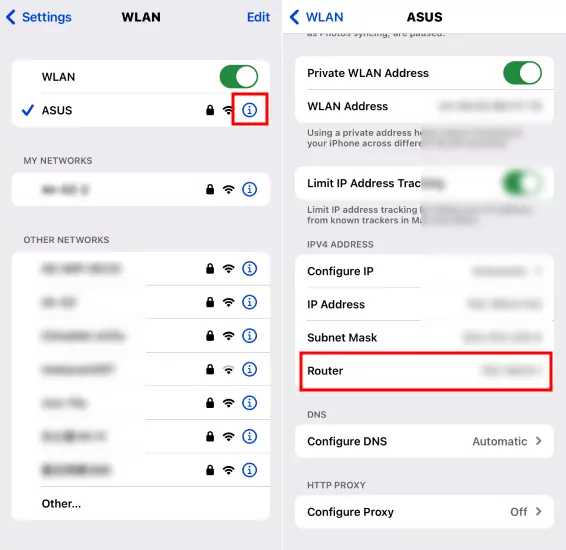
Your home or office router is more than just a box that broadcasts internet signals; it’s the primary traffic controller for your local network. When a device requests to visit a website, it first sends a Domain Name System (DNS) query to translate the human-readable website address (like “google.com”) into an IP address that computers understand. Your router, or a DNS server it’s configured to use, handles these queries.
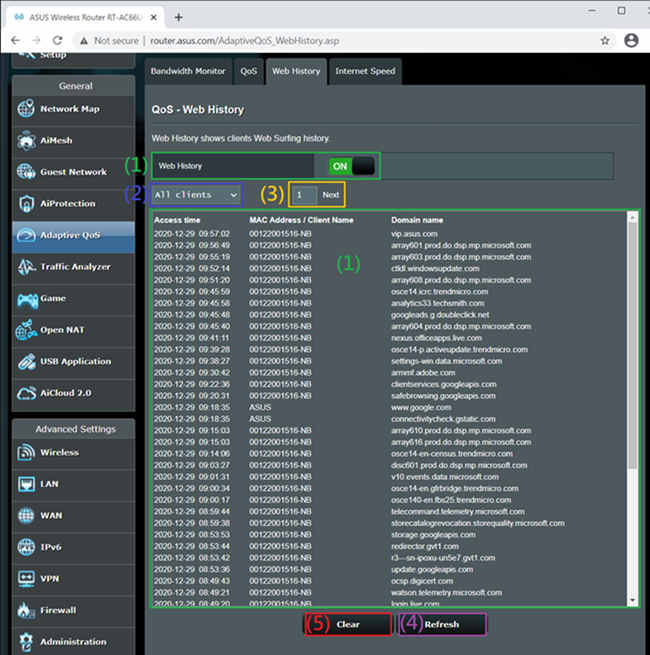
Because of this, your router can typically log the DNS requests made by devices on your network. This means it can see which domains (e.g., facebook.com, amazon.com) were requested, and when. Some advanced routers or those with custom firmware might offer basic logging features that display this information. However, this only tells you the domain, not the specific pages visited within that domain (e.g., “amazon.com/product/xyz” versus just “amazon.com”). More importantly, it doesn’t reveal the content of the communication.
Deep Packet Inspection and Advanced Tools
For a more granular view of network traffic, one would typically need more sophisticated tools and techniques, such as Deep Packet Inspection (DPI) or network sniffers like Wireshark. DPI is a form of computer network packet filtering that examines the data part (and header) of a packet as it passes an inspection point, searching for protocol non-compliance, viruses, spam, intrusions, or defined criteria to decide whether the packet may pass or if it needs to be routed to a different destination, or dropped.
Historically, with unencrypted HTTP traffic, these tools could reveal a significant amount of information, including the specific URLs visited, form data, and even the content of unencrypted messages. For businesses, dedicated network monitoring software and firewalls often employ DPI capabilities to ensure compliance, manage bandwidth, detect threats, and monitor employee productivity. These tools can identify abnormal traffic patterns, flag visits to prohibited websites, or prioritize critical business applications over recreational browsing. However, even these powerful tools face a significant hurdle in the modern internet: encryption.
The Encryption Barrier: Why HTTPS Changes Everything
The most significant development impacting the visibility of website traffic is the widespread adoption of HTTPS (Hypertext Transfer Protocol Secure). HTTPS encrypts the communication between your device and the website you’re visiting using SSL/TLS protocols. When you see a padlock icon in your browser’s address bar, you’re on an HTTPS site.
This encryption creates a secure tunnel. While your router can still see that you are connecting to a particular domain (e.g., “google.com”), it cannot see the specific pages you visit on that site (e.g., “google.com/search?q=my+private+query”) or the content you exchange with it. All that traffic appears as scrambled, unreadable data to anyone monitoring the local network, including your router, your ISP, or anyone with network sniffing tools. The “payload” of the packet – the actual data – is encrypted end-to-end between your browser and the website’s server. This is a fundamental privacy feature designed to protect sensitive information like passwords, credit card numbers, and personal communications from eavesdropping.
VPNs: The Ultimate Cloak
Virtual Private Networks (VPNs) take the encryption barrier a step further. When you use a VPN, all your internet traffic is routed through an encrypted tunnel to a remote server operated by the VPN provider, before it even reaches your local router.
From the perspective of your local WiFi network (and your router), all it sees is an encrypted connection to the VPN server’s IP address. It has no idea what websites you are visiting, what content you are accessing, or even what applications you are using, beyond the fact that you are connected to a VPN. The VPN server then performs the actual requests to the websites on your behalf. This makes VPNs an incredibly effective tool for maintaining privacy and circumventing geo-restrictions, by essentially making your internet activity invisible to anyone on your local network and even your Internet Service Provider (ISP).
Privacy, Ethics, and Legality: Walking the Digital Tightrope
The technical ability to monitor network traffic, even if limited by encryption, raises significant questions about privacy, ethical conduct, and legal boundaries. These considerations vary significantly depending on whether it’s a personal home network or a corporate environment.
Personal Networks: Family, Friends, and Guests
In a home setting, the “owner” of the WiFi network often feels a sense of proprietorship over its usage. Parents might want to monitor their children’s online activities for safety, while someone sharing their network with housemates or guests might simply be curious.
Ethically, monitoring someone’s internet activity without their explicit knowledge and consent is generally considered a breach of privacy, even if it’s on your network. For family members, especially children, open communication about internet usage rules and potential monitoring tools (like parental controls) is paramount. For adult housemates or guests, the expectation of privacy is much higher. Simply providing WiFi access does not imply permission to snoop. Building trust and maintaining respectful relationships often outweighs the desire to secretly monitor. Implementing clear “acceptable use policies,” even informally, can foster transparency. For example, a dedicated guest network that offers basic internet access without logging could be a more ethical approach than trying to secretly track usage on the main network.
Business Networks: Employer Monitoring and Employee Rights
The landscape shifts considerably in a business environment. Employers have a legitimate interest in monitoring network usage for several reasons:
- Productivity: Ensuring employees are focused on work-related tasks and not excessive personal browsing, which directly impacts the company’s financial output.
- Security: Detecting and preventing access to malicious websites, unauthorized data transfers, or other cyber threats that could compromise corporate data or intellectual property. This is crucial for maintaining a strong digital security posture, which directly impacts brand reputation and financial stability.
- Compliance: Adhering to industry regulations and legal requirements regarding data handling and employee conduct.
However, employee rights to privacy are also a significant concern. Most jurisdictions have laws governing employee monitoring. Typically, employers are required to inform employees that their network activity may be monitored. This is often outlined in employee handbooks or IT policies that employees acknowledge upon hiring. These policies usually specify what is monitored, why, and how the data is used. Without such explicit disclosure, employers risk legal challenges. The balance lies in transparency and proportionality – monitoring should be relevant to legitimate business interests and not overly intrusive.
Legal Implications and Data Protection Laws
The legality of monitoring WiFi traffic is heavily dependent on jurisdiction and the context of the network. Laws like the General Data Protection Regulation (GDPR) in Europe and the California Consumer Privacy Act (CCPA) in the US, along with many other national and local data protection laws, establish strict rules around the collection, processing, and storage of personal data.
These laws often require:
- Lawful Basis: A legitimate reason for data collection (e.g., consent, legitimate interest, legal obligation).
- Transparency: Individuals must be informed about what data is being collected and why.
- Purpose Limitation: Data should only be collected for specified, explicit, and legitimate purposes.
- Data Minimization: Only collect data that is necessary for the stated purpose.
- Security: Implement appropriate measures to protect the collected data.
For businesses, non-compliance can result in substantial fines, legal action, and severe damage to their brand reputation. Even for individuals, unauthorized monitoring could, in extreme cases, lead to legal repercussions depending on local privacy laws. The legal framework reinforces the ethical principle that privacy is a fundamental right, and network monitoring must be conducted responsibly and within established legal boundaries.
Beyond Snooping: Practical Applications for Network Management
While the idea of “seeing” what others do online often conjures images of surveillance, understanding network traffic has legitimate and beneficial applications beyond mere curiosity. These applications are critical for both personal and corporate digital health, touching upon cybersecurity, productivity, and financial well-being.
Enhancing Home Network Security and Performance
For the average home user, understanding your network’s activity isn’t necessarily about tracking specific websites your family visits. Instead, it’s about broader security and performance:
- Identifying Unusual Traffic: Are there devices on your network generating excessive traffic at odd hours? This could indicate a compromised device, malware, or an unauthorized user. Monitoring overall data usage can help identify these anomalies.
- Troubleshooting Network Issues: If your internet speed is inexplicably slow, seeing which devices are consuming the most bandwidth (e.g., streaming 4K video, large downloads) can help you diagnose and resolve performance bottlenecks. Some routers offer bandwidth monitoring features that show total usage per device, without revealing specific sites.
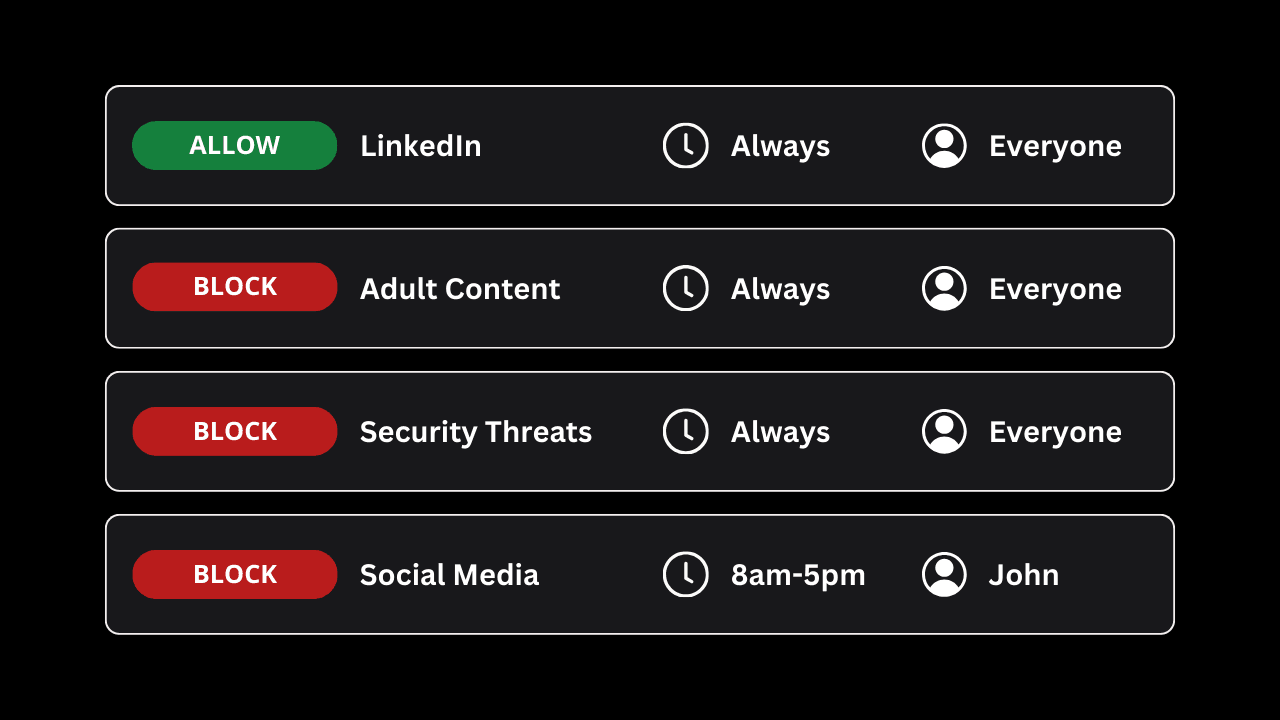
- Parental Controls: Modern routers often include robust parental control features that allow you to block specific websites or categories of content (e.g., gambling, adult sites) and set internet access schedules for specific devices. This is a proactive, policy-based approach to content management rather than reactive monitoring.
- IoT Device Management: With an increasing number of smart home devices, it’s vital to ensure they are not compromised or sending data to untrustworthy servers. Basic network monitoring can help identify suspicious outbound connections from IoT gadgets.
Business Productivity and Cybersecurity
In a corporate setting, network visibility is a cornerstone of effective IT management and cybersecurity strategy. This is where the intersection of Tech, Brand, and Money becomes most apparent:
- Policy Enforcement: Businesses can enforce acceptable use policies by blocking access to non-work-related websites (social media, streaming services) during business hours, thereby boosting productivity and ensuring employees are focused on tasks that generate revenue.
- Threat Detection and Prevention: Advanced network monitoring tools, often incorporating AI tools for anomaly detection, are crucial for identifying cyber threats in real-time. This includes detecting malware communication, phishing attempts, data exfiltration, or unauthorized access attempts. Proactive threat detection is vital for protecting the company’s intellectual property, customer data, and financial assets from costly breaches that can severely damage a brand’s reputation.
- Bandwidth Management: Businesses rely on consistent network performance. Monitoring allows IT teams to identify bandwidth hogs, prioritize critical business applications (e.g., CRM systems, video conferencing), and ensure optimal performance for all users, which directly impacts operational efficiency and financial outcomes.
- Compliance Audits: Many industries require detailed logs of network activity for compliance purposes (e.g., HIPAA for healthcare, PCI DSS for financial services). Network monitoring tools provide the necessary data for these audits, safeguarding the company against legal penalties and reinforcing its brand as a trustworthy entity.
Protecting Your Digital Brand and Financial Well-being
Whether you’re an individual managing personal finances or a business striving to maintain a strong corporate identity, digital security is paramount.
- Personal Financial Security: Unsecured WiFi networks or careless browsing habits can expose your financial transactions, login credentials for banking apps, or personal investment portfolios. Understanding how your network traffic can be viewed (or protected) empowers you to use VPNs, secure browsers, and strong passwords to safeguard your online income, side hustles, and overall financial health. A personal data breach can be financially devastating and erode trust in your personal brand.
- Corporate Identity and Brand Trust: For businesses, a robust cybersecurity posture, informed by network monitoring insights, is directly tied to brand reputation. A data breach resulting from inadequate network security can lead to massive financial losses (fines, lawsuits, customer churn) and irreparable damage to public trust. A brand built on security and reliability is a valuable asset in the digital age. Conversely, companies that prioritize digital security can leverage this as a key differentiator in their brand strategy.
- Productivity and Business Finance: Efficient network management through monitoring contributes directly to business finance. By minimizing unproductive online activity and ensuring network resources are optimally utilized, businesses can maximize employee output and prevent resource wastage, ultimately impacting the bottom line.
Safeguarding Your Online Presence: A Proactive Approach
In the complex world of digital connectivity, both network owners and users have a responsibility to act proactively to ensure security and privacy.
For Network Owners: Best Practices for Responsibility and Security
If you own a WiFi network, whether at home or in a business, your actions dictate the level of security and privacy for all connected users:
- Strong Router Security: Change default router passwords immediately. Use WPA3 or WPA2-AES encryption. Keep your router’s firmware updated to patch vulnerabilities.
- Guest Networks: For visitors, utilize a separate guest network. This isolates their devices from your main network, enhancing security and preventing them from accessing local resources or potentially viewing even basic DNS logs of others on the main network.
- Transparent Policies: If monitoring is necessary (especially in a business context), clearly communicate your acceptable use policy and monitoring practices to all users. Transparency builds trust and helps mitigate legal risks.
- Parental Controls: For home networks with children, implement router-level parental controls or third-party solutions to manage content and screen time, fostering a safer online environment.
- Regular Audits: Periodically review your router logs (if available) and connected devices to identify anything suspicious.
For Network Users: How to Protect Your Privacy
As a user connecting to various WiFi networks, you are the primary guardian of your own digital privacy and financial security:
- Use a VPN Religiously: For sensitive activities, or whenever connected to public or untrusted WiFi, a reputable VPN is your best defense. It encrypts all your traffic, making it unreadable to anyone on the local network or your ISP. This is crucial for protecting personal finance details, investment activities, and confidential communications related to online income or side hustles.
- Always Use HTTPS: Ensure websites you visit use HTTPS (look for the padlock). Most modern browsers warn you if a site is not secure.
- Privacy-Focused Browsers and Settings: Utilize browsers like Firefox or Brave that prioritize privacy, and configure your browser settings to block tracking cookies and scripts.
- Strong, Unique Passwords: Use a password manager to create and store strong, unique passwords for all your online accounts, especially those related to money and personal branding.
- Be Skeptical of Public WiFi: Avoid conducting sensitive transactions (banking, shopping with credit cards) on unencrypted public WiFi networks, even if they claim to be secure. The risk of eavesdropping is higher.
Conclusion
The question “can you see what websites people visit on your WiFi?” is met with a complex answer. Technically, your router can see the domains (like “google.com”) that devices request through DNS logs. However, the widespread adoption of HTTPS encryption means that the specific pages visited on those domains and the content of communications are largely invisible to local network monitoring. VPNs further enhance this privacy by encrypting all traffic before it even reaches your local network.
Beyond the technicalities, the act of monitoring carries significant ethical and legal weight. In personal settings, respect for privacy and open communication are paramount. In business environments, monitoring serves legitimate purposes like security and productivity but must be conducted transparently and within legal frameworks to protect both the company’s brand and financial stability, and employee rights.
Ultimately, understanding the capabilities and limitations of WiFi monitoring empowers both network owners and users. For owners, it means implementing robust security measures, maintaining transparent policies, and utilizing network insights for legitimate management purposes. For users, it means adopting proactive privacy tools like VPNs, being mindful of network security, and recognizing that protecting your digital footprint is an essential aspect of safeguarding your personal brand, financial well-being, and overall digital security in an increasingly interconnected world. The digital landscape demands constant vigilance and informed decision-making from all who navigate it.
aViewFromTheCave is a participant in the Amazon Services LLC Associates Program, an affiliate advertising program designed to provide a means for sites to earn advertising fees by advertising and linking to Amazon.com. Amazon, the Amazon logo, AmazonSupply, and the AmazonSupply logo are trademarks of Amazon.com, Inc. or its affiliates. As an Amazon Associate we earn affiliate commissions from qualifying purchases.